
1. Konec produktuview
The Eureka Forbes Aquaguard Champ RO+UV is a 7-liter water purifier designed to provide safe drinking water through a multi-stage purification process. It combines Reverse Osmosis (RO) and Ultraviolet (UV) technologies to effectively remove impurities, bacteria, viruses, and protozoa, ensuring protection against waterborne diseases.

Image 1.1: Illustration of how the Aquaguard water purifier removes common contaminants like bacteria, protozoa, and viruses from water.
This appliance features a water level indicator for convenience and is suitable for various water sources.
2. Nastavení a instalace
Your Aquaguard Champ RO+UV water purifier comes with all necessary components for installation. It offers flexible placement options.
2.1 Vybalení
Carefully unpack the water purifier and check for all included components:
- Water Purifier Unit
- Záruční list
- Uživatelská příručka (tento dokument)
- Installation Kit (if applicable, check packaging for details)
2.2 Možnosti umístění
The unit can be installed as a wall-mounted system or placed on a countertop, depending on your preference and kitchen layout.

Image 2.1: The water purifier can be placed on a counter or mounted on a wall.
2.3 Odborná instalace
It is recommended to have the water purifier installed by a qualified service technician to ensure proper setup and optimal performance. Refer to the warranty card for details on installation services.
3. Návod k obsluze
Once installed, operating your Aquaguard Champ RO+UV is straightforward.
3.1 Powering On and Initial Flush
- Ensure all connections are secure and the water supply is open.
- Zapojte napájecí kabel do vhodné elektrické zásuvky.
- Allow the purifier to fill its internal tank. The purification process will begin automatically.
- For the first use, dispense and discard the first 2-3 liters of purified water to flush out any manufacturing residues.
3.2 Indikátor hladiny vody
The water purifier is equipped with a water level indicator, allowing you to monitor the amount of purified water available in the 7-liter storage tank.

Image 3.1: Detail of the water level indicator on the side of the unit.
3.3 Purification Process
The Aquaguard Champ RO+UV utilizes a 4-stage proces čištění:
- I-Filter: Removes fine suspended particles like dust, dirt, and sand.
- Chemi-Block: Reduces excess chlorine and organic impurities.
- RO membrána: Filters out dissolved salts, heavy metals, pesticides, and other chemical contaminants.
- UV e-boiling™: Uses ultraviolet light to eliminate bacteria, viruses, and other microorganisms, ensuring water is as safe as if it were boiled.
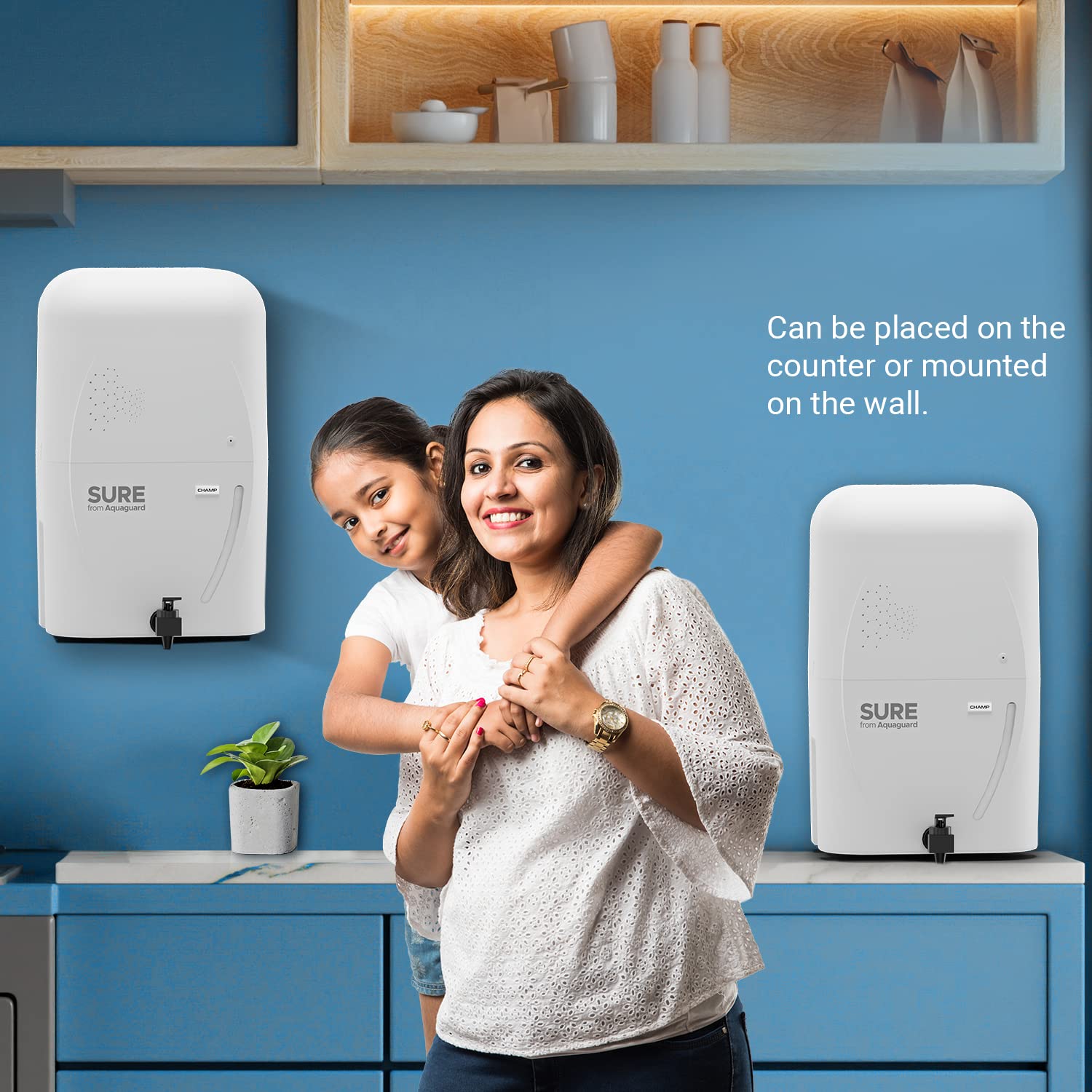
Image 3.2: Visual representation of the multi-stagproces čištění.
4. Údržba
Regular maintenance ensures the longevity and efficiency of your water purifier.
4.1 Filter and Membrane Replacement
The RO membrane and other filters have a limited lifespan. The RO membrane typically lasts for 1 year or purifies 6000 liters of water, whichever comes first. Other filters may require replacement more frequently depending on water quality and usage.

Image 4.1: RO Membrane lifespan indication.
It is crucial to replace filters and membranes as recommended by Eureka Forbes to maintain purification effectiveness. Contact customer service for filter replacement schedules and genuine parts.
4.2 Čištění jednotky
- Otřete vnější povrch čističky měkkým hadříkemamp tkanina. Nepoužívejte agresivní chemikálie nebo abrazivní čisticí prostředky.
- Periodically clean the water dispensing tap.
- Ensure the area around the purifier is kept clean and dry.
5. Řešení problémů
If you encounter any issues with your Aquaguard Champ RO+UV, refer to the following common problems and solutions. For complex issues, always contact authorized service personnel.
| Problém | Možná příčina | Řešení |
|---|---|---|
| Bez výdeje vody | No power, no water supply, or clogged filters. | Check power connection and water inlet. If filters are suspected, contact service. |
| Pomalý proud vody | Clogged filters or RO membrane. | Filters or membrane may need replacement. Contact service. |
| Neobvyklá chuť nebo vůně | Expired filters or contamination. | Replace filters. If problem persists, contact service. |
| Jednotka se nezapíná | Power supply issue, internal electrical fault (e.g., PCB). | Check power outlet. If still unresponsive, contact service. |
Note: Do not attempt to repair the unit yourself. Always contact authorized Eureka Forbes service technicians for repairs.
6. Specifikace
| Funkce | Detail |
|---|---|
| Značka | Heuréka Forbes |
| Název modelu | Sure From Aquaguard Champ RO+UV |
| Číslo modelu | GWPDCHARU00000 |
| Kapacita | 7 litrů |
| Rozměry produktu (D x Š x V) | 24L x 18W x 24H centimetrů |
| Typ instalace | Držák na zeď |
| Metoda čištění | Reverse Osmosis (RO) + Ultraviolet (UV) |
| Typ zdroje napájení | Elektrický kabel |
| Maximální průtok | 0.65 litrů za minutu |
| Rozsah provozních teplot | 10 až 40 stupňů Celsia |
| Speciální funkce | Indikátor hladiny vody |

Image 6.1: Product dimensions (L x W x H: 24L x 18W x 24H Centimeters).
7. Záruka a podpora
7.1 Informace o záruce
The Eureka Forbes Aquaguard Champ RO+UV water purifier comes with a 1letá záruka od výrobce from the date of purchase. Please retain your purchase receipt and warranty card for any claims. The warranty covers manufacturing defects under normal operating conditions.
7.2 Zákaznická podpora
For installation, service requests, filter replacements, or any other queries, please contact Eureka Forbes customer support. You can also book a service through the Eureka Forbes Service App.

Image 7.1: Book a service easily via the Eureka Forbes Service App.
Kontaktní údaje výrobce: EUREKA FORBES LTD.
For the latest contact details, please refer to the official Eureka Forbes webwebu nebo na vašem záručním listu.