
BoomToneDJ V-GAS
BoomTone DJ V-GAS Multicolor Disco Club Light Instruction Manual
Model: V-GAS | Brand: BoomToneDJ
1. Úvod
Děkuji za nákupasing the BoomTone DJ V-GAS Multicolor Disco Club Light. This device is designed to provide dynamic multi-beam and wash lighting effects for various events. To ensure safe and optimal performance, please read this instruction manual thoroughly before operation and retain it for future reference.
Bezpečnostní informace
- Vždy připojte zařízení k uzemněné elektrické zásuvce.
- Nevystavujte zařízení dešti nebo vlhkosti.
- Zajistěte řádné větrání kolem jednotky, abyste zabránili přehřátí.
- Vyhněte se přímému vystavení očí světelnému zdroji.
- Před čištěním nebo opravou odpojte napájení.
- Nepokoušejte se jednotku opravovat sami. Veškerý servis svěřte kvalifikovanému personálu.
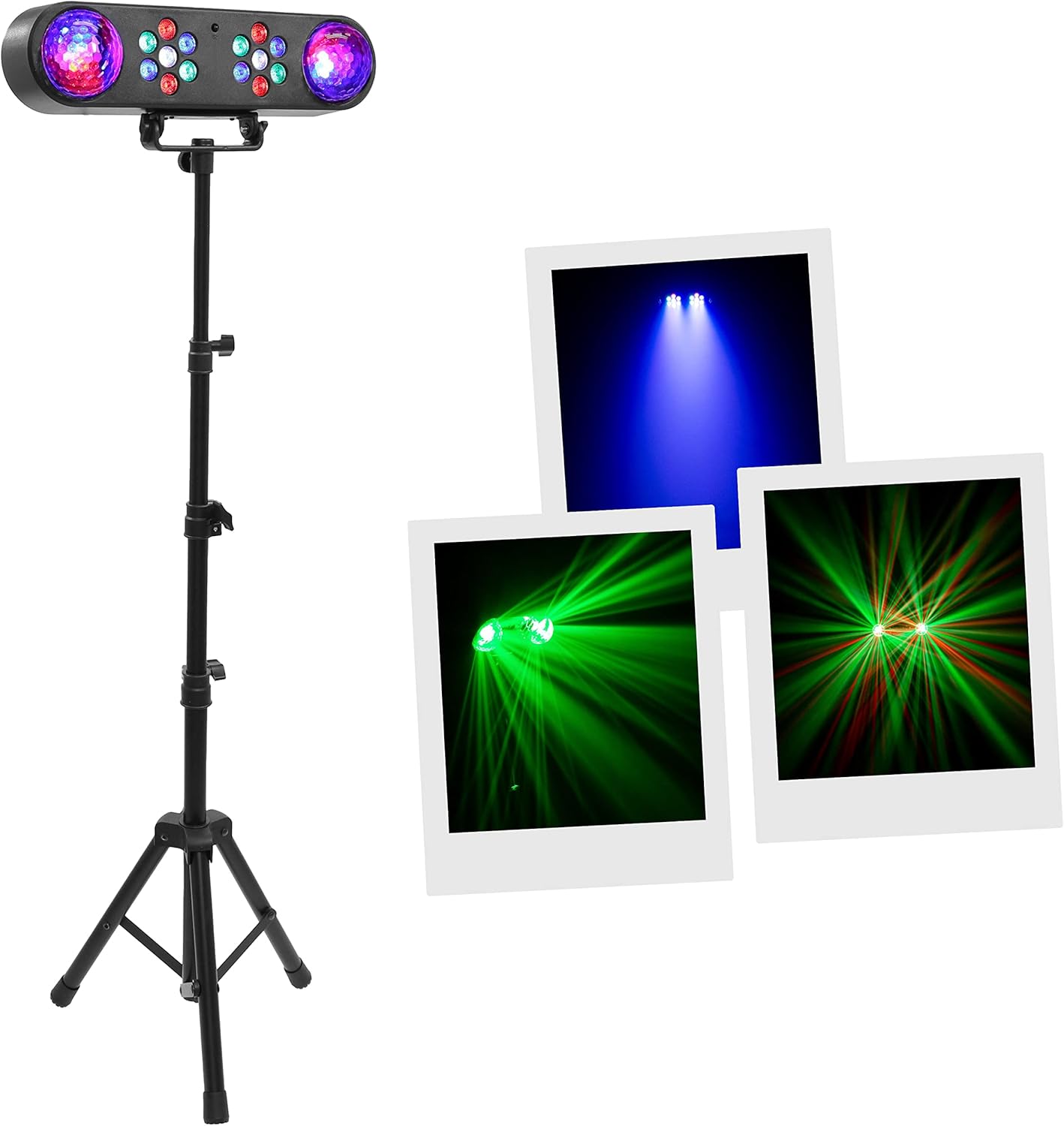
Figure 1: BoomTone DJ V-GAS Light with demonstrated effects.
This image shows the BoomTone DJ V-GAS light unit mounted on its adjustable tripod stand. The light unit features two disco ball effects on the ends and multiple RGB LEDs in the center. Surrounding the main unit are three inset images demonstrating the various light effects it can produce: a wide blue wash, focused green laser beams, and a combination of red and green laser patterns, highlighting the device's versatility.
2. Obsah balení
Please check that all items listed below are present and in good condition upon unpacking:
- BoomTone DJ V-GAS Light Unit (14 RGB LEDs + 2 Color Balls)
- Nastavitelný stojan na stativ
- Bezdrátové dálkové ovládání
- Napájecí kabel
- Návod k použití (tento dokument)
3. Nastavení
3.1 Assembling the Tripod Stand
- Rozložte nohy stativu, dokud nebudou zcela vysunuté a stabilní.
- Loosen the height adjustment knobs on the central pole.
- Extend the pole to your desired height (up to 150cm) and securely tighten the knobs.

Obrázek 2: Přední strana view of the V-GAS light unit on its tripod.
This image displays the BoomTone DJ V-GAS light unit from the front, securely mounted on its adjustable tripod stand. The light unit is black, elongated, and features two clear, faceted disco ball domes on either end, with two clusters of smaller RGB LEDs positioned in the center. The tripod stand is also black, with three splayed legs for stability and a central pole with adjustable sections, indicating its height-adjustable feature.
3.2 Mounting the Light Unit
- Locate the mounting bracket on the underside of the V-GAS light unit.
- Align the bracket with the top of the tripod stand.
- Secure the light unit to the tripod using the provided screw and knob, ensuring it is firmly attached.
- Adjust the angle of the light unit as needed.

Figure 3: Close-up of the V-GAS light unit's front panel.
This close-up image focuses on the main light unit of the BoomTone DJ V-GAS. It clearly shows the two transparent, faceted disco ball domes on the left and right ends, designed to project wide-ranging patterns. In the center, two distinct clusters of smaller, individual RGB LEDs are visible, which are responsible for the multi-beam and wash effects. This view highlights the different types of light sources integrated into the unit.
3.3 Připojení napájení
- Connect the provided power cable to the power input socket on the rear of the V-GAS unit.
- Zapojte druhý konec napájecího kabelu do vhodné uzemněné elektrické zásuvky.
- Ensure the power switch on the unit is in the "OFF" position before connecting to power.
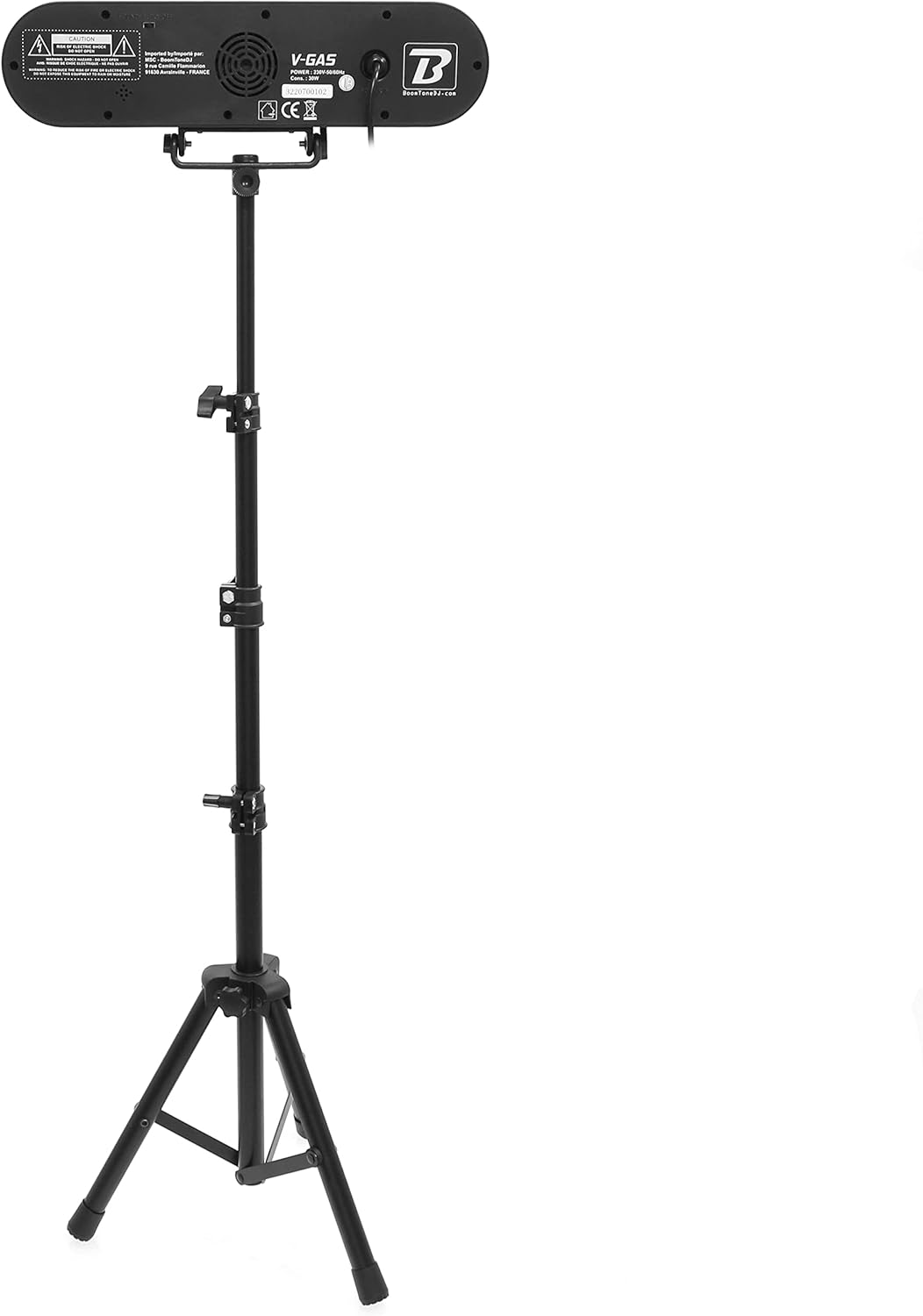
Obrázek 4: Zadní view of the V-GAS light unit.
Tento obrázek poskytuje zadní pohled view of the BoomTone DJ V-GAS light unit mounted on its tripod. The back panel of the light unit is visible, showing the power input socket, a fan for cooling, and potentially other control interfaces or indicators. This view is crucial for understanding how to connect the device to power and access any rear-mounted controls.
4. Návod k obsluze
The V-GAS light offers multiple control options for various lighting effects.
4.1 Zapnutí/vypnutí
Locate the power switch on the rear of the unit. Flip it to the "ON" position to power on the device. Flip it to "OFF" to power off.
4.2 režimy ovládání
The V-GAS can be operated in three main modes:
- Automatické programy: The unit cycles through pre-programmed light sequences.
- Zvuk aktivován: The lights react to the beat of music or ambient sound.
- Dálkové ovládání: Use the included wireless remote to select modes, colors, and other settings.
4.3 Používání bezdrátového dálkového ovladače
The remote control allows for convenient adjustment of the light's functions. Specific buttons may include:
- ON/OFF: Zapíná nebo vypíná jednotku.
- REŽIM: Cycles through automatic, sound-activated, or static color modes.
- BARVA: Selects specific colors or color combinations (e.g., Red, Green, Blue, RGB, etc.).
- SPEED/DIMMER: Adjusts the speed of automatic programs or the brightness of the lights.
- ZVUK: Activates or deactivates sound-activated mode.
Note: Ensure the remote control has working batteries and is pointed towards the front of the light unit for optimal reception.
4.4 Demonstrating Light Effects

Figure 5: Blue Wash Effect.
This image illustrates a broad blue wash light effect, where the light is diffused to cover a wide area with a soft, uniform blue glow. This effect is typically produced by the RGB LEDs and is suitable for creating atmospheric backgrounds.

Figure 6: Green Laser Effect.
This image shows distinct, focused green laser beams projecting from the light unit. The beams are sharp and create dynamic patterns, often used for energetic visual displays. This effect is generated by the disco ball components of the V-GAS unit.

Figure 7: Red and Green Laser Patterns.
This image captures a combination of red and green laser beams forming complex, intersecting patterns against a dark backdrop. This effect demonstrates the multi-color laser capabilities of the V-GAS, adding depth and excitement to the light show.
5. Údržba
5.1 Čištění
- Před čištěním se ujistěte, že je jednotka vypnutá a odpojená od sítě.
- K otření vnější strany jednotky použijte měkký hadřík, který nepouští vlákna.
- Pro odolnou špínu lehceampen the cloth with water; do not use harsh chemicals or abrasive cleaners.
- Keep the light output lenses and disco ball domes clean for optimal light projection.
5.2 Skladování
When not in use, store the V-GAS light in a cool, dry place, away from direct sunlight and extreme temperatures. It is recommended to store it in its original packaging or a protective case to prevent damage.
6. Řešení problémů
| Problém | Možná příčina | Řešení |
|---|---|---|
| Jednotka se nezapne. | Chybí napájení; napájecí kabel uvolněný; vypínač vypnutý. | Check power cable connection; ensure power outlet is functional; flip power switch to ON. |
| Světla jsou slabá nebo nepromítají jasný obraz. | Lenses/domes are dirty; dimmer setting too low. | Clean the light output lenses and disco ball domes; adjust dimmer setting via remote. |
| Sound-activated mode not working effectively. | Microphone sensitivity too low; ambient sound too quiet or too far from unit. | Ensure the unit is placed close to the sound source; increase music volume; check remote setting for sound mode. |
| Dálkové ovládání nereaguje. | Batteries are dead or incorrectly inserted; remote not pointed at unit. | Replace remote batteries; ensure correct polarity; point remote directly at the front of the light unit. |
7. Specifikace
| Funkce | Detail |
|---|---|
| Značka | BoomToneDJ |
| Model | V-GAS |
| Světelný zdroj | 14 x 1W RGB LEDs (multi-beam), 2 x 6 LED RGB 3W Color Balls (wash) |
| Celkový výkon | 20 wattů |
| Úhel paprsku | 25 stupňů |
| Režimy ovládání | Automatic Programs, Sound Activated, Remote Control |
| Vlastnosti | Dimmable, RGB Color Changing |
| Materiál | Kov, Plast |
| Rozměry produktu (D x Š x V) | 38 x 9 x 5.5 cm (light unit) |
| Výška stativu (nastavitelná) | Až 150 cm |
| Hmotnost (systém) | 0.8 kg (disassembled) |
| Zdroj napájení | Elektrický kabel |
8. Záruka a podpora
Specific warranty information for the BoomTone DJ V-GAS is not provided in this manual. For details regarding warranty coverage, technical support, or replacement parts, please contact your retailer or the manufacturer directly. Keep your proof of purchase for any warranty claims.
Výrobce Webmísto: www.boomtonedj.com (Poznámka: Toto je zástupný symbol URL, prosím ověřte skutečného výrobce webstránky pro podporu.)
Ask a question about this manual
Ask about setup, troubleshooting, compatibility, parts, safety, or missing instructions. Manuals+ will review the question and use this page’s manual context to help answer it.