
Andoer 111
Andoer 4K Compact Digital Camera User Manual
Model: 111
Zavedení
Děkuji za nákupasing the Andoer 4K Compact Digital Camera. This camera is designed for ease of use, offering high-quality photo and video capture in a portable form factor. It features a 48-megapixel image resolution, 4K video recording capabilities, a 2.4-inch IPS screen, 16X digital zoom, anti-shake technology, and a built-in flash. This manual provides detailed instructions to help you get the most out of your new camera.

Obrázek: Overview of the Andoer Digital Camera, highlighting features such as strong battery life, 4K video, micro size, 2.4-inch IPS screen, and 16X digital zoom.
Co je v krabici
Zkontrolujte prosím obsah balení, abyste se ujistili, že jsou přítomny všechny položky:
- Andoer 4K Compact Digital Camera
- Řemínek na zápěstí
- Přepravní taška
- USB kabel
- 32GB Memory Card (TF Card)
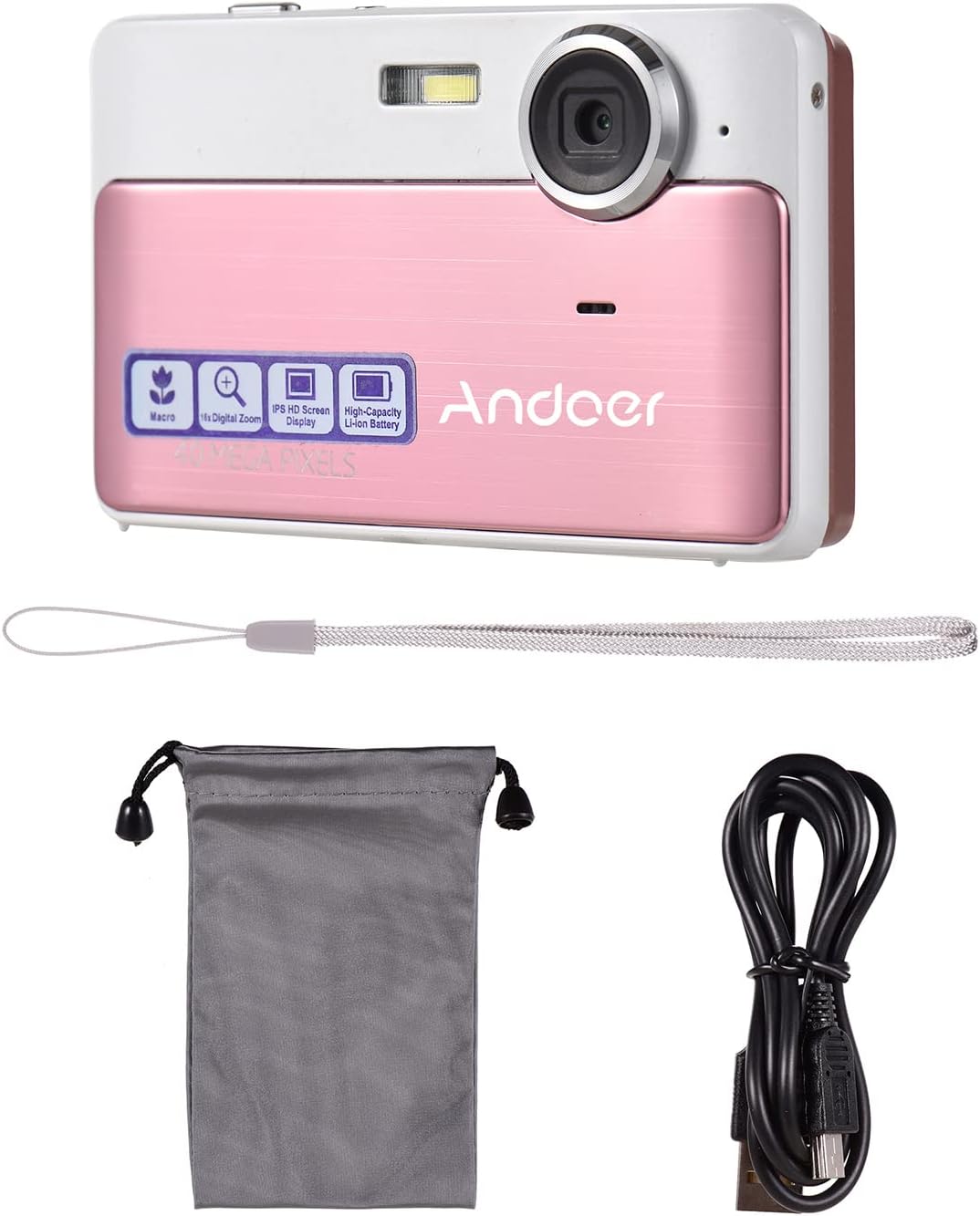
Image: The package contents including the pink digital camera, a grey carrying bag, a white wrist strap, a black USB cable, and a 32GB memory card.
Konec produktuview
Familiarize yourself with the various parts and controls of your Andoer Digital Camera.

Image: Labeled diagrams of the camera's top, back, and bottom views, indicating buttons and ports such as ON/OFF, OK, indicator light, zoom, macro, mode, flash/up, delete/right, self-timer/down, scene/left, flash, lens, plastic cover, tripod nut, and card slot.
Klíčové komponenty:
- Čočka: Zachycuje obrázky a videa.
- Blikat: Poskytuje osvětlení za zhoršených světelných podmínek.
- 2.4palcová IPS obrazovka: Zobrazuje se živě view, nabídky a přehrávání.
- Ovládací tlačítka: Navigate menus, adjust settings, and operate camera functions.
- USB port: Pro nabíjení a přenos dat.
- Slot na kartu: For inserting the TF (Micro SD) memory card.
- Tripod Nut: For mounting the camera on a tripod.
Nastavení
1. Nabíjení baterie
The camera has a built-in 600mAh lithium battery. Before first use, ensure the battery is fully charged.
- Connect the included USB cable to the camera's USB port.
- Druhý konec kabelu USB připojte k napájecímu adaptéru USB (není součástí balení) nebo k portu USB počítače.
- The indicator light will show charging status. Once fully charged, the light will change or turn off.
2. Vložení paměťové karty
The camera requires a TF (Micro SD) memory card for storing photos and videos. A 32GB memory card is included.
- Locate the card slot on the side or bottom of the camera (refer to Product Overview diagram).
- Gently insert the TF card into the slot with the metal contacts facing the correct direction (usually towards the front of the camera or as indicated by a small icon).
- Push the card in until it clicks into place. To remove, push it in again until it springs out.
Poznámka: Ensure the camera is turned off before inserting or removing the memory card to prevent data corruption.
Návod k obsluze
1. Zapnutí/vypnutí
- To turn on the camera, press and hold the ON/OFF tlačítko.
- To turn off the camera, press and hold the ON/OFF znovu tlačítko.
2. Fotografování
- Ensure the camera is in photo mode (indicated on the screen). If not, press the MODE tlačítko pro přepnutí.
- Komponujte svůj snímek pomocí 2.4palcového IPS displeje.
- Použijte W/T buttons (Zoom In/Out) to adjust the 16X digital zoom.
- Stiskněte tlačítko OK button (shutter button) to capture the photo.

Image: A visual representation of the 16X digital zoom function, showing how the camera can enlarge images to capture details.
3. Nahrávání videí
- Stiskněte tlačítko MODE button to switch to video recording mode.
- Stiskněte tlačítko OK button to start recording. A timer or indicator will appear on the screen.
- Stiskněte tlačítko OK dalším tlačítkem nahrávání zastavíte.
4. Použití blesku
The camera has a built-in flash for low-light conditions.
- V režimu fotografování stiskněte Flash/Up button to cycle through flash modes (e.g., Auto Flash, Fill-in Flash, Red-eye Reduction, Flash Off).
- Select the appropriate mode for your shooting environment.
5. Scene Settings
Optimize your photos for different environments using scene settings.
- Stiskněte tlačítko Scene/Left button to access scene modes.
- Available modes include: Auto, Landscape, Macro, Night Scenery, Portrait, Night Portrait, Beach, Sport, Dinner.
- Use the navigation buttons to select a mode and press OK potvrdit.

Image: A graphic illustrating various scene settings available on the camera, including Auto, Landscape, Night Scenery, Portrait, Night Portrait, Beach, Sport, and Dinner, alongside an image showcasing maximum 48MP photo resolution.
6. Macro and Long Distance Switching
Adjust focus for close-up or distant subjects.
- Stiskněte tlačítko Makro button (often integrated with other navigation buttons) to toggle between Macro mode (for close-up shots, typically within 10cm) and normal/long distance mode.
- When Macro mode is active, a macro icon will appear on the screen.

Image: A diagram showing how to switch between Macro and Long Distance focus modes. It explains that in Macro mode, objects within 10cm of the camera appear clearer.
7. Režim přehrávání
- Stiskněte tlačítko MODE button until you enter playback mode.
- Use the navigation buttons (Left/Right) to browse through your captured photos and videos.
- Stiskněte OK na view video.
8. Připojení k počítači
- Zapněte fotoaparát.
- Připojte fotoaparát k počítači pomocí dodaného kabelu USB.
- The camera should appear as a removable disk drive on your computer, allowing you to transfer files.
Údržba
Čištění fotoaparátu
- K čištění těla fotoaparátu použijte měkký, suchý hadřík.
- For the lens and screen, use a specialized lens cleaning cloth and solution if necessary. Avoid abrasive materials.
- Do not use organic solvents or strong chemicals to clean the camera.
Péče o baterie
- Recharge the battery regularly, even if the camera is not in use, to maintain battery health.
- Avoid exposing the camera to extreme temperatures, which can affect battery performance.
Manipulace s paměťovými kartami
- Always format a new memory card in the camera before first use.
- Do not remove the memory card while the camera is writing data (e.g., during recording or saving).
- Chraňte paměťové karty před silnými magnetickými poli.
Odstraňování problémů
| Problém | Možná příčina / řešení |
|---|---|
| Fotoaparát se nezapne. | Baterie je vybitá. Baterii plně nabijte. |
| Nelze fotografovat/nahrávat videa. | Memory card is full or not inserted correctly. Insert/replace memory card or delete files. Ensure camera is in correct mode. |
| Obrázky jsou rozmazané. | Lens is dirty. Clean the lens. Insufficient light (use flash). Camera shake (hold steady or use anti-shake feature). Incorrect focus mode (adjust Macro/Long Distance). |
| Kamera zamrzne. | Remove and reinsert the memory card. If issue persists, turn off and on again. |
| Nelze se připojit k počítači. | Ensure USB cable is properly connected. Try a different USB port or cable. Ensure camera is powered on. |
Specifikace
| Funkce | Detail |
|---|---|
| Název modelu | 111 |
| Rozlišení obrazu | Up to 48 Megapixels (40MP, 30MP, 24MP, 18MP, 12MP, 8MP, 5MP) |
| Rozlišení videa | 4K, 1080P, 720P |
| Obrazovka | 2.4palcový IPS displej |
| Digitální zoom | 16X |
| Stabilizace obrazu | Digitální Anti-Shake |
| Typ baterie | Vestavěná lithiová baterie 600mAh |
| Skladování | External, supports up to 32GB TF (Micro SD) Memory Card |
| Formát fotografie | JPG |
| Formát videa | AVI |
| Přístav | USB 2.0 |
| Velikost položky | 9.5 * 5.8 * 2.2cm / 3.7 * 2.3 * 0.9inch |
| Hmotnost položky | 90 g / 3.2 oz |
| Podporované jazyky | English, French, Spanish, German, Italian, Portuguese, Japanese, Arabic, Simple Chinese, etc. |

Image: The physical dimensions of the camera, showing a length of 9.5cm, height of 5.8cm, and thickness of 2.2cm.
Záruka a podpora
Andoer products are manufactured to high quality standards. For any issues or support inquiries, please refer to the seller's return policy or contact Andoer customer service through their official channels. Please retain your proof of purchase for warranty claims.
Pro další pomoc můžete navštívit Andoer Store on Amazon.
Ask a question about this manual
Ask about setup, troubleshooting, compatibility, parts, safety, or missing instructions. Manuals+ will review the question and use this page’s manual context to help answer it.