
Logicool M550MGR
Logicool Signature M550MGR Silent Wireless Mouse User Manual
Model: M550MGR
1. Úvod
The Logicool Signature M550MGR is a silent wireless mouse designed for comfort and productivity. It features the unique SmartWheel for versatile scrolling and SilentTouch technology for reduced click noise. This mouse offers dual connectivity options: Bluetooth Low Energy and the Logi Bolt USB receiver, ensuring stable performance across various operating systems.

Image: The Logicool Signature M550MGR mouse, highlighting its ergonomic design and advanced scrolling capabilities.
2. Obsah balení
- Logicool Signature M550MGR Wireless Mouse
- USB přijímač Logi Bolt
- 1 baterie AA (předinstalovaná)
- Uživatelská dokumentace (tato příručka)
3. Nastavení
3.1. Instalace baterie
- Najděte přihrádku na baterie na spodní straně myši.
- Otevřete kryt bateriového prostoru.
- Ensure the AA battery is correctly oriented according to the polarity indicators (+/-).
- Zavřete kryt prostoru pro baterie.
3.2. Připojení myši
The M550MGR offers two connection methods: Logi Bolt USB receiver or Bluetooth Low Energy.
3.2.1. Připojení USB přijímače Logi Bolt
- Remove the Logi Bolt USB receiver from the battery compartment or packaging.
- Zapojte USB přijímač Logi Bolt do volného USB portu na vašem počítači.
- The mouse should automatically connect. If not, ensure the mouse is powered on.
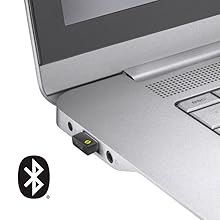
Image: The Logi Bolt USB receiver connected to a laptop, illustrating the wireless connection method.
3.2.2. Bluetooth Low Energy Connection
- Ujistěte se, že je na vašem zařízení povoleno rozhraní Bluetooth.
- Zapněte myš.
- Press and hold the connect button on the underside of the mouse for 3 seconds until the LED indicator starts blinking rapidly.
- On your device, go to Bluetooth settings and select "Logicool M550MGR" from the list of available devices to pair.
- The LED indicator will turn solid for a few seconds, then turn off, indicating a successful connection.

Image: Visual representation of the two connectivity options: Bluetooth and the Logi Bolt USB receiver.
4. Návod k obsluze
4.1. Základní funkce
- Levé kliknutí: Primární akce, výběr.
- Klikněte pravým tlačítkem myši: Secondary action, context menus.
- Rolovací kolečko: Procházejte dokumenty nahoru nebo dolů a web stránky.
4.2. Posouvání pomocí SmartWheel
The SmartWheel automatically switches between two scrolling modes:
- Line-by-line Scrolling: For precise navigation, ideal for detailed work.
- Hyper-fast Scrolling: Spin the wheel quickly to effortlessly glide through long documents and web pages. The wheel will automatically switch to this mode when spun with momentum.

Obrázek: Detailní záběr view of the SmartWheel, demonstrating its design for efficient scrolling.
4.3. Technologie SilentTouch
The M550MGR incorporates SilentTouch technology, which reduces click noise by 90% compared to traditional mice, while maintaining the familiar click feel. This creates a quieter work environment without compromising tactile feedback.

Image: A user operating the silent mouse in a calm environment, illustrating the benefit of SilentTouch technology.
5. Vlastnosti
- Chytré kolo: Automatic switching between precise line-by-line and hyper-fast scrolling.
- Technologie SilentTouch: 90% reduced click noise with retained click feel.
- Duální konektivita: Connect via Logi Bolt USB receiver or Bluetooth Low Energy.
- Ergonomický design: Comfortable shape with rubber side grips for extended use.
- Dlouhá výdrž baterie: Up to 24 months on a single AA battery.
- Kompatibilita s více operačními systémy: Supports Windows, macOS, Chrome OS, iPadOS, and Android.
6. Informace o baterii
- Typ baterie: 1 x AA alkaline battery.
- Životnost baterie: Up to 24 months, depending on usage.
- Výměna baterie: Replace the AA battery when the LED indicator on the mouse turns red or when performance degrades. Follow the installation steps in Section 3.1.
7. Kompatibilita
The Logicool Signature M550MGR mouse is compatible with the following operating systems:
- Logi Bolt Connection:
- Windows 10, 11 nebo novější
- macOS 10.10 nebo novější
- Chrome OS
- Bluetooth Low Energy Connection:
- Windows 10, 11 nebo novější
- macOS 10.15 nebo novější
- Chrome OS
- iPadOS 13.4 nebo novější
- Android 5.0 nebo novější
Note: This mouse is not compatible with Logitech Unifying receivers.
8. Údržba
- Čištění: Use a soft, lint-free cloth to clean the mouse surface. For stubborn dirt, slightly damphadřík vodou. Vyhněte se agresivním chemikáliím nebo abrazivním materiálům.
- Senzor: Pro optimální sledování udržujte optický senzor na spodní straně myši čistý a bez prachu a nečistot.
- Skladování: When not in use for extended periods, turn off the mouse to conserve battery life. Store in a dry, cool place.
9. Řešení problémů
9.1. Myš nereaguje
- Ujistěte se, že je myš zapnutá.
- Zkontrolujte stav baterie a v případě potřeby ji vyměňte.
- For Logi Bolt connection: Ensure the receiver is securely plugged into a working USB port. Try a different USB port.
- For Bluetooth connection: Ensure Bluetooth is enabled on your device and the mouse is paired. Try re-pairing the mouse (refer to Section 3.2.2).
- Restartujte počítač nebo zařízení.
9.2. Nepravidelný pohyb kurzoru
- Vyčistěte optický senzor na spodní straně myši.
- Ujistěte se, že myš používáte na vhodném povrchu. Vyhněte se vysoce reflexním nebo průhledným povrchům.
- Move the mouse closer to the Logi Bolt receiver or your Bluetooth-enabled device to reduce interference.
9.3. SmartWheel Not Switching Modes
- Ensure the wheel is spun with enough momentum to activate hyper-fast scrolling.
- Check for any debris around the scroll wheel that might impede its movement.
10. Specifikace
| Značka | Logicool |
| Číslo modelu | M550MGR |
| Barva | Grafit |
| Technologie připojení | Bluetooth, Logi Bolt (USB) |
| Technologie detekce pohybu | Optický |
| Speciální funkce | SilentTouch, Wireless |
| Rozměry produktu | 6.1 x 10.82 x 3.88 cm |
| Hmotnost položky | 97.4 g |
| Typ baterie | 1 x AA baterie |
| Doba nepřetržitého používání | Až 24 měsíců |
11. Záruka a podpora
The Logicool Signature M550MGR Wireless Mouse comes with a 2letá záruka výrobce od data nákupu.
For technical support, warranty claims, or additional information, please visit the official Logicool support webnebo se obraťte na jejich zákaznický servis. Uschovejte si doklad o koupi pro účely záruky.
Official Logicool Support: www.logicool.co.jp
Ask a question about this manual
Ask about setup, troubleshooting, compatibility, parts, safety, or missing instructions. Manuals+ will review the question and use this page’s manual context to help answer it.