
1. Úvod
This manual provides essential information and instructions for the safe and efficient use of your Blackview BV7200 Rugged Smartphone. The BV7200 is designed for durability and performance in challenging environments, featuring advanced water and dust resistance, a powerful processor, and a high-capacity battery.
Mezi klíčové vlastnosti patří:
- IP68 & IP69K Certification: Advanced water and dust resistance for outdoor and demanding conditions.
- MediaTek Helio G85 Processor: Ensures smooth performance for gaming, multitasking, and general use.
- 50MP Dual Camera: Capture high-quality photos, even in low-light conditions.
- Baterie 5180 mAh: Long-lasting power with 18W fast charging support.
- 6.1-inch HD+ Display: Durable screen with Corning Gorilla Glass 3, optimized for comfortable viewIng.
- Režim v rukavicích: Allows screen operation even when wearing gloves.

Obrázek: Overview Černéhoview BV7200 Rugged Smartphone, highlighting its MediaTek Helio G85 processor, 50MP camera, IP68/IP69K ratings, 5180mAh battery, 6.1-inch display, and Glove Mode.
2. Nastavení
2.1. Instalace SIM karty a karty MicroSD
To install your SIM card(s) and/or MicroSD card:
- Vyhledejte držák SIM karty na boku zařízení.
- K otevření zásuvky použijte dodaný nástroj pro vysunutí SIM karty.
- Carefully place your Nano-SIM card(s) and/or MicroSD card into the designated slots, ensuring correct orientation.
- Jemně zatlačte zásobník zpět do zařízení, dokud nezapadne na místo.
2.2. Počáteční nabíjení a zapnutí
Před prvním použitím se doporučuje zařízení plně nabít.
- Connect the USB Type-C cable to the charging port at the bottom of the phone. Ensure the port cap is securely opened before inserting the cable and closed after charging to maintain water resistance.
- Druhý konec kabelu připojte ke kompatibilnímu napájecímu adaptéru a zapojte jej do zásuvky ve zdi.
- Once sufficiently charged, press and hold the Power button (usually on the right side) for a few seconds until the Blackview zobrazí se logo.
- Postupujte podle pokynů na obrazovce a dokončete počáteční nastavení, včetně výběru jazyka, připojení k Wi-Fi a nastavení účtu Google.
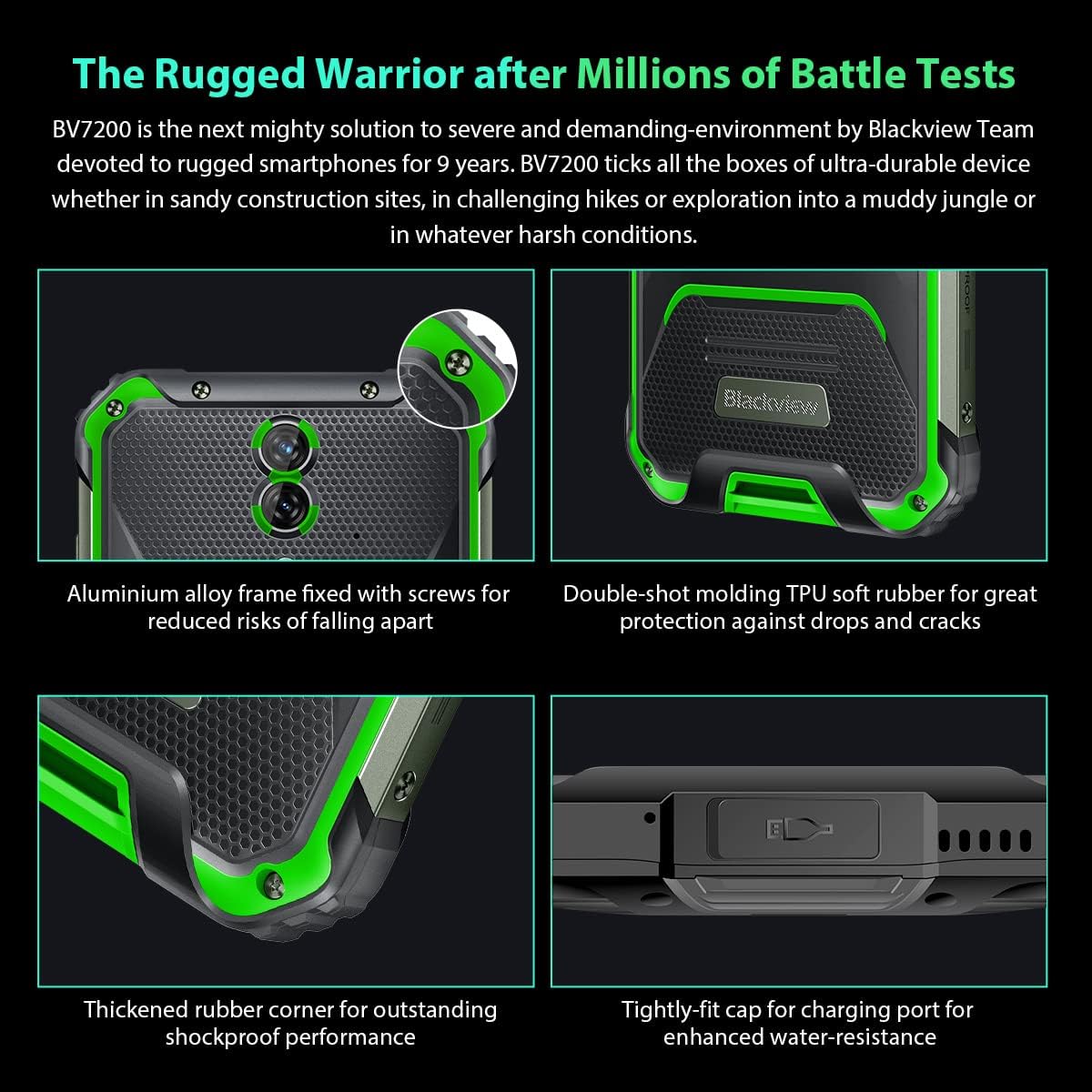
Obrázek: Detail views of the Blackview BV7200's rugged construction, including aluminum alloy frame, double-shot molding TPU rubber, thickened rubber corners, and the tightly-fit cap for the charging port, emphasizing its durability and water resistance.
3. Návod k obsluze
3.1. Základní navigace
Černýview BV7200 operates on Doke OS 3.0, based on Android 12. Use touch gestures for navigation:
- Klepněte na: Vyberte položku nebo otevřete aplikaci.
- Výpad: Procházení obrazovek nebo seznamů.
- Štípání: Přiblížení nebo oddálení obrázků a web stránky.
- Dlouhé stisknutí: Přístup k kontextovým nabídkám nebo přesun ikon aplikací.
3.2. Použití fotoaparátu
The BV7200 features a 50MP main rear camera and an 8MP ultra-wide/macro rear camera.
- Otevřete aplikaci Fotoaparát z domovské obrazovky nebo ze zásuvky aplikací.
- Vyberte požadovaný režim (Fotografie, Video, Portrét, Profesionální atd.).
- Klepnutím na obrazovku zaostříte na konkrétní oblast.
- Press the Shutter button to capture a photo or start/stop video recording.

Image: Diagram illustrating the Blackview BV7200's 50MP Samsung ISOCELL JN1 main rear camera, 8MP ultra-wide and ultra-macro rear camera, and rear flash, highlighting its photographic capabilities.
3.3. Režim rukavic
The BV7200 supports Glove Mode, allowing you to operate the touchscreen while wearing gloves.
- To activate/deactivate Glove Mode, navigate to Settings > Smart Assistant > Glove Mode.
- Ensure this mode is enabled when using gloves for optimal touch responsiveness.

Image: Collage demonstrating the Blackview BV7200's Glove Mode in various scenarios, showing users operating the phone while wearing different types of gloves, emphasizing its utility in cold or industrial environments.
3.4. Water and Dust Resistance (IP68 & IP69K)
The BV7200 is certified IP68 and IP69K, making it resistant to water immersion and high-pressure water jets. This allows for use in aquatic sports or dusty environments.
- Always ensure all port caps (charging port, SIM tray) are securely closed before exposing the device to water or dust.
- Rinse the phone with clean water after exposure to saltwater or chemicals.
- Do not charge the phone if the charging port is wet. Allow it to dry completely.
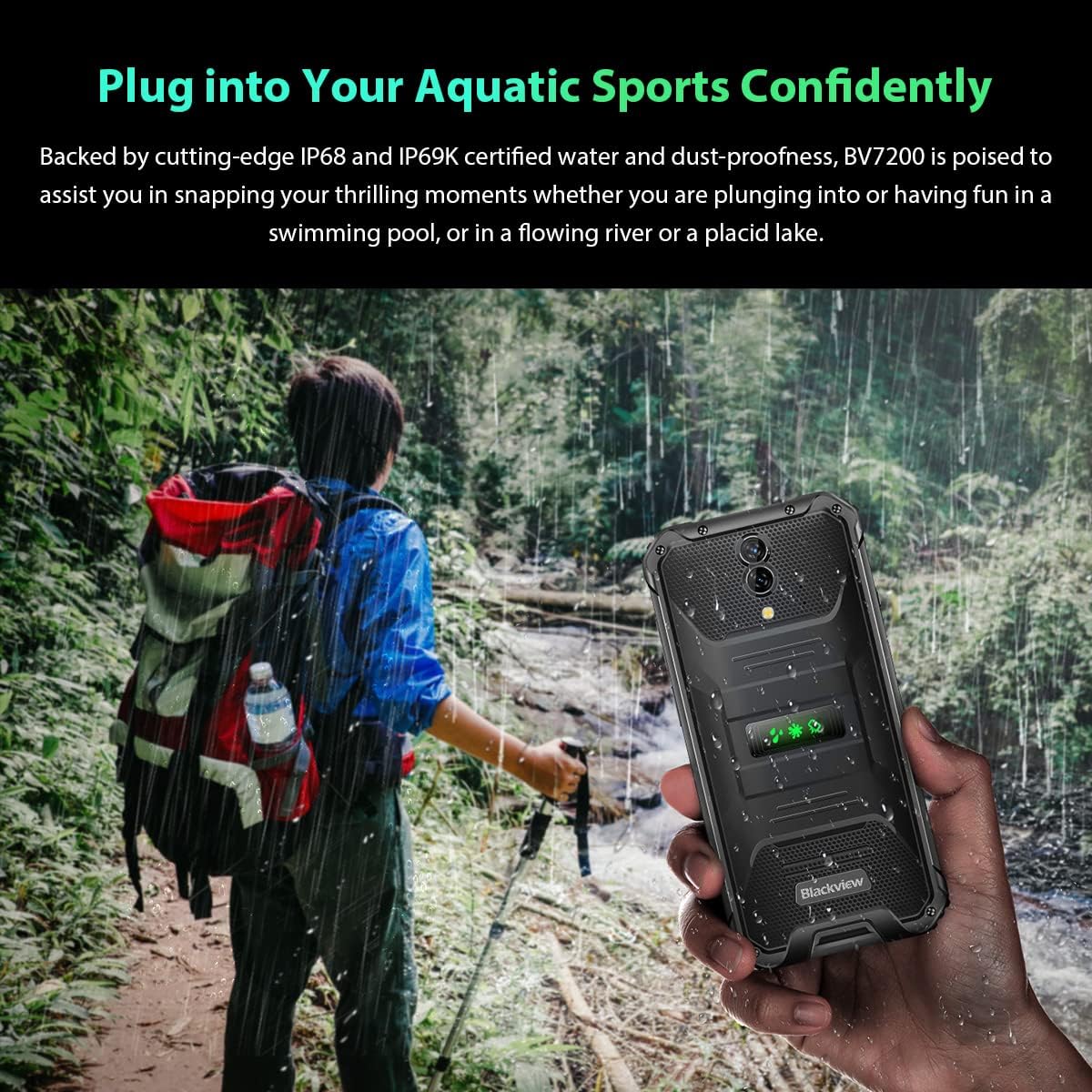
Image: A person holding the Blackview BV7200 near a stream or waterfall, illustrating its water resistance and suitability for outdoor and aquatic activities.
3.5. Správa baterií
The 5180mAh battery provides extended usage. The device supports 18W fast charging.
- Use the original charger and cable for optimal charging speed and safety.
- The battery is designed to withstand temperatures down to -10°C.
- To prolong battery life, avoid extreme temperatures and fully discharging the battery regularly.
3.6. Rozšíření paměti
The BV7200 features 6GB of RAM with an additional 4GB virtual memory expansion, totaling 10GB, for enhanced multitasking and performance.

Image: Graphic illustrating the memory expansion feature of the Blackview BV7200, showing 6GB of physical RAM and an additional 4GB of virtual RAM, combining for a total of 10GB for improved performance.
4. Údržba
4.1. Čištění zařízení
Pro čištění černéview BV7200:
- Otřete obrazovku a tělo měkkým hadříkem, který nepouští vlákna.
- Na odolné nečistoty použijte mírně damp hadříkem s jemným mýdlem a poté otřete dosucha.
- Nepoužívejte agresivní chemikálie, rozpouštědla ani abrazivní čisticí prostředky.
- Ensure all port caps are closed before cleaning with liquids.
4.2. Aktualizace softwaru
Pravidelně kontrolujte a instalujte aktualizace softwaru, abyste zajistili optimální výkon, zabezpečení a přístup k novým funkcím.
- Přejít na Nastavení > Systém > Aktualizace systému pro kontrolu dostupných aktualizací.
- Před zahájením aktualizace se ujistěte, že má vaše zařízení dostatečné nabití baterie a stabilní připojení k Wi-Fi.
5. Řešení problémů
5.1. Běžné problémy a jejich řešení
- Zařízení se nezapne: Ujistěte se, že je baterie nabitá. Připojte zařízení k nabíječce alespoň na 15 minut a poté jej zkuste znovu zapnout.
- Obrazovka nereaguje: Restart the device by holding the Power button for about 10-15 seconds. If the issue persists, try a factory reset (data will be lost).
- Connectivity issues (Wi-Fi/Bluetooth/Mobile Data):
- Vypněte a zapněte Wi-Fi/Bluetooth/mobilní data.
- Restartujte zařízení.
- Check router/network settings.
- For mobile data, ensure SIM card is correctly inserted and activated.
- Pády aplikací: Vymažte mezipaměť a data aplikace (Nastavení > Aplikace > [Název aplikace] > Úložiště > Vymazat mezipaměť/Vymazat data). Pokud problém přetrvává, odinstalujte a znovu nainstalujte aplikaci.
5.2. Obnovení továrního nastavení
Obnovení továrního nastavení vymaže všechna data z telefonu a obnoví jeho původní tovární nastavení. Před pokračováním si zálohujte důležitá data.
- Přejít na Nastavení > Systém > Možnosti resetování > Vymazat všechna data (obnovení továrního nastavení).
- Confirm your decision. The device will restart and perform the reset.
6. Specifikace
Below are the technical specifications for the Blackview BV7200:
| Funkce | Specifikace |
|---|---|
| Značka | Černýview |
| Velikost RAM | 6 GB (rozšiřitelné až na 10 GB pomocí virtuální RAM) |
| Model CPU | MediaTek Helio G85 |
| Kapacita úložiště | 128 GB (rozšiřitelné až na 1 TB pomocí TF karty) |
| Velikost obrazovky | 6.1 palce |
| Rezoluce | 720 x 1560 HD+ |
| Buněčná technologie | 4G |
| Bezdrátová síťová technologie | GSM, LTE, Wi-Fi |
| Kapacita baterie | 5180 XNUMX mAh |
| Operační systém | Android 12 (Doke OS 3.0) |
| Odolnost vůči vodě/prachu | IP68, IP69K |

Obrázek: Podrobný view of the MediaTek Helio G85 processor, highlighting its specifications including RAM, ROM, GPU, and expandable storage, emphasizing its strong performance capabilities.

Image: Graphic detailing the Blackview BV7200's 6.1-inch HD+ display specifications, including resolution (720x1560), screen-to-body ratio (83%), brightness (380cd/cm2), and PPI (283), emphasizing its visual quality and durability with Corning Gorilla Glass 3.
7. Záruka a podpora
For warranty information and technical support, please refer to the warranty card included with your product or visit the official Blackview webUschovejte si doklad o koupi pro případ reklamace.
For further assistance, you may contact Blackview zákaznický servis prostřednictvím jejich oficiálních kanálů.