
1. Úvod a konecview
The SVS Prime Wireless Pro Powered Speaker System delivers high-fidelity audio with versatile connectivity options. Designed for immersive sound, this 2-channel active/passive stereo speaker array features a powerful 200-watt amplifier (50 watts x 4) and a 24-bit/192kHz DAC for ultra high-resolution audio streaming.
Mezi klíčové vlastnosti patří:
- Precision-tuned electronic crossover for powerful dynamics, deep bass, and stunning clarity.
- Wireless Hi-Res audio streaming via WiFi, Apple Airplay 2, and Chromecast.
- Bluetooth with aptX for high-quality wireless audio.
- Ample connectivity options: HDMI (ARC/eARC), Line Level (RCA), Optical, 3.5mm AUX, and Ethernet inputs.
- Subwoofer output for enhanced bass.
- Control via smartphone/desktop app, front panel, and IR remote.

Figure 1: SVS Prime Wireless Pro Powered Speaker System (Piano Gloss White).
2. Co je v krabici
Your SVS Prime Wireless Pro Powered Speaker System package includes the following components:
- SVS Prime Wireless Pro Powered Speaker Pair (one active, one passive)
- Napájecí kabel
- Inter-speaker cable (USB-C)
- Dálkový ovladač s bateriemi
- Rychlý průvodce
- Informace o záruce

Figure 2: Included components with the SVS Prime Wireless Pro system.
3. Nastavení
Follow these steps to set up your SVS Prime Wireless Pro speakers:
- Umístění: Position the active (primary) speaker and passive (secondary) speaker in your desired stereo configuration. Ensure adequate space for optimal sound dispersion.
- Připojení reproduktorů: Use the supplied USB-C inter-speaker cable to connect the primary and secondary speakers. This cable ensures proper compatibility and performance.
- Připojení napájení: Connect the power cable to the primary speaker and then to a wall outlet.
- Stáhnout aplikaci: Download the SVS app (or compatible control app like DTS Play-Fi) on your smartphone or desktop device.
- Nastavení sítě: Follow the in-app instructions to connect your speakers to your Wi-Fi network. This enables streaming features like Airplay 2 and Chromecast.
- Bluetooth párování: If using Bluetooth, activate Bluetooth on your device and select the SVS Prime Wireless Pro from the list of available devices.
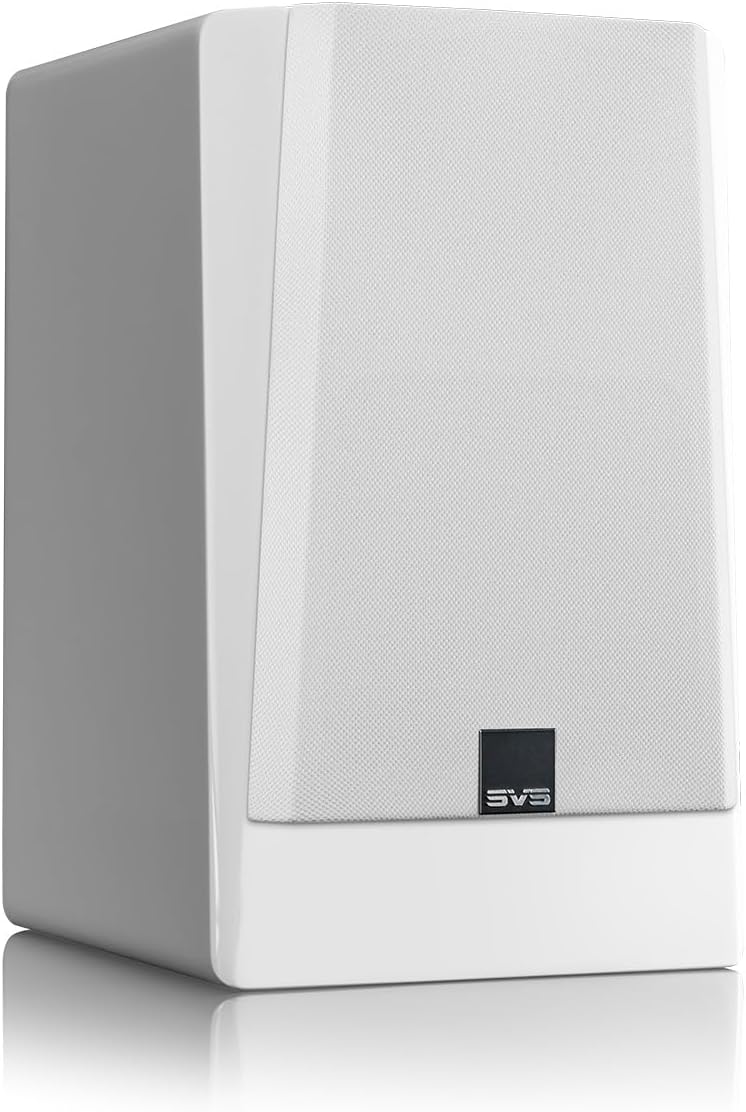
Figure 3: Rear panel connections for the SVS Prime Wireless Pro speaker.
4. Návod k obsluze
The SVS Prime Wireless Pro offers multiple ways to control your audio experience:
- Ovládací prvky na předním panelu: Use the knobs and buttons on the front panel of the primary speaker to adjust volume, select input sources, and manage presets. The data-rich front panel interface provides visual feedback.
- IR dálkové ovládání: Utilize the included IR remote control for convenient adjustments from a distance.
- Smartphone/Desktop App: The dedicated SVS app provides comprehensive control over all speaker functions, including input selection, volume, EQ settings, and firmware updates.
- Hlasové příkazy: Integrate with compatible voice assistants for hands-free control.

Figure 4: Front panel controls and display.
5. Konektivita
The SVS Prime Wireless Pro offers extensive connectivity options:
- Bezdrátové streamování:
- Wi-Fi: Stream lossless Hi-Res audio.
- Apple Airplay 2: For iPhones and iOS devices.
- Chromecast: For Android phones and other devices.
- Bluetooth with aptX: For high-quality wireless connection to various devices.
- Kabelové vstupy:
- HDMI (ARC/eARC): Connect directly to your TV for a superior soundbar replacement or compact home theater system.
- Line Level (RCA): Pro tradiční audio komponenty.
- Optický: Pro digitální audio zdroje.
- 3.5 mm AUX: For portable devices.
- Ethernet: Pro stabilní kabelové síťové připojení.
- Výstup subwooferu: Connect an external subwoofer for deeper, heart-pounding bass.

Figure 5: Wireless streaming options available.
6. Specifikace
| Funkce | Specifikace |
|---|---|
| Název modelu | Prime Wireless Pro |
| Číslo modelu položky | PWPROWHT |
| Značka | SVS |
| Typ reproduktoru | Regál |
| Typ montáže | Stojící na podlaze |
| Maximální výstupní výkon reproduktoru | 200 wattů (50 wattů x 4) |
| Typ zvukového ovladače | Dynamický ovladač |
| Průměr basového reproduktoru | 5.25 palce |
| Frekvenční odezva | 42000 Hz |
| Technologie připojení | Auxiliary, Bluetooth, HDMI, Optical, RCA, Ethernet, Wi-Fi |
| Technologie bezdrátové komunikace | Bluetooth, Wi-Fi (Airplay 2, Chromecast) |
| Režim zvukového výstupu | Stereo |
| Konfigurace kanálů prostorového zvuku | 2.0 |
| Kontrolní metoda | Voice, Remote, App, Front Panel |
| Rozměry produktu | 16"H x 12"Š x 19"V |
| Hmotnost položky | 28.9 libry |
| Barva | Piano Gloss White |
| Materiál | Hliník |
| Zahrnuté komponenty | FEA-optimized cabinet and bracing eliminates resonances |
| Typ záruky | Plný |

Obrázek 6: Rozměry reproduktoru.
7. Údržba
To ensure the longevity and optimal performance of your SVS Prime Wireless Pro speakers, follow these maintenance guidelines:
- Čištění: Use a soft, dry cloth to gently wipe the speaker cabinets. Avoid abrasive cleaners, solvents, or harsh chemicals, as these can damage the finish.
- Grily: The protective cloth grilles can be carefully removed for cleaning. Use a soft brush or vacuum cleaner with a brush attachment to remove dust. Ensure grilles are securely reattached after cleaning.
- Umístění: Avoid placing speakers in direct sunlight, near heat sources, or in areas with high humidity. Ensure proper ventilation around the speakers.
- Spojení: Periodically check all cable connections (power, inter-speaker, audio inputs) to ensure they are secure and free from damage.
8. Řešení problémů
If you encounter issues with your SVS Prime Wireless Pro speakers, refer to the following common troubleshooting steps:
- Bez napájení:
- Ensure the power cable is securely connected to both the speaker and a working wall outlet.
- Ověřte funkčnost elektrické zásuvky zapojením jiného zařízení.
- Žádný zvuk:
- Check that the correct input source is selected on the speaker (via app, remote, or front panel).
- Increase the volume on both the speaker and your source device.
- Ensure all audio cables are securely connected and undamaged.
- If using wireless, check Wi-Fi/Bluetooth connection status.
- Problémy s připojením (Wi-Fi/Bluetooth):
- Ensure your router is working correctly and within range.
- Restart your router, source device, and the speakers.
- Try re-pairing Bluetooth devices or re-connecting to Wi-Fi via the app.
- Zkreslený zvuk:
- Reduce the volume on both the speaker and your source device.
- Check audio source quality and try a different source.
- Ensure speaker placement is not causing unwanted resonances.
For further assistance, please refer to the full user manual available on the SVS webwebu nebo kontaktujte zákaznickou podporu SVS.
9. Záruka a podpora
Your SVS Prime Wireless Pro Powered Speaker System comes with a Plná záruka. For specific terms and conditions, please refer to the warranty documentation included in your package or visit the official SVS webmísto.
For technical support, product inquiries, or service requests, please contact SVS customer support through their official webwebu nebo kontaktních informací uvedených ve vaší Stručné úvodní příručce.