
Zavedení
This manual provides comprehensive instructions for the installation, operation, and maintenance of your STRONG SRT 3030 Digital HD Cable Receiver. The SRT 3030 is designed to deliver high-quality digital cable television directly to your home, offering superior image and sound. It features a convenient front USB port for file playback and software updates, an electronic program guide, 32 favorite lists for personalized channel sorting, multilingual audio tracks, and subtitle support. Please read this manual carefully before using the device to ensure optimal performance and safety.
Obsah balení
Pečlivě zkontrolujte obsah balení. Pokud některé položky chybí nebo jsou poškozené, ihned kontaktujte svého prodejce.
- 1x STRONG SRT 3030 HD Cable Receiver
- 1x Dálkové ovládání
- 2x AAA baterie
- 1x Power Adapter (PSU 12V/1A/12W)
Vlastnosti produktu
- Receives free digital SD and HD channels on all cable networks.
- Exceptional image and sound quality.
- Front USB port for media playback, channel list backup, and software updates.
- Electronic Program Guide (EPG) for program information.
- 32 customizable favorite lists for TV and radio stations.
- Supports Dolby Digital Plus audio.
- Parental control features.
- Multilingual menu support.
- 8 event timers with 3 modes.
- 800 program memory capacity.
Konec produktuview
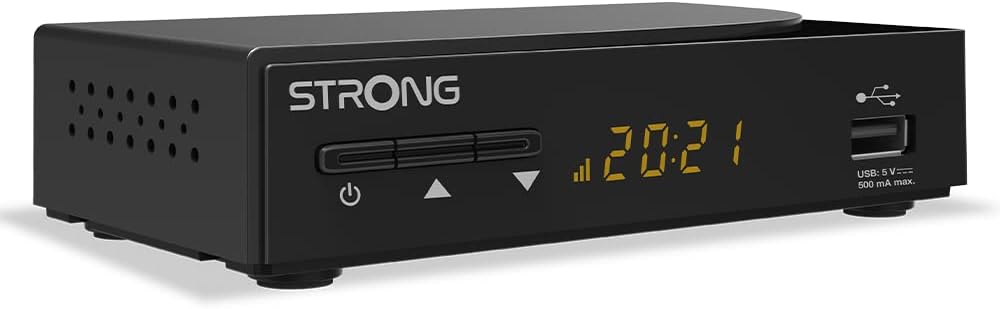
Obrázek 1: Celkově view of the STRONG SRT 3030 Digital HD Cable Receiver. This image shows the compact black unit with its front panel display and USB port.

Obrázek 2: Přední view of the receiver, highlighting the power button, channel navigation buttons, digital display, and the accessible USB port.

Obrázek 3: Zadní view of the receiver, showing the "CABLE IN" port, HDMI output, TV SCART connector, and the power input.

Obrázek 4: Strana view of the receiver, illustrating the ventilation holes designed for heat dissipation.
Nastavení
- Připojení k televizi: Use an HDMI cable to connect the HDMI OUT port on the receiver to an HDMI IN port on your television. Alternatively, use a SCART cable if your TV does not have an HDMI port.
- Connect to Cable Network: Connect your cable network's coaxial cable to the "CABLE IN" port on the back of the receiver.
- Připojte napájení: Plug the provided power adapter into the DC IN port on the receiver and then into a wall outlet.
- Zapnutí: Press the power button on the front panel of the receiver or on the remote control.
- Průvodce počátečním nastavením: Follow the on-screen instructions for the initial setup, which typically includes language selection, country, and automatic channel scanning. Allow the receiver to complete the channel scan to find all available digital channels.
Návod k obsluze
Základní funkce
- Zapnutí/vypnutí: Stiskněte tlačítko MOC na dálkovém ovladači nebo na předním panelu.
- Výběr kanálu: Použijte CH +/- tlačítky pro postupné přepínání kanálů nebo zadejte číslo kanálu přímo pomocí numerické klávesnice.
- Ovládání hlasitosti: Použijte VOL +/- tlačítka pro nastavení hlasitosti.
- Ztlumit: Stiskněte tlačítko ZTLUMIT button to temporarily turn off the sound.
- Elektronický programový průvodce (EPG): Stiskněte tlačítko EPG tlačítko na view program information and schedule recordings.
Navigace v nabídce
Stiskněte tlačítko MENU button on the remote control to access the main menu. Use the arrow keys (NAHORU DOLU VLEVO VPRAVO) to navigate through options and OK pro potvrzení výběru. Stiskněte EXIT vrátit se k živému televiznímu vysílání.
Správa kanálů
- Channel Sorting: In the menu, navigate to "Channel Management" to sort channels by name, LCN, or other criteria.
- Seznamy oblíbených: Create and manage up to 32 favorite lists to quickly access your preferred TV and radio stations.
USB funkce
Insert a USB storage device into the front USB port. You can use it for:
- Přehrávání médií: Play back various media files (e.g., photos, music, videos) stored on the USB device.
- Aktualizace softwaru: Update the receiver's firmware by placing the update file on a USB drive and following the instructions in the system settings menu.
- Channel List Backup: Save your customized channel list to the USB device.
Údržba
To ensure the longevity and optimal performance of your STRONG SRT 3030 receiver, follow these maintenance guidelines:
- Čištění: Disconnect the power before cleaning. Use a soft, dry cloth to wipe the exterior of the receiver. Do not use liquid cleaners, aerosols, or abrasive materials.
- Větrání: Ensure that the ventilation openings on the receiver are not blocked. Do not place the receiver on soft surfaces like carpets or blankets that may obstruct airflow.
- Umístění: Place the receiver in a well-ventilated area, away from direct sunlight, heat sources, and excessive moisture.
Odstraňování problémů
Pokud narazíte na problémy s přijímačem, podívejte se do níže uvedené tabulky, kde najdete běžné problémy a jejich řešení.
| Problém | Možná příčina | Řešení |
|---|---|---|
| Žádný obraz ani zvuk |
|
|
| Zpráva „Žádný signál“ |
|
|
| Dálkové ovládání nefunguje |
|
|
| Cannot play USB media |
|
|
Technické specifikace
| Funkce | Specifikace |
|---|---|
| Značka | Silný |
| Číslo modelu | SRT3030 |
| Barva | Černý |
| Technologie připojení | HDMI |
| Rozhraní | HDMI, USB 2.0 |
| Celkový počet portů HDMI | 1 |
| Režim zvukového výstupu | Stereo |
| Konfigurace kanálů prostorového zvuku | 2.0 |
| Kódování videa | H.264, H.265/HEVC, VP9, AV1, MPEG-4 |
| Kompatibilní zařízení | TV, personal computer, tablet, smartphone, game console, amplifier, speaker |
| Složení baterie (dálkový ovladač) | Alkalický |
| Výrobce | SILNÝ |
| Země původu | Čína |
Záruka a podpora
For warranty information and technical support, please refer to the documentation included with your product or visit the official Strong webUschovejte si účtenku jako doklad o koupi pro případ reklamace.
Online podpora: For further assistance, FAQs, and software updates, please visit the official Strong support page.