
1. Nastavení a instalace
This section provides detailed instructions for setting up your BONTEC Under Desk Keyboard Tray. Please review all steps carefully before beginning installation.
1.1 Kompatibilita se stolem
Před nákupemasing or installing, ensure your desk is compatible with the C-clamp mechanism. This keyboard tray is není kompatibilní with desks that have curved, beveled, or rounded edges, or crossbars/support beams underneath the installation area. The desk must have a flat, unobstructed underside for proper clamp instalace.

Obrázek: Přamples of desk edges that are not suitable for this keyboard tray.

Image: The C-clamp mechanism with protective pads, designed for flat desk edges.
1.2 Required Desk Dimensions and Clearance
The tray requires specific dimensions underneath your desk to slide in and out smoothly:
- Minimální šířka: 25.8 palců
- Minimální hloubka: 11.4 palců
C-třamps can attach to desks up to 1.57 palce tlustý. Ensure there are no obstructions (like crossbars or support beams) in the required area under your desk.

Image: Visual guide for measuring the required 25.8-inch clearance under the desk.

Image: Illustration of the 11.4-inch depth clearance needed for the tray to slide in.
1.3 Installation Steps (No-Drill)
- Sestavte zásobník: The keyboard tray comes in two main pieces that connect. Secure these pieces together according to the included hardware.
- Připojte C-Clamps: Zajistěte C-clamps to the support brackets on the keyboard tray. Ensure they are aligned correctly.
- Position on Desk: Slide the assembled keyboard tray onto the edge of your desk. The protective pads on the clamps prevent scratches.
- Utáhněte Clamps: Hand-tighten the C-clamps securely until the tray is firmly attached to the desk. No drilling or additional tools are required for this step.
1.4 Video Guide for Installation
No official BONTEC seller videos specifically demonstrating the installation of this model were found. Please refer to the written instructions and diagrams provided.
2. Návod k obsluze
The BONTEC Under Desk Keyboard Tray is designed for ease of use and to enhance your ergonomic setup.
2.1 Sliding Mechanism
The tray features a smooth slide-out mechanism. To use, gently pull the tray forward from underneath your desk. To store, push the tray back until it is fully retracted under the desk. This allows for quick access and storage, maximizing your desktop space.

Image: The keyboard tray in use, extended from under the desk.
2.2 Weight Capacity and Usage
The tray surface measures 20 palce x 11.8 palců and supports a maximum weight of 11 liber. It is designed for standard keyboards and mice. Please note:
- Not recommended for vertical mice or split ergonomic keyboards due to potential height clearance issues.
- Avoid placing excessive weight on the tray to prevent damage or instability.
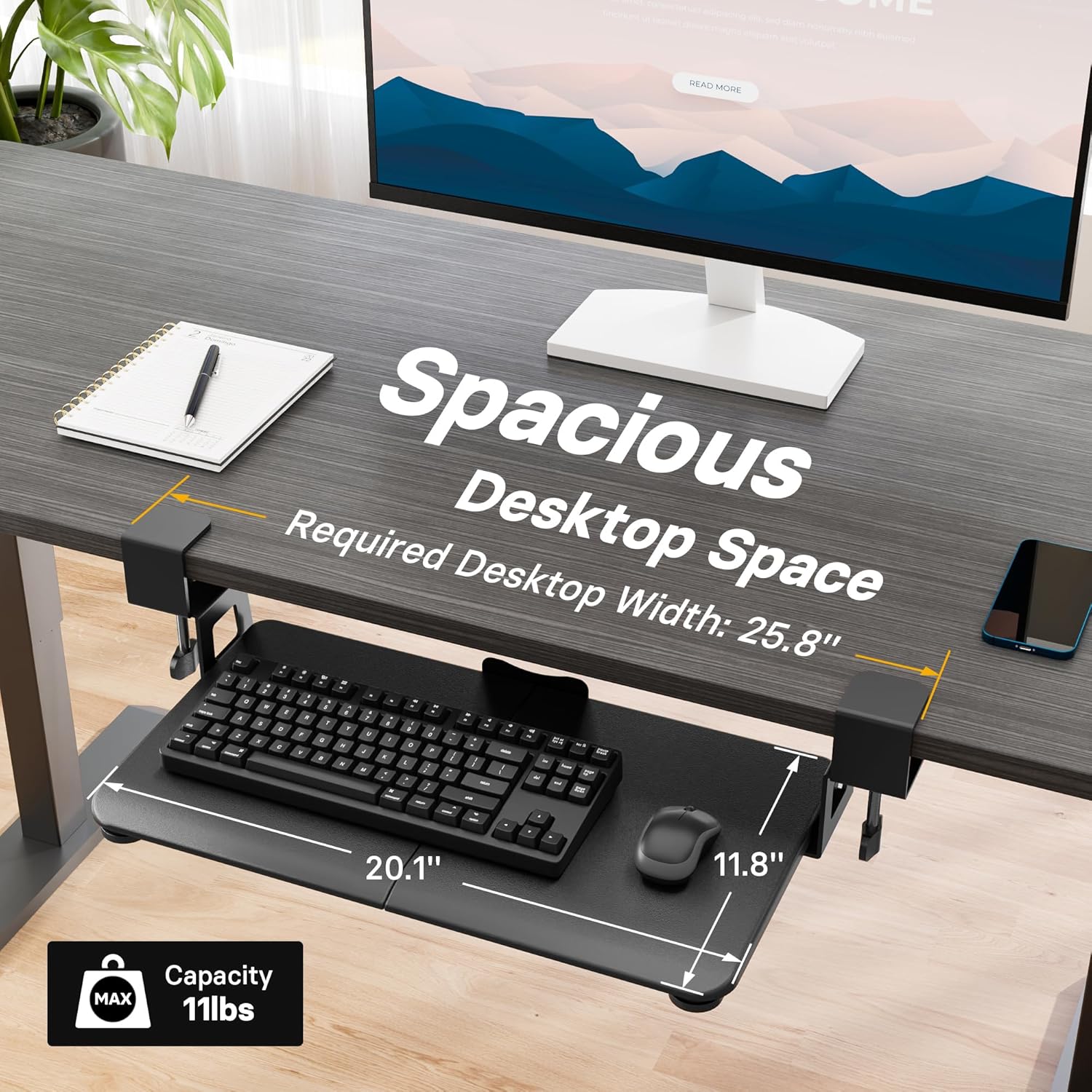
Image: Dimensions and weight capacity of the keyboard tray.
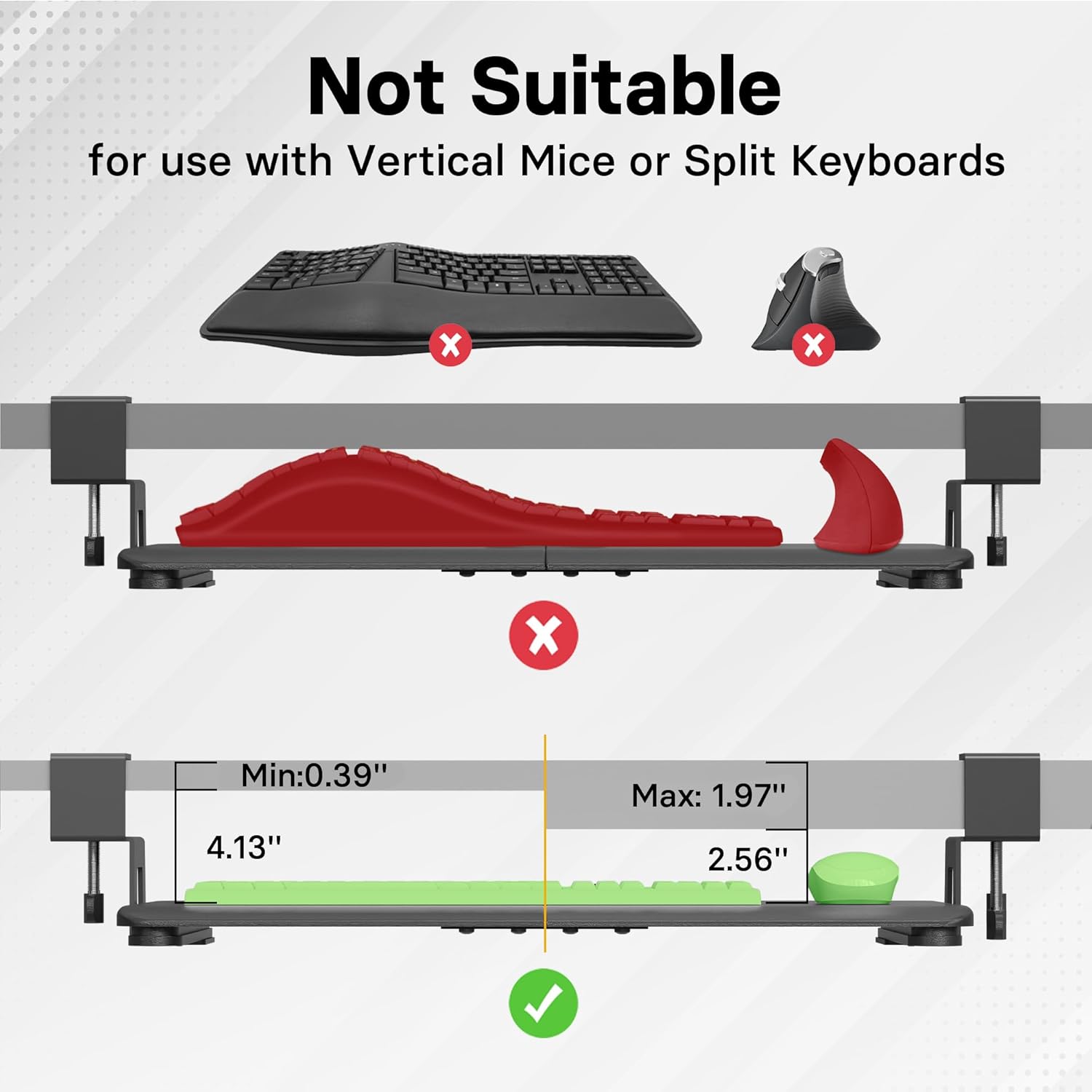
Image: Compatibility guide for different keyboard and mouse types.
3. Údržba
To ensure the longevity and smooth operation of your keyboard tray, follow these simple maintenance guidelines:
- Čištění: Wipe the tray surface with a soft, damp hadříkem. Nepoužívejte abrazivní čisticí prostředky ani rozpouštědla, která by mohla poškodit povrchovou úpravu.
- Zkontrolujte Clamps: Pravidelně kontrolujte C-clamps to ensure they remain tightly secured to your desk. Re-tighten if necessary.
- Mazání: The sliding mechanism is designed for smooth operation. If you notice any stiffness, a small amount of silicone-based lubricant can be applied to the sliders.
4. Řešení problémů
If you encounter any issues with your keyboard tray, please refer to the following common troubleshooting tips:
- Zásobník se kymácí: Zajistěte, aby C-clamps are fully tightened to the desk. Check that the desk surface is flat and the clamps are not obstructed.
- Zásobník se neposouvá hladce: Inspect the sliding rails for any debris or obstructions. Clean the rails and apply a small amount of silicone lubricant if needed.
- Keyboard/Mouse Not Fitting: Verify the dimensions of your keyboard and mouse against the tray's surface (20 x 11.8 inches) and ensure they are not vertical or split ergonomic types, which may not fit.
5. Specifikace
| Značka | BONTEC |
| Model | 20 x 11.8 palce |
| Rozměry zásobníku | 20 inches (Width) x 11.8 inches (Depth) |
| Hmotnostní kapacita | Až 11 liber |
| Kompatibilita tloušťky stolu | Až 1.57 palce |
| Minimum Under-Desk Width Clearance | 25.8 palců |
| Minimum Under-Desk Depth Clearance | 11.4 palců |
| Typ instalace | C-Clamp (No-Drill) |
| Specifický návod k použití | podnikání |
| Jsou vyžadovány baterie | Žádný |
| Zahrnuté komponenty | USB Cable (as per product data) |
| ASIN | B0BKRTGQXJ |
| Datum první dostupnosti | 12. ledna 2023 |
6. Záruka a podpora
For warranty information or customer support, please refer to the contact details provided with your product packaging or visit the official BONTEC webmísto. Uschovejte si doklad o koupi pro případ záručních reklamací.