
LENRUE A39PRO
LENRUE A39PRO USB-C Computer Speaker User Manual
Model: A39PRO | Brand: LENRUE
1. Úvod
Thank you for choosing the LENRUE A39PRO USB-C Computer Speaker. This speaker is designed to provide clear and powerful audio for your laptop or desktop computer with a simple plug-and-play Type-C connection. This manual provides detailed instructions for setup, operation, and maintenance to ensure optimal performance and longevity of your device.
2. Obsah balení
Prosím, ověřte, zda jsou v balení přítomny všechny položky:
- 1 x LENRUE A39PRO Computer Speaker
- 1 x Uživatelská příručka (tento dokument)
3. Konec produktuview
The LENRUE A39PRO speaker features a sleek design with intuitive controls and vibrant lighting. Familiarize yourself with the components below.
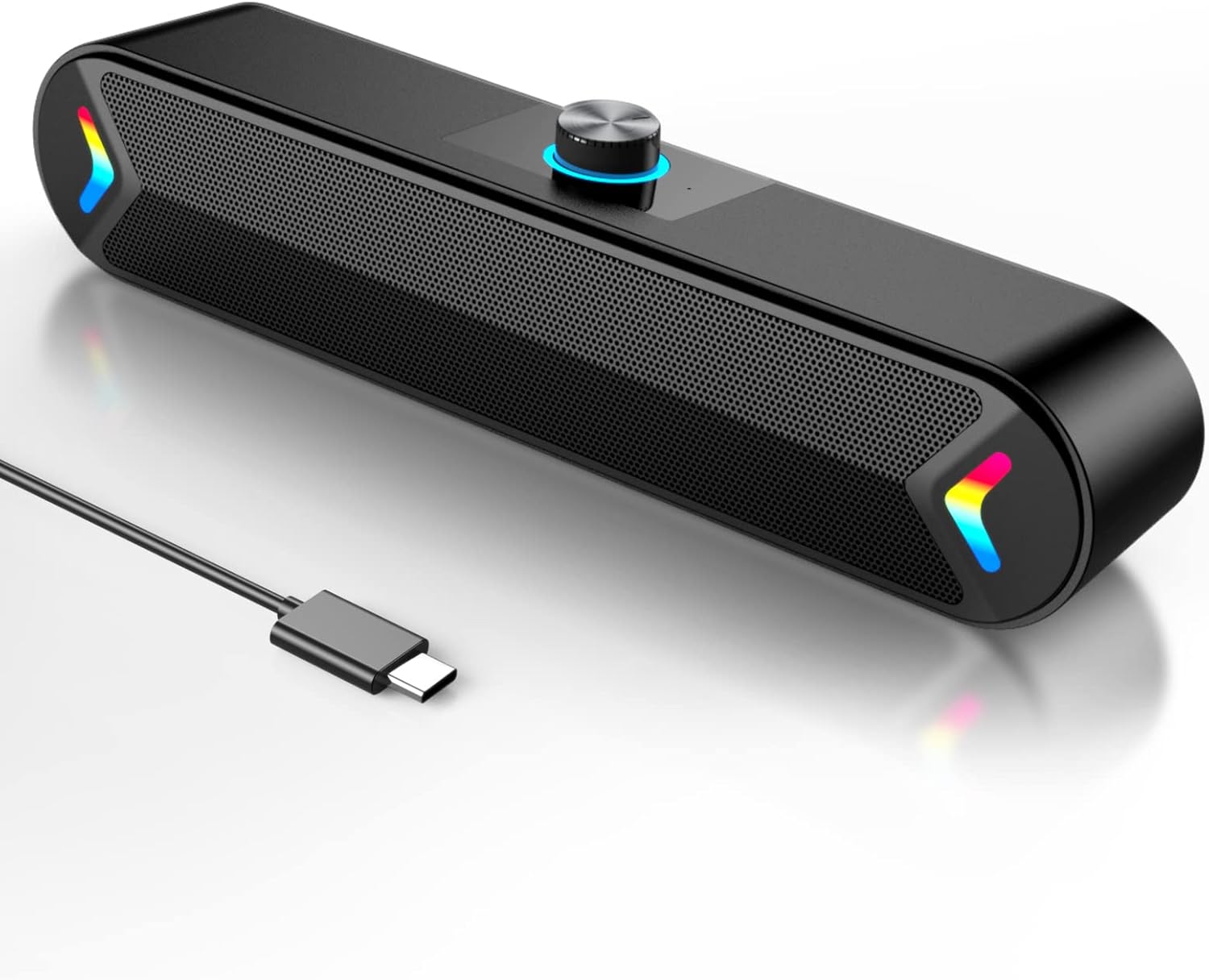
Obrázek 3.1: Přední view of the LENRUE A39PRO speaker, showing the main grille and integrated USB-C cable.

Obrázek 3.2: Horní a zadní view of the speaker, highlighting the volume knob and the power/light control button.
Klíčové komponenty:
- Knoflík hlasitosti: Located on the top, used for adjusting audio volume.
- Tlačítko napájení/světla: Located on the back, controls power and the colorful light feature.
- USB-C kabel: Integrated cable for both power and audio input.
- Dual 5W Drivers: Internal components providing clear stereo sound.
- Independent Bass Diaphragm: Enhances bass performance.
4. Pokyny k nastavení
The LENRUE A39PRO speaker is designed for simple plug-and-play operation. No additional drivers or software are required for most operating systems.
Připojení reproduktoru:
- Locate an available USB-C port on your laptop or desktop computer.
- Insert the integrated USB-C cable from the LENRUE A39PRO speaker firmly into the USB-C port on your computer.

Obrázek 4.1: Illustrates connecting the speaker's USB-C cable to a laptop's Type-C port.
- The speaker will automatically power on and be recognized by your operating system. You may need to select the "LENRUE A39PRO" as the default audio output device in your computer's sound settings.

Obrázek 4.2: The speaker in operation, connected to a laptop, demonstrating its plug-and-play functionality.
Důležitá poznámka: Ensure your device has a Type-C interface for compatibility. The single USB-C cable transmits both audio and electrical power to the speaker.
5. Návod k obsluze
Ovládání hlasitosti:
- Otočte Ovladač hlasitosti on the top of the speaker clockwise to increase the volume.
- Otočte Ovladač hlasitosti proti směru hodinových ručiček pro snížení hlasitosti.
Controlling the Colorful Light:
The speaker features a colorful light design that can be controlled via the button on the back.
- Stiskněte tlačítko Tlačítko napájení/světla once to turn on the speaker and activate the colorful lights.
- Stiskněte tlačítko Tlačítko napájení/světla a second time to turn off the colorful lights while keeping the speaker powered on.
- Stiskněte tlačítko Tlačítko napájení/světla a third time to power off both the speaker and the lights.
6. Kompatibilita
The LENRUE A39PRO speaker offers wide compatibility with various operating systems and devices that feature a USB-C port for audio and power.

Obrázek 6.1: Visual representation of the speaker's compatibility with Windows, macOS, Chrome OS, Linux, and Unix systems.
Podporované operační systémy:
- Windows PCs (Vista/7/8/10)
- macOS (MacBook Air, Mac mini)
- Google Chromebooks
- Linux
- Unix
Kompatibilní zařízení:
- Laptops with Type-C port
- Desktop Computers with Type-C port
7. Řešení problémů
If you encounter issues with your LENRUE A39PRO speaker, please refer to the following common problems and solutions:
| Problém | Možná příčina | Řešení |
|---|---|---|
| Z reproduktoru není slyšet žádný zvuk. |
|
|
| Lights are off, but speaker is on. | Lights have been toggled off. | Press the Power/Light Button once to cycle through light modes and turn them back on. |
| Zvuk je zkreslený nebo nejasný. |
|
|
| Počítač nerozpoznává reproduktor. |
|
|
8. Specifikace
| Funkce | Detail |
|---|---|
| Název modelu | A39PRO |
| Typ reproduktoru | Computer Speaker |
| Technologie připojení | USB (typ C) |
| Zdroj napájení | Elektrické napájení s kabelem (přes USB-C) |
| Režim zvukového výstupu | Stereo |
| Maximální výstupní výkon reproduktoru | 10 wattů (2x5 W) |
| Typ ovladače | Ovládání knoflíkem |
| Rozměry produktu (D x Š x V) | 2.17"H x 12.6"Š x 2.56"V |
| Hmotnost položky | 1.3 libry |
| Barva | Black-USBC |
| Speciální funkce | One Cable with Type-C plug for charging and audio, Colorful light Design |
9. Údržba
Proper care and maintenance will ensure the longevity and optimal performance of your speaker.
- Čištění: Use a soft, dry cloth to wipe the surface of the speaker. Do not use liquid cleaners or abrasive materials, as they may damage the finish or internal components.
- Skladování: Pokud reproduktor delší dobu nepoužíváte, skladujte jej na chladném a suchém místě mimo dosah přímého slunečního záření a extrémních teplot.
- Zacházení: Avoid dropping the speaker or subjecting it to strong impacts, which can damage internal circuitry.
- Vystavení vodě: Reproduktor není vodotěsný. Nevystavujte jej vodě ani jiným kapalinám.
10. Záruka a podpora
The LENRUE A39PRO speaker comes with a Omezená záruka. For specific warranty terms, conditions, and support inquiries, please refer to the warranty information provided at the time of purchase or contact LENRUE customer support directly through their official channels.
For further assistance or technical support, please visit the official LENRUE webnebo kontaktujte jejich oddělení zákaznických služeb.
Ask a question about this manual
Ask about setup, troubleshooting, compatibility, parts, safety, or missing instructions. Manuals+ will review the question and use this page’s manual context to help answer it.