
Bewinner Dilwegyrcfmb8sp862
Bewinner Digital Camera User Manual
Model: Dilwegyrcfmb8sp862
Zavedení
Děkuji za nákupasing the Bewinner Digital Camera. This compact and versatile camera is designed to capture high-quality photos and videos with ease. Featuring 4K Ultra HD video recording, 48MP image resolution, 8x digital zoom, and a 2.7-inch LCD screen, it's perfect for capturing your precious moments. This manual provides detailed instructions on how to set up, operate, and maintain your camera.
Obsah balení
Zkontrolujte prosím balení, zda jsou všechny položky přítomny:
- 1 x Bewinner Digital Camera
- 1 x USB kabel
- 1 x Uživatelská příručka (tento dokument)
- 1 x úložný sáček
- 1 x řemínek na zápěstí

Image: Contents of the Bewinner Digital Camera package.
Vlastnosti produktu
- Vysoké rozlišení: Supports up to 48MP image resolution and 4K video resolution.
- 8x digitální zoom: Allows for clear capture of distant objects.
- 2.7palcový LCD displej: Pro snadné viewfotografie a videa.
- Vestavěné doplňovací světlo: Zlepšuje viditelnost za zhoršených světelných podmínek.
- Všestranné funkce: Includes selfie mode, continuous shooting, and anti-shake.
- Dobíjecí baterie: Built-in 550mAh Li-ion battery, rechargeable via USB.
- Rozšiřitelné úložiště: Supports memory cards up to 128GB (not included).

Obrázek: Přední strana view of the Bewinner Digital Camera highlighting its features.
Nastavení
1. Nabíjení baterie
The camera comes with a built-in 550mAh lithium battery. Before first use, ensure the battery is fully charged.
- Locate the USB port on the camera.
- Připojte dodaný kabel USB k portu USB fotoaparátu.
- Druhý konec kabelu USB připojte k napájecímu adaptéru USB (není součástí balení) nebo k portu USB počítače.
- Rozsvítí se kontrolka nabíjení. Po dokončení nabíjení se světlo změní nebo zhasne.
2. Vložení paměťové karty
The camera supports memory cards up to 128GB (not included). A memory card is required to save photos and videos.
- Najděte slot pro paměťovou kartu na boční straně fotoaparátu.
- Gently insert the memory card into the slot with the metal contacts facing the correct direction (refer to the diagram on the camera).
- Push the card in until it clicks into place. To remove, push the card again until it springs out.
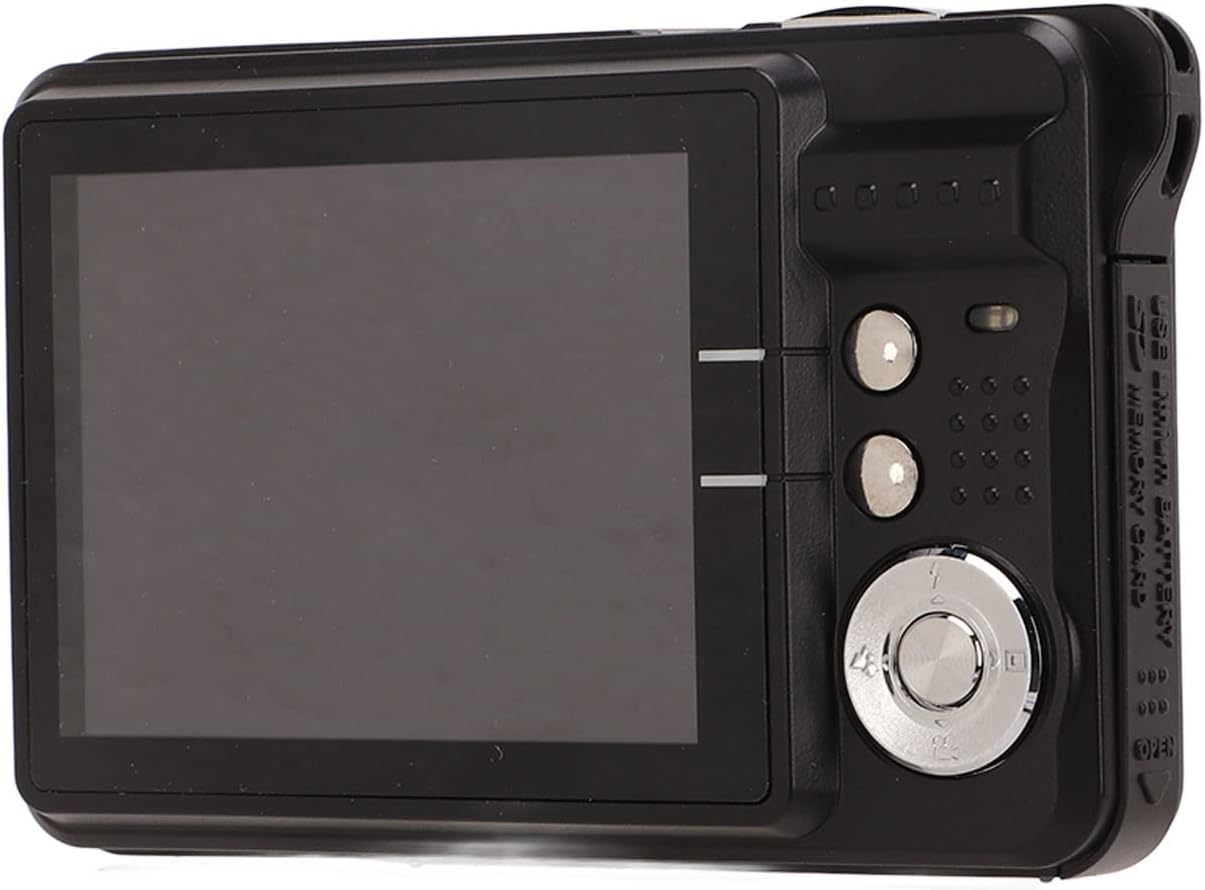
Image: Detail of the USB port and memory card slot for setup.
Návod k obsluze
Pořizování statických snímků
- Hold the camera steady and aim it so you can see your subject on the screen.
- Set the shooting menu: Press the A, Blikatnebo Scéna button to adjust flash settings or select a scene mode. Other settings can be accessed and adjusted within the camera's main menu.
- Use the zoom function: Press T to zoom in on a larger subject, or W to widen the field of view.
- Stisknutím tlačítka spouště pořiďte snímek.

Obrázek: Zadní view of the camera, illustrating the LCD screen and control layout for operation.
Nahrávání videí
The camera supports video recording up to 4K resolution.
- Switch the camera to video recording mode (if applicable, refer to on-screen icons).
- Kompozice snímku se provede pomocí LCD displeje.
- Press the record button (usually marked with a red dot or video camera icon) to start recording.
- Dalším stisknutím tlačítka nahrávání nahrávání zastavíte.
Using the Built-in Fill Light
The built-in fill light can be activated in dark environments to improve image brightness.
- Access the camera's menu or dedicated button for flash/fill light settings.
- Select the appropriate fill light mode (e.g., On, Off, Auto) based on your shooting conditions.
Údržba
- Čištění: K čištění těla fotoaparátu používejte měkký, suchý hadřík. Na objektiv použijte speciální hadřík a roztok na čištění objektivů. Nepoužívejte abrazivní materiály.
- Skladování: Pokud fotoaparát nepoužíváte, uložte jej do dodaného úložného pouzdra na chladném a suchém místě mimo dosah přímého slunečního záření a extrémních teplot.
- Péče o baterie: Recharge the battery regularly, even if the camera is not used frequently, to maintain battery health. Avoid fully discharging the battery for extended periods.
- Vyhněte se vodě: This camera is not waterproof. Keep it away from water and high humidity.
Odstraňování problémů
| Problém | Možná příčina | Řešení |
|---|---|---|
| Fotoaparát se nezapne. | Baterie je vybitá nebo není nabitá. | Charge the camera battery using the provided USB cable. |
| Nelze pořizovat fotografie/videa. | Paměťová karta je plná, není vložena nebo je poškozená. | Insert a memory card, free up space, or format the card (this will erase all data). |
| Obrázky jsou rozmazané. | Camera shake, dirty lens, or incorrect focus. | Hold the camera steady, clean the lens, or ensure proper lighting. |
| Nelze přenést filek počítači. | Problém s kabelem USB nebo problém s ovladačem. | Ensure USB cable is securely connected. Try a different USB port or computer. |
Specifikace
| Funkce | Detail |
|---|---|
| Typ položky | Digitální fotoaparát |
| Materiál | Plast a kov |
| Fotocitlivá komponenta | CMOS 5MP processor |
| Rozlišení obrazu | 48MP (8000x6000), 30MP (6400x4800), 24MP (5600x4200), 20MP (5200x3900), 18MP (4896x3672), 16MP (4608x3456), 12MP (4000x3000), 8MP (3264x2448), 7MP (3072x2304), 5MP (2592x1944), 2MP (1600x1200) |
| Formát obrázku | JPEG |
| Rozlišení videa | 4K (3840x2160), 2.7K (2688x1520), FHD (1920x1080), HD (1280x720) |
| Formát videa | AVI |
| Velikost obrazovky | 2.7 palců |
| Digitální zoom | 8x |
| Závěrka | Elektronický |
| Skladování | Maximum support memory card 128GB (not included) |
| Baterie | Vestavěná lithiová baterie, 550mAh |
| Hrubá hmotnost | 164 g / 5.8 oz |
| Číslo modelu | Dilwegyrcfmb8sp862 |
Záruka a podpora
Bewinner products are manufactured to high-quality standards. For warranty information and technical support, please refer to the warranty card included in your package or visit the official Bewinner webwebu. Uschovejte si účtenku jako doklad o koupi.
For further assistance, please contact Bewinner customer service.
Ask a question about this manual
Ask about setup, troubleshooting, compatibility, parts, safety, or missing instructions. Manuals+ will review the question and use this page’s manual context to help answer it.