
1. Úvod
This manual provides essential information for the safe and efficient operation of your JFA X-LINE 70A Power Supply and Charger. Please read these instructions carefully before installation and use to ensure proper function and to prevent damage to the unit or connected equipment. The JFA X-LINE 70A is an intelligent power source designed to charge, feed, and monitor automotive batteries, offering advanced features for optimal performance.
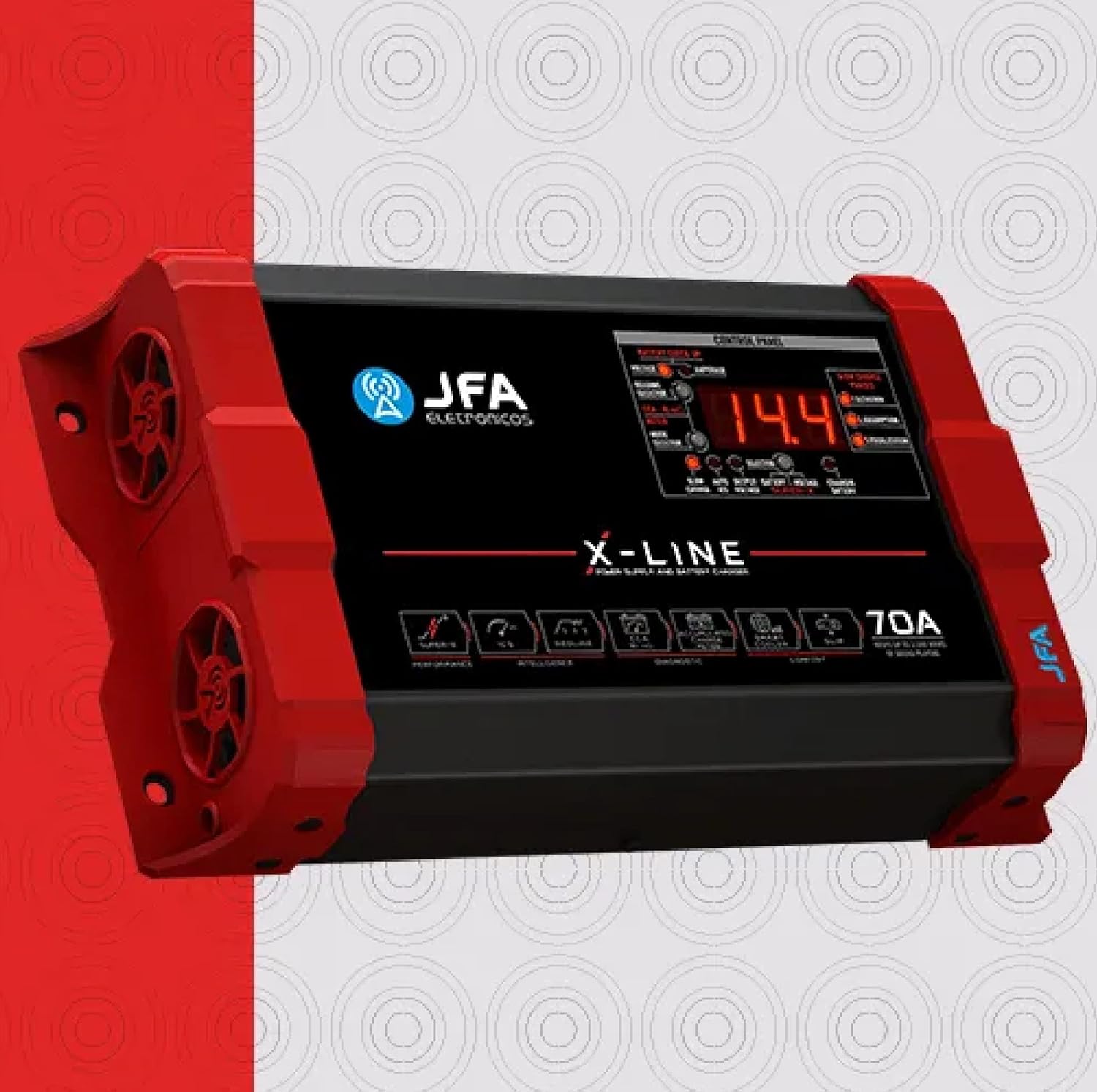
Obrázek 1.1: Přední strana view of the JFA X-LINE 70A Power Supply and Charger, showcasinjeho kompaktní design a ovládací panel.
2. Bezpečnostní opatření
- Always ensure the unit is disconnected from the power source before making any connections or disconnections.
- Operate the charger in a well-ventilated area to prevent overheating.
- Nevystavujte jednotku vlhkosti, dešti nebo extrémním teplotám.
- Do not attempt to open or modify the unit. Refer all servicing to qualified personnel.
- Uchovávejte mimo dosah dětí.
3. Nastavení
- Rozbalení: Carefully remove the JFA X-LINE 70A from its packaging and inspect for any signs of damage. Retain packaging for future transport or storage.
- Umístění: Place the unit on a stable, flat surface. Ensure adequate clearance around the unit for proper air circulation, especially around the intelligent ventilation system with dynamic PWM control.
- Připojení napájení: Connect the power supply cable to a suitable AC outlet. Verify the voltage odpovídá požadavkům jednotky.
- Battery/System Connection: Connect the output cables of the JFA X-LINE 70A to your automotive battery or sound system. Ensure correct polarity (positive to positive, negative to negative) to prevent damage.
- Počáteční zapnutí: Once all connections are secure, switch on the unit. The control panel display will illuminate, indicating the unit is ready for operation.

Obrázek 3.1: Boční strana view of the JFA X-LINE 70A, highlighting the intelligent ventilation system.
4. Návod k obsluze
The JFA X-LINE 70A features a user-friendly control panel for monitoring and selecting operating modes.
- Displej ovládacího panelu: The digital display shows real-time voltage a amperage čtení.
- Výběr režimu: Use the mode selector buttons to choose between the following operational modes:
- Slow Charge: Provides a three-phase slow charge, optimizing battery health and longevity.
- Auto ICS (Intelligent Charge System): Automatically manages the charging process, increasing the capacity and accumulation of charge, and extending the useful life of batteries.
- Výstupní objemtage: Allows the unit to function as a stable power supply for your audio system.
- Super-X Function: Activate the Super-X function to temporarily raise the output voltage to 15V. This provides maximum performance to connected amplifiers for short durations.
- Battery Diagnosis (CCA Meter): The exclusive CCA meter function allows for a quick battery diagnosis in approximately 10 seconds, providing a real analysis of the load accumulation capacity.
5. Údržba
Regular maintenance ensures the longevity and optimal performance of your JFA X-LINE 70A.
- Čištění: Periodically clean the exterior of the unit with a soft, dry cloth. Do not use abrasive cleaners or solvents. Ensure ventilation openings are free from dust and debris.
- Větrání: Regularly check that the intelligent ventilation system's fans are clear and operating correctly. Blocked vents can lead to overheating.
- Kontrola kabelů: Inspect all power and output cables for any signs of wear, cuts, or damage. Replace damaged cables immediately.
- Skladování: When not in use for extended periods, store the unit in a cool, dry place, away from direct sunlight and moisture.
6. Řešení problémů
If you encounter issues with your JFA X-LINE 70A, refer to the following common troubleshooting steps:
- Jednotka se nezapíná:
- Zkontrolujte, zda je napájecí kabel bezpečně připojen k jednotce i k elektrické zásuvce.
- Verify the AC outlet is functional by plugging in another device.
- Ensure the unit's power switch is in the 'ON' position.
- Baterie se nenabíjí:
- Confirm that the output cables are correctly connected to the battery terminals with proper polarity.
- Check the selected operating mode. Ensure 'Slow Charge' or 'Auto ICS' is active.
- Use the CCA meter function to diagnose the battery's condition. A severely damaged battery may not accept a charge.
- Přehřívání:
- Ensure the unit has adequate ventilation and that no objects are blocking the air vents.
- Reduce the load on the power supply if it is operating at its maximum capacity for extended periods.
- Neobvyklé zvuky nebo pachy:
- Immediately disconnect the unit from the power source and the battery.
- Do not attempt to operate the unit. Contact customer support.
Pokud problém přetrvává i po provedení těchto kroků, kontaktujte prosím zákaznickou podporu s žádostí o další pomoc.
7. Specifikace
| Funkce | Specifikace |
|---|---|
| Číslo modelu | 70AX |
| Výstupní proud | 70A |
| Výstupní objemtage | 15 Volts (Super-X function) |
| Výkon | Maintains up to 3,500 WRMS of sound playing |
| Rozměry produktu (D x Š x V) | 2.28 x 10.2 x 5.94 palce |
| Hmotnost položky | 4 libry |
| Systém nabíjení | Intelligent Charge System (ICS), Three-phase slow charge |
| Chladicí systém | Intelligent ventilation with dynamic PWM control |
8. Záruka a podpora
Informace o záruce: Specific warranty details for the JFA X-LINE 70A Power Supply and Charger are typically provided with the product packaging or can be found on the official JFA webstránky. Uschovejte si prosím doklad o koupi pro případ reklamace.
Zákaznická podpora: For technical assistance, troubleshooting beyond this manual, or warranty inquiries, please contact your retailer or the manufacturer directly. Refer to the contact information provided with your product or visit the official JFA webmísto pro zdroje podpory.