
MSZ-FH09NA, MSZ-FH12NA, MSZ-FH15NA, MSZ-FE09NA, MSZ-FE12NA, MSZ-FE18NA
User Manual for Mitsubishi Air Conditioning Remote Control
Compatible Models: MSZ-FH09NA, MSZ-FH12NA, MSZ-FH15NA, MSZ-FE09NA, MSZ-FE12NA, MSZ-FE18NA
1. Úvod
This manual provides comprehensive instructions for the operation and maintenance of your new replacement remote control for Mitsubishi Air Conditioning units. Please read this manual thoroughly before use to ensure proper functionality and to maximize the lifespan of your remote control.
2. Konec produktuview
This remote control is designed as a direct replacement for various Mitsubishi Air Conditioning models, offering seamless compatibility and full functionality. It utilizes infrared (IR) communication for reliable control of your air conditioning unit.

Obrázek 2.1: Úhlové view of the remote control, highlighting the display and button layout.
Compatible Air Conditioning Models:
- MSZ-FH09NA
- MSZ-FH12NA
- MSZ-FH15NA
- MSZ-FE09NA
- MSZ-FE12NA
- MSZ-FE18NA
3. Nastavení
Before using the remote control, you must install batteries.
- Otevřete přihrádku na baterie: Najděte kryt baterie na zadní straně dálkového ovladače. Posuňte kryt dolů nebo stiskněte západku a zvedněte jej pro otevření.
- Vložte baterie: Insert two new AAA batteries (not included) into the compartment. Ensure the positive (+) and negative (-) terminals align correctly with the markings inside the compartment.
- Zavřete přihrádku na baterie: Zasuňte kryt baterie zpět na místo, dokud bezpečně nezapadne.
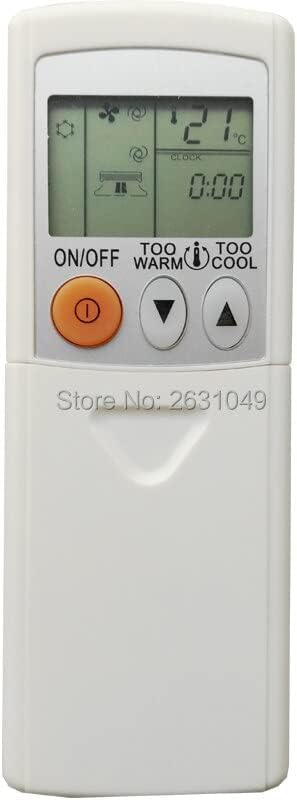
Figure 3.1: Top section of the remote control, displaying the screen and primary controls.
Poznámka: If the remote control does not respond after battery installation, check the battery orientation or replace with fresh batteries.
4. Návod k obsluze
Familiarize yourself with the buttons and their functions to effectively control your air conditioning unit.

Obrázek 4.1: Plná view of the remote control, detailing all available buttons.
| Tlačítko | Funkce |
|---|---|
| ON/OFF | Turns the air conditioning unit on or off. |
| TOO WARM / TOO COOL (Temperature ▲/▼) | Adjusts the desired temperature setting. Press 'TOO WARM' to increase temperature, 'TOO COOL' to decrease. |
| MODE | Cycles through operating modes: Auto, Cool, Dry, Fan, Heat (availability depends on AC unit). |
| FAN | Upravuje rychlost ventilátoru (např. Automaticky, Nízká, Střední, Vysoká). |
| VANE / WIDE VANE | Controls the vertical and horizontal airflow direction of the air conditioner louvers. |
| ÚSPORNÉ CHLAZENÍ | Aktivuje energeticky úsporný chladicí režim. |
| SPÁT | Aktivuje režim spánku, který postupně upravuje teplotu pro pohodlný spánek a úsporu energie. |
| POWERFUL COOL | Initiates rapid cooling for a short period. |
| STOP / START (Timer) | Used to set or cancel the ON/OFF timer function. |
| TIME (▲/▼) | Adjusts the time for timer settings. |
| RESETOVAT HODINY | Resetuje vnitřní hodiny dálkového ovladače. |
5. Údržba
Správná údržba zajistí dlouhou životnost a optimální výkon vašeho dálkového ovladače.
- Výměna baterie: Replace batteries when the display becomes dim or the remote control stops responding. Always replace both batteries at the same time with new ones of the same type.
- Čištění: Dálkový ovladač otírejte měkkým, suchým hadříkem. Nepoužívejte tekuté čisticí prostředky, abrazivní čisticí prostředky ani chemické spreje, protože by mohly poškodit povrch dálkového ovladače nebo jeho vnitřní součásti.
- Skladování: Pokud dálkový ovladač nebudete delší dobu používat, vyjměte baterie, abyste zabránili jejich vytečení a korozi. Skladujte na chladném a suchém místě.
6. Řešení problémů
Pokud narazíte na problémy s dálkovým ovladačem, podívejte se do následující tabulky, kde najdete běžné problémy a jejich řešení.
| Problém | Možná příčina / řešení |
|---|---|
| Dálkové ovládání nefunguje. |
|
| Displej je tmavý nebo prázdný. | Baterie jsou slabé. Vyměňte za nové baterie. |
| AC unit does not respond to specific buttons. | The button function may not be supported by your specific AC unit model, or the remote may require a reset (remove and reinsert batteries). |
7. Specifikace
| Funkce | Detail |
|---|---|
| Použití | Klimatizace |
| Bezdrátová komunikace | Infračervený (IR) |
| Podpora APP | Žádný |
| Kanál | 1 |
| Balík | Ano |
| Frekvence | 433 MHz |
| Maximální počet podporovaných zařízení | 1 |
| Kompatibilní zařízení | Klimatizace |
| Speciální funkce | Ergonomický |
8. Záruka a podpora
This product is covered by a standard manufacturer's warranty against defects in materials and workmanship. For specific warranty terms and conditions, please refer to the product packaging or contact the seller directly. For technical support or further assistance, please reach out to the point of purchase or the manufacturer's customer service.
Ask a question about this manual
Ask about setup, troubleshooting, compatibility, parts, safety, or missing instructions. Manuals+ will review the question and use this page’s manual context to help answer it.