
1. Přesview
The ASRock X670E PG Lightning is a high-performance motherboard designed to support AMD AM5 Ryzen 7000 Series Processors. It features advanced connectivity, robust power delivery, and extensive expansion options, making it suitable for demanding computing tasks and gaming. This manual provides essential information for the proper installation, operation, and maintenance of your motherboard.
Klíčové vlastnosti:
- Supports AMD AM5 Ryzen 7000 Series Processors
- Čipová sada AMD X670
- Dual Channel DDR5 Memory, up to 128GB
- Multiple PCIe 5.0 and PCIe 4.0 slots for expansion
- Integrated AMD RDNA2 Graphics (actual support varies by CPU)
- 7.1-CH HD Audio (Realtek ALC897)
- Realtek 2.5G LAN
- Six SATA3 ports and three Hyper M.2 slots
- Extensive I/O with USB 3.2 Gen2x2 Type-C, HDMI, and DisplayPort
2. Nastavení a instalace
Before beginning installation, ensure your workspace is clean and static-free. Always handle components by their edges to avoid damage from electrostatic discharge.
2.1. Instalace procesoru
Carefully open the CPU socket lever. Align the triangular mark on your AMD AM5 Ryzen processor with the corresponding mark on the socket. Gently place the CPU into the socket without applying force. Close the lever to secure the processor.

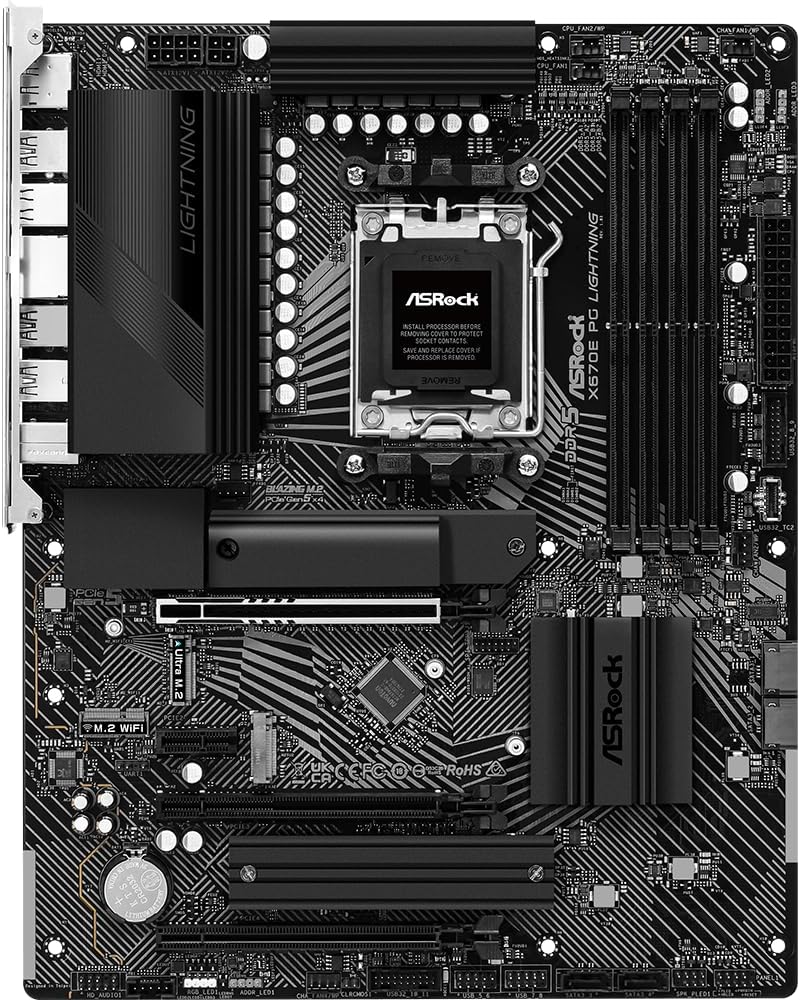
Obrázek: Shora dolů view of the ASRock X670E PG Lightning motherboard, showing the CPU socket ready for processor installation.
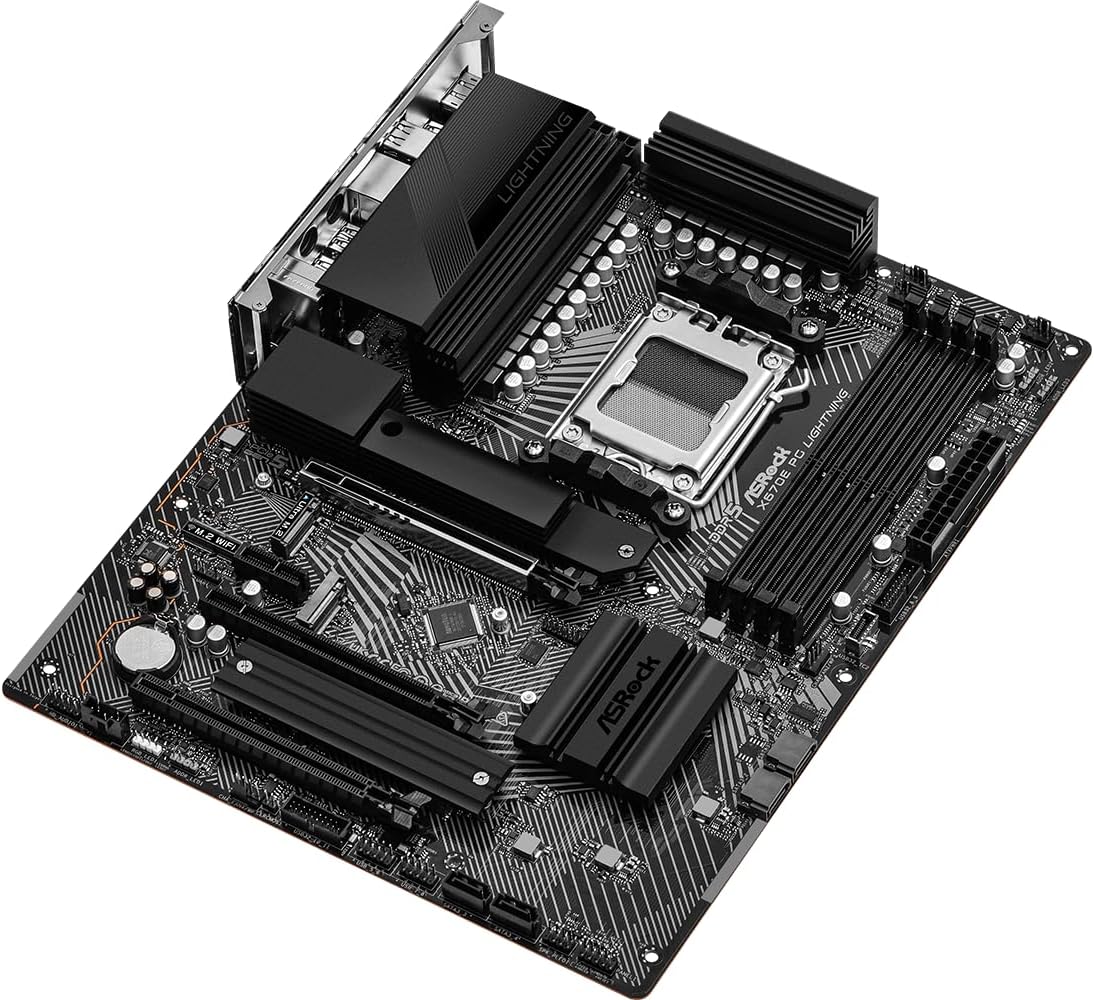
Image: Close-up of the CPU socket on the ASRock X670E PG Lightning motherboard with the retention arm open, illustrating the installation readiness.
2.2. Instalace paměti
The motherboard supports DDR5 memory. For optimal performance, install memory modules in a dual-channel configuration. Refer to the motherboard manual for specific slot population guidelines. Open the clips on the DIMM slots, align the memory module notch with the slot key, and press down firmly on both ends until the clips snap into place.
Obrázek: Úhlový view of the ASRock X670E PG Lightning motherboard, showing the four DDR5 memory slots and the CPU socket area.
2.3. Instalace úložného zařízení
Install M.2 NVMe SSDs into the available M.2 slots. Secure them with the provided screws or standoffs. For SATA drives, connect the SATA data cables to the motherboard's SATA ports and the power cables from your power supply to the drives.

Obrázek: Detail view of the ASRock X670E PG Lightning motherboard, detailing the M.2 slots, heatsinks, and chipset area.
2.4. Instalace grafické karty
Insert your PCIe graphics card into the primary PCIe 5.0 x16 slot. Ensure it is seated firmly and secure it with the case screw. Connect the necessary PCIe power cables from your power supply to the graphics card.
2.5. Připojení napájecího zdroje
Connect the 24-pin ATX power connector and the 8-pin (or 4+4-pin) CPU power connector from your power supply to the corresponding headers on the motherboard. Ensure all connections are secure.
3. Návod k obsluze
3.1. První spuštění
After assembling your system, connect your monitor, keyboard, and mouse. Power on the system. The first boot may take longer than usual due to memory training. If the system does not display, check all power connections and component seating.
3.2. Konfigurace BIOSu/UEFI
Press the 'Delete' or 'F2' key during startup to enter the BIOS/UEFI setup utility. Here you can configure boot order, enable XMP/EXPO profiles for memory, adjust fan speeds, and monitor system status. Save changes before exiting.
3.3. Instalace ovladače
After installing your operating system, install the latest drivers for your motherboard's chipset, LAN, audio, and any other integrated components. These can typically be found on the ASRock support webweb pro váš konkrétní model.
4. Údržba
4.1. Aktualizace BIOSu
Pravidelně kontrolujte ASRock website for BIOS/UEFI updates. Updates can improve system stability, compatibility, and performance. Follow the provided instructions carefully when performing a BIOS update to avoid system damage.
4.2. Čištění
Pravidelně čistěte vnitřek počítače, abyste zabránili hromadění prachu, který může vést k přehřátí a snížení výkonu. K odstranění prachu z ventilátorů, chladičů a dalších součástí použijte stlačený vzduch. Před čištěním se ujistěte, že je systém vypnutý a odpojený od sítě.
4.3. Kontroly součástí
Occasionally inspect all internal connections (power cables, data cables, expansion cards) to ensure they are securely seated. Loose connections can cause intermittent issues or system instability.
5. Řešení problémů
5.1. Běžné problémy
- Bez displeje: Verify monitor connection, graphics card seating, and power cables. Try reseating RAM modules.
- Boot Loops/System Instability: Reset BIOS to default settings. Check memory compatibility and seating. Ensure CPU cooler is properly installed.
- Periferní zařízení nebylo detekováno: Ujistěte se, že jsou zařízení USB připojena ke správným portům. Aktualizujte ovladače čipové sady.
5.2. Diagnostické LED diody
The motherboard features four single LEDs to indicate the boot state (CPU, DRAM, VGA, BOOT). If an issue occurs during startup, the corresponding LED will remain lit, helping to identify the problematic component.
5.3. Kontaktujte podporu
If you encounter persistent issues that cannot be resolved using the troubleshooting steps, please contact ASRock technical support for further assistance.
6. Specifikace
| Funkce | Specifikace |
|---|---|
| Značka | ASRock |
| Název modelu | X670E PG LIGHTNING |
| Zásuvka CPU | Zásuvka AM5 |
| Kompatibilní procesory | Procesory AMD Ryzen řady 7000 |
| Typ čipové sady | AMD X670 |
| Technologie paměti RAM | DDR5 |
| K dispozici paměťové sloty | 4 |
| Max RAM Memory Size | 128 GB |
| Rozhraní grafické karty | Integrated (actual support varies by CPU) |
| Total PCIe Ports | 4 (1x PCIe 5.0 x16, 1x PCIe 4.0 x16, 1x PCIe 4.0 x1, 1x M.2) |
| Total SATA Ports | 6 |
| Celkový počet portů USB | 16 (including USB 3.2 Gen2x2 Type-C) |
| Počet ethernetových portů | 1 (2.5G LAN) |
| Rozměry položky D x Š x V | 11.7 cm D x 2.8 cm Š x 13.8 cm V |
7. Záruka a podpora
This ASRock motherboard comes with a 3-letá záruka. For detailed warranty terms and conditions, please refer to the official ASRock webnebo kontaktujte jejich zákaznický servis.
For technical support, driver downloads, and further product information, visit the official ASRock support page: Obchod ASRock na Amazonu
8. Vizualizace produktu
8.1. Obrázky produktů

Image: Rear I/O panel of the ASRock X670E PG Lightning motherboard, featuring multiple USB ports, 2.5G LAN, HDMI, DisplayPort, and audio jacks.

Obrázek: Úhlový view of the ASRock X670E PG Lightning motherboard, showcasing the overall layout and design from the top-right perspective.
8.2. Oficiální produktová videa
Video: Video s ukázkou produktuasing the features and design of the ASRock X670E PG Lightning motherboard.