
1. Úvod
The LogiLink SH0125 is a 2-gang Smart Home Wi-Fi Wall Switch designed to provide convenient control over your lighting. It integrates with existing Wi-Fi networks and can be managed via the Smart Life or Megos Smart Home application. This device also supports voice control through Amazon Alexa and Google Home, offering enhanced automation for your home environment.
2. Bezpečnostní informace
- Elektrická instalace: Installation must be performed by a qualified electrician in accordance with local electrical codes and regulations. Ensure the main power supply is disconnected before installation.
- Pouze pro vnitřní použití: This device is intended for indoor use in dry locations. Do not expose to moisture or extreme temperatures.
- Výkon: Do not exceed the maximum load rating of 230 Watts (AC 230V, 10.0 A). Overloading can cause damage to the switch and connected devices, and poses a fire hazard.
- Čištění: Před čištěním odpojte napájení. Použijte měkký, suchý hadřík. Nepoužívejte tekuté ani aerosolové čisticí prostředky.
3. Obsah balení
Zkontrolujte prosím balení, zda neobsahuje následující položky:
- 1x LogiLink SH0125 Smart Home Wi-Fi Wall Switch
- 1x User Manual (French version included, English provided here)
4. Konec produktuview
The LogiLink SH0125 features a sleek design with two touch-sensitive buttons for manual control. The rear of the device provides terminals for electrical wiring.

Obrázek 1: Přední view of the LogiLink SH0125 Smart Home Wi-Fi Wall Switch. It features a white glass panel with two circular touch buttons, each marked with a power symbol. The 'Powered by Tuya' logo is visible in the bottom left corner.
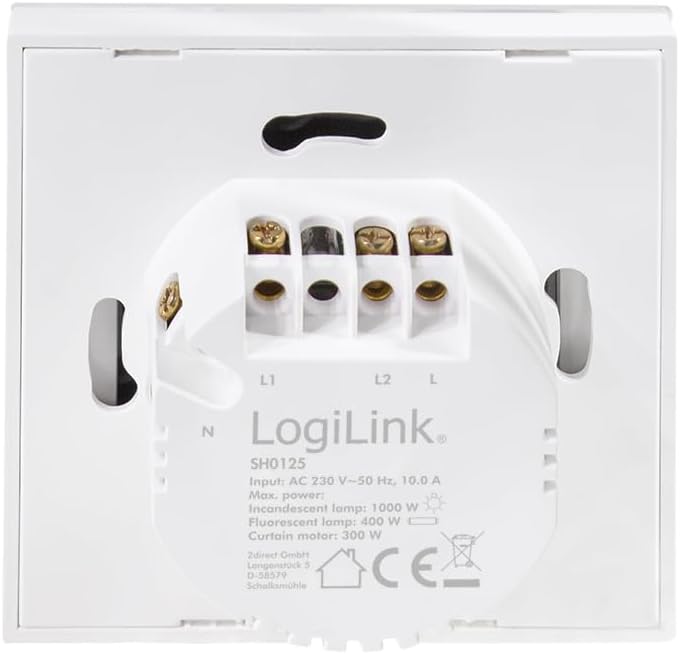
Obrázek 2: Zadní view of the LogiLink SH0125 Smart Home Wi-Fi Wall Switch. This image displays the wiring terminals labeled L1, L2, L, and N, along with product specifications such as input voltage (AC 230V), frequency (50 Hz), and maximum power ratings for different lamp typy.
5. Nastavení
5.1. Elektroinstalace
- Odpojit napájení: Before beginning any electrical work, ensure the main power supply to the circuit is turned off at the circuit breaker.
- Demontáž starého spínače: Opatrně vyjměte stávající nástěnný vypínač z nástěnné krabice.
- Identifikace vodičů: Identify the Live (L), Neutral (N), and Load (L1, L2) wires. Refer to Figure 2 for terminal identification on the LogiLink SH0125.
- Wire the Switch: Connect the wires to the corresponding terminals on the LogiLink SH0125.
- Připojte fázový vodič ke svorce „L“.
- Připojte nulový vodič ke svorce „N“.
- Connect the Load wire for the first light circuit to the 'L1' terminal.
- Connect the Load wire for the second light circuit to the 'L2' terminal.
- Namontujte spínač: Carefully place the wired switch into the wall box and secure it with screws. Attach the faceplate.
- Obnovit napájení: Znovu zapněte hlavní napájení jističem.
5.2. Párování aplikací
To control your switch via smartphone, you need to pair it with the Smart Life or Megos Smart Home app.
- Stáhnout aplikaci: Download and install the 'Smart Life' or 'Megos Smart Home' app from your device's app store (iOS or Android).
- Registrace/Přihlášení: Otevřete aplikaci a zaregistrujte si nový účet nebo se přihlaste pomocí stávajícího účtu.
- Vstupte do režimu párování: With the switch powered on, press and hold one of the touch buttons for approximately 5-10 seconds until the LED indicator on the switch starts blinking rapidly. This indicates it is in pairing mode.
- Přidat zařízení do aplikace: In the app, tap the '+' icon (usually in the top right corner) to add a new device. Select 'Wall Switch (Wi-Fi)' or a similar category.
- Připojení k Wi-Fi: Follow the on-screen instructions to connect the switch to your 2.4GHz Wi-Fi network. Ensure your phone is also connected to the same 2.4GHz network during pairing. Note: This device does not support 5GHz Wi-Fi networks.
- Kompletní párování: Once the switch is successfully added, you can rename it and assign it to a room within the app.
Obrázek 3: The LogiLink SH0125 Smart Home Wi-Fi Wall Switch positioned next to a smartphone displaying the 'Register' or 'Login with Existing Account' screen of the Smart Home application, illustrating the initial setup phase.
6. Ovládání přepínače
6.1. Ruční ovládání
Each touch button on the switch controls one connected light circuit. Simply tap a button to toggle the corresponding light ON or OFF.
6.2. Ovládání aplikací
After successful pairing, you can control the switch from the Smart Life or Megos Smart Home app:
- Zapnuto/Vypnuto: Tap the virtual switch icons in the app to turn lights on or off.
- Plánování: Set schedules for your lights to turn on or off automatically at specific times.
- scény: Create custom scenes to control multiple smart devices with a single command.
- Automatizace: Set up automations based on conditions like sunrise/sunset, temperature, or other smart device statuses.

Obrázek 4: Detailní záběr view of a hand holding a smartphone, showing the Smart Life application interface. The app displays two virtual light switches, labeled 'Switch 1' and 'Switch 2', allowing for remote control of connected lighting.
6.3. Hlasové ovládání (Alexa/Google Home)
To enable voice control, link your Smart Life/Megos Smart Home account to Amazon Alexa or Google Home:
- Otevřete aplikaci Hlasový asistent: Otevřete aplikaci Amazon Alexa nebo Google Home na svém smartphonu.
- Enable Skill/Link Account: Hledat the 'Smart Life' or 'Megos Smart Home' skill/service and enable it. You will be prompted to link your account using your app credentials.
- Objevte zařízení: Once linked, ask your voice assistant to discover devices (e.g., "Alexa, discover my devices" or "Hey Google, sync my devices").
- Hlasové příkazy: You can now control your lights using voice commands, such as:
- „Alexo, rozsviť světlo v obývacím pokoji.“
- "Hey Google, turn off Kitchen Light."
7. Údržba
The LogiLink SH0125 requires minimal maintenance. Ensure the power is off before cleaning.
- Čištění: Use a soft, dry, lint-free cloth to wipe the surface of the switch. Do not use abrasive cleaners, solvents, or chemical sprays, as these can damage the finish or internal components.
- Aktualizace firmwaru: Periodically check the Smart Life/Megos Smart Home app for available firmware updates to ensure optimal performance and security.
8. Řešení problémů
If you encounter issues with your LogiLink SH0125, refer to the following common solutions:
| Problém | Možná příčina | Řešení |
|---|---|---|
| Spínač nereaguje na dotyk. | No power; incorrect wiring; switch malfunction. | Check circuit breaker. Verify wiring (refer to Section 5.1). If problem persists, contact support. |
| Nelze se připojit k Wi-Fi/aplikaci. | Incorrect Wi-Fi password; 5GHz Wi-Fi network; switch not in pairing mode; weak Wi-Fi signal. | Ensure correct 2.4GHz Wi-Fi password. Confirm switch is blinking rapidly (pairing mode). Move switch closer to router or improve Wi-Fi signal. |
| Hlasové ovládání nefunguje. | Account not linked; device not discovered; incorrect voice command. | Ensure Smart Life/Megos Smart Home account is linked in Alexa/Google Home app. Ask assistant to discover devices. Use correct device names in commands. |
| Světla blikají nebo se úplně nevypínají. | Incompatible load (e.g., some LED lights); minimum load not met. | Ensure connected lights are compatible with smart switches. Some LED lights may require a bypass capacitor (not included) to prevent flickering. Consult a qualified electrician. |
9. Specifikace
| Funkce | Specifikace |
|---|---|
| Číslo modelu | SH0125 |
| Značka | LogiLink |
| Vstupní objemtage | AC 230 V ~ 50 Hz |
| Max. Proud | 10.0 A |
| Max. Power (Total) | 230 wattů |
| Rozměry (D x Š x V) | 8.6 x 8.6 x 3.4 cm |
| Hmotnost | 90 gramů |
| Materiál | Plast |
| Barva | Bílý |
| Wi-Fi standard | 2.4 GHz (IEEE 802.11b/g/n) |
| Kontrolní metoda | Application, Touch Button |
| Kompatibilita | Tuya, Amazon Alexa, Google Home |
| Typ instalace | Zapuštěné |
10. Záruka a podpora
LogiLink products are designed and manufactured to the highest quality standards. For information regarding warranty terms and conditions, please refer to the documentation provided with your purchase or visit the official LogiLink website. For technical support or assistance with product setup and troubleshooting, please contact LogiLink customer service through their official channels.