
Zavedení
Děkuji za nákupasing the Thomson MIC401BT Stereo CD/Bluetooth Micro-Chain System. This manual provides essential information for the safe and efficient operation of your new audio system. Please read these instructions thoroughly before use and retain them for future reference.
Bezpečnostní informace
- Zdroj napájení: Zajistěte napájení objtage odpovídá štítku s výkonem na jednotce.
- Větrání: Neblokujte větrací otvory. Ponechte kolem jednotky dostatečný prostor pro správné proudění vzduchu.
- Voda a vlhkost: Nevystavujte jednotku dešti, vlhkosti ani kapajícím/stříkajícím tekutinám. Udržujte předměty naplněné tekutinami, jako například vázy, v dostatečné vzdálenosti od jednotky.
- Teplo: Neumisťujte přístroj do blízkosti zdrojů tepla, jako jsou radiátory, topná tělesa, kamna nebo jiná zařízení (včetně amplifikátory), které produkují teplo.
- Čištění: Před čištěním odpojte přístroj ze zásuvky. Používejte pouze měkký, suchý hadřík.
- Servis: Nepokoušejte se tento výrobek opravit sami. Veškerý servis svěřte kvalifikovanému servisnímu personálu.
Obsah balení
Carefully unpack your micro-chain system and check that all items are present and in good condition. The package should contain:
- Thomson MIC401BT Stereo Micro-Chain System
- Dálkové ovládání
- Napájecí adaptér
- Uživatelská příručka
Packaging box of the Thomson MIC401BT Stereo CD/Bluetooth Micro-Chain System, showing the product and its features.
Konec produktuview
Familiarize yourself with the main components and controls of your Thomson MIC401BT system.
Přední View

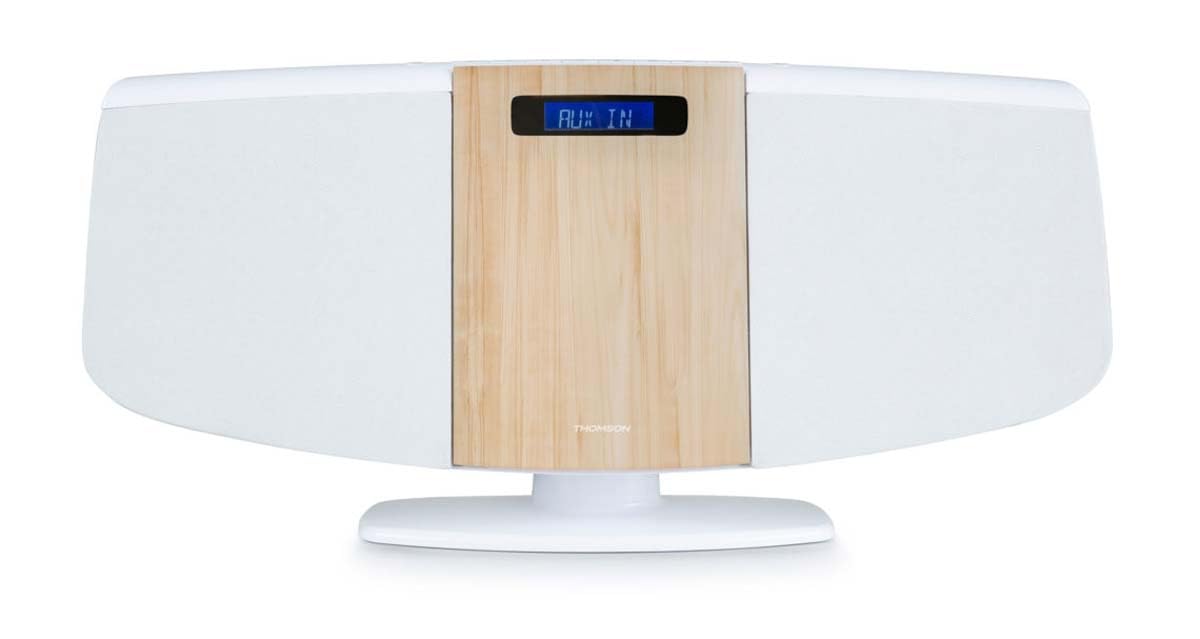
Přední view of the Thomson MIC401BT micro-chain system, showcasing its white and wood-grain design with a digital display.
The front panel features the central digital display, the CD loading slot (behind the wood-grain panel), and integrated stereo speakers on either side.
Ovládací prvky a porty na horním panelu

Close-up of the top panel controls of the Thomson MIC401BT, including the USB charge port, AUX-IN jack, and various function buttons for playback and settings.
The top panel includes:
- Tlačítko SOURCE: To switch between input modes (CD, Bluetooth, FM, AUX).
- Tlačítko SLEEP: To set the sleep timer.
- Tlačítko TIME: Chcete-li nastavit hodiny.
- Tlačítko ALARM: To set the alarm function.
- Tlačítko ENTER: Pro potvrzení výběrů.
- Ovládací tlačítka přehrávání: Přehrát/Pozastavit, Zastavit, Přeskočit vpřed/vzad.
- USB CHARGE Port (5V === 1000mA): Pro nabíjení externích zařízení.
- AUX IN (3.5 mm): Pro připojení externích audio zdrojů.
- Sluchátkový jack: Pro soukromý poslech.
Nastavení
1. Připojení napájení
- Připojte napájecí adaptér k portu DC IN na zadní straně jednotky.
- Zapojte napájecí adaptér do standardní zásuvky.
2. Anténa FM
Extend the FM wire antenna fully for optimal radio reception. Position it away from other electronic devices to minimize interference.
3. Možnosti umístění
The MIC401BT can be placed on a flat surface using its integrated stand or mounted on a wall.
- Umístění na počítači: Ujistěte se, že je jednotka umístěna na stabilním rovném povrchu.
- Montáž na stěnu: Use appropriate screws and wall plugs (not supplied) for your wall type. Consult a professional if unsure. Ensure the unit is securely fastened to prevent falling.

The Thomson MIC401BT micro-chain system mounted on a wall shelf, demonstrating its versatile placement options.
Návod k obsluze
1. Zapnutí/vypnutí
Stiskněte tlačítko ZDROJ button once to turn the unit on. Press and hold the ZDROJ tlačítko pro jeho vypnutí.
2. Výběr zdroje
Stiskněte tlačítko ZDROJ button repeatedly to cycle through available modes: CD, Bluetooth, FM Radio, AUX-IN.
3. Přehrávání CD
- Vyberte režim CD pomocí ZDROJ tlačítko.
- Gently open the CD door (the wood-grain panel) and insert a CD with the label side facing forward.
- Close the CD door. The system will automatically begin playing the CD.
- Use the Play/Pause, Stop, and Skip buttons on the unit or remote control to manage playback.

Detailní view of the Thomson MIC401BT CD player mechanism with the disc tray open, ready for CD insertion.
4. Párování Bluetooth
- Vyberte režim Bluetooth pomocí ZDROJ button. The display will show "BLUETOOTH" and flash, indicating it's in pairing mode.
- Povolte Bluetooth na svém mobilním zařízení (chytrém telefonu, tabletu atd.).
- Hledat "MIC401BT" in your device's Bluetooth settings and select it to pair.
- Once paired, the display will stop flashing, and you can play audio from your device through the micro-chain system.
5. FM rádio
- Vyberte režim FM rádia pomocí ZDROJ tlačítko.
- Use the Skip Forward/Backward buttons to manually tune to a station or press and hold them for automatic scanning.
- To save a station, refer to the detailed instructions in the full manual for memory presets.
6. Připojení AUX-IN
- Připojte externí audio zařízení (např. MP3 přehrávač) k AUX IN port using a 3.5mm audio cable (not supplied).
- Select AUX-IN mode using the ZDROJ tlačítko.
- Přehrávejte zvuk z připojeného zařízení.
7. USB nabíjení
Connect your USB-powered device to the USB NABÍJENÍ port (5V === 1000mA) on the top panel to charge it. This port is for charging only and does not support media playback.
8. Funkce alarmu
Stiskněte tlačítko POPLACH button to enter alarm setting mode. Use the navigation buttons to set the desired alarm time and source (e.g., FM radio, CD). Press ENTER to confirm each setting. Refer to the full manual for detailed alarm setup instructions.
Údržba
- Čištění jednotky: K čištění vnější strany jednotky používejte měkký, suchý hadřík. Nepoužívejte abrazivní čisticí prostředky, vosky ani rozpouštědla.
- Péče o CD přehrávač: Keep the CD compartment clean. Avoid touching the lens. If a CD is dirty, wipe it with a soft, lint-free cloth from the center outwards.
- Skladování: Pokud nebudete jednotku delší dobu používat, odpojte ji ze zásuvky a uložte ji na chladném a suchém místě.
Odstraňování problémů
| Problém | Možná příčina | Řešení |
|---|---|---|
| Žádná síla | Napájecí kabel není připojen; Vadná zásuvka | Zkontrolujte připojení napájecího kabelu; zkuste jinou zásuvku |
| Žádný zvuk | Volume too low; Incorrect source selected; Headphones connected | Increase volume; Select correct source; Disconnect headphones |
| CD se nepřehrává | CD inserted incorrectly; CD is dirty or scratched; Incorrect mode | Znovu správně vložte CD; Vyčistěte nebo vyměňte CD; Vyberte režim CD |
| Bluetooth není párování | Device too far; Bluetooth not enabled on device; Incorrect mode | Move device closer; Enable Bluetooth on device; Select Bluetooth mode |
| Špatný příjem FM | Antenna not extended; Interference | Extend and adjust antenna; Move unit away from other electronics |
Specifikace
- Model: MIC401BT
- Značka: Thomson (Manufactured by Big Ben)
- Konektivita: Pomocný, Bluetooth, USB
- Barva: Bílý
- Typ reproduktoru: Stereo
- Zdroj napájení: Elektrický kabel
- Kompatibilní zařízení: MP3 player, Personal computer, Tablet, Television, Smartphone
- Styl: CD Boombox
- Výstup zvuku: 60 wattů
- Podporované standardy: Bluetooth, FM
- Podpora formátů zvuku: CD, MP3
- Počet reproduktorů: 2
- USB Charge Output: 5 V, 1000 mA
Záruka a podpora
This Thomson MIC401BT Stereo CD/Bluetooth Micro-Chain System comes with a 2-letá záruka od data nákupu. Uschovejte si prosím doklad o koupi pro případné reklamace.
For technical support, troubleshooting assistance beyond this manual, or warranty service, please contact your retailer or the official Thomson customer support channel. Contact information can typically be found on the product packaging or the manufacturer's webmísto.