
Zavedení
The AODELAN WTR-2 is a versatile wireless remote shutter release system designed for Canon EOS cameras. It functions as both a remote shutter release and a programmable timer, offering advanced control over your camera's exposure settings. This manual provides detailed instructions for setting up, operating, and maintaining your WTR-2 system.
The system operates using 2.4 GHz wireless transmission, providing a range of up to 60 meters (196.8 feet). It features an LCD screen for easy programming and monitoring of settings.
Obsah balení
Zkontrolujte prosím obsah balení, abyste se ujistili, že jsou přítomny všechny položky:
- WTR-2 Transmitter (Remote Control)
- Přijímač WTR-2
- Connecting Cable (C8 type for Canon)
- 2x šňůrky na krk
- Návod k použití

Image: The complete package contents of the AODELAN WTR-2 wireless remote shutter release system.
Konec produktuview
Vysílač (dálkové ovládání)
The transmitter features an LCD display for setting timer functions and viewing current modes. It includes a two-stage shutter release button (half-press for autofocus, full-press for shutter release), mode buttons, and navigation controls.
Přijímač
The receiver connects to your camera's remote port and receives signals from the transmitter. It has a hot shoe mount for easy attachment to your camera or a cold shoe mount on a rig.

Obrázek: Overview of the AODELAN WTR-2 Transmitter and Receiver, highlighting key features like timer, time-lapse, bulb mode, 2.4G wireless, and operating range.
Nastavení
1. Instalace baterie
Both the transmitter and receiver require 2x AAA batteries (not included). Open the battery compartment on the back of each unit and insert the batteries, observing the correct polarity.

Image: Battery installation for the WTR-2 Transmitter and Receiver, showing the location for two AAA batteries in each unit.
2. Connecting the Receiver to your Camera
Attach the receiver to your camera's hot shoe or a cold shoe mount. Connect the C8 connecting cable to the receiver's port and then to your Canon camera's remote control terminal. Ensure the connection is secure.

Image: The C8 connecting cable being inserted into the 3-pin remote connection port of a Canon EOS camera.
3. Zapnutí
Turn on both the transmitter and the receiver using their respective ON/OFF buttons. The receiver's LED will blink red initially, then periodically blink green to indicate it is active and paired.
Provozní režimy
The WTR-2 offers various shooting modes and timer functions. Use the MODE button on the transmitter to cycle through the main shooting modes (S, C, B, 2S) and the ČASOVAČ button to access timer settings.
Shutter Release Modes
- S (Single Shot): Takes a single photo with each full press of the shutter button.
- C (Kontinuální snímání): Takes multiple photos as long as the shutter button is held down.
- B (Bulb Mode): Keeps the shutter open for as long as the shutter button is pressed, ideal for long exposures.
- 2S (2-Second Delay): Takes a single photo after a 2-second delay.
Funkce časovače
The WTR-2 provides advanced timer settings for precise control over your photography. Press the ČASOVAČ button to access these functions. Use the arrow keys to navigate and the SOUBOR tlačítko pro potvrzení.
- DELAY (Self-Timer): Sets a delay before the first exposure. Adjustable in 0.1-second increments.
- DLOUHÝ (Časovač dlouhé expozice): Sets the duration of the shutter opening for long exposures, especially useful in Bulb mode. Adjustable in 0.1-second increments.
- INTVL (Intervalový časovač): Sets the time interval between consecutive shots for time-lapse photography. Adjustable in 0.1-second increments.
- N (počet expozic): Sets the total number of photos to be taken in a sequence.
- BKLN (Bracketed Exposure): Automatically triggers a sequence of 3, 5, or 7 bracketed exposures for HDR photography.
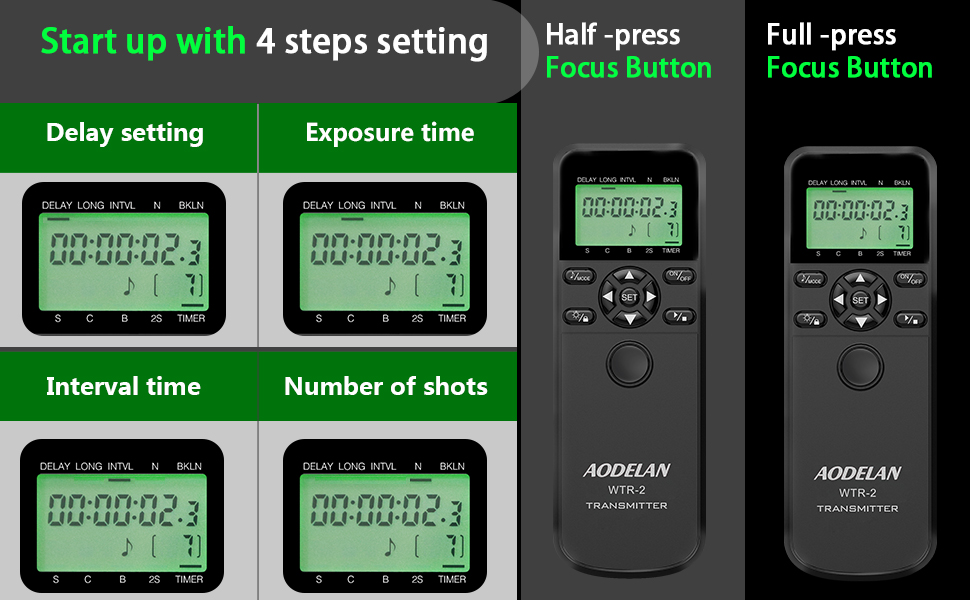
Image: The LCD display of the WTR-2 transmitter showing the settings for Delay, Long Exposure, Interval, and Number of Shots.
Example: Time-Lapse Photography
Nastavení časosběrné sekvence:
- Nastavte ZPOŽDĚNÍ to your desired initial delay (e.g., 10 seconds).
- Nastavte DLOUHO exposure time (if applicable, otherwise set to 0).
- Nastavte INTL (interval) between shots (e.g., 10 seconds).
- Nastavte N (number of exposures) (e.g., 120 shots for a 1-hour time-lapse with 30-second intervals).
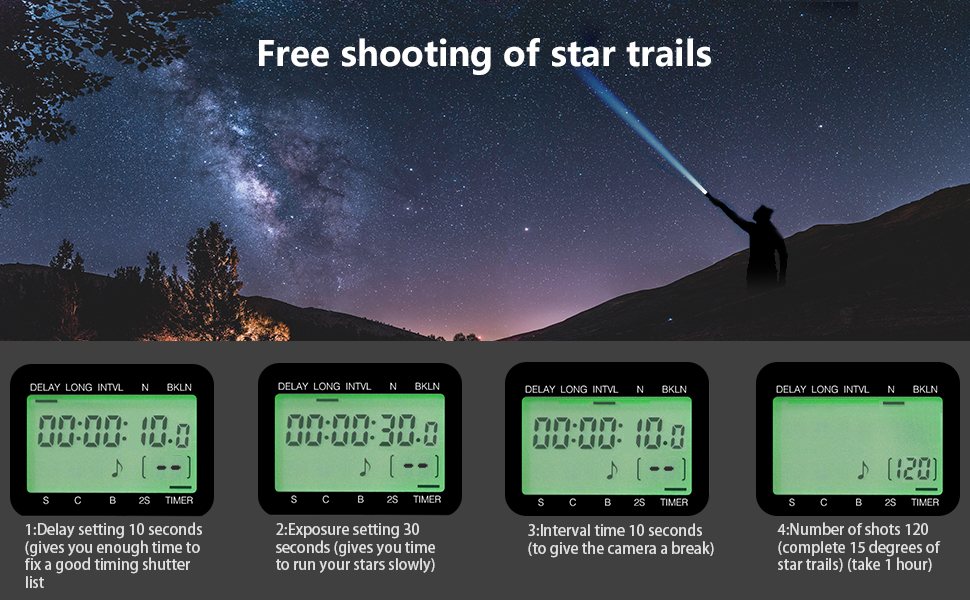
Obrázek: Bývalý/áample of star trail photography, illustrating how the WTR-2's timer functions (Delay, Exposure, Interval, Number of shots) can be configured for complex sequences.
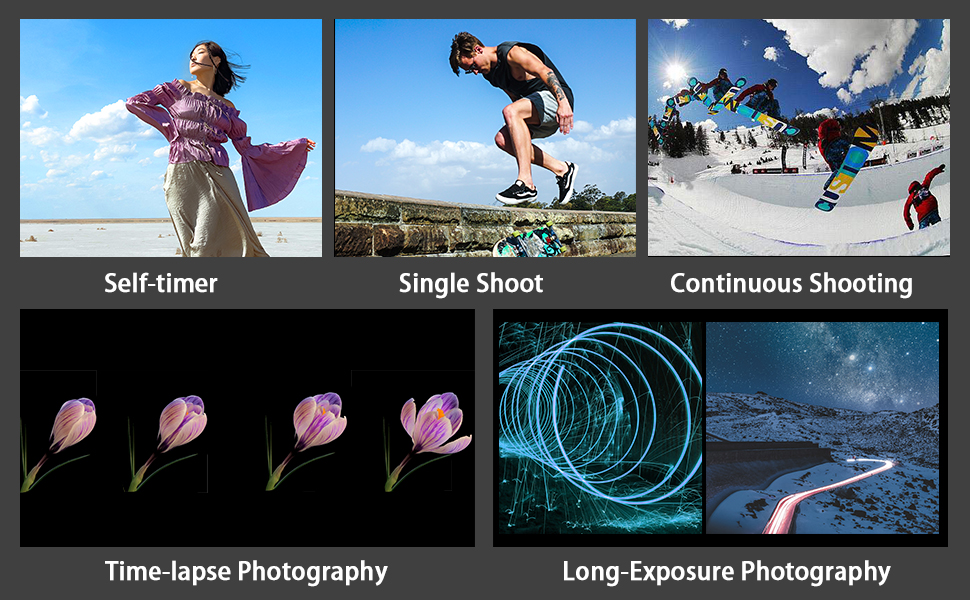
Image: Visual representations of various photography techniques achievable with the WTR-2, including self-timer, single shot, continuous shooting, time-lapse, and long exposure.
Údržba
- Uchovávejte zařízení v suchu. Nevystavujte jej vlhkosti ani dešti.
- Čistěte přístroj měkkým, suchým hadříkem. Nepoužívejte agresivní chemikálie ani abrazivní čisticí prostředky.
- Pokud zařízení nebudete delší dobu používat, vyjměte baterie, abyste zabránili jejich vytečení.
- Skladujte na chladném a suchém místě mimo dosah přímého slunečního záření.
Odstraňování problémů
| Problém | Možná příčina / řešení |
|---|---|
| Zařízení se nezapne. | Zkontrolujte instalaci baterií a ujistěte se, že jsou nové. V případě potřeby je vyměňte. |
| Camera does not respond to shutter release. |
|
| LCD displej je tmavý nebo prázdný. | Vyměňte baterie ve vysílači. |
| Funkce časovače nefungují podle očekávání. | Review the timer settings on the transmitter's LCD. Ensure all parameters (Delay, Long, Interval, N) are correctly configured and activated. |
Specifikace
| Název modelu: | WTR-2 |
| Značka: | AODELAN |
| Technologie připojení: | 2.4 GHz bezdrátový |
| Maximální rozsah: | 60 metrů (196.8 stop) |
| Kompatibilní zařízení: | Canon EOS R3, R5, R5 C, 10D, 6D Mark II, 1D X Mark III, 1D X Mark II, 1D X, 1D C, 1DS Mark III, 1DS Mark II, 1Ds, 1D Mark IV, 1D Mark III, 1D Mark II N, 1D Mark II, 1D, 5D Mark II, 5D Mark III, 5D Mark IV, 5DS, 5DS R, 6D, 7D, 7D Mark II, 50D, 40D, 30D, 20D, D2000, D60, D30, EOS-1V, EOS-3 (C8 type connection) |
| Zdroj napájení: | 2x AAA batteries for Transmitter, 2x AAA batteries for Receiver (not included) |
| Speciální funkce: | Digital LCD Display, Timer Functions (Delay, Long Exposure, Interval, Number of Shots, Bracketed Exposure) |
| Počet tlačítek: | 3 (main control buttons, plus navigation/set) |
| Země původu: | Čína |
Záruka a podpora
Specific warranty information is typically provided with your purchase documentation. For product support, technical assistance, or warranty claims, please refer to the contact information provided by your retailer or visit the official AODELAN webmísto.
Pro další pomoc se můžete také obrátit na AODELAN brand page on Amazon.