
Zavedení
This manual provides comprehensive instructions for the Phomemo P12 PRO Bluetooth Label Maker. Please read this document carefully before operating the device to ensure proper use, optimal performance, and longevity of your label maker. This device is designed for creating personalized labels for home and office organization.
Obsah balení
Po otevření balení ověřte, zda jsou v něm obsaženy všechny následující položky:
- 1 x Phomemo P12 PRO Label Maker
- 2 x Plastic Label Tapes (12mm x 4m, Black on White)
- 4 x Additional Label Tapes (White on Black, Gold on Black, Black on Gold, Black on Silver)
- 1 x USB nabíjecí kabel
- 1 x Uživatelská příručka (tento dokument)
Nastavení
1. Nabíjení zařízení
The Phomemo P12 PRO features a built-in 1000mAh lithium battery. Before first use, fully charge the device using the provided USB cable. Connect the cable to the label maker's charging port and a standard USB power adapter (not included). A full charge allows for approximately 2.5 hours of continuous use or up to 30 days of standby time.
2. Installing the Print Master App
The label maker operates via a mobile application. Download the "Print Master" app from your device's app store (compatible with iOS and Android). Hledat "Print Master" and follow the on-screen instructions to install.
3. Připojení přes Bluetooth
- Ensure your label maker is powered on.
- Povolte Bluetooth na svém smartphonu nebo tabletu.
- Open the "Print Master" app.
- Within the app, search for available devices and select "P12 PRO" to establish a connection. The app will indicate a successful connection.
4. Vkládání štítkové pásky
Open the label compartment cover. Insert the label tape roll with the label side facing up, ensuring the tape end extends slightly past the cutter. Close the cover securely.
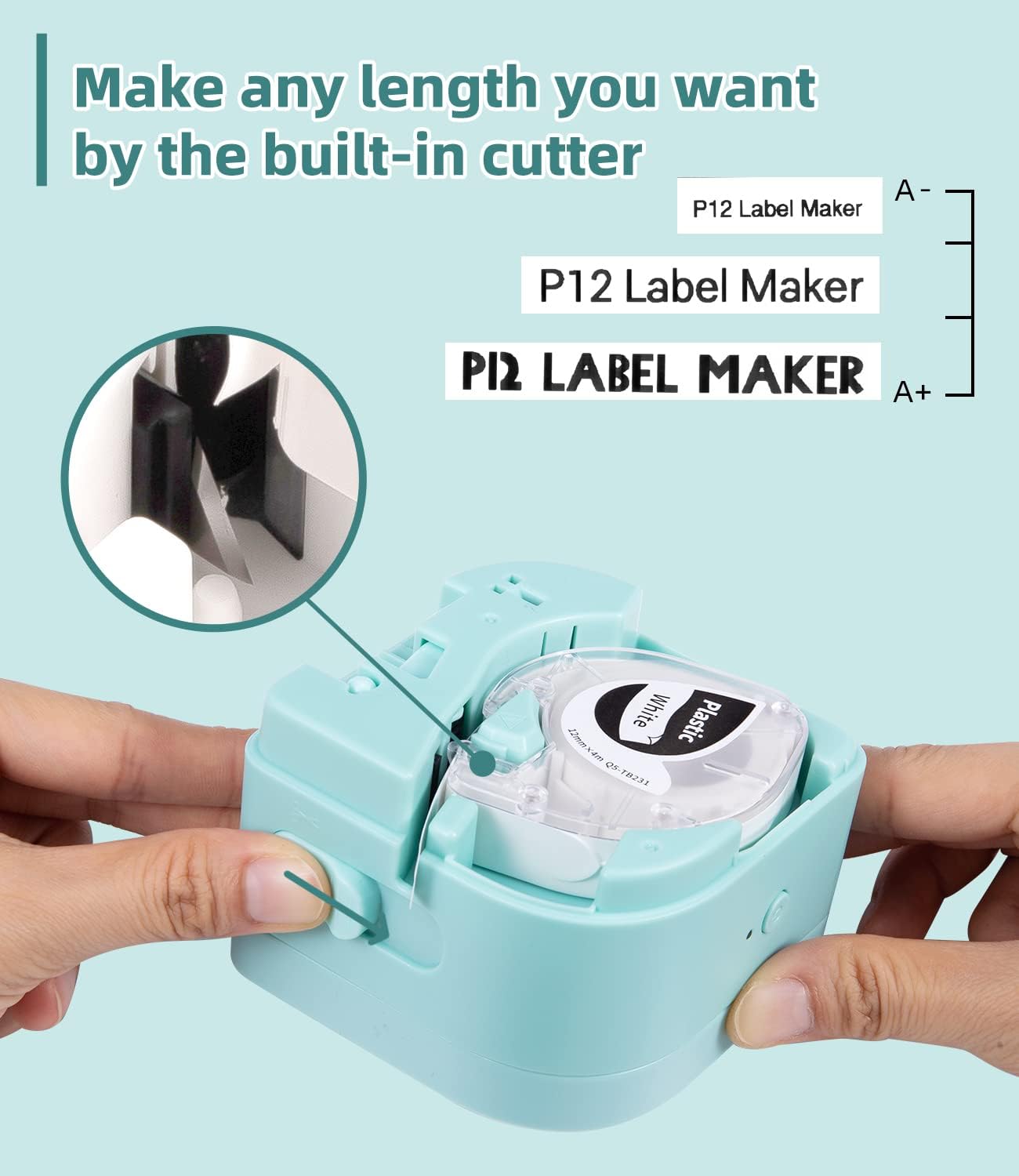
Figure 1: Loading label tape and the built-in cutter mechanism.
Návod k obsluze
1. Vytváření a úprava štítků
Utilize the "Print Master" app to design your labels. The app offers:
- Multiple Fonts and Symbols: Access 12 languages, 8 fonts, 62 frames, and 1048 symbols to personalize your labels.
- Zadávání textu: Supports printing 1-3 lines of text.
- Uložení šablony: Create and save templates for future use.

Figure 2: Label maker connected to the Print Master app for design.
2. Tisk štítků
Once your label design is complete in the app, tap the print button. The label maker will print the label. The P12 PRO supports both thermal labels and thermal transfer labels, offering versatility for various applications.
3. Řezání štítků
After printing, use the built-in cutter to cleanly separate the printed label from the roll. Pull the lever on the side of the device to activate the cutter.
4. Applying Labels
The label tapes feature a split-back design for easy peeling. Carefully peel off the backing and apply the label to a clean, dry surface.

Figure 3: Easy-peel split-back label design.
5. Label Material Compatibility and Durability
The P12 PRO is compatible with various label materials, including:
- Plastic Labels: Durable, high-temperature resistant, cold-resistant, waterproof, and oil-proof.
- Iron-on Labels: Washable labels for fabric.
- Satin-ribbon Labels: Printable for decorative purposes.

Obrázek 4: Přamples of compatible label materials.

Figure 5: Durability features of Phomemo plastic labels.

Figure 6: Various uses for Phomemo P12 PRO labels.
Údržba
1. Čištění tiskové hlavy
Pro zachování kvality tisku pravidelně čistěte tiskovou hlavu. Použijte měkký hadřík, který nepouští vlákna, lehce osušteampened with isopropyl alcohol. Gently wipe the print head surface. Ensure the device is powered off before cleaning.
2. Čištění exteriéru
Vnější povrch štítkovače otřete měkkým, suchým hadříkem. Nepoužívejte abrazivní čisticí prostředky ani rozpouštědla.
3. Skladování
Store the label maker in a cool, dry place away from direct sunlight and extreme temperatures. Remove any label tape from the compartment if storing for an extended period.
Odstraňování problémů
1. Zařízení se nezapíná
- Ensure the battery is charged. Connect the label maker to a power source and allow it to charge for at least 30 minutes before attempting to power on again.
2 Nelze se připojit přes Bluetooth
- Ověřte, zda je na vašem mobilním zařízení povoleno Bluetooth.
- Ensure the label maker is within range (typically 10 meters or 33 feet).
- Restartujte štítkovač i mobilní zařízení.
- Check if the "Print Master" app has Bluetooth permissions enabled in your device settings.
3. Poor Print Quality or Blank Labels
- Zkontrolujte, zda je štítková páska správně vložena a není zaseknutá.
- Ensure the label tape is not expired or damaged.
- Vyčistěte tiskovou hlavu podle pokynů v části Údržba.
- Verify that the correct label type is selected in the "Print Master" app if applicable.
4. Label Jamming
- Vypněte zařízení.
- Open the label compartment and carefully remove any jammed tape.
- Ensure the tape is loaded correctly and not twisted.
Specifikace
| Název modelu | P12 PRO |
| Značka | Phomemo |
| Technologie připojení | Bluetooth |
| Hardwarové rozhraní | Bluetooth |
| Kontrolní metoda | App (Print Master) |
| Technologie tisku | Thermal, Thermal Transfer |
| Speciální funkce | Portable, Rechargeable, Dual-mode printing |
| Tiskový výstup | Monochrome (with color tape options) |
| Typ ovladače | iOS, Android |
| Tisková média | Labels (Plastic, Iron-on, Satin-ribbon) |
| Baterie | Lithiová baterie 1000mAh |
| ASIN | B0BF54JH68 |
| Datum první dostupnosti | 13. září 2022 |
Záruka a podpora
For warranty information, technical support, or customer service inquiries, please refer to the contact details provided on the product packaging or visit the official Phomemo webUschovejte si účtenku jako doklad o koupi pro případ reklamace.