
1. Úvod
This manual provides essential information for the safe and efficient operation of your PowerWalker VFI 1000 AT FR Online Uninterruptible Power Supply (UPS). The VFI AT series utilizes double-conversion technology to provide reliable power protection for critical devices. Please read this manual thoroughly before installation and use, and retain it for future reference.
2. Bezpečnostní pokyny
WARNING: Failure to follow these safety instructions can result in fire, electric shock, serious injury, or death.
- Neotevírejte UPS casing. Uvnitř nejsou žádné součásti, které by mohl uživatel opravit. Veškerý servis svěřte kvalifikovanému servisnímu personálu.
- Do not connect appliances that could overload the UPS, such as hair dryers or vacuum cleaners.
- Ensure the UPS is connected to a properly grounded power outlet.
- Do not block ventilation openings. Maintain adequate clearance around the UPS for proper airflow.
- Neinstalujte UPS v oblastech s nadměrnou prašností, vlhkostí nebo extrémními teplotami.
- In case of emergency, press the OFF button and disconnect the UPS from the AC power source.
3. Konec produktuview
The PowerWalker VFI 1000 AT FR UPS is designed to provide clean, stable power to your connected equipment. It features a user-friendly interface and various connectivity options.
3.1 Přední panel

Figure 3.1: Front Panel of the UPS. This image shows the main display screen indicating input and output voltage, battery status, and load level. Below the screen are four control buttons: ON, OFF, ENTER, and ESC.
The front panel includes an LCD display that provides real-time information about the UPS status, such as input/output voltage, battery charge, and load level. Control buttons allow for easy navigation and configuration.
- LCD displej: Zobrazuje provozní stav a parametry.
- Tlačítko ON: Zapíná UPS.
- Tlačítko OFF: Vypne UPS.
- Tlačítko ENTER: Potvrzuje výběry nebo vstupuje do nabídek.
- Tlačítko ESC: Ukončí nabídky nebo zruší operace.
3.2 Zadní panel
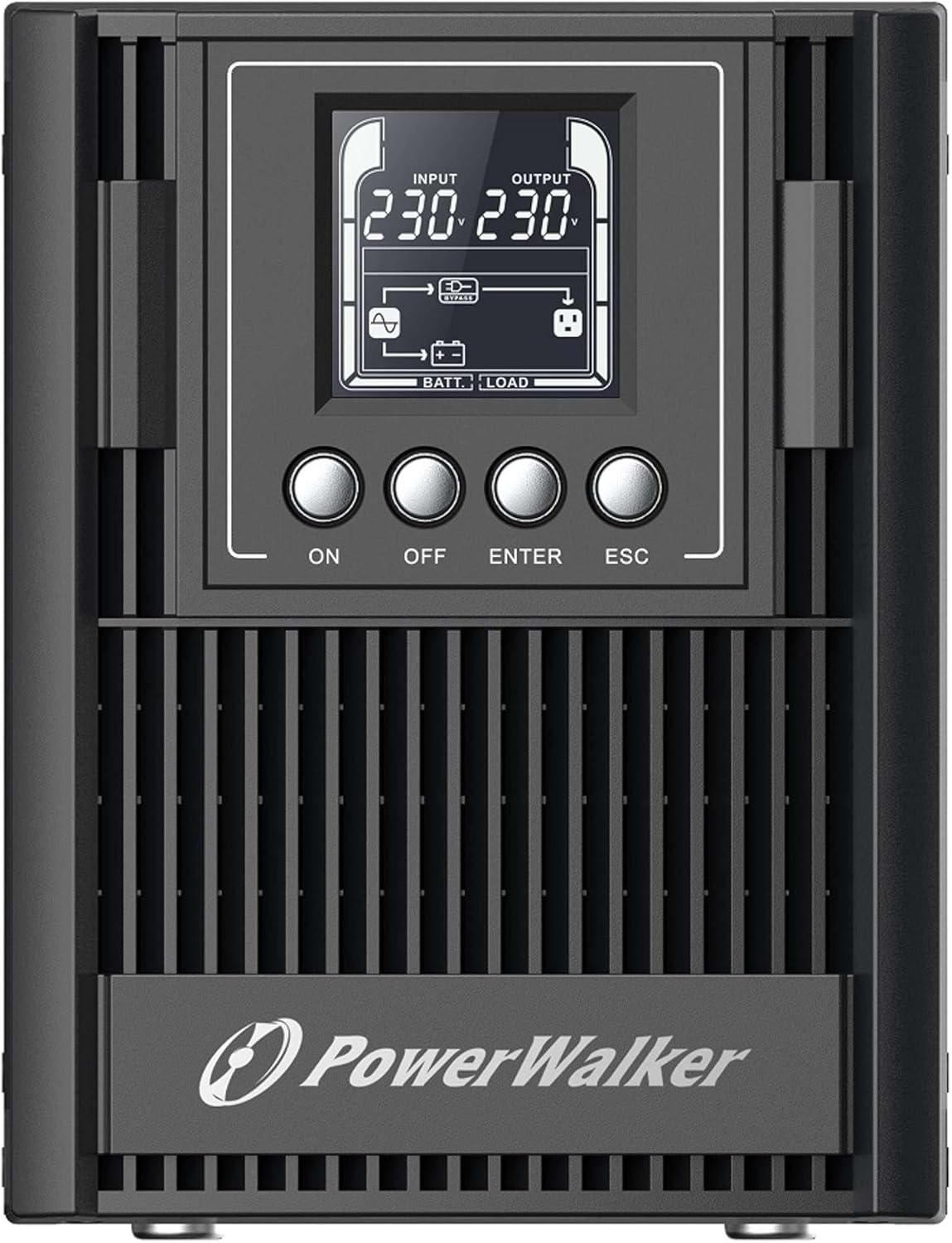
Figure 3.2: Rear Panel of the UPS. This image displays the connectivity options including a serial port (DB9), cooling fan, multiple Type F outlets, a USB port, an EPO (Emergency Power Off) terminal, and the AC input socket.
The rear panel provides all necessary connections for input power, output to protected devices, and communication interfaces.
- AC vstup: Připojuje UPS k hlavnímu zdroji napájení.
- Výstupní zásuvky: Type F, Type E, or Type G outlets (depending on model) for connecting protected equipment.
- USB port: For communication with a computer and monitoring software.
- RS-232 Port (Serial): For advanced communication and monitoring.
- Terminál EPO (nouzové vypnutí): For remote emergency shutdown.
- Inteligentní slot: Pro volitelné komunikační karty (např. kartu SNMP).
- Konektor externí baterie: For connecting optional external battery packs to extend backup time.
4. Nastavení
4.1 Vybalení a kontrola
Carefully unpack the UPS and inspect it for any shipping damage. If any damage is found, do not install the unit and contact your dealer.
4.2 Umístění
Place the UPS in a clean, dry, and well-ventilated area. Ensure sufficient clearance (at least 20 cm) around the unit for proper heat dissipation. Avoid direct sunlight, heat sources, and excessive moisture.
4.3 Počáteční nabíjení
Before initial use, connect the UPS to a standard AC power outlet for at least 8 hours to ensure the internal batteries are fully charged. The UPS will charge its batteries whether it is turned ON or OFF.
4.4 Připojení zařízení
- Connect your critical equipment (computers, monitors, network devices) to the output sockets on the rear panel of the UPS.
- Connect the UPS power cord to a grounded AC power outlet.
- (Optional) Connect the USB or RS-232 cable from the UPS to your computer for monitoring and management.
- (Optional) If using external battery packs, connect them according to their specific instructions to the designated connector on the UPS.
5. Obsluha UPS
5.1 Zapnutí UPS
Stiskněte a podržte ON button on the front panel for approximately 2 seconds until you hear a beep and the LCD display illuminates. The UPS will perform a self-test and then enter normal operating mode.
5.2 Vypnutí UPS
To turn off the UPS, press and hold the VYPNUTO button for approximately 2 seconds until the LCD display turns off. Ensure all connected equipment is properly shut down before turning off the UPS.
5.3 LCD displej a navigace
The LCD display provides various operational parameters. Use the ENTER a ESC buttons to navigate through menus and view different information screens. The display automatically darkens after a period of inactivity and can be woken up with a single button press.
5.4 Remote Shutdown (RPO)
The UPS supports Remote Power Off (RPO) functionality. Connect an external switch to the EPO terminal on the rear panel. Activating this switch will immediately shut down the UPS and connected equipment. Refer to the wiring diagram in the advanced user manual for proper connection.
6. Údržba
6.1 Péče o baterii
The UPS contains internal lithium batteries. To maximize battery life:
- Keep the UPS connected to AC power to keep batteries charged.
- Neskladujte UPS v extrémních teplotách.
- Perform a battery calibration (if available via software) or a full discharge/recharge cycle every 3-6 months.
- Replace batteries when their capacity significantly degrades. Battery replacement should only be performed by qualified personnel.
6.2 Čištění
Vnější povrch UPS čistěte měkkým, suchým hadříkem. Nepoužívejte tekuté ani aerosolové čisticí prostředky. Ujistěte se, že ventilační otvory jsou bez prachu a nečistot.
6.3 Skladování
If storing the UPS for an extended period, ensure the batteries are fully charged. Recharge the batteries every three months to prevent permanent damage.
7. Řešení problémů
Tato část obsahuje řešení běžných problémů, se kterými se můžete setkat u vašeho UPS. Pokud problém přetrvává, kontaktujte technickou podporu.
| Problém | Možná příčina | Řešení |
|---|---|---|
| UPS se nezapne. | No AC input power; Low battery charge. | Check AC power connection; Allow UPS to charge for 8 hours. |
| UPS nepřetržitě pípá. | Přetížení; Vybitá baterie; Porucha. | Reduce connected load; Allow batteries to charge; Check LCD for error codes. |
| Krátká doba zálohování. | Batteries not fully charged; Batteries reaching end of life. | Ensure full charge; Consider battery replacement. |
| Připojené zařízení není napájeno. | UPS is off; Output sockets not enabled; UPS in fault mode. | Turn on UPS; Check LCD for status; Consult manual for output settings. |
8. Specifikace
| Funkce | Detail |
|---|---|
| Model | VFI 1000 AT FR (Model Number: 10122183) |
| Značka | PowerWalker |
| Výstupní výkon | 900W |
| Vstupní objemtage | 220V (Wide input voltage rozsah) |
| Typ baterie | Lithium |
| Výstupní zásuvky | Type F, Type E, Type G (various versions available) |
| Komunikační porty | USB (HID support), RS-232, Intelligent Slot |
| Rozměry (V x Š x H) | 50 x 10 x 48 cm (přibližně) |
| Hmotnost | 2 kg |
| Speciální funkce | Double-conversion online technology, Generator compatible, RPO, External battery pack support, Automatically darkening LCD. |
9. Záruka a podpora
The PowerWalker VFI 1000 AT FR UPS is covered by a standard manufacturer's warranty. Please refer to the warranty card included with your product or visit the official PowerWalker webpodrobné záruční podmínky naleznete na webu.
For technical support, troubleshooting assistance beyond this manual, or spare parts inquiries, please contact your local dealer or PowerWalker customer service. The EU Spare Part Availability Duration is 2 Years.