
1. Konec produktuview
The Point Wired Mini Keyboard Pt-350 is a compact and versatile keyboard designed for both gaming and general typing. It features a high-quality build and a modern design, adhering to industry standards for reliable performance. This keyboard is an ideal choice for users seeking a durable and efficient input device.
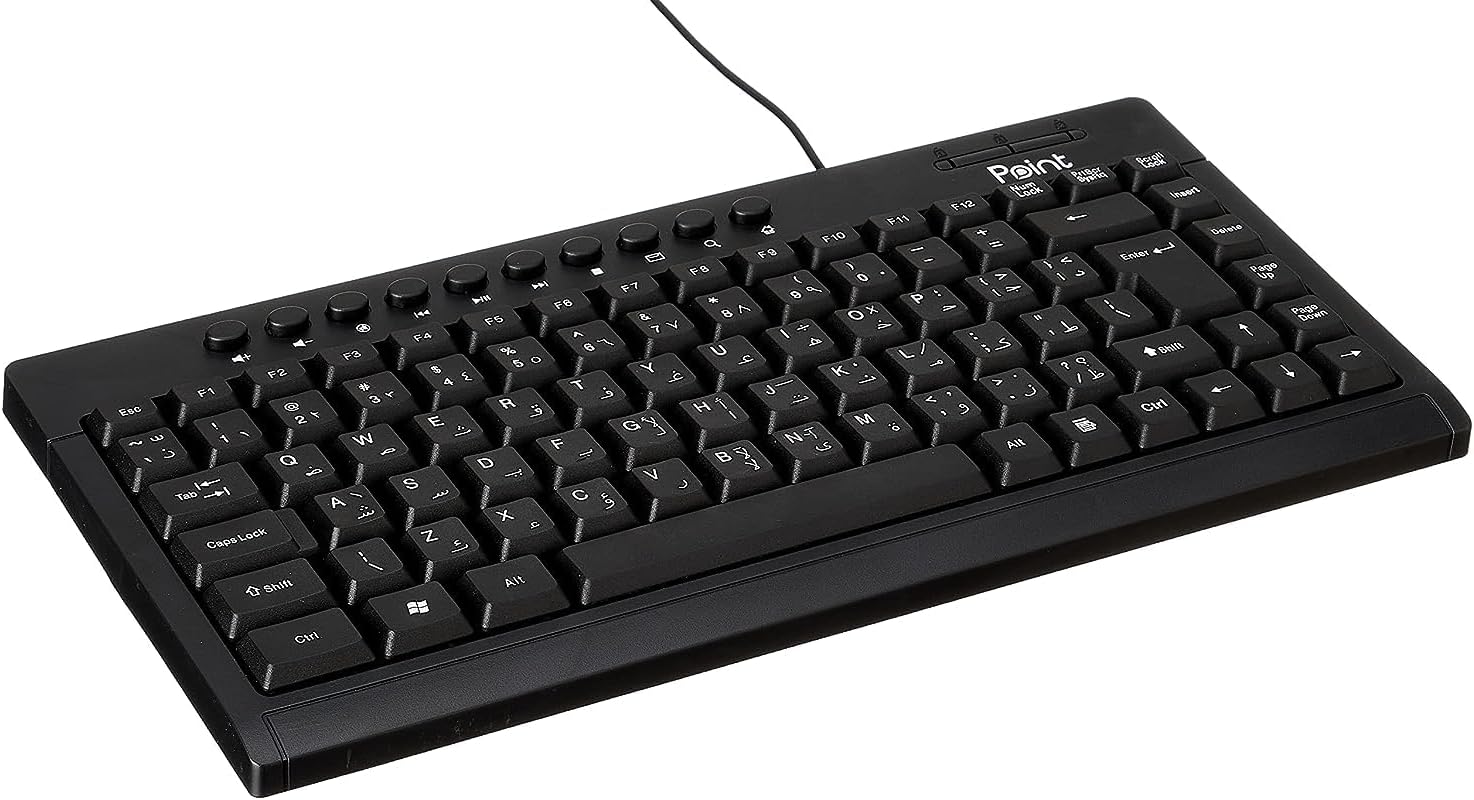
Obrázek 1.1: Úhlové view of the Point Wired Mini Keyboard Pt-350, showcasinjeho kompaktní design a rozložení kláves.
Klíčové vlastnosti:
- Wired connectivity for stable performance.
- Compact design suitable for various setups.
- Durable construction from high-quality plastic materials.
- Designed for both gaming and typing applications.
2. Obsah balení
Pečlivě zkontrolujte balení, abyste se ujistili, že jsou přítomny všechny položky:
- Point Wired Mini Keyboard Pt-350
- Uživatelská příručka (tento dokument)
3. Nastavení
Follow these steps to set up your Point Wired Mini Keyboard Pt-350:
- Rozbalte klávesnici: Opatrně vyjměte klávesnici z obalu.
- Identifikace USB konektoru: The keyboard comes with an integrated USB cable.
- Připojte se k počítači: Locate an available USB port on your computer (desktop PC, laptop, etc.). Insert the keyboard's USB connector firmly into the USB port.
- Instalace ovladače (Plug & Play): The keyboard is plug-and-play compatible. Your operating system (Windows, macOS, Linux) should automatically detect and install the necessary drivers. This process usually takes a few seconds.
- Ověřte funkčnost: Once connected, open a text editor or any application that accepts text input and test the keys to ensure proper operation.

Obrázek 3.1: Shora dolů view of the keyboard, illustrating the key layout and integrated cable for connection.
4. Návod k obsluze
The Point Wired Mini Keyboard Pt-350 operates like a standard computer keyboard. Below are general instructions and tips for use:
Základní psaní:
- Simply press the desired keys to input characters, numbers, and symbols into your active application.
- Použijte Posun key for uppercase letters and alternative symbols on keys.
- The Caps Lock key toggles permanent uppercase typing.
- The Backspace key deletes characters to the left of the cursor.
- The Vstupte key confirms input or moves to the next line.
Funkční klávesy (F1–F12):
The function keys (F1 through F12) perform various tasks depending on the active program or operating system. Some common uses include:
- F1: Often opens help for the active program.
- F2: Renames a selected item.
- F5: Osvěžuje a web page or document.
- F11: Toggles full-screen mode in many browsers.
Multimediální klávesy:
The keyboard may include dedicated multimedia keys or secondary functions on the F-keys (accessed via the Fn key, if present). These typically control:
- Volume control (Mute, Volume Up, Volume Down)
- Media playback (Play/Pause, Stop, Previous Track, Next Track)
5. Údržba
Správná údržba zajišťuje dlouhou životnost a optimální výkon vaší klávesnice:
- Čištění: Pravidelně čistěte klávesnici, abyste zabránili hromadění prachu a nečistot. Používejte měkký hadřík, který nepouští vlákna, lehce navlhčený.ampOmyjte vodou nebo jemným čisticím roztokem. Vyhněte se agresivním chemikáliím nebo abrazivním materiálům.
- Odstranění prachu: Use compressed air to blow out dust and crumbs from between the keys.
- Vyvarujte se rozlití: Keep liquids away from the keyboard to prevent damage to internal components. In case of a spill, immediately disconnect the keyboard and allow it to dry completely before reconnecting.
- Skladování: Pokud klávesnici nepoužíváte, skladujte ji v čistém a suchém prostředí mimo dosah extrémních teplot.
6. Řešení problémů
If you encounter issues with your Point Wired Mini Keyboard Pt-350, refer to the following common problems and solutions:
Klávesnice nereaguje:
- Zkontrolujte připojení USB: Ujistěte se, že je kabel USB bezpečně zapojený do funkčního portu USB v počítači. Zkuste jiný port USB.
- Restartujte počítač: Problémy s připojením může často vyřešit jednoduchý restart.
- Test na jiném počítači: Connect the keyboard to another computer to determine if the issue is with the keyboard or your computer's setup.
- Zkontrolujte Správce zařízení (Windows): In Windows, go to Device Manager and check if the keyboard is listed under 'Keyboards' and if there are any error symbols. You might need to update or reinstall the driver.
Keys Not Working or Sticky:
- Čisté klíče: Dust, crumbs, or liquid residue can cause keys to stick or malfunction. Refer to the Maintenance section for cleaning instructions.
- Fyzické poškození: Inspect the keys for any visible physical damage.
Nesprávný výstup znaků:
- Check Language Settings: Ensure your operating system's keyboard language settings match the physical layout of your keyboard.
- Problém s ovladačem: Reinstalling the keyboard driver might resolve this.
Pokud problém přetrvává i po vyzkoušení těchto kroků, kontaktujte prosím zákaznickou podporu.
7. Specifikace
Technical specifications for the Point Wired Mini Keyboard Pt-350:

Obrázek 7.1: Strana view of the keyboard, highlighting its profile and compact form factor.
| Funkce | Detail |
|---|---|
| Název značky | Bod |
| Model | Pt-350 |
| Technologie připojení | Kabelové |
| Kompatibilní zařízení | Počítač |
| Popis klávesnice | Multifunkční |
| Doporučená použití | PC hry |
| Speciální funkce | Hraní |
| Barva | Černý |
| Styl | Moderní |
| Materiál | Plast |
| Přepravní rozměry | 34.5 x 26.4 x 3 cm |
| Hmotnost | 800 gramů |
| První dostupný termín | 4. září 2022 |
| ASIN | B0BD2DM9ZJ |
8. Záruka a podpora
This product is covered by a standard manufacturer's warranty. Please refer to the warranty card included with your purchase for specific terms and conditions, including the warranty period and coverage details.
For technical support, troubleshooting assistance, or warranty claims, please contact Point customer service through the contact information provided on the product packaging or the official Point website. When contacting support, please have your product model (Pt-350) and purchase details ready.