
Zavedení
Thank you for choosing the Yenkee YMS 5030 Wireless Ergonomic Vertical Mouse. This manual provides detailed instructions for setting up, operating, and maintaining your new mouse. Designed for comfort and precision, this vertical mouse helps promote a natural wrist posture, reducing strain during extended use.
Před použitím produktu si prosím pečlivě přečtěte tento návod k použití, abyste zajistili jeho správnou funkci a dlouhou životnost.
Obsah balení
Ověřte, zda jsou v balení přítomny všechny položky:
- 1 x Yenkee 1000/1600 DPI Wireless Ergonomic Vertical Mouse
- 1 x USB Nano přijímač
- 1 x Uživatelská příručka (tento dokument)
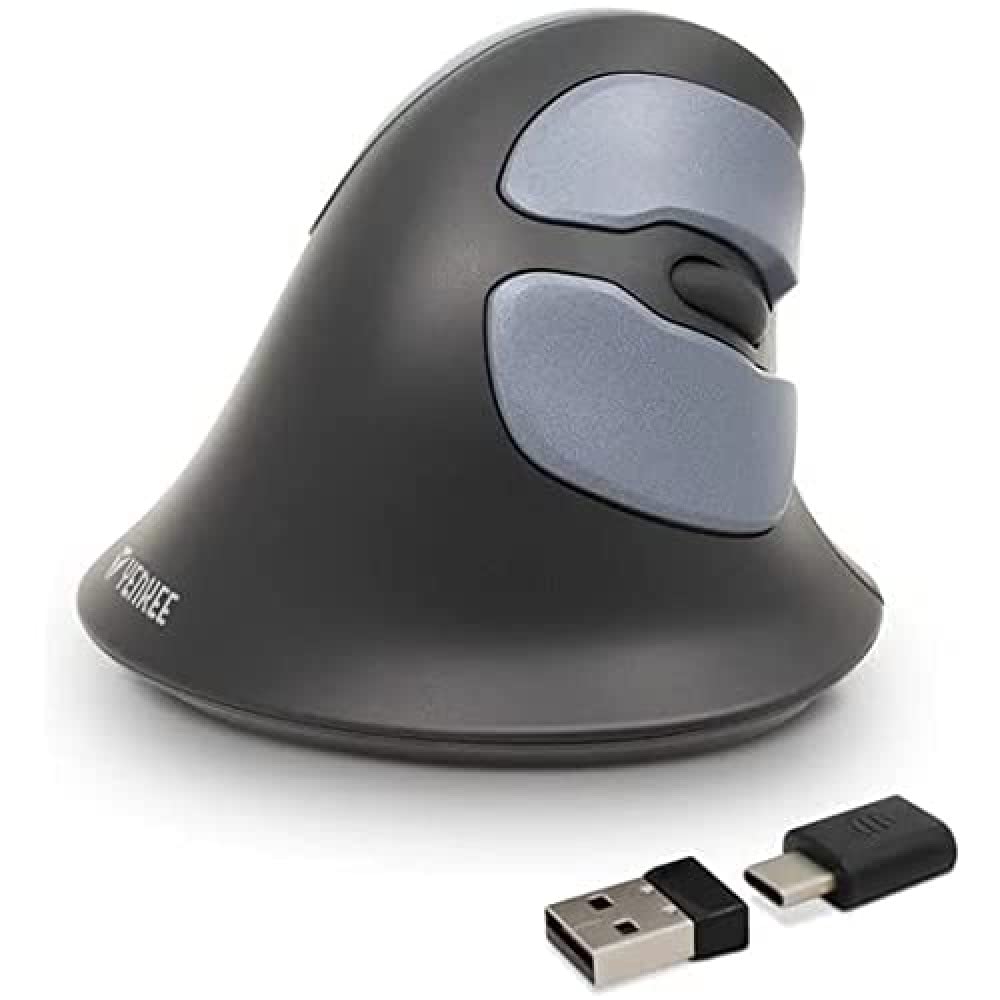
Image: Yenkee YMS 5030 Wireless Ergonomic Vertical Mouse with its USB nano receiver. The mouse is black, featuring a vertical design with multiple buttons.
Nastavení
- Nainstalujte baterie:
Locate the battery compartment on the underside of the mouse. Open the cover and insert the required batteries (not included), ensuring correct polarity (+/-). Close the battery compartment cover securely.
Obrázek: Spodní strana view of the Yenkee YMS 5030 mouse, highlighting the battery compartment and the on/off switch.
- Připojení USB Nano přijímače:
Plug the USB nano receiver into an available USB port on your computer. Your operating system should automatically detect and install the necessary drivers. This process may take a few moments.
- Zapnutí myši:
Slide the ON/OFF switch, located on the underside of the mouse, to the "ON" position. The mouse should now be active and ready for use.
Návod k obsluze
The Yenkee YMS 5030 mouse features 6 buttons and adjustable DPI settings for precise control.
- Levé tlačítko myši: Standardní funkce primárního kliknutí.
- Kliknutí pravým tlačítkem: Standardní funkce sekundárního kliknutí.
- Rolovací kolečko: Procházejte dokumenty nahoru nebo dolů a web stránky. Lze také stisknout pro funkci kliknutí prostředním tlačítkem myši.
- Tlačítka vpřed/vzad: Located on the side, these buttons allow for quick navigation in web prohlížeče popř file průzkumníci.
- Tlačítko pro nastavení DPI: Located near the scroll wheel, press this button to cycle between DPI settings (1000 DPI and 1600 DPI). Adjust the sensitivity to suit your preference and task.
Obrázek: Shora dolů view of the Yenkee YMS 5030 mouse, indicating the positions of the left/right click, scroll wheel, forward/backward, and DPI adjustment buttons.
Ergonomický design
The vertical design of the YMS 5030 mouse positions your hand in a natural handshake posture, which can help alleviate wrist strain and discomfort often associated with traditional horizontal mice. This design is particularly beneficial for users seeking to reduce the risk of repetitive strain injuries like Carpal Tunnel Syndrome.
Údržba
- Čištění: Use a soft, dry cloth to clean the surface of the mouse. For stubborn dirt, slightly damphadřík vodou. Nepoužívejte agresivní chemikálie ani abrazivní čisticí prostředky.
- Výměna baterie: When the mouse performance degrades or it stops responding, it's time to replace the batteries. Follow the "Install Batteries" steps in the Setup section. Dispose of old batteries responsibly according to local regulations.
- Skladování: When not in use for extended periods, turn off the mouse using the ON/OFF switch to conserve battery life. Store the mouse and receiver in a dry, cool place.
Odstraňování problémů
| Problém | Možná příčina | Řešení |
|---|---|---|
| Myš nereaguje. |
|
|
| Pohyb kurzoru je nepravidelný nebo trhaný. |
|
|
| DPI setting does not change. | DPI button not pressed correctly or mouse not powered on. | Ensure the mouse is on and press the DPI button firmly. Observe if cursor speed changes. |
Specifikace
| Funkce | Detail |
|---|---|
| Značka | Yenkee |
| Číslo modelu | YMS 5030 |
| Barva | Černý |
| Technologie připojení | Bezdrátové (Wi-Fi) |
| Technologie detekce pohybu | Optický |
| Nastavení DPI | 1000 DPI / 1600 DPI |
| Počet tlačítek | 6 |
| Pracovní vzdálenost | Až 10 metrů |
| Zdroj napájení | Napájeno bateriemi (baterie nejsou součástí balení) |
| Hardwarová platforma | PC |
| Kompatibilita operačního systému | Windows 7, Windows 8, Windows Vista, Windows XP |
| Rozměry produktu | 14.1 x 7.8 x 23 cm |
| Hmotnost položky | 125 g |
Záruka a podpora
Yenkee products are manufactured to high-quality standards. For information regarding warranty terms and conditions, please refer to the warranty card included with your purchase or visit the official Yenkee website. For technical support or service inquiries, please contact your local retailer or the Yenkee customer support team.