
1. Úvod
The Black Box Boxilla KVM Manager, model BXAMGR-R2-ULT, is a robust and TAA-compliant KVM management solution designed to streamline network operations. This device allows for efficient management and control of an unlimited number of devices within your KVM infrastructure, eliminating the need for multiple licenses. It ensures compliance with government and public sector standards, providing a secure and reliable platform for KVM management.
This manual provides comprehensive instructions for the setup, operation, maintenance, and troubleshooting of your Boxilla KVM Manager.
2. Bezpečnostní informace
Please read and understand all safety instructions before operating this device. Failure to follow these instructions may result in electric shock, fire, or damage to the product.
- Ujistěte se, že je zařízení připojeno k uzemněné zásuvce.
- Nevystavujte zařízení vodě ani nadměrné vlhkosti.
- Neotevírejte zařízení casing. Veškerý servis svěřte kvalifikovanému personálu.
- Provozujte zařízení v rámci specifikovaných teplotních a vlhkostních rozsahů.
- Před čištěním nebo přemisťováním zařízení odpojte napájení.
3. Obsah balení
Ověřte, zda jsou v balení přítomny všechny položky:
- Black Box Boxilla KVM Manager (BXAMGR-R2-ULT)
- Napájecí adaptér
- Rychlý průvodce
- Montážní materiál (pokud je k dispozici)
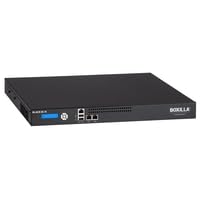
Image of the Black Box Boxilla KVM Manager, model BXAMGR-R2-ULT, showing its front panel and compact design.
4. Nastavení
Follow these steps for initial setup of your Boxilla KVM Manager:
- Rozbalte zařízení: Carefully remove the KVM manager and all accessories from its packaging.
- Umístění: Place the device on a stable, flat surface or mount it in a rack using the provided hardware. Ensure adequate ventilation around the unit.
- Připojte síťové kabely: Connect the KVM manager to your network infrastructure using standard Ethernet cables. Refer to your network topology for specific port connections.
- Připojte napájení: Plug the power adapter into the KVM manager's power input, then connect it to a grounded electrical outlet. The device will power on automatically.
- Počáteční konfigurace: Přístup k zařízení web rozhraní přes a web browser using its default IP address (refer to the Quick Start Guide for default IP and login credentials). Follow the on-screen prompts to configure network settings, user accounts, and initial KVM device discovery.
5. Návod k obsluze
Once the Boxilla KVM Manager is set up, you can begin managing your KVM devices. The primary interface for operation is the web-based management console.
- Přihlášení: Otevřete a web browser and navigate to the IP address or hostname of your Boxilla KVM Manager. Enter your username and password.
- Zjišťování zařízení: Use the discovery tools within the interface to find and add KVM transmitters and receivers to your management system.
- Správa uživatelů: Create and manage user accounts, assigning appropriate access levels and permissions for KVM control.
- Session Management: Initiate, monitor, and terminate KVM sessions to connected devices.
- Sledování systému: Review system logs, device status, and network performance metrics through the dashboard.
- Aktualizace firmwaru: Pravidelně kontrolujte a instalujte aktualizace firmwaru, abyste zajistili optimální výkon a zabezpečení.
6. Údržba
Regular maintenance ensures the longevity and optimal performance of your Boxilla KVM Manager.
- Čištění: K čištění vnější strany zařízení používejte měkký, suchý hadřík. Nepoužívejte tekuté čisticí prostředky ani aerosoly.
- Větrání: Ensure that ventilation openings are clear of dust and obstructions to prevent overheating.
- Firmware: Keep the device firmware updated to the latest version. Refer to the Black Box support webstránky s aktualizacemi a pokyny.
- Konfigurace zálohy: Periodically back up your device configuration settings to prevent data loss in case of an unforeseen issue.
7. Řešení problémů
This section addresses common issues you might encounter with the Boxilla KVM Manager.
| Problém | Možná příčina | Řešení |
|---|---|---|
| Zařízení se nezapne. | No power supply, faulty power adapter, or power outlet issue. | Check power cable connection. Verify power outlet functionality. Try a different power adapter if available. |
| Nelze získat přístup web rozhraní. | Incorrect IP address, network connectivity issue, or firewall blocking access. | Verify the device's IP address. Check network cable connections. Ensure your computer is on the same network segment. Temporarily disable firewall for testing. |
| KVM devices not discovered. | Network configuration issues, KVM devices not powered on, or incorrect discovery settings. | Ensure KVM transmitters/receivers are powered and connected. Verify network settings on Boxilla and KVM devices. Check discovery range settings in the web rozhraní. |
| Pomalý výkon. | Network congestion, outdated firmware, or high CPU/memory usage. | Check network bandwidth. Update firmware to the latest version. Monitor system resources via the web rozhraní. |
8. Specifikace
Detailed specifications for the Black Box Boxilla KVM Manager BXAMGR-R2-ULT:
- Číslo modelu: BXAMGR-R2-ULT
- ASIN: B0BCX8GNRR
- Rozměry produktu: 11 x 10 x 6 palce
- Výrobce: Black Box Network
- První k dispozici: 30. května 2023
- Licence: Unlimited Device License
- Dodržování: Vyhovuje TAA
9. Záruka a podpora
For warranty information and technical support, please refer to the official Black Box Network webnebo se obraťte na jejich zákaznický servis. Uschovejte si doklad o koupi pro případ reklamace.
Black Box Network Official Webmísto: Www.blackbox.com