
1. Úvod
Thank you for choosing the Meetion C4120 2.4G Wireless Mouse and Keyboard Combo. This manual provides essential information for setting up, operating, and maintaining your new wireless peripheral set. Please read it thoroughly before use to ensure optimal performance and longevity.
This combo includes a full-size wireless keyboard and a wireless optical mouse, designed for efficient and comfortable use across various operating systems.
2. Obsah balení
- Meetion 2.4G Wireless Keyboard
- Meetion 2.4G Wireless Mouse
- USB Nano Receiver (typically stored inside the mouse battery compartment)
- Uživatelská příručka (tento dokument)
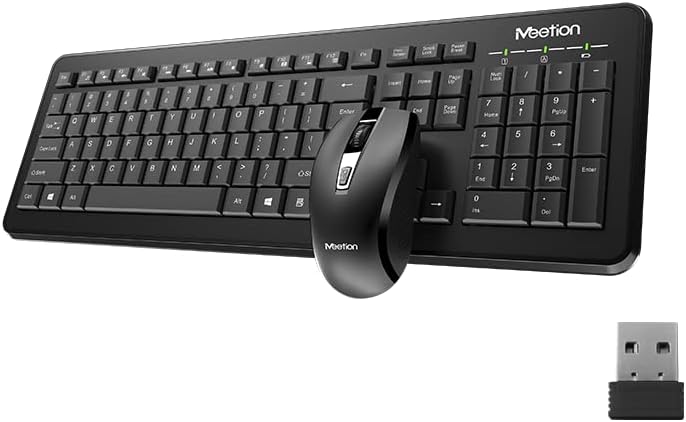
Image Description: This image displays the Meetion C4120 wireless keyboard, the wireless mouse, and the compact USB nano receiver, which is essential for connecting both devices to your computer.
3. Průvodce nastavením
3.1. Instalace baterií
Instalace baterie klávesnice
- Vyhledejte přihrádku na baterie na spodní straně klávesnice.
- Otevřete kryt bateriového prostoru.
- Insert the required batteries (e.g., 2 x AAA alkaline batteries), ensuring correct polarity (+/-).
- Bezpečně zavřete kryt bateriového prostoru.
Instalace baterie myši
- Najděte přihrádku na baterie na spodní straně myši.
- Otevřete kryt bateriového prostoru.
- Remove the USB Nano Receiver from its storage slot.
- Insert the required battery (e.g., 1 x AA alkaline battery), ensuring correct polarity (+/-).
- Bezpečně zavřete kryt bateriového prostoru.
3.2. Připojení k počítači
- Ujistěte se, že jsou baterie správně vloženy do klávesnice i myši.
- Turn on the power switch on the underside of the mouse (if present).
- Zapojte USB Nano přijímač do volného USB portu na vašem počítači.
- Váš počítač by měl automaticky detekovat a nainstalovat potřebné ovladače. Tento proces může chvíli trvat.
- Po instalaci ovladačů by měla být klávesnice a myš připraveny k použití.

Image Description: This image shows the top view of the wireless keyboard and mouse, along with the USB receiver, illustrating their compact design and how they appear together.
4. Návod k obsluze
4.1. Funkce klávesnice
The Meetion C4120 keyboard features a standard layout with a numeric keypad for efficient data entry.
Kontrolky:
- Indikátor Num Lock: Svítí, když je numerická klávesnice aktivní.
- Indikátor Caps Lock: Svítí, když je zapnutá klávesa Caps Lock.
- Indikátor zámku rolování: Illuminates when Scroll Lock is active.
- Indikátor baterie: May flash or illuminate to indicate low battery power. Replace batteries when this occurs.
4.2. Funkce myši
The Meetion C4120 wireless mouse is equipped with a 1200 DPI optical sensor for precise tracking and smooth cursor movement.
tlačítka:
- Levé tlačítko myši: Standardní výběr a aktivace.
- Kliknutí pravým tlačítkem: Zpřístupňuje kontextové nabídky.
- Rolovací kolečko: Posouvá dokumenty a web stránky. Může také fungovat jako prostřední tlačítko.
- Tlačítko pro nastavení DPI: Located below the scroll wheel, this button allows you to cycle through different DPI settings for varying cursor speeds.
DPI (body na palec): The mouse operates at 1200 DPI, providing accurate and smooth cursor movement suitable for general computing tasks.

Image Description: This image provides a detailed view of the Meetion C4120 wireless mouse, highlighting its ergonomic design and the USB nano receiver.
5. Řešení problémů
5.1. Keyboard or Mouse Not Responding
- Zkontrolujte baterie: Ujistěte se, že jsou baterie správně vloženy a dostatečně nabité. V případě potřeby je vyměňte.
- Zkontrolujte USB přijímač: Make sure the USB Nano Receiver is securely plugged into a working USB port on your computer. Try a different USB port.
- Vypínač: Ensure the mouse's power switch (if applicable) is in the "ON" position.
- Obnovení připojení: Unplug the USB receiver, wait a few seconds, and plug it back in.
- Rušení: Move the keyboard and mouse closer to the USB receiver. Avoid placing the receiver near other wireless devices or large metal objects that could cause interference.
- Restartujte počítač: Někdy může problémy s připojením vyřešit jednoduchý restart počítače.
5.2. Lagging or Intermittent Connection
This can often be caused by wireless interference. Try the suggestions above regarding proximity and interference sources.
5.3. Mouse Cursor Jumps or is Inaccurate
Ensure the mouse optical sensor is clean and free from dust or debris. Use the mouse on a clean, non-reflective surface.
6. Údržba
To ensure the longevity and optimal performance of your Meetion C4120 wireless combo, follow these maintenance guidelines:
- Čištění:
- Keyboard: Use a soft, dry cloth to wipe the surface. For deeper cleaning, use compressed air to remove debris from between keys. Avoid liquid cleaners directly on the keys.
- Mouse: Use a soft, dry cloth to clean the exterior. Ensure the optical sensor on the underside is free of dust and lint.
- Výměna baterie: Replace batteries promptly when the low battery indicator appears or performance degrades. Dispose of old batteries responsibly according to local regulations.
- Skladování: When not in use for extended periods, remove batteries and store the devices in a cool, dry place away from direct sunlight and extreme temperatures.
- Vyhněte se tekutinám: Keep the keyboard and mouse away from liquids to prevent damage.
7. Specifikace produktu
| Funkce | Detail |
|---|---|
| Model | C4120 (MT-C4120) |
| Značka | SETKÁNÍ |
| Konektivita | Bezdrátové připojení 2.4G |
| DPI myši | Optické rozlišení 1200 DPI |
| Kompatibilita | Windows, Mac, Linux |
| Typ klávesnice | Plnohodnotná s numerickou klávesnicí |
| Battery Type (Keyboard) | Alkaline (e.g., 2x AAA*) |
| Battery Type (Mouse) | Alkaline (e.g., 1x AA*) |
| Barva | Černý |
*Note: Battery types are typical for such devices; please refer to the product packaging for exact requirements.
8. Záruka a podpora
8.1. Záruka výrobce
The Meetion C4120 Wireless Mouse and Keyboard Combo comes with a 1letá záruka výrobce od data nákupu. Tato záruka se vztahuje na vady materiálu a zpracování při běžném používání.
The warranty does not cover damage caused by misuse, accident, unauthorized modification, or external causes such as liquid damage.
8.2. Zákaznická podpora
For technical assistance, warranty claims, or further inquiries, please contact Meetion customer support through their official webna webu nebo u prodejce, kde byl produkt zakoupen.
Please have your product model number (C4120 or MT-C4120) and proof of purchase ready when contacting support.