
1. Úvod
This manual provides detailed instructions for the installation, operation, and maintenance of your Aideepen LCD Digital AC Power Meter, model PZEM-022. This 6-in-1 device is designed to accurately measure and display various electrical parameters for household and industrial applications. Please read this manual thoroughly before use to ensure safe and correct operation.
2. Klíčové vlastnosti
The Aideepen PZEM-022 power meter offers comprehensive monitoring capabilities:
- Měření 6 v 1: Současně zobrazuje hlasitosttage (AC 80-260V), Current (0-100A), Power (0-22000W), Energy Consumption (0-999kWh), Frequency (45-65 Hz), and Power Factor (0-1PF).
- Ovládání podsvícení: Easily toggle the LCD backlight on or off with a short button press. Data is automatically saved when the backlight is off.
- Overload Alarm Function: Set a current alarm threshold. The backlight will flash to indicate an overload condition. The alarm stops when the current drops below the threshold.
- Energy Data Reset: A dedicated function allows for clearing accumulated energy consumption data.
- Úložiště dat: Automatically stores measurement data even when power is off.

Obrázek 2.1: Přesview of the meter's display showing all 6 measurement parameters and their ranges.
3. Bezpečnostní informace
Dodržujte prosím následující bezpečnostní opatření, abyste předešli poškození zařízení nebo zranění osob:
- Jmenovité zatížení: Ensure that the electrical load connected to the circuit does not exceed the rated power capacity of the meter (22000W) or the current transformer (100A).
- Správné zapojení: Always follow the provided wiring diagram precisely. Incorrect wiring can lead to device malfunction, electrical shock, or fire.
- Pouze pro vnitřní použití: This product is designed for indoor use in dry environments. Do not install or operate this device outdoors or in damp podmínky.
- Profesionální instalace: If you are not familiar with electrical wiring, seek assistance from a qualified electrician for installation.
- Odpojení napájení: Před zahájením jakékoli instalace, zapojení nebo údržby vždy odpojte napájení obvodu.
4. Obsah balení
Ověřte, zda jsou v balení přítomny všechny položky:
- 1 x Aideepen LCD Digital AC Power Meter (PZEM-022)
- 1 x proudový transformátor (CT)
- 1 x Uživatelská příručka

Figure 4.1: The power meter unit and the current transformer.
5. Nastavení a instalace
Follow these steps for proper installation of the power meter:
- Odpojit napájení: Before starting any wiring, ensure that the main power supply to the circuit is completely disconnected to prevent electrical shock.
- Mount the Meter: Choose a suitable indoor location for the meter. The meter is designed for panel mounting.
- Připojte napájecí zdroj: Connect the AC 80-260V power supply to the meter's input terminals as shown in the wiring diagram. Ensure correct polarity if applicable, though for AC, line and neutral are typically interchangeable for the meter's power input.
- Instalace proudového transformátoru (CT):
- Identify the load wire (live wire) of the circuit you wish to monitor.
- Open the CT clamp and pass only the load wire through the center hole of the CT. Ensure the arrow on the CT points in the direction of current flow (from source to load).
- Connect the two wires from the CT clamp to the CT input terminals on the meter.
- Ověřte připojení: Double-check all wiring connections against the diagram to ensure they are secure and correct.
- Obnovit napájení: Once all connections are verified, restore power to the circuit. The meter display should light up.

Figure 5.1: Wiring Diagram. Disconnect power before wiring.
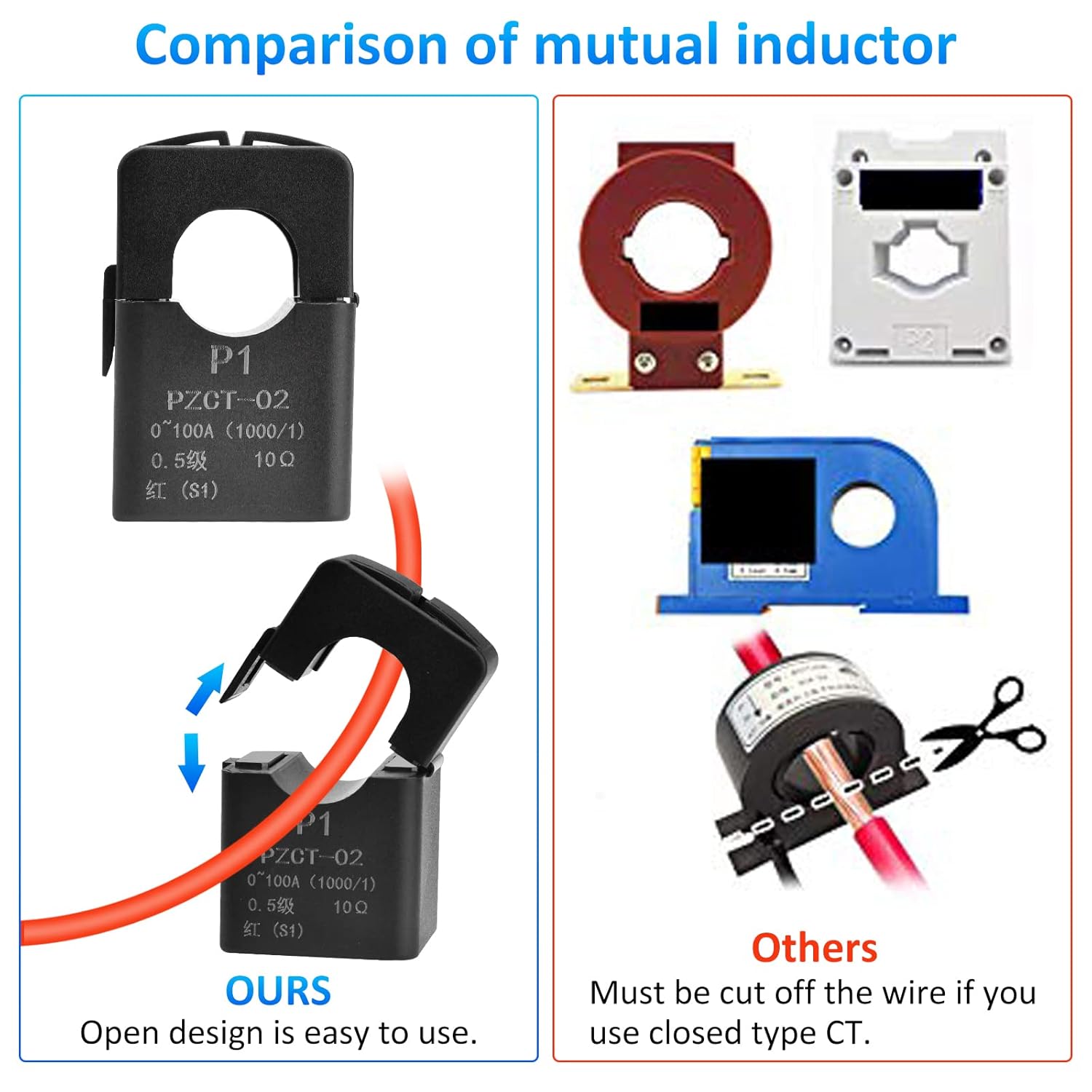
Figure 5.2: The open-design current transformer allows for easy installation without cutting the main wire.
6. Návod k obsluze
The meter is designed for straightforward operation. Once powered on, it will immediately begin displaying real-time measurements.
6.1. Ovládání podsvícení
To control the display backlight:
- Zapnout/Vypnout: Briefly press the button located on the front panel. Each press will toggle the backlight state.
- Úspora dat: The meter automatically saves measurement data regardless of the backlight status.
6.2. Overload Alarm Setting
To set or adjust the current overload alarm threshold:
- Vstupte do režimu nastavení: Press and hold the button for approximately 3 seconds until the current alarm threshold value starts flashing on the display.
- Upravit prahovou hodnotu: While the value is flashing, briefly press the button to increase the threshold value. The value will cycle through available settings.
- Uložit nastavení: Stop pressing the button. After 3 seconds of inactivity, the meter will automatically save the new threshold and exit the setting mode.
When the measured current exceeds the set threshold, the backlight will flash to alert you of an overload condition. The flashing will stop once the current drops below the threshold.
6.3. Energy Data Reset
To clear the accumulated energy consumption (kWh) data:
- Zahájit reset: Press and hold the button for 5 seconds until the energy consumption number starts flashing. Then release the button.
- Potvrdit reset: Briefly press the button again. This action will clear the energy data and stop the flashing.
- Cancel Reset: If no button operation occurs within 5 seconds after the number starts flashing, the reset will be canceled, and the energy data will remain unchanged.

Figure 6.1: Icons illustrating key functions of the meter.
7. Údržba
The Aideepen PZEM-022 power meter requires minimal maintenance:
- Čištění: K čištění displeje a c použijte měkký, suchý hadříkasing. Nepoužívejte abrazivní čisticí prostředky ani rozpouštědla.
- Prostředí: Ensure the meter is kept in a dry, dust-free environment within its specified operating temperature range.
- Inspekce: Pravidelně kontrolujte, zda jsou kabelové spoje pevné a zda nejeví známky opotřebení nebo poškození.
8. Řešení problémů
If you encounter issues with your power meter, refer to the following common problems and solutions:
| Problém | Možná příčina | Řešení |
|---|---|---|
| Displej je prázdný | Chybí napájení nebo je zapojení nesprávné. | Check the AC 80-260V power connections to the meter. Ensure power is supplied to the circuit. |
| Current/Power readings are zero or incorrect | ČT třamp not installed correctly or connected to the wrong wire. | Ensure the load wire passes through the CT clamp and the CT is connected to the meter. Verify the arrow on the CT points from source to load. |
| Backlight flashing continuously | Overload alarm triggered. | Reduce the load on the circuit or adjust the overload alarm threshold if necessary (refer to Section 6.2). |
| Energy consumption resets unexpectedly | Energy consumption exceeded 999kWh, or accidental reset. | The meter automatically resets if 999kWh is exceeded. Be careful when using the reset function (Section 6.3). |
9. Specifikace
| Parametr | Hodnota |
|---|---|
| Číslo modelu | PZEM-022 |
| Provozní svtage | AC 80-260V |
| Aktuální rozsah | 0-100A |
| Rozsah výkonu | 0-22000W |
| Energy Consumption Range | 0-999kWh (resets after 999kWh) |
| Frekvenční rozsah | 45-65 Hz |
| Rozsah účiníku | 0-1PF |
| Typ zobrazení | LCD s podsvícením |
| Rozměry produktu (D x Š x V) | 11 x 7 x 3.5 cm |
| Hmotnost položky | 160 gramů |
| Certifikace | CE |
| Zahrnuté komponenty | Ammeter *1, User Manual *1 |

Obrázek 9.1: Rozměry produktu.
10. Záruka a podpora
Aideepen products are designed for reliability and performance. For warranty information or technical support, please refer to the contact details provided with your purchase or visit the official Aideepen webUschovejte si účtenku jako doklad o koupi pro případ reklamace.