
Edifier MF200
Edifier MF200 USB Powered Multimedia Bluetooth Soundbar User Manual
Model: MF200
Zavedení
Děkuji za nákupasing the Edifier MF200 USB Powered Multimedia Bluetooth Soundbar. This manual provides detailed instructions for setting up, operating, and maintaining your new soundbar. Please read this manual thoroughly before use to ensure proper functionality and to maximize your listening experience.

Obrázek 1: Přední strana view of the Edifier MF200 Soundbar, showcasing its sleek design and integrated controls on the right side.
Obsah balení
Zkontrolujte prosím obsah balení a ujistěte se, že jsou v něm přítomny všechny položky:
- Edifier MF200 Soundbar
- Pouzdro na přenášení
- Kabel USB-C na USB-C
- Uživatelská příručka (tento dokument)
Nastavení
Follow these steps to set up your Edifier MF200 Soundbar:
- Umístění: Place the soundbar on a stable, flat surface, such as a desk or shelf, preferably in front of your monitor or TV for optimal sound projection.
- Připojení napájení: Connect the provided USB-C to USB-C cable to the USB-C port on the back of the soundbar. Connect the other end to a USB power source (e.g., computer USB port, USB wall adapter 5V 1A). The soundbar will power on automatically.
- Audio připojení:
- Bluetooth: The soundbar will enter Bluetooth pairing mode automatically upon first power-on. The indicator light will flash.
- Vstup AUX: For wired connection, connect an audio device (e.g., MP3 player, laptop) to the 3.5mm AUX input port on the soundbar using a 3.5mm audio cable (not included).
- USB audio: Connect the soundbar to your computer via the USB-C cable for digital audio playback.

Obrázek 2: Zadní view of the Edifier MF200 Soundbar, showing the USB-C power/audio input and the 3.5mm AUX input port.
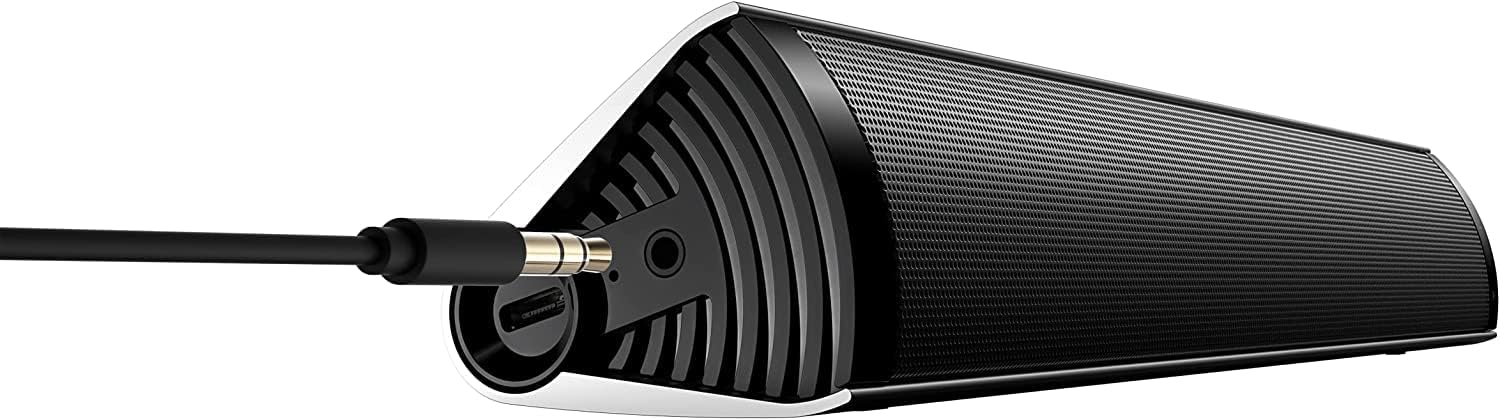
Figure 3: The Edifier MF200 Soundbar with a 3.5mm AUX cable connected to its input port, demonstrating a wired audio connection.
Návod k obsluze
The Edifier MF200 features intuitive controls for easy operation.
Ovládání je ukončenoview

Figure 4: A hand demonstrating the touch control functionality on the Edifier MF200, highlighting the multi-function knob.
- Tlačítko napájení (vlevo nahoře): Stiskněte a podržte pro zapnutí/vypnutí.
- Zvýšení hlasitosti (+): Stisknutím zvýšíte hlasitost.
- Snížit hlasitost (-): Stisknutím snížíte hlasitost.
- Multi-function Knob (Right Side):
- Stiskněte: Play/Pause (in Bluetooth mode), Answer/End Call.
- Stiskněte a podržte: Enter Bluetooth pairing mode (when not connected), Reject Call.
- Střídat: Upravte hlasitost.
- Previous Track (|<): Press to go to the previous track (in Bluetooth mode).
- Next Track (>|): Press to go to the next track (in Bluetooth mode).
Párování pomocí Bluetooth
- Ensure the soundbar is powered on. The indicator light on the multi-function knob will flash blue, indicating it's in pairing mode.
- Na svém zařízení (chytrý telefon, tablet, počítač) povolte Bluetooth a vyhledejte nová zařízení.
- Select "EDIFIER MF200" from the list of available devices.
- Once paired, the indicator light will turn solid blue. You can now play audio through the soundbar.
- To disconnect or pair with a new device, press and hold the multi-function knob until the indicator light flashes again.
Režim vstupu AUX
When a 3.5mm audio cable is connected to the AUX input, the soundbar will automatically switch to AUX mode. Disconnect the AUX cable to return to Bluetooth or USB audio mode.
Režim USB Audio
Connect the soundbar to your computer via the USB-C cable. The computer should recognize the MF200 as an audio output device. Select it from your computer's sound settings.
Baterie a nabíjení
The Edifier MF200 features a built-in rechargeable battery for portable use.
- Životnost baterie: The soundbar provides up to 10 hours of music playtime on a full charge.
- Nabíjení: Connect the soundbar to a USB power source using the provided USB-C cable. The indicator light will show charging status (e.g., red for charging, off or green for fully charged, depending on model specifics).
- Slabá baterie: When the battery is low, the indicator light may flash or change color to alert you.

Figure 5: Visual representation of the Edifier MF200's battery life, indicating up to 10 hours of music playback on a single charge.
Údržba
To ensure the longevity and optimal performance of your Edifier MF200 Soundbar, follow these maintenance guidelines:
- Čištění: Use a soft, dry cloth to wipe the surface of the soundbar. Do not use liquid cleaners, aerosols, or abrasive solvents.
- Skladování: When not in use for extended periods, store the soundbar in a cool, dry place, away from direct sunlight and extreme temperatures. Use the provided carry pouch for protection.
- Vyhněte se vlhkosti: Keep the soundbar away from water and high humidity. It is not waterproof.
- Zacházejte opatrně: Zabraňte pádu soundbaru na zem nebo jeho vystavení silným nárazům.
Odstraňování problémů
If you encounter any issues with your Edifier MF200 Soundbar, please refer to the following common problems and solutions:
| Problém | Možná příčina / řešení |
|---|---|
| Žádná síla |
|
| Žádný zvuk |
|
| Bluetooth connection unstable or unable to pair |
|
| Zkreslení zvuku |
|
Specifikace
Detailed technical specifications for the Edifier MF200 Soundbar:

Figure 6: A detailed list of technical specifications for the Edifier MF200 Soundbar, including input types, Bluetooth version, driver units, and dimensions.
| Funkce | Detail |
|---|---|
| Název modelu | MF200 |
| Typy vstupů | Bluetooth / USB-C sound card / 3.5mm AUX |
| Verze Bluetooth | 5.0 |
| Jednotky řidiče | 36mm full-range × 2 |
| Frekvenční odezva | 100Hz-20KHz |
| Výstupní výkon | 4W+4W (RMS) |
| Poměr signálu k šumu | ≥85 dB (A) |
| Úroveň hluku | ≤25 dB (A) |
| Kapacita baterie | 2200 XNUMX mAh |
| Doba přehrávání Bluetooth | 10 hodin |
| Vstup napájení | DC 5V 1A |
| Rozměry produktu (Š×V×H) | 293mm × 45mm × 53mm (11.54"D x 1.77"W x 2.09"H) |
| Čistá hmotnost | 0.5 kg (1.1 lb) |
| Technologie připojení | Bluetooth, USB |
| Typ reproduktoru | Tweeter |
| Konfigurace kanálů prostorového zvuku | 2.1 |
Záruka a podpora
The Edifier MF200 Soundbar comes with a limited warranty. For detailed warranty terms and conditions, please refer to the warranty card included in your package or visit the official Edifier webmísto.
For technical support, troubleshooting assistance, or service inquiries, please contact Edifier customer support through their official webwebu nebo kontaktních informací uvedených v dokumentaci k produktu.
Online zdroje: www.edifier.com
Ask a question about this manual
Ask about setup, troubleshooting, compatibility, parts, safety, or missing instructions. Manuals+ will review the question and use this page’s manual context to help answer it.