
JIGUUN 647581563908
JIGUUN 2000W Pure Sine Wave Power Inverter User Manual
Model: 647581563908
1. Úvod
This manual provides comprehensive instructions for the safe and efficient operation of your JIGUUN 2000W Pure Sine Wave Power Inverter. This device converts 12V DC power from a battery into 110V/120V AC power, suitable for various household appliances, tools, and electronics. It is designed for use in vehicles, RVs, camping, home backup, and emergency situations.
The inverter features a continuous output of 2000W and a peak output of 4000W, offering clean and stable power comparable to grid electricity. Please read this manual thoroughly before installation and use to ensure proper function and safety.
2. Bezpečnostní informace
VAROVÁNÍ: Nedodržení těchto bezpečnostních pokynů může vést k úrazu elektrickým proudem, požáru, vážnému zranění nebo smrti.
- Elektrická bezpečnost: Always connect the inverter to a 12V DC power source. Ensure correct polarity (red to positive, black to negative) to prevent short circuits and damage.
- Kapacita zatížení: Do not connect equipment with a rated power higher than 2000W to avoid damaging the inverter. Be aware that inductive loads (e.g., microwave ovens, refrigerators) may have a starting power 4-6 times their working power.
- Větrání: Ensure adequate ventilation around the inverter. Do not block cooling fans or vents. The cooling fan activates when the internal temperature exceeds 45°C.
- Prostředí: Do not expose the inverter to direct sunlight, water, moisture, or flammable materials. Operate in a dry, well-ventilated area.
- Připojení baterie: It is recommended to use a 12V 240AH or above battery for power supply. Incorrect voltage poškodí jednotku.
- Použití vozidla: Do not keep the inverter on when your RV, truck, or car engine is not running for extended periods, as this can drain the vehicle's battery.
- Integrace solárního systému: This inverter cannot be directly connected to solar panels. It requires a solar charge controller and battery in a solar installation.
- Základy: Ensure the AC ground terminal is properly connected.
3. Obsah balení
Ověřte, zda jsou v balení přítomny všechny položky:
- 1x JIGUUN DC 12V to AC 110V 2000W Pure Sine Wave Inverter
- 1x Uživatelská příručka
- 2 Sets of Battery Cables (2x Red, 2x Black)
- 1x Dálkové ovládání
- 10x 30A Fuses (Note: Inverter has built-in fuses, these are spares)
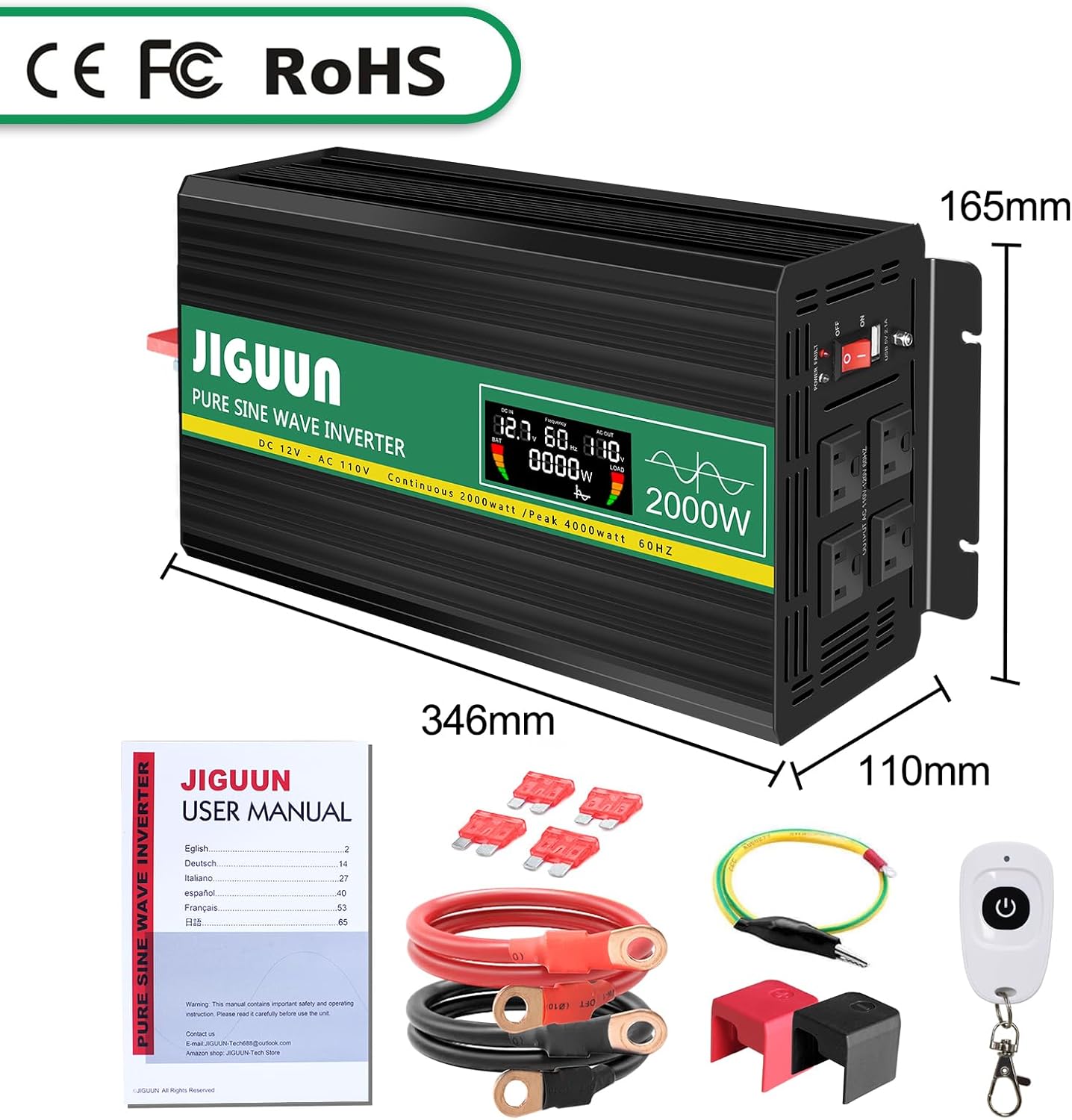
Image: Package contents of the JIGUUN 2000W Pure Sine Wave Inverter.
4. Konec produktuview
4.1 Klíčové vlastnosti
- Výstup čisté sinusové vlny: Provides clean, stable, and interference-free AC power, suitable for sensitive electronics.
- Vysoká účinnost: Conversion efficiency greater than 90%.
- Inteligentní LCD displej: Zobrazuje hlasitost vstupu v reálném časetage, výstupní objemtage, output frequency, battery level, and load power.
- Comprehensive Protection System (BMS): Zahrnuje pod objememtage, přes-voltage, overload, over-temperature, short-circuit, AC ground terminal, and reverse connection protection.
- Chladicí systém: Equipped with two high-speed, silent fans that activate automatically when the temperature exceeds 45°C.
- Dálkové ovládání: Wireless remote for convenient power management.
- Odolná konstrukce: Aluminum alloy shell for lasting protection.
4.2 Identifikace součásti

Image: Front and Rear Panel Components.
- Přední panel:
- AC Receptacles (x4)
- USB Ports (2.1A)
- Vypínač ON/OFF
- LED indikátor napájení
- LCD displej
- AC Ground Terminal
- Zadní panel:
- Positive DC Terminal (Red)
- Negative DC Terminal (Black)
- Cooling Fans (x2)

Image: Intelligent LCD Display Details.
The LCD display provides the following information:
- Ukazatel úrovně baterie
- Loads Level Bar
- DC vstupní voltage
- Výstupní napětí ACtage
- Výstupní frekvence
- Load Power (Watts)
5. Pokyny k nastavení
5.1 Výběr umístění
Select a location for the inverter that is:
- Dry and protected from moisture.
- Dobře větrané pro zajištění správného chlazení.
- Mimo dosah přímého slunečního záření a zdrojů tepla.
- Bezpečně upevněno, aby se zabránilo pohybu.
5.2 Připojení k baterii
- Ensure the inverter's ON/OFF switch is in the OFF position.
- Připojte červený kabel baterie ke kladnému (+) pólu vaší 12V baterie.
- Connect the other end of the red cable to the positive (+) DC input terminal on the inverter.
- Připojte černý kabel baterie k zápornému (-) pólu vaší 12V baterie.
- Connect the other end of the black cable to the negative (-) DC input terminal on the inverter.
- Ensure all connections are tight and secure. Incorrect polarity will damage the inverter.

Image: Inverter with battery cables for connection.
5.3 Solar System Integration (Conceptual Diagram)
The inverter can be part of a solar power system but cannot be directly connected to solar panels. A typical setup involves solar panels, a charge controller, and a battery, with the inverter drawing power from the battery.

Image: Conceptual diagram of a DIY Solar System with the inverter.
6. Návod k obsluze
6.1 Zapnutí a vypnutí
- After connecting the inverter to the battery, switch the ON/OFF button on the inverter to the ON position.
- The LCD display will illuminate, showing input voltage, výstupní objemtage a další parametry.
- To power off, switch the ON/OFF button to the OFF position.
6.2 Connecting AC Devices
- Ujistěte se, že je měnič zapnutý.
- Plug your AC devices into the AC outlets on the front panel of the inverter.
- For USB charging, connect your device to the USB port.
- Monitor the LCD display for real-time load power and battery status.

Image: Inverter powering multiple devices.
6.3 Používání dálkového ovladače
The included remote control allows you to power the inverter ON or OFF wirelessly, providing convenience, especially when the inverter is installed in a less accessible location.

Image: Remote control for the inverter.
6.4 Aplikace Přamples

Image: Inverter applications in car, emergency, home, and work settings.
7. Údržba
- Čištění: Keep the inverter clean and free of dust. Use a dry cloth to wipe the exterior. Do not use liquid cleaners.
- Větrání: Regularly check that the cooling fans and vents are clear of obstructions. The fans operate automatically when the internal temperature exceeds 45°C to prevent overheating.
- Spojení: Periodically inspect battery cable connections to ensure they remain tight and free of corrosion.
- Skladování: Pokud budete měnič skladovat delší dobu, odpojte jej od baterie a uložte jej na chladném a suchém místě.
8. Řešení problémů
The JIGUUN inverter is equipped with a 7-point comprehensive protection system to ensure safe operation. If the inverter stops working or an error is indicated, check the following:

Image: Upgraded BMS System and Protection Features.
- No Output Power / Inverter Not Turning On:
- Zkontrolujte těsnost a správnou polaritu připojení baterie.
- Ověřte objem baterietage is within the 12V operating range.
- Ensure the inverter's ON/OFF switch is in the ON position.
- Check if the internal fuses have blown (replace with supplied 30A fuses if necessary).
- Low Output Voltage / Inconsistent Output:
- Ensure the connected load does not exceed the inverter's continuous power rating (2000W).
- Check the battery charge level; a low battery can cause voltage kapky.
- Verify that the battery cables are of adequate gauge and length for the current draw.
- Aktivovaná ochrana proti přetížení:
- Disconnect some of the connected devices.
- Restartujte měnič.
- Remember that some inductive loads have high starting power.
- Over-Temperature Protection Activated:
- Ensure the inverter has adequate ventilation and cooling fans are operating.
- Snižte zatížení střídače.
- Před opětovným spuštěním nechte střídač vychladnout.
- Ochrana proti zkratu:
- Disconnect all AC loads.
- Inspect AC cables and devices for any short circuits.
- Restartujte měnič.
If problems persist after troubleshooting, please contact JIGUUN customer support.
9. Specifikace
| Funkce | Specifikace |
|---|---|
| Název modelu | 647581563908 |
| Kontinuální Wattage | 2000 wattů |
| Vrchol Wattage | 4000 wattů |
| DC vstupní voltage | 12V |
| Výstupní napětí ACtage | 110V/120V |
| Výstupní průběh | Čistá sinusová vlna |
| Účinnost konverze | >90 % |
| USB výstup | 2.1A |
| Rozměry produktu | 13.62 x 6.5 x 4.33 palce |
| Hmotnost položky | 11.22 libry |
| Zdroj napájení | Solární a bateriové napájení |
10. Záruka a podpora
The JIGUUN 2000W Pure Sine Wave Power Inverter comes with a 1-letá záruka, including free replacement for manufacturing defects.
For any questions, technical assistance, or warranty claims, please contact the JIGUUN support team via email. Our team is dedicated to resolving any issues you may encounter.
Kontaktní údaje: Please refer to the contact details provided on the product packaging or the official JIGUUN webmísto.
Ask a question about this manual
Ask about setup, troubleshooting, compatibility, parts, safety, or missing instructions. Manuals+ will review the question and use this page’s manual context to help answer it.