
1. Konec produktuview
The Hikity 9 Inch Quad Split Screen Backup Camera Monitor is designed to provide enhanced visibility for various vehicles, including cars, SUVs, vans, trucks, and pickups. This monitor features a 9-inch TFT LCD display with 4-channel video input, allowing for multiple viewing modes. It supports a wide power input range of 9-36V, making it versatile for different vehicle types. The monitor can display up to four camera feeds simultaneously, aiding in driving and parking maneuvers.

Image 1.1: The Hikity 9 Inch Quad Split Screen Backup Camera Monitor.
Video 1.1: Overview of the Hikity 9-inch 4-channel backup camera monitor, highlighting its features and capabilities.
2. Obsah balení
Ověřte, zda jsou všechny níže uvedené položky součástí balení. Pokud některé položky chybí nebo jsou poškozené, kontaktujte zákaznickou podporu.
- 1 x 9-inch Quad Split Monitor
- 1 x Headrest Shell
- 1 x Bracket Mount
- 1 x IR dálkový ovladač
- 1 x Video & Power Cable

Image 2.1: All components included in the Hikity 9 Inch Backup Camera Monitor package.
Video 2.1: A detailed unboxing and display of the Hikity 9 Inch Backup Camera Monitor package contents.
3. Specifikace
| Velikost obrazovky | 9 palce |
| Rezoluce | HD (800x480 native) |
| Poměr stran | 16:9 |
| Typ zobrazení | TFT LCD |
| Viewúhel | 170 stupňů |
| svtage Vstup | 9-36 voltů |
| Konektivita | RCA (4 Channels) |
| Další funkce | Anti-Glare Screen, Quad Split Screen Display |
| Kompatibilní zařízení | CCTV Camera, Car Camera, DVD/VCD, TV BOX |
4. Nastavení a instalace
The monitor offers two primary installation methods: stereoscopic (dashboard mount) and embedded (headrest shell). Choose the method that best suits your vehicle and preferences.
4.1 Způsoby instalace

Image 4.1: Visual representation of stereoscopic (dashboard) and embedded (headrest) installation options.
4.2 Schéma zapojení
Connect the power and video cables as shown in the diagram. Ensure correct polarity for power connections (+12-24V and GND). The camera control lines (Brown, Blue, Green, Gray) should be connected to the positive of the reverse gear or other trigger sources for automatic switching.
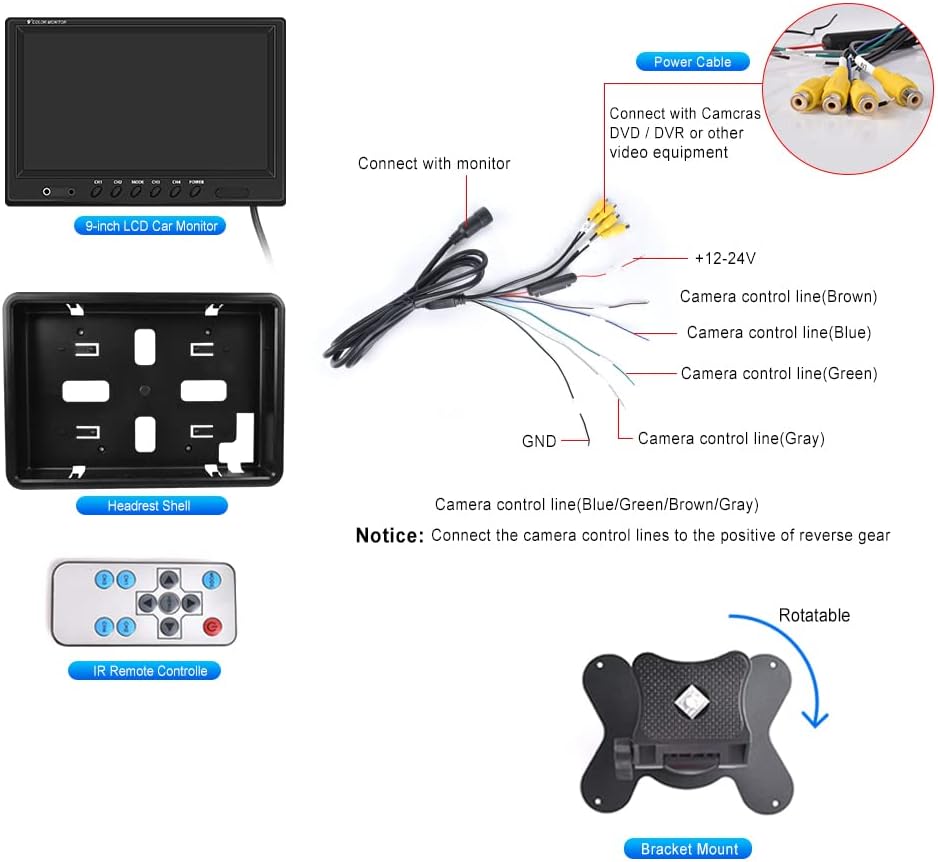
Image 4.2: Detailed wiring connections for the monitor, including power and four RCA video inputs.
Video 4.1: Krátká úvodníview demonstrating an installation method for the monitor, focusing on placement and initial setup.
5. Návod k obsluze
The Hikity monitor offers various viewing modes and adjustable settings for optimal use.
5.1 Viewrežimy
The monitor supports 6 selectable viewing modes: Single Full View, Split Dual Video View, Split Tri Video View, and Quad Four View. These modes allow you to customize how camera feeds are displayed on the screen.

Image 5.1: Illustration of the quad split screen functionality, showing four camera feeds simultaneously.
5.2 Úpravy
Use the included IR remote controller or the buttons on the monitor to adjust settings such as brightness, contrast, and color. The monitor also supports rotating or mirroring the screen display for each channel.
5.3 Driving Assistance
Each of the four video input channels (CH1/CH2/CH3/CH4) has a dedicated signal wire for backup or turning triggers. Connecting these wires allows the monitor to automatically switch to the corresponding camera view when a trigger is activated (e.g., shifting into reverse).

Image 5.2: The 9-inch monitor displaying a quad-split view, showing multiple perspectives for driving assistance.
6. Údržba
Pro zajištění dlouhé životnosti a optimálního výkonu vašeho monitoru Hikity dodržujte tyto pokyny pro údržbu:
- Čištění: K čištění obrazovky monitoru a krytu použijte měkký, suchý hadřík.asing. V případě odolných šmouh lehce otřeteampOtřete hadřík vodou nebo čisticím prostředkem vhodným pro obrazovky. Vyhněte se abrazivním materiálům nebo agresivním chemikáliím.
- Podmínky prostředí: Avoid exposing the monitor to extreme temperatures, direct sunlight for prolonged periods, or excessive moisture.
- Správa kabelů: Ensure all cables are securely connected and not pinched or strained, which can lead to damage or intermittent signal loss.
- Skladování: If storing the monitor for an extended period, disconnect it from power and store it in a cool, dry place.
7. Řešení problémů
If you encounter issues with your Hikity monitor, refer to the following common problems and solutions:
- Bez napájení:
- Zkontrolujte všechna napájecí připojení, zda jsou bezpečná.
- Verify that the power source (9-36V) is functioning correctly.
- Zkontrolujte napájecí kabel, zda není viditelně poškozen.
- Žádný video signál:
- Ensure all RCA video cables are firmly connected to both the cameras and the monitor.
- Confirm that the cameras are powered on and functioning.
- Check the selected input channel on the monitor matches the connected camera.
- If using trigger wires, ensure they are correctly connected and receiving a signal.
- Špatná kvalita obrazu:
- Adjust the brightness, contrast, and color settings using the remote control or monitor buttons.
- Ensure camera lenses are clean and free from obstructions.
- Verify that the video cables are not damaged or experiencing interference.
- Dálkové ovládání nefunguje:
- Zkontrolujte a vyměňte baterii v dálkovém ovladači.
- Ensure there are no obstructions between the remote and the monitor's IR receiver.
If these steps do not resolve the issue, please contact Hikity customer support for further assistance.
8. Záruka a podpora
Společnost Hikity poskytuje komplexní podporu pro své produkty:
- Záruka vrácení peněz: 30denní lhůta pro vrácení peněz.
- Záruka na výměnu: 2letá záruka na výměnu.
- Technická podpora: K dispozici je doživotní technická podpora.
For installation or usage issues, please contact Hikity Flagship Store via the product page on Amazon. Support inquiries are typically responded to within 24 hours.