
Andoer e417fe28-cba1-49bd-8acb-ddcd73b41592
Andoer 4K Digital Video Camera User Manual
Model: e417fe28-cba1-49bd-8acb-ddcd73b41592
1. Úvod
This user manual provides detailed instructions for operating your Andoer 4K Digital Video Camera. Please read this manual thoroughly before using the camera to ensure proper operation and to maximize its performance. Keep this manual for future reference.
1.1 Obsah balení
Po otevření balíku se prosím ujistěte, že jsou všechny níže uvedené položky přítomny a v dobrém stavu:
- 1 x Andoer 4K Digital Video Camera
- 2 x NP-40 Li-ion Battery (one pre-installed)
- 1 x USB kabel
- 1 x Video kabel
- 1 x Dálkové ovládání
- 1 x brašna na fotoaparát
- 1 x Uživatelská příručka (anglicky)

Image: The Andoer 4K Digital Video Camera, remote control, and two NP-40 Li-ion batteries, illustrating the main components included in the package.
2. Vlastnosti produktu
The Andoer 4K Digital Video Camera is equipped with a range of features designed to enhance your video recording and photography experience:
- 4K Ultra HD Video Recording: Capture stunning videos at 4K/30fps and 2.7K/30fps resolutions.
- 56MP Still Image Capture: Produce high-resolution photos up to 56 megapixels (interpolation).
- 3.0 Inch IPS Touchscreen: A rotatable 270° touchscreen for intuitive control and versatile viewing úhly.
- 18x digitální zoom: Bring distant subjects closer without compromising image quality.
- IR noční vidění: Record clear and natural footage in low-light or dark environments.
- WiFi připojení: Easily connect to your smartphone or tablet via the DV-CAM APP for remote control, live viewa file převod.
- Detekce obličeje a stabilizace obrazu: Enhance focus and stability for clearer shots.
- Podpora externího mikrofonu: Hot shoe mount for connecting an external microphone for improved audio quality.
- Standard Tripod Mount: 1/4 inch thread for mounting on a tripod or other accessories.

Image: An infographic highlighting the camera's main features including 4K 56MP resolution, 18X Digital Zoom, Face Detection, Night Vision, Dual Outputs, Digital Anti-shake, IPS Touchscreen, WiFi Connection, and Built-in Microphone.
3. Začínáme
3.1 Instalace a nabíjení baterie
The camera uses NP-40 Li-ion batteries. One battery is typically pre-installed. Ensure batteries are fully charged before first use.
- Otevřete kryt přihrádky na baterie, který se nachází ve spodní části fotoaparátu.
- Insert the NP-40 battery, ensuring the correct polarity.
- Bezpečně zavřete kryt bateriového prostoru.
- To charge, connect the camera to a power source using the provided USB cable. The charging indicator light will illuminate.
- Nabíjení je dokončeno, když kontrolka zhasne.
3.2 Instalace SD karty
The camera supports SD/SDHC cards up to 128GB (Class 6 or above recommended, not included).
- Vyhledejte slot pro SD kartu, obvykle na boku nebo ve spodní části fotoaparátu.
- Vložte SD kartu kovovými kontakty ve správném směru (viz obrázek poblíž slotu). Zatlačte, dokud nezacvakne na místo.
- Chcete-li kartu vyjmout, jemně ji znovu zatlačte, dokud nevyskočí.
4. Základní obsluha
4.1 Zapnutí/vypnutí
- Zapnutí: Open the LCD screen or press the Power button.
- Vypnout: Close the LCD screen or press and hold the Power button.
4.2 Nahrávání videa
- Zapněte fotoaparát.
- Ensure the camera is in video recording mode (indicated by an icon on the screen). If not, use the Mode button to switch.
- Press the Record button (usually a red circle) to start recording.
- Opětovným stisknutím tlačítka Nahrávání nahrávání zastavíte.
4.3 Fotografování
- Zapněte fotoaparát.
- Ujistěte se, že je fotoaparát v režimu fotografie.
- Kompozice snímku se provede pomocí LCD displeje.
- Press the Photo button (often a camera icon or shutter button) to take a picture.
4.4 Funkce zoom
The camera features 18X digital zoom.
- Use the T (Telephoto) button to zoom in.
- Use the W (Wide) button to zoom out.

Image: A visual demonstration of the 18X digital zoom capability, showing how the camera can magnify distant subjects.
4.5 Přehrávání
- In standby mode, press the Playback button (often an arrow icon) to enter playback mode.
- Use the navigation buttons to browse through your recorded videos and photos.
- Stisknutím tlačítka OK přehrajete video nebo view fotku na celou obrazovku.
- Opětovným stisknutím tlačítka Přehrávání ukončíte režim přehrávání.
5. Pokročilé funkce
5.1 Připojení WiFi
The camera supports WiFi connectivity for remote control and file transfer via the DV-CAM APP.
- Download and install the "DV-CAM" APP on your smartphone or tablet from your device's app store.
- On the camera, navigate to the WiFi settings and enable WiFi. The camera's WiFi network name (SSID) and password will be displayed.
- On your smartphone/tablet, go to WiFi settings and connect to the camera's WiFi network using the provided password.
- Open the DV-CAM APP. You can now view živé footage, control recording, take photos, and download files directly to your mobile device.

Image: A visual representation of the camera's WiFi function, showing a smartphone connected to the camera to view živé footage or transfer files.
5.2 IR noční vidění
The IR Night Vision feature allows you to record in low-light conditions.
- To activate IR Night Vision, locate the IR button or setting in the camera menu.
- When activated, the camera will use infrared light to illuminate the scene, capturing clear black and white footage ve tmě.

Image: A side-by-side comparison demonstrating the effectiveness of IR Night Vision, showing a scene in normal light versus the same scene captured in darkness using infrared.
5.3 3.0 Inch IPS Touchscreen
The 3.0-inch IPS touchscreen offers intuitive control and can be rotated 270 degrees for various shooting angles, including self-recording.
- Tap the screen to access menu options or focus.
- Swipe to navigate through playback or menu pages.
- Rotate the screen to face forward for vlogging or self-portraits.
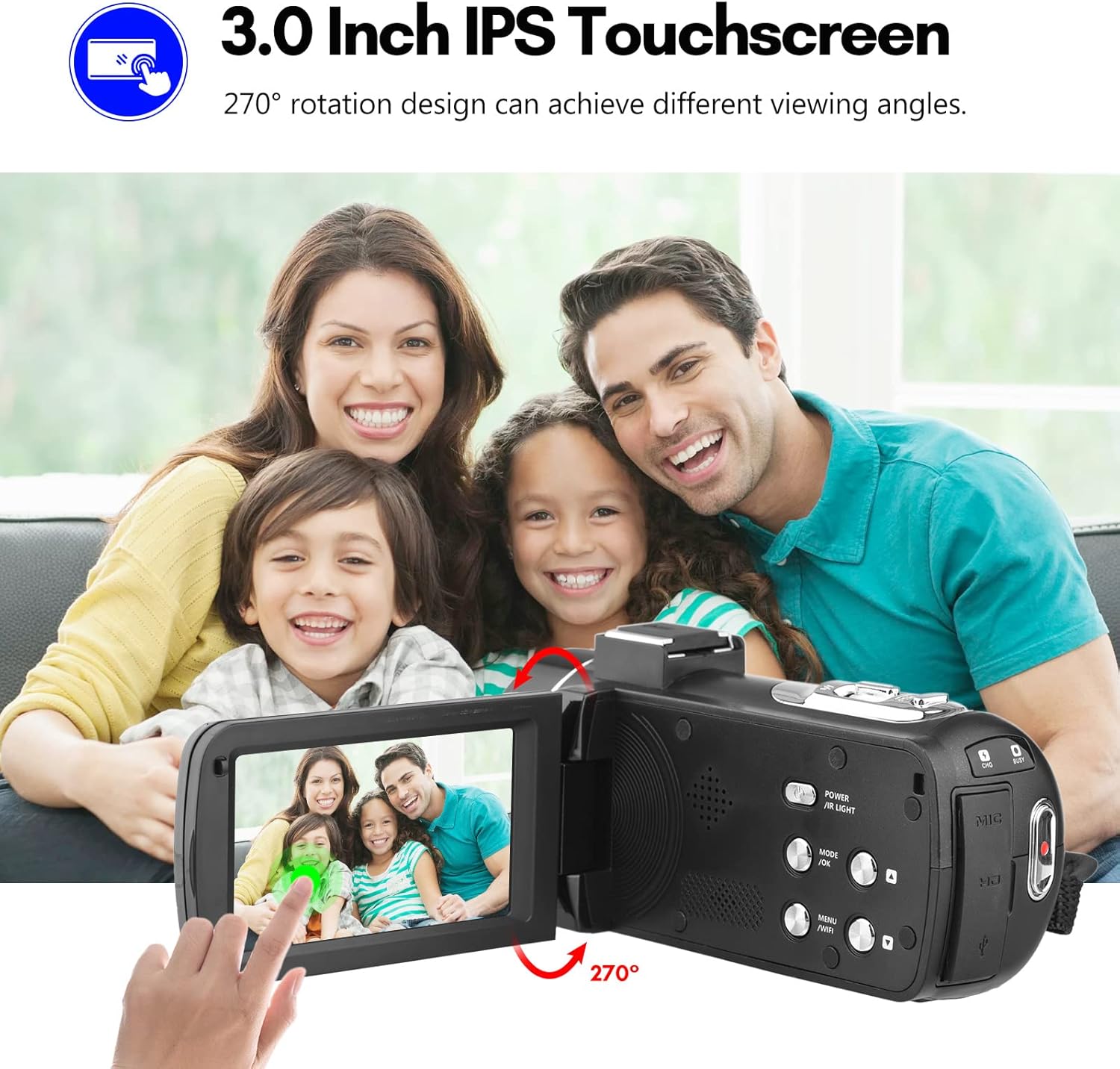
Image: The Andoer camera with its 3.0-inch IPS touchscreen rotated, demonstrating its 270-degree rotation capability for flexible viewnahrávání a samonahrávání.
5.4 Nastavení nabídky
Access the camera's menu to adjust various settings such as video resolution, photo resolution, white balance, exposure, self-timer, and auto power off.
- Stisknutím tlačítka MENU vstupte do nabídky nastavení.
- Use the navigation buttons or touchscreen to select options.
- Stisknutím tlačítka OK potvrďte výběr.
- Pro ukončení stiskněte znovu MENU.
6. Konektivita
The camera offers multiple connectivity options for viewing and transferring your media.
6.1 Connecting to a TV (HD Multimedia Interface)
- Ujistěte se, že je fotoaparát vypnutý.
- Connect one end of the HD multimedia interface cable (not explicitly listed in package contents, but mentioned in description) to the camera's HD port and the other end to an HD input on your TV.
- Turn on the TV and select the correct HD input source.
- Turn on the camera. The camera's display will be mirrored on the TV screen, allowing you to view fotografie a videa.
6.2 Připojení k počítači (USB)
- Ujistěte se, že je fotoaparát vypnutý.
- Připojte fotoaparát k počítači pomocí dodaného kabelu USB.
- Turn on the camera. It will typically enter "Mass Storage" or "PC Camera" mode. Select "Mass Storage" to access files.
- The camera will appear as a removable disk drive on your computer, allowing you to transfer files.

Image: An illustration detailing how to connect the Andoer camera to a television via HD multimedia interface and to a computer via USB for viewing and transferring media.
7. Údržba
7.1 Čištění fotoaparátu
- K čištění těla fotoaparátu použijte měkký, suchý hadřík.
- For the lens, use a specialized lens cleaning cloth and lens cleaning solution. Avoid touching the lens with your fingers.
- Do not use strong detergents or solvents, as they may damage the camera's finish.
7.2 Skladování
- Pokud fotoaparát delší dobu nepoužíváte, vyjměte z něj baterii.
- Fotoaparát skladujte na chladném a suchém místě, mimo dosah přímého slunečního záření a extrémních teplot.
- Use the provided camera bag to protect it from dust and scratches.
8. Řešení problémů
| Problém | Možná příčina | Řešení |
|---|---|---|
| Fotoaparát se nezapne. | Baterie je vybitá nebo nesprávně vložená. | Nabijte baterii nebo ji znovu správně vložte. |
| Nelze nahrávat video/fotit. | SD karta je plná, uzamčená nebo není vložena. | Vymazat files, unlock the SD card, or insert an SD card. |
| Špatná kvalita obrazu/videa. | Objektiv je znečištěný; nedostatečné osvětlení; nesprávné nastavení. | Clean the lens; use IR Night Vision in low light; adjust resolution/exposure settings. |
| Problémy s připojením k Wi-Fi. | Incorrect password; APP not installed; distance too far. | Verify password; install DV-CAM APP; move closer to camera. |
9. Specifikace
| Funkce | Detail |
|---|---|
| Obrazový snímač | CMOS |
| ISO | Auto, 100, 200, 400, 800, 1600 |
| Skladování | SD/SDHC Card, max. 128GB (Class 6 or above) |
| Čočka | Fixed, f/2.6, f=7.0mm |
| Ohnisková vzdálenost | 0.5m do nekonečna |
| Obrazovka | 3.0 Inch IPS Touchscreen (270° rotation) |
| Photo Format & Resolution | JPG, 56M/ 48M/ 30M/ 24M/ 20M/ 16M/ 12M/ 8M/ 5M |
| Video Format & Resolution | MP4, 4K/30fps, 2.7K/30fps, 1080P/60fps, 1080P/30fps, 720P/60fps, 720P/30fps |
| Digitální zoom | 18X |
| IR světlo | <1.0 mil |
| Vyvážení bílé | Auto/ Daylight/ Cloudy/ Tungsten/ Fluorescent |
| Vystavení | ± 3.0 EV |
| Samospoušť | OFF/2s/ 5s/ 10s |
| Automatické vypnutí | OFF/ 1min/3min/ 5min/ 10min |
| Mikrofon | Built-in, supports external microphone |
| Napájení | 1 x NP-40 Li-ion Battery |
| Baterie dálkového ovládání | 2 x AAA baterie (nejsou součástí balení) |
| Velikost fotoaparátu | 12.6 x 5.8 x 5.9 cm / 5 x 2.3 x 2.3 palců |
| Hmotnost fotoaparátu | 318 g / 11.2 oz |
10. Záruka a podpora
For warranty information and technical support, please refer to the official Andoer webnebo kontaktujte jejich zákaznický servis. Uschovejte si účtenku jako doklad o koupi.
You can visit the official Andoer store on Amazon for more information: Andoer Store
11. Bezpečnostní informace
Dodržujte prosím následující bezpečnostní opatření, abyste předešli zranění nebo poškození produktu:
- Nevystavujte fotoaparát extrémním teplotám, přímému slunečnímu záření ani vysoké vlhkosti.
- Chraňte fotoaparát před vodou a jinými tekutinami.
- Nepokoušejte se fotoaparát rozebírat ani upravovat. Opravy by měl provádět pouze autorizovaný servisní personál.
- Keep plastic bags and packaging materials away from babies and children to avoid suffocation hazards.

Image: A multi-language warning label emphasizing the importance of keeping plastic bags away from children to prevent suffocation.
Ask a question about this manual
Ask about setup, troubleshooting, compatibility, parts, safety, or missing instructions. Manuals+ will review the question and use this page’s manual context to help answer it.