
1. Úvod
This manual provides detailed instructions for the safe and efficient use of your MECHEN HIFI MP3 Player M30. Please read this manual thoroughly before operating the device and retain it for future reference.
The MECHEN M30 is a dedicated HIFI lossless audio player designed for high-fidelity sound reproduction. It features advanced DSD decoding technology and supports a wide range of audio formats. Please note that this device does not support Bluetooth, FM radio, recording, video playback, e-books, photos, or alarm functions.

Figure 1: MECHEN M30 HIFI MP3 Player Overview
2. Vlastnosti produktu
- Vysoce kvalitní zvuk: Equipped with a high-quality DSP chip and advanced DSD decoding technology for immersive, low-distortion sound.
- Rozšiřitelné úložiště: Comes with a 64GB microSD card and supports expansion up to 256GB, allowing for extensive music libraries.
- Durable Design & Intuitive Controls: Constructed from a high-quality zinc alloy for durability. Features a unique scroll control wheel and simple physical buttons for easy navigation and operation.
- Všestranná konektivita: Includes a 3.5mm headphone jack and a line-out port, enabling connection to wired headphones, AUX speakers, and car audio systems.
- Dlouhá výdrž baterie: Built-in 1500mAh battery provides approximately 30 hours of music playback on a 2.5-hour full charge.
- Podpora širokého formátu: Compatible with numerous audio formats including MP3, WMA, WAV/PCM, APE, FLAC, AAC, OGG, DSF, AIFF, ALAC, IMA/MS-ADPCM, DFF, and DSD 128. (Note: AAC files play in mono.)

Figure 2: High-Quality DSD and DAC Chips
3. Nastavení
3.1. Obsah balení
Ověřte, zda jsou v balení přítomny všechny položky:
- MECHEN HIFI MP3 Player M30
- 64GB paměťová karta MicroSD
- USB kabel
- Uživatelská příručka (tento dokument)

Obrázek 3: Zahrnuté součásti
3.2. Nabíjení zařízení
- Connect the provided USB cable to the player's charging port.
- Druhý konec kabelu USB připojte k napájecímu adaptéru USB (není součástí balení) nebo k portu USB počítače.
- The battery indicator on the screen will show charging status. A full charge takes approximately 2.5 hours.
3.3. Vložení karty MicroSD
- Vyhledejte slot pro kartu microSD na boku přehrávače.
- Gently insert the provided 64GB microSD card (or another compatible card up to 256GB) into the slot until it clicks into place.
- To remove, push the card inward until it clicks, then release, and it will eject.
3.4. Přenos hudby Files
- Připojte přehrávač k počítači pomocí kabelu USB.
- The player will appear as a removable disk (or prompt you to select 'Mass Storage' mode).
- Přetáhněte požadovaný zvuk files into the appropriate folders on the microSD card. Organizing files into folders (e.g., by Artist, Album) is recommended for easier navigation.
- Před odpojením kabelu USB bezpečně vyjměte přehrávač z počítače.
4. Návod k obsluze
4.1. Zapnutí/vypnutí
- Zapnutí: Stiskněte a podržte tlačítko napájení, dokud se obrazovka nerozsvítí.
- Vypnout: Stiskněte a podržte tlačítko napájení, dokud se zařízení nevypne.
4.2. Navigace a nabídka
- Rolovací kolečko: Rotate the scroll wheel to navigate through menus and lists.
- Tlačítko MENU: Press to enter the main menu or confirm a selection.
- Tlačítko Zpět: Press to return to the previous screen or cancel an action.
- Ovládací tlačítka přehrávání: Use the dedicated buttons for Play/Pause, Next Track, Previous Track.
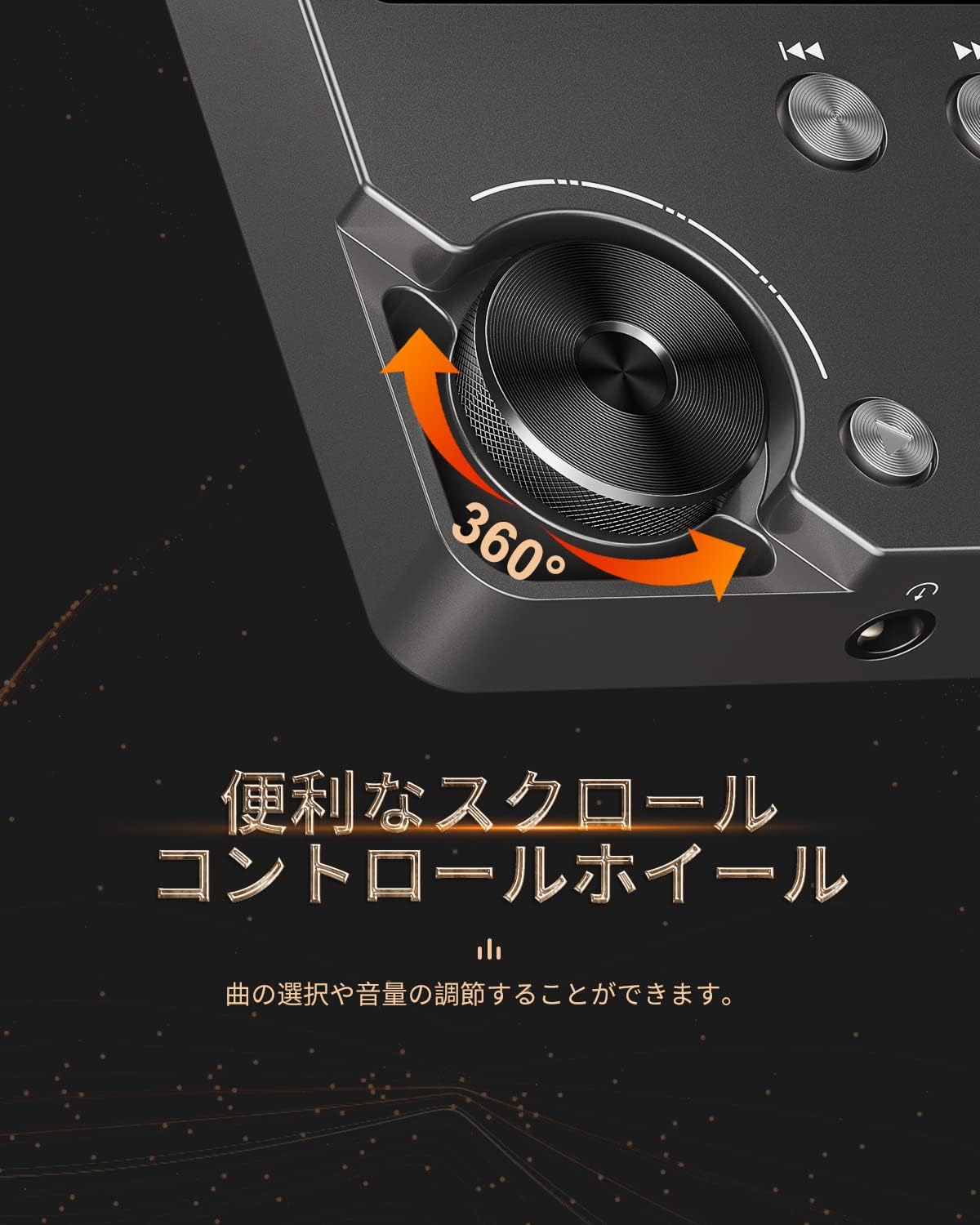
Figure 4: Scroll Control Wheel
4.3. Přehrávání hudby
- V hlavní nabídce přejděte do sekce „Hudba“.
- Browse your music by folder, artist, album, or all songs.
- Select a track and press the MENU button to start playback.
- Přehrávání ovládejte tlačítkem Přehrát/Pozastavit.
- Press Next Track or Previous Track buttons to skip songs. Hold these buttons for fast forward or rewind.
4.4. Ovládání hlasitosti
Rotate the scroll wheel during music playback to adjust the volume level. It is recommended to set the initial maximum volume to a low level to prevent sudden loud sounds.
4.5. Nastavení ekvalizéru
The player features an equalizer with various presets (e.g., Rock, Pop, Jazz, Classical, Soft, Techno) and a custom setting. Access the equalizer settings from the playback screen or system settings to adjust the sound profile podle vašich preferencí.

Figure 5: Equalizer Function
4.6. Repeat and Shuffle Modes
During playback, access the options menu to select repeat modes (e.g., repeat one, repeat all) or enable shuffle playback for a randomized song order.
4.7. Připojení k externím zařízením
The MECHEN M30 can connect to various audio output devices:
- Drátová sluchátka: Plug your 3.5mm headphones into the headphone jack.
- External Speakers/Car Audio: Use an AUX cable (not included) to connect the player's line-out port to your speakers or car's AUX input.

Figure 6: Connecting to Various Devices
5. Údržba
5.1. Čištění
Zařízení otřete měkkým, suchým hadříkem. Nepoužívejte tekuté čisticí prostředky ani abrazivní materiály, protože by mohly poškodit povrchovou úpravu nebo vnitřní součásti.
5.2. Péče o baterie
Chcete-li prodloužit životnost baterie, vyvarujte se častého úplného vybíjení. Zařízení pravidelně nabíjejte, i když jej delší dobu nepoužíváte. Zařízení skladujte na chladném a suchém místě.

Obrázek 7: Informace o baterii
5.3. Skladování
When storing the player for a long time, ensure it is fully charged and then power it off completely. Recharge it every few months to prevent deep discharge.
6. Řešení problémů
- Zařízení se nezapne: Ensure the battery is charged. Connect the player to a power source using the USB cable and try again. If the issue persists, perform a reset by pressing the reset button (if available) or holding the power button for an extended period.
- Žádný zvuk: Check the volume level. Ensure headphones or external speakers are properly connected. Test with different headphones or speakers if possible.
- Hudba filenení rozpoznáno: Ověřte, že hudba files are in a supported format (refer to Specifications). Ensure the microSD card is properly inserted and the files are not corrupted. Re-transfer the files v případě potřeby.
- Screen is unresponsive or erratic: Try restarting the device. If the problem continues, ensure the device is not exposed to extreme temperatures or moisture.
- Album art or metadata not displayed: Ensure that the metadata (ID3 tags) for your music files are correctly embedded. While the player supports folder-based navigation, correct tags enhance the browsing experience.
- Playback stops unexpectedly: Ensure the battery is sufficiently charged. If connected to a car audio system via USB, playback might pause when the engine is turned off or on due to changes in the USB host communication.
7. Specifikace
| Funkce | Popis |
|---|---|
| Název modelu | M30 |
| Značka | MECHEN |
| Zobrazit | 2palcový LCD |
| Paměťové úložiště | 64GB MicroSD card included (expandable up to 256GB) |
| Konektivita | AUX (3.5mm headphone jack, Line Out) |
| Kapacita baterie | 1500 XNUMX mAh |
| Životnost baterie | Přibližně 30 hodin přehrávání |
| Doba nabíjení | Přibl. 2.5 hodin |
| Rozměry produktu (D x Š x V) | 1.6 x 5.6 x 8.8 cm |
| Hmotnost produktu | 176 gramů |
| Podporované zvukové formáty | MP3 (8-48KHz, 16bits), WMA (8-192KHz, 16/24bits), WAV/PCM (8-192KHz, 8/16/24/32bits), APE (8-192KHz, 16/24bits), FLAC (8-192KHz, 16/24bits), AAC (8-96KHz, 16bits - mono playback), OGG (8-48KHz, 10-500bits), DSF (2822.4KHz, 1bit), AIFF (8-192KHz, 8/16/24/32bits), ALAC (8-192KHz, 16/24bits), IMA/MS-ADPCM (8-48KHz, 8/16bits), DFF (3072KHz, 1bit), DSD 128 (5.6MHz) |
| Speciální funkce | Equalizer, Shuffle Play, Hi-Res Audio, Repeat Play, Auto Power-Off |
| Země původu | Čína |
| UPC | 607469642453 |

Obrázek 8: Podporované zvukové formáty
8. Záruka a podpora
8.1. Záruka výrobce
The MECHEN HIFI MP3 Player M30 comes with a one-year manufacturer's warranty from the date of purchase. This warranty covers defects in materials and workmanship under normal use. It does not cover damage caused by misuse, accidents, unauthorized modifications, or normal wear and tear.
8.2. Zákaznická podpora
For technical assistance, warranty claims, or any questions regarding your MECHEN M30 player, please contact your retailer or the MECHEN customer support team. Refer to the contact information provided with your purchase documentation or visit the official MECHEN webstránky pro podrobnosti o podpoře.