
Zavedení
Thank you for choosing the Varmilo MA Series V2 Summit R2 Mechanical Keyboard. This manual provides essential information for setting up, operating, maintaining, and troubleshooting your new keyboard. Please read this manual thoroughly to ensure optimal performance and longevity of your device.
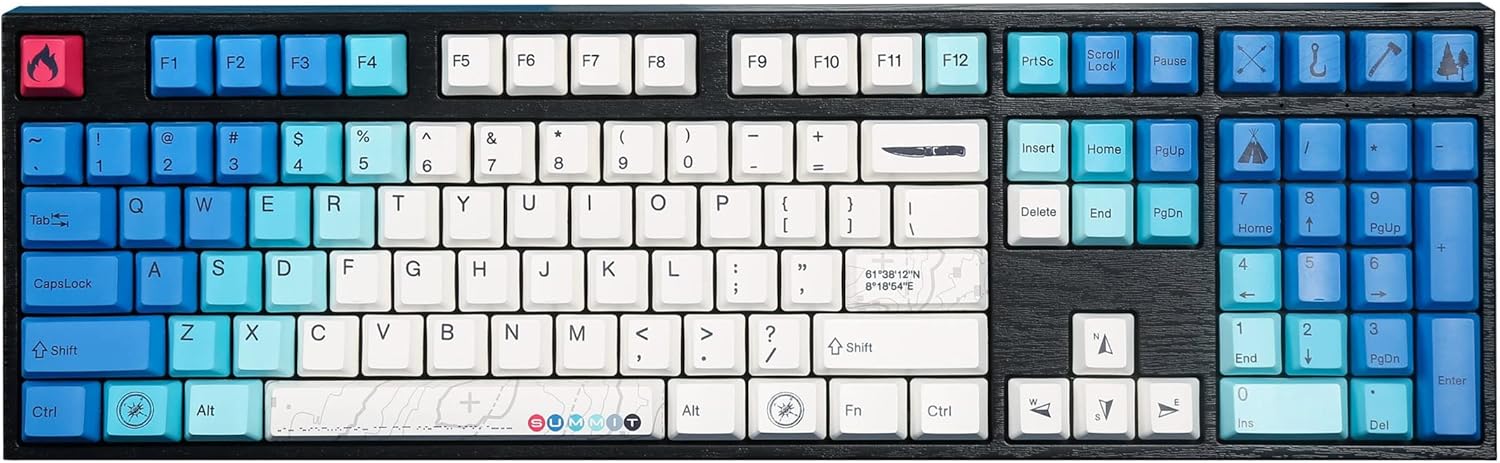
Image: The Varmilo MA Series V2 Summit R2 Mechanical Keyboard, showcasing its full layout and unique keycap design.
Nastavení
1. Vybalení
Opatrně vyjměte klávesnici a veškeré příslušenství z obalu. Ujistěte se, že jsou přítomny následující položky:
- Varmilo MA Series V2 Summit R2 Mechanical Keyboard
- USB-C kabel
- Stahovák kláves (pokud je součástí balení)
- Uživatelská příručka (tento dokument)
2. Připojení klávesnice
- Vyhledejte port USB-C na zadní straně klávesnice.
- Připojte jeden konec dodaného kabelu USB-C ke klávesnici.
- Připojte druhý konec kabelu USB-C k volnému portu USB v počítači.
- Klávesnice je plug-and-play a váš operační systém by ji měl automaticky rozpoznat.
3. Nastavení úhlu klávesnice
The Varmilo MA Series V2 features a double-section kickstand, allowing for two different typing angles. Gently flip out the desired sections of the kickstand located on the underside of the keyboard to adjust its height and angle for ergonomic comfort.

Obrázek: Side profile of the Varmilo keyboard, illustrating the adjustable kickstand in an extended position.
Návod k obsluze
1. Základní funkce kláves
The keyboard features a standard full-size (104-key) layout. All alphanumeric and standard function keys operate as expected. The Varmilo EC Ivy V2 switches provide a smooth and responsive typing experience.
2. Function (Fn) Key Combinations
The Fn key (typically located near the right Alt key) allows access to secondary functions printed on certain keycaps. Hold down the Fn key and press the desired function key simultaneously.
- Fn + F1–F12: Multimedia controls (e.g., volume, play/pause, stop).
- Fn + klávesy se šipkami: LED brightness or effect control (refer to specific keycap legends).
- Fn + Win: Klávesa pro zamknutí/odemknutí systému Windows.

Obrázek: Detailní záběr view of the right side of the Varmilo keyboard, highlighting the special function keys and their legends.
3. LED Backlighting Control
The keyboard features White LED backlighting. Use the Fn key combinations to adjust the brightness and switch between various lighting effects. Specific key legends will indicate the corresponding functions for LED control.
Údržba
1. Čištění klávesnice
Pro zachování vzhledu a funkčnosti klávesnice:
- Před čištěním odpojte klávesnici od počítače.
- Použijte měkký hadřík, který nepouští vlákna dampotřete klávesy vodou nebo jemným čisticím roztokemasing.
- Pro odstranění prachu a nečistot mezi klávesami použijte stlačený vzduch.
- Avoid using harsh chemicals, abrasives, or solvents, as these can damage the PBT keycaps and finish.
2. Demontáž a výměna krytky kláves
The keyboard features durable Dye Sub PBT keycaps. If you need to remove keycaps for deep cleaning or customization:
- Use the provided keycap puller (if applicable) or a similar tool.
- Gently attach the keycap puller to the keycap and pull straight up to remove it. Avoid twisting or excessive force.
- Chcete-li klávesu nasadit zpět, zarovnejte ji s dříkem spínače a pevně ji zatlačte, dokud nezacvakne.

Image: A collection of individual Varmilo keycaps, including special design keycaps, demonstrating their PBT material and dye-sublimated legends.
Odstraňování problémů
If you encounter issues with your Varmilo keyboard, please refer to the following common solutions:
- Klávesnice nereaguje:
- Ujistěte se, že je kabel USB-C bezpečně připojen ke klávesnici i k počítači.
- Zkuste připojit klávesnici k jinému USB portu na počítači.
- Otestujte klávesnici na jiném počítači, abyste vyloučili problémy specifické pro systém.
- Restartujte počítač.
- LEDs Not Working or Incorrect:
- Ensure the LED brightness is not set to the lowest level using Fn key combinations.
- Check if any specific lighting modes are active that might turn off certain LEDs.
- Klíče se neregistrují:
- Remove the keycap and inspect the switch for any obstructions.
- Clean around the switch stem with compressed air.
Obnovení továrního nastavení
If issues persist, a factory reset may resolve them. Consult the Varmilo official website or support for specific reset procedures for your model, as these can vary.
Specifikace
The following are the technical specifications for the Varmilo MA Series V2 Summit R2 Mechanical Keyboard:
| Funkce | Detail |
|---|---|
| Značka | Varmilo |
| Model | MA Series V2 Summit R2 |
| Rozložení | Full-size (104 + 4 keys) |
| Typ přepínače | Varmilo EC Ivy V2 Mechanical Switches |
| Materiál krytky klíče | Dye Sub PBT |
| Konektivita | USB-C |
| Podsvícení | Bílá LED |
| Materiál | Polybutylentereftalát, silikon |
| Zdroj napájení | USB Powered |
| Kompatibilní zařízení | Počítač (přes USB-C) |
Záruka a podpora
Varmilo products are manufactured to high-quality standards. For information regarding warranty coverage, technical support, or service inquiries, please visit the official Varmilo webwebu nebo se obraťte přímo na jejich zákaznickou podporu. Uschovejte si účtenku jako doklad o koupi pro případ reklamace.
Official Varmilo Store: Obchod Varmilo na Amazonu