
1. Konec produktuview
The MOTPK 55-inch L-Shaped Gaming Desk is designed to provide an ergonomic and functional workspace for gamers. It features integrated LED lighting, built-in power outlets with USB ports, a large monitor shelf, and a durable carbon fiber textured surface. Its L-shaped design is optimized for corner placement, maximizing space efficiency.

Image 1.1: The MOTPK 55-inch L-Shaped Gaming Desk in a gaming setup, showcasing LED lighting and monitor placement.
2. Bezpečnostní informace
VAROVÁNÍ: Nedodržení těchto bezpečnostních pokynů může vést ke zranění nebo poškození produktu.
- This product has a maximum weight limit of 220 lbs (approximately 100 kg). Do not exceed this limit to ensure stability and prevent structural damage.
- Ensure proper assembly as detailed in the instructions to maintain desk stability and prevent wobbling.
- Exercise caution when handling electrical components, including LED lights and power outlets, to avoid electrical shock.
- Always unplug the desk from the power source when not in use or before cleaning and maintenance.
- Keep liquids away from electrical components to prevent short circuits and electrical hazards.
- Do not modify the electrical components or wiring of the desk. Contact qualified personnel for any repairs.
3. Montážní návod
Assembly of the MOTPK Gaming Desk is designed to be straightforward. It is recommended to have at least one person for assembly, though two people may make the process easier.
- Rozbalte komponenty: Opatrně vyjměte všechny díly z obalu a zkontrolujte je podle přiloženého seznamu dílů.
- Review Manuální: Read the detailed installation manual thoroughly before beginning assembly.
- Follow Step-by-Step Video: For visual guidance, scan the QR code provided in the manual or visit the MOTPK brand store for a step-by-step assembly video. This can significantly reduce assembly time.
- Instalace elektrických zásuvek: It is advised to install the built-in power outlets onto the desk surface before attaching the upper monitor shelf to the desktop back. This provides easier access for securing the outlets.
- Zabezpečená připojení: Ensure all screws and connections are tightened securely for a stable structure. Adjustable leg pads should be used to level the desk on uneven surfaces.
Video 3.1: Official MOTPK L-shaped Gaming Desk with LED Lights assembly guide. This video demonstrates the step-by-step process for setting up the desk, including attaching the LED strips and power outlets, and securing the frame components.

Obrázek 3.1: Detail view of the integrated LED strips and power outlets on the MOTPK Gaming Desk, highlighting their placement and functionality.
4. Návod k obsluze
4.1 LED Strips Lights
The desk is equipped with high-quality LED strips offering multiple colors and modes to enhance your gaming environment.
- Zapnutí/vypnutí: Connect the LED strip power cable to the built-in power outlet or a suitable power source. Use the included remote control or integrated button (if available) to turn the lights on or off.
- Výběr barvy: Cycle through 10 different light colors to match your preference.
- Výběr režimu: Choose from 7 lighting modes (e.g., static, fade, strobe) and 20 dynamic modes for various effects.
- Nastavení rychlosti: Adjust the flashing speed of dynamic modes using the controls.
Image 4.1: Visual representation of the various LED lighting options, including multiple colors, modes, and speed adjustments available on the desk.
4.2 Zásuvky a USB porty
The desk includes a built-in socket with 2 AC outlets and 2 USB ports for convenient device charging and power supply.
- AC zásuvky: Use the 125V/12A AC outlets to power your computer, monitors, and other peripherals.
- USB porty: The 5V/2A USB ports are suitable for charging smartphones, tablets, and other USB-powered devices.
- Používání: Plug devices directly into the integrated outlets and USB ports. Ensure devices are compatible with the provided power specifications.

Image 4.2: Close-up of the recessed power strip on the MOTPK Gaming Desk, showing the AC outlets and USB ports in use for charging devices.
4.3 Monitor Shelf and Storage
The large monitor shelf supports up to 40 lbs and provides an ergonomic viewing height between 29.5 inches and 36.7 inches. The L-shaped design also includes additional storage shelves for your PC tower and other accessories.
- Umístění monitoru: Place your monitor(s) on the elevated shelf for improved posture and reduced neck strain.
- PC Tower Storage: Utilize the dedicated lower shelf for your PC tower, keeping it off the floor and integrated into the desk design.
- Háček na sluchátka: Use the rotatable headphone hook to keep your headphones organized and easily accessible.
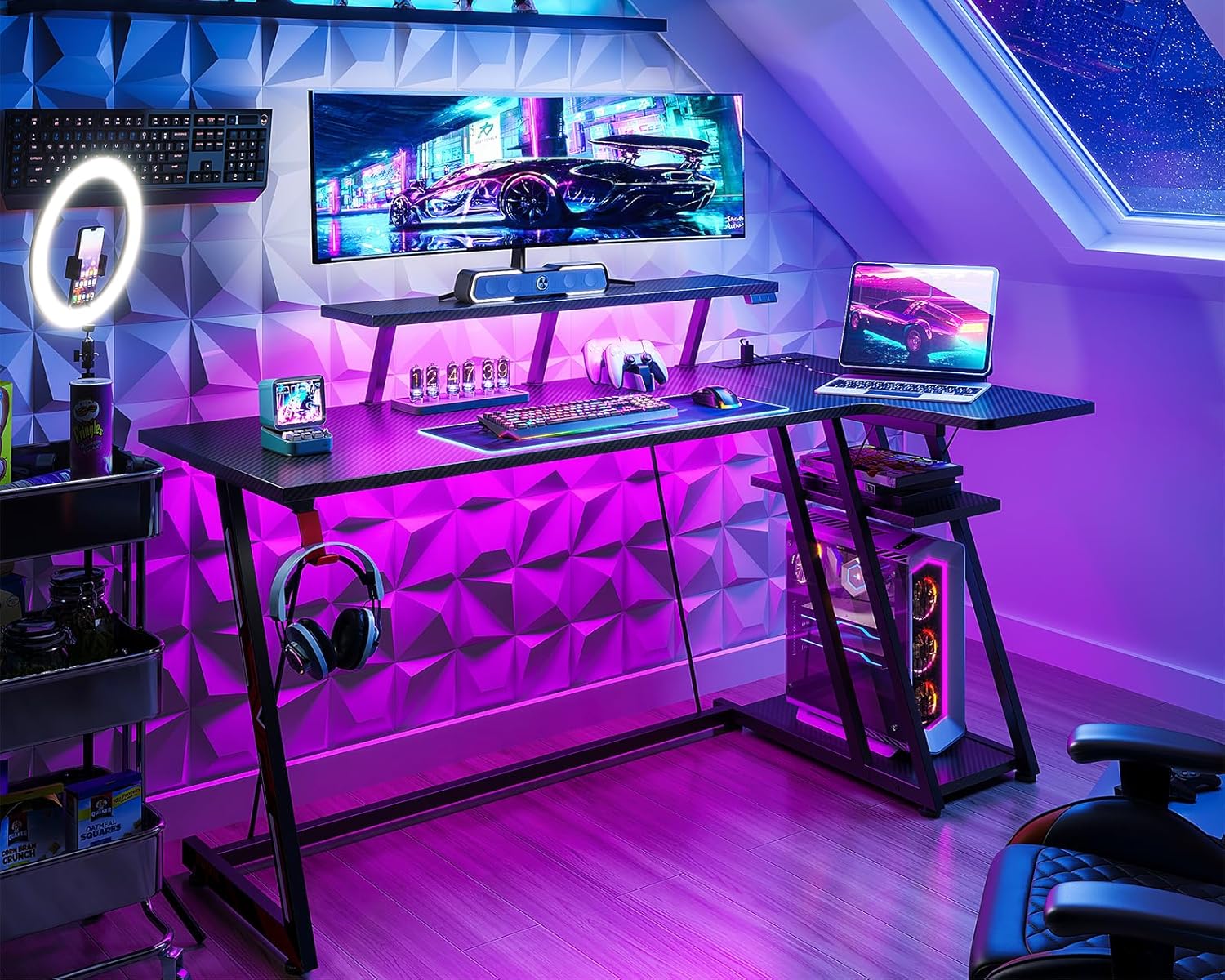
Image 4.3: Detailed diagram illustrating the dimensions of the MOTPK Gaming Desk, including the monitor shelf height and storage shelf measurements.
5. Údržba
- Čištění: Otřete povrch stolu měkkým, damp cloth. Avoid abrasive cleaners or harsh chemicals that could damage the carbon fiber texture or finish. For electrical components, ensure the desk is unplugged and use a dry cloth.
- Utáhněte upevňovací prvky: Pravidelně kontrolujte a utahujte všechny šrouby a upevňovací prvky, aby stůl zůstal stabilní a bezpečný.
- Správa kabelů: Uspořádejte kabely tak, aby se nezamotaly a snížilo se namáhání spojů.
- LED pásky: If LED strips become dirty, gently wipe them with a dry, soft cloth. Do not immerse in water.
6. Řešení problémů
| Problém | Možná příčina | Řešení |
|---|---|---|
| Stůl se kymácí | Nerovná podlaha; uvolněné upevňovací prvky | Adjust leg pads to level the desk. Check and tighten all assembly screws. |
| LED světla nefungují | Power cable disconnected; faulty LED strip; remote control battery low | Ensure power cable is securely plugged in. Check remote control battery. If issues persist, contact customer support. |
| Zásuvky/USB porty nefungují | Desk not plugged into wall outlet; internal wiring issue | Verify the desk's main power cord is plugged into a functional wall outlet. Ensure the power strip is correctly installed. If still not working, contact customer support. |
| Monitor shelf feels unstable | Overloaded; loose connections | Ensure the weight on the monitor shelf does not exceed 40 lbs. Re-tighten all screws securing the monitor shelf. |
7. Specifikace
| Funkce | Detail |
|---|---|
| Značka | MOTPK |
| Číslo modelu | B01011188C2USDFODK |
| Design stolu | Počítačový stůl ve tvaru L |
| Barva | Černý |
| Rozměry produktu (D x Š x V) | 27.56"H x 55.11"Š x 36.22"V |
| Hmotnost položky | 42.99 libry |
| Typ horního materiálu | Engineered Wood with Carbon Fiber Texture |
| Základní materiál | Legovaná ocel |
| Speciální funkce | LED Lights, Built-in Power Outlets (2 AC, 2 USB), Monitor Stand, Headphone Hook, Ergonomic Design |
| Monitor Shelf Capacity | Až 40 liber |
| Doporučená maximální hmotnost | 220 libry |
| Požadovaná montáž | Ano (nářadí je součástí balení) |
8. Záruka a podpora
MOTPK is committed to providing high-quality products and excellent customer service. This product comes with a limited warranty.
- Typ záruky: Limited Warranty. For specific terms and conditions, please refer to the warranty card included with your product or contact MOTPK customer support.
- Zákaznická podpora: For any questions, missing parts, or assistance with assembly or operation, please visit the official MOTPK brand store on Amazon or contact their customer service directly.
- Ověření transparentnosti: Each item includes a unique code for verification before shipping, ensuring product authenticity.