
1. Úvod
Thank you for choosing the Qubo B-209 Senior Mobile Phone. This manual provides essential information for setting up, operating, and maintaining your device. Please read it carefully to ensure proper use and to maximize the phone's features.
Obsah balení
- Qubo B-209 Mobile Phone
- Dobíjecí Li-Ion baterie
- Nabíjecí dok
- USB kabel
- Napájecí adaptér
- Uživatelská příručka (tento dokument)
2. Konec produktuview
The Qubo B-209 is designed for ease of use, featuring large buttons, a clear display, and essential functions for communication. Its key features include a dedicated SOS button for emergencies, a convenient charging dock, and a built-in flashlight.
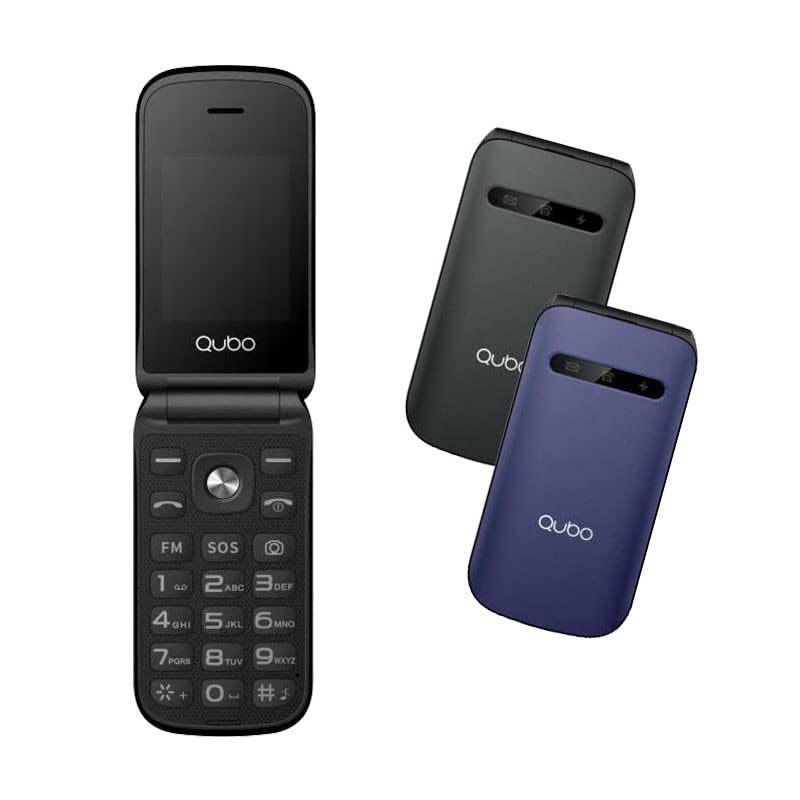
Obrázek 1: Qubo B-209 Senior Mobile Phone with its charging dock. The phone features a blue casing, a large keypad, and a color display.
Klíčové vlastnosti
- 2.4-inch QVGA TFT LCD Display: Jasná a snadno čitelná obrazovka.
- Velká klávesnice: Ergonomic buttons for comfortable dialing and texting.
- SOS tlačítko: Dedicated emergency button for quick contact with pre-set numbers.
- Nabíjecí dok: Convenient desktop charger for easy power replenishment.
- Podpora dvou SIM karet: Use two SIM cards simultaneously.
- FM rádio: Poslouchejte své oblíbené rozhlasové stanice.
- Svítilna: Built-in LED light for convenience.
- 0.3 MP Camera: Basic camera functionality.
- Bluetooth 3.0: Pro bezdrátové připojení ke kompatibilním zařízením.
3. Nastavení
3.1 Instalace baterie
- Opatrně sejměte zadní kryt telefonu.
- Najděte přihrádku na baterie.
- Insert the provided Li-Ion battery, ensuring the gold contacts align with the phone's terminals.
- Nasaďte zadní kryt zpět, dokud bezpečně nezacvakne na místo.
3.2 SIM Card(s) Installation
- With the back cover and battery removed, locate the SIM card slots. The Qubo B-209 supports Dual SIM.
- Carefully insert your SIM card(s) into the designated slot(s) with the gold contacts facing down and the cut corner aligned as shown in the diagram (refer to phone's internal markings).
- Ujistěte se, že jsou SIM karty zcela zasunuty.
- Znovu nainstalujte baterii a zadní kryt.
3.3 Nabíjení telefonu
Před prvním použitím plně nabijte baterii telefonu.
- Používání nabíjecího doku:
- Connect the USB cable to the power adapter, then plug the adapter into a wall outlet.
- Připojte druhý konec kabelu USB k nabíjecí stanici.
- Place the phone into the charging dock, ensuring the charging contacts on the phone align with those on the dock. The phone will indicate charging status on its screen.
- Přímé nabíjení přes USB:
- Connect the USB cable to the power adapter, then plug the adapter into a wall outlet.
- Connect the micro USB end of the cable directly to the micro USB port on the side or bottom of the phone.
A full charge typically takes approximately 2-3 hours. The battery indicator on the screen will show the charging progress.
4. Návod k obsluze
4.1 Zapnutí/vypnutí
- Zapnutí: Stiskněte a podržte Napájení/Ukončení hovoru button (usually red) until the screen lights up.
- Vypnutí: Stiskněte a podržte Napájení/Ukončení hovoru button until the power-off options appear, then select "Power off" or confirm.
4.2 Uskutečňování a přijímání hovorů
- Chcete-li zavolat:
- Zadejte telefonní číslo pomocí klávesnice.
- Stiskněte tlačítko Volání button (usually green) to initiate the call.
- Chcete-li přijmout hovor: Když telefon zvoní, stiskněte Volání tlačítko.
- Ukončení hovoru: Stiskněte tlačítko Napájení/Ukončení hovoru tlačítko.
4.3 Sending and Receiving Messages (SMS)
- Z hlavní obrazovky přejděte do nabídky „Zprávy“.
- Vyberte „Napsat zprávu“ nebo „Nová SMS“.
- Zadejte telefonní číslo příjemce nebo jej vyberte z kontaktů.
- Napište zprávu pomocí klávesnice.
- Stiskněte tlačítko „Odeslat“ pro odeslání zprávy.
4.4 Nouzové tlačítko SOS
Tlačítko SOS se nachází na zadní straně telefonu. Umožňuje vám rychle kontaktovat přednastavená tísňová čísla.
- Nastavení tísňových čísel:
- Go to "Settings" > "SOS Settings" or "Emergency Settings".
- Add up to 5 emergency contact numbers. These numbers will be called in sequence when the SOS button is activated.
- Můžete také povolit odeslání tísňové zprávy těmto kontaktům.
- Použití funkce SOS:
- V případě nouze stiskněte a podržte SOS tlačítko na několik sekund.
- The phone will automatically call the pre-set emergency numbers one by one until an answer is received.
- If enabled, an emergency SMS message will also be sent.
Důležité: Ensure your SOS contacts are aware they are listed as emergency contacts and that their numbers are up-to-date.
4.5 FM rádio
- V hlavní nabídce přejděte do aplikace „FM rádio“.
- Pomocí navigačních tlačítek můžete vyhledávat stanice nebo ručně ladit frekvenci.
- Adjust the volume using the side volume buttons (if available) or menu options.
4.6 Svítilna
The flashlight can be activated quickly.
- Locate the dedicated flashlight button on the side of the phone (if present) or access it via the menu.
- Press the button once to turn the flashlight on, and again to turn it off.
4.7 Fotoaparát
- Aplikaci „Fotoaparát“ otevřete z hlavní nabídky.
- Komponujte snímek pomocí obrazovky jako viewnálezce.
- Press the designated "Capture" or "OK" button to take a photo.
- Photos are saved to the phone's internal memory or an inserted T-Flash card.
5. Údržba
5.1 Čištění
- K čištění obrazovky a těla telefonu použijte měkký, suchý hadřík, který nepouští vlákna.
- Avoid using liquid cleaners, aerosols, or harsh chemicals, as these can damage the phone.
- Zajistěte, aby se do nabíjecího portu ani jiných otvorů nedostala vlhkost.
5.2 Péče o baterii
- Nevystavujte baterii extrémním teplotám (horkým ani nízkým).
- Avoid fully discharging the battery frequently. Charge it regularly.
- Pokud telefon nebudete delší dobu používat, nabijte baterii přibližně na 50 % a uložte ji na chladném a suchém místě.
5.3 Skladování
- Store the phone in a dry environment, away from direct sunlight and excessive humidity.
- Keep the phone out of reach of children and pets.
6. Řešení problémů
| Problém | Možná příčina | Řešení |
|---|---|---|
| Telefon se nezapne. | Baterie je vybitá nebo není správně nainstalována. | Ujistěte se, že je baterie správně nainstalována a plně nabitá. |
| Nelze uskutečňovat ani přijímat hovory. | No network signal; SIM card not installed or activated; incorrect network settings. | Check signal strength. Ensure SIM card is properly inserted and activated. Contact your network provider if issues persist. |
| Telefon se nenabíjí. | Charging cable/adapter faulty; charging port/dock dirty or damaged; battery issue. | Check connections. Try a different outlet or charging method (dock vs. direct USB). Clean charging contacts. |
| Tlačítko SOS nefunguje. | SOS numbers not set up; no network signal. | Verify SOS numbers are correctly configured in settings. Ensure the phone has network coverage. |
| Displej je prázdný nebo zamrzlý. | Softwarová chyba; slabá baterie. | Restart the phone by holding the Power/End Call button. Charge the battery. |
7. Specifikace
| Funkce | Detail |
|---|---|
| Číslo modelu | B-209 |
| Zobrazit | 2.4-inch QVGA TFT LCD |
| Čipová sada | M76261DA, ARM7 CPU, 260MHz |
| Paměť (RAM / ROM) | 32MB RAM, 32MB ROM |
| Konektivita | 2G GSM 850/900/1800 (GSM/GPRS), Bluetooth 3.0 |
| Baterie | 800 mAh Li-Ion |
| Fotoaparát | 0.3 MP (Rear) |
| Podpora SIM | Duální SIM |
| Externí úložiště | T-Flash (up to 32MB) |
| Vlastnosti | FM Radio, Flashlight, SOS Button, External Indicator (Messages, Calls, Charge) |
| Spojení | Micro USB, 3.5 mm Jack |
| Rozměry (balení) | 15.3 x 8.1 x 6.9 cm; 230 g |
| Operační systém | Symbian 9.1 |
8. Záruka a podpora
8.1 Záruka výrobce
The Qubo B-209 Senior Mobile Phone comes with a tříletá záruka výrobce od data nákupu. Tato záruka se vztahuje na vady materiálu a zpracování při běžném používání. Nevztahuje se na škody způsobené nesprávným použitím, nehodami, neoprávněnými úpravami nebo běžným opotřebením. Uschovejte si doklad o koupi pro případné reklamace.
8.2 Zákaznická podpora
For technical assistance, troubleshooting beyond this manual, or warranty inquiries, please contact Qubo customer support. Refer to the packaging or the official Qubo webstránky s nejaktuálnějšími kontaktními informacemi.