
Zavedení
This manual provides detailed instructions for the operation and maintenance of your Raynic CR1019 8.7-inch Digital Alarm Clock. Please read this manual thoroughly before use to ensure proper functionality and to maximize your product experience. This device features a large LED display, dual alarms, USB and Type-C charging ports, temperature and humidity display, and adjustable brightness and volume.
Obsah balení
- Raynic CR1019 Digital Alarm Clock
- Napájecí adaptér (s kabelem)
- Uživatelská příručka
Konec produktuview
The Raynic CR1019 Digital Alarm Clock is designed for ease of use and includes multiple features for convenience. The front panel displays time, date, day of the week, temperature, and humidity. The top panel features control buttons for various settings.

Obrázek 1: Přední view of the Raynic CR1019 Digital Alarm Clock displaying time, date, temperature, and humidity, with a smartphone connected for charging.

Obrázek 2: Nadview of the Raynic Digital Alarm Clock highlighting its large LED display, dual alarms, USB/Type-C charging, snooze, 12/24H/DST, temperature/humidity, adjustable brightness, and volume.
Nastavení
1. Připojení napájení
- Připojte dodaný napájecí adaptér k portu DC IN na zadní straně budíku.
- Zapojte adaptér do standardní elektrické zásuvky. Displej se rozsvítí.
2. Instalace záložní baterie (volitelné)
The clock requires 2 AAA batteries (not included) for battery backup. These batteries are only used to remember time and alarm settings during a power outage and do not power the display.

Obrázek 3: Zadní view of the alarm clock with the battery compartment open, showing where to insert two AAA batteries for backup.
- Najděte přihrádku na baterie na zadní straně hodin.
- Otevřete kryt bateriového prostoru.
- Vložte 2 baterie typu AAA a dbejte na správnou polaritu (+/-).
- Zavřete kryt prostoru pro baterie.
Návod k obsluze
1. Nastavení času a data
Refer to the specific buttons on the top of the clock for time and date adjustments. Typically, a 'SET' or 'TIME SET' button is used to enter setting mode, and '+' / '-' buttons adjust values.
2. Dual Alarm Settings
The clock supports two independent alarms with four mode options: Weekdays (Mon-Fri), Weekends (Sat-Sun), Everyday (Mon-Sun), and One Time.

Obrázek 4: Illustration of dual alarm functionality, allowing two separate wake-up times for different users or purposes.
- Stiskněte tlačítko „ALARM 1“ nebo „ALARM 2“ pro výběr požadovaného budíku.
- Use the adjustment buttons to set the alarm time.
- Select the alarm mode (Weekdays, Weekends, Everyday, One Time) using the mode selection button.
- Potvrďte nastavení pro aktivaci budíku.
3. Nastavení jasu
The display brightness can be adjusted to 5 levels (L1 to L5) to suit your preference, especially for light-sensitive individuals.
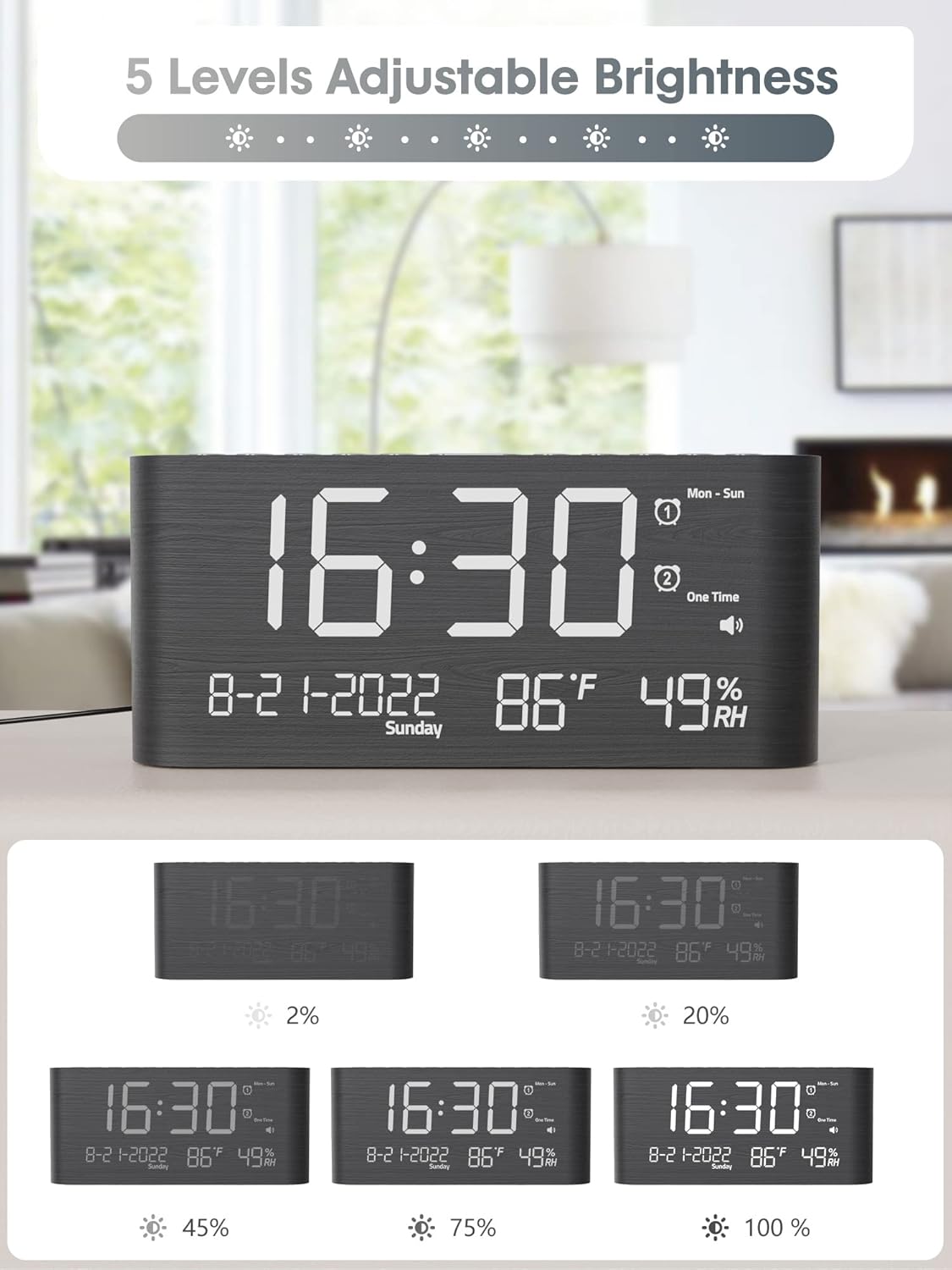
Obrázek 5: Visual representation of the 5 adjustable brightness levels of the clock display.
- Press the 'DIMMER' or 'BRIGHTNESS' button repeatedly to cycle through the 5 brightness levels.
- Vyberte požadovaný jas.
4. Nastavení hlasitosti
The alarm volume can be set to 5 levels, ranging from 0dB to 120dB, with a gradual ascending tone.

Obrázek 6: Depiction of the 5 adjustable volume levels for the alarm, suitable for various sleeping preferences.
- During alarm setting or when the alarm is sounding, use the 'VOLUME' or adjustment buttons to change the volume level.
5. 12H/24H/DST Switchable
Můžete přepínat mezi 12hodinovým a 24hodinovým formátem času a aktivovat letní čas (DST).

Obrázek 7: Illustration of switching between 12-hour, 24-hour, and Daylight Saving Time (DST) display modes.
- Press the '12/24H' button to toggle between 12-hour and 24-hour formats.
- Press the 'DST' button to activate or deactivate Daylight Saving Time.
6. Funkce odložení buzení
When the alarm sounds, press the 'SNOOZE' button to temporarily silence the alarm for 9 minutes.

Obrázek 8: Demonstrating the 9-minute snooze function by pressing the snooze button on the clock.
7. Nabíjecí porty USB a typu C
The clock includes both USB and Type-C charging ports for convenient charging of external devices.

Obrázek 9: The back of the alarm clock with a smartphone and smartwatch charging simultaneously via the integrated USB and Type-C ports.
- Connect your device's charging cable to either the USB-A or Type-C port on the back of the clock.
- Ensure your device begins charging.
8. Zobrazení teploty a vlhkosti
The clock displays accurate indoor temperature and humidity readings.

Obrázek 10: The clock displaying current temperature and humidity, indicating its function for health care monitoring.
- The temperature and humidity are displayed automatically on the screen.
- To switch between Celsius and Fahrenheit, refer to the specific button (often combined with time/date settings).
Údržba
- Čištění: Hodiny otřete měkkým, suchým hadříkem. Nepoužívejte abrazivní čisticí prostředky ani rozpouštědla.
- Umístění: Umístěte hodiny na stabilní, rovný povrch. Chraňte je před přímým slunečním zářením, extrémními teplotami a vysokou vlhkostí.
- Moc: Vždy používejte dodaný napájecí adaptér.
Odstraňování problémů
- Displej je prázdný:
Ensure the power adapter is securely connected to both the clock and a working electrical outlet. If using battery backup, remember it only saves settings, it does not power the display. - Budík se nespustí:
Check if the alarm is activated and set to the correct time and mode. Verify the alarm volume is not set to 0dB. - Čas je nesprávný:
Re-enter the time and date settings. Ensure 12H/24H format and DST settings are correct for your region. - Devices not charging via USB/Type-C:
Ensure the clock is powered on. Check the charging cables and the devices themselves. Try a different port or cable.
Specifikace
| Funkce | Detail |
|---|---|
| Značka | Raynic |
| Číslo modelu | CR1019 |
| Typ zobrazení | Digitální LED |
| Rozměry produktu | 1.7"W x 3.6"H (Note: Full dimensions are 8.7"L x 1.7"W x 3.6"H) |
| Hmotnost položky | 7.7 unce (0.48 libry) |
| Zdroj napájení | Elektrický kabel |
| Zálohování baterie | 2 AAA batteries required (not included) for memory only |
| Speciální funkce | Dual Alarms, USB & Type-C Charging, Temperature, Humidity, Date, 5-level Brightness, 5-level Volume, 9-min Snooze, 12H/24H/DST |
| Materiál | Dřevo |
Záruka a podpora
Raynic products are designed for reliability and performance. For warranty information or technical support, please refer to the contact details provided with your purchase documentation or visit the official Raynic webmísto. Uschovejte si doklad o koupi pro případ záručních reklamací.