
1. Úvod
The LogiLink 4K 2x2 port bidirectional HDMI switch allows you to connect two (2) HDMI sources, such as a video camera, Blu-ray player, satellite receiver, digital video recorder, set-top boxes, or game consoles, to two (2) HDMI-compatible displays. This switch can simultaneously route one of the two HDMI input signals to two (2) UHD displays. The integrated Downscaler function supports displaying 4K content on Full HD screens, and both 4K and Full HD screens can operate simultaneously. This smart switch ensures no compromise on image and sound quality. 4K/UHD image signals are transmitted without loss, with HDCP 2.2/1.4, HDR, and 3D support. Audio transmission in LPCM 7.1, DTS, Dolby Digital, DTS-HD Master Audio, and Dolby TrueHD meets all your audio needs.
2. Vlastnosti produktu
- Allows switching between two HDMI signal sources to two displays/TVs simultaneously.
- Compliant with HDMI 2.0, offering a bandwidth of 6 Gbit/s at 600 MHz per line (18 Gbit/s total).
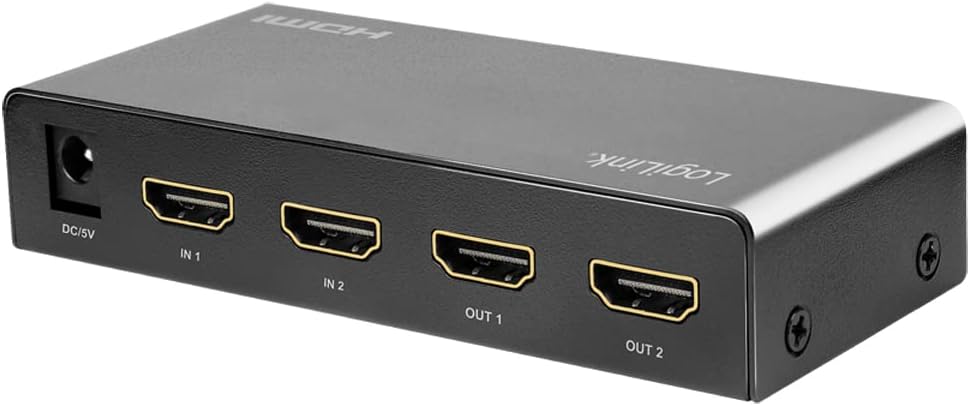
- Connections: 2 x HDMI A inputs, 5V DC power input; Outputs: 2 x HDMI A.
- Supports Ultra HD 4K/60 Hz YUV 4:4:4 and Full 3D.
- Supports 36-bit Deep Color (12 bits per channel).
- Supports EDID Pass-Through.
- Supports HDCP 1.4/2.2, HDR, and Downscaler functionality.
- Supports uncompressed audio like LPCM 7.1.
- Supports compressed audio data such as DTS, Dolby Digital (including DTS-HD Master Audio and Dolby TrueHD).
- Odolný kovový casing, dimensions: 11.6 x 5.2 x 2.3 cm.
3. Obsah balení
Zkontrolujte prosím balení, zda neobsahuje následující položky:
- LogiLink HD0039 2x2 Port Bidirectional HDMI Switch
- 5V DC napájecí adaptér
- Uživatelská příručka
4. Zařízení skončiloview


5. Pokyny k nastavení
- Vypínací zařízení: Before making any connections, ensure all HDMI source devices (e.g., Blu-ray player, game console) and display devices (e.g., TV, monitor) are powered off.
- Připojení zdrojů HDMI: Connect your HDMI source devices to the HDMI IN 1 and HDMI IN 2 ports on the LogiLink HD0039 switch using high-quality HDMI cables.
- Připojení HDMI displejů: Connect your HDMI display devices to the HDMI OUT 1 and HDMI OUT 2 ports on the switch using high-quality HDMI cables.
- Připojte napájecí adaptér: Insert the 5V DC power adapter into the DC 5V port on the switch, then plug the adapter into a power outlet. The power LED on the switch should illuminate.
- Zapnutí zařízení: Power on your display devices first, then power on your HDMI source devices.
- Select Input/Output: Use the 'SOURCE' button on the front panel to select the desired input source (IN 1 or IN 2) and the 'SWITCH' button to toggle between output configurations.
6. Návod k obsluze
The LogiLink HD0039 switch offers flexible control for managing your HDMI signals.
6.1. Switching Inputs
- Stiskněte tlačítko ZDROJ button on the front panel to cycle between HDMI IN 1 and HDMI IN 2. The corresponding LED indicator (IN 1 or IN 2) will light up to show the currently selected input.
6.2. Switching Outputs
- Stiskněte tlačítko PŘEPÍNAČ button on the front panel to control which output ports receive the selected input signal. This switch allows you to send the selected input to OUT 1, OUT 2, or both simultaneously.
6.3. HDMI Version Selection
- A small switch labeled 1.4/2.0 is located on the front panel. This allows you to manually select the HDMI version. For 4K/60Hz content and HDR, ensure this switch is set to 2.0. For compatibility with older devices, you may switch to 1.4 v případě potřeby.
6.4. Výběr režimu zvuku
- The AUDIO button allows you to select the audio mode. Refer to the LED indicators (HIGH/LOW) for the current audio setting. This feature can be used to optimize audio output for different display capabilities.
7. Údržba
- Čištění: K čištění zařízení používejte měkký, suchý hadřík. Nepoužívejte tekuté ani aerosolové čisticí prostředky.
- Větrání: Ujistěte se, že je zařízení umístěno v dobře větraném prostoru, aby nedošlo k přehřátí. Neblokujte žádné větrací otvory.
- Prostředí: Keep the device away from excessive heat, humidity, dust, and direct sunlight.
- Moc: Always use the provided 5V DC power adapter. Disconnect the power adapter if the device will not be used for an extended period.
8. Řešení problémů
| Problém | Možná příčina | Řešení |
|---|---|---|
| No picture on display. |
|
|
| Špatná kvalita obrazu nebo blikání. |
|
|
| Žádný zvuk. |
|
|
| 4K content not displaying correctly on Full HD screen. | Downscaler not active or issue. | Ensure the Downscaler function is enabled (it is integrated and should work automatically). If issues persist, try restarting all devices. |
9. Specifikace
| Funkce | Specifikace |
|---|---|
| Značka | LogiLink |
| Číslo modelu | HD0039 |
| Barva | Černý |
| Typ konektoru | HDMI |
| Počet portů | 2 vstupy, 2 výstupy |
| Kompatibilní zařízení | Camera, Blu-ray Player, DVD Player, Television |
| HDMI standard | HDMI 2.0 (backward compatible with 1.4) |
| Šířka pásma | 18 Gbit/s (6 Gbit/s per line at 600 MHz) |
| Podpora rozlišení | Up to 4K/60 Hz YUV 4:4:4, Full 3D |
| Barevná hloubka | 36-bit Deep Color (12 bitů na kanál) |
| Podpora HDCP | HDCP 1.4 / 2.2 |
| Podpora HDR | Ano |
| Podpora EDID | EDID Pass-Through |
| Podpora zvuku | LPCM 7.1, DTS, Dolby Digital, DTS-HD Master Audio, Dolby TrueHD |
| Downscaler Function | Integrated (4K to Full HD) |
| Napájení | 5V DC |
| CasinMateriál | Kov |
| Rozměry (D x Š x V) | 11.6 x 5.2 x 2.3 cm |
| Výrobce | 2direct GmbH |
| Země původu | Čína |
10. Záruka a podpora
Produkty LogiLink jsou navrženy pro spolehlivost a výkon. Konkrétní informace o záruce naleznete v záruční kartě dodané s produktem nebo na oficiálních webových stránkách LogiLink. website. For technical support or assistance, please contact your retailer or LogiLink customer service.
Spare parts availability and software update guarantees are not available for this product.