
1. Konec produktuview
The Zemismart Smart Blinds WiFi Motorized Roller Blind Motor Kit is designed to upgrade existing manual window blinds into smart, motorized systems. This tubular motor features an integrated Wi-Fi module, enabling control via a remote, smartphone application (Tuya/Smart Life APP), and voice commands through smart assistants like Alexa and Google Home.
This specific model is suitable for blind tubes with an outer diameter (OD) of approximately 32mm (1.25 inches). It can also accommodate 38mm (1.5 inches) tubes, with an inner diameter (ID) suitable for 30mm or 36mm. Please verify your tube dimensions before installation.
2. Obsah balení
- Inteligentní trubkový motor
- Koncové zátky
- Montážní držáky
- Napájecí kabel
- (Optional: 1-Channel or 6-Channel Remote Control, depending on purchased variant)
3. Kroky instalace
Follow these steps to correctly install your Zemismart smart blind motor:
- Vložit motor: Place the motor into the suitable drive tube of your roller blind. Ensure it fits securely.
- Instalace koncových zátek a konzol: Attach the end plugs and mounting brackets to the tube. Test the full length of the blind to mark the precise location for installation on the wall or window frame.
- Nasedněte na slepce: Clamp the entire curtain assembly, with the motor installed, to the mounting bracket. Ensure it is securely fastened. The installation is now complete.
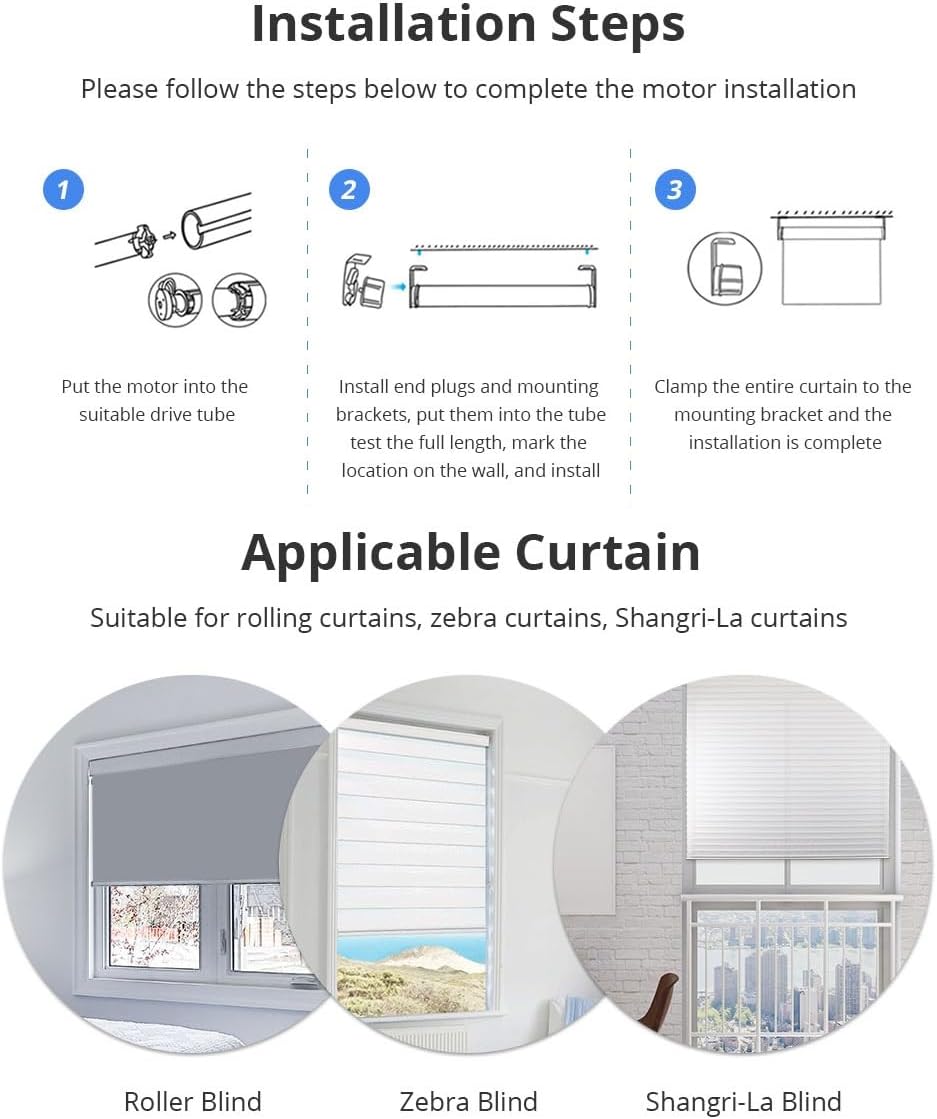
Figure 3.1: Visual guide for motor installation steps.
3.1 Applicable Curtain Types
This motor kit is suitable for various types of window coverings, including:
- Rolling Curtains
- Zebra Curtains
- Shangri-La Curtains

Obrázek 3.2: Přamples of compatible blind types.
3.2 Motor Details and Tube Compatibility
The motor includes LED lights, a setting button, and a smart port. It is designed for 30mm inner diameter (ID) and 32mm outer diameter (OD) tubes. A tail plug with a diameter of 29.5mm is also shown.
Poznámka: If the groove size of your pipe is relatively large, you may need to cut the accessories yourself to ensure a proper fit.

Figure 3.3: Motor components and compatible tube styles.
4. Návod k obsluze
4.1 APP Control (Tuya/Smart Life APP)
The motor can be controlled remotely using the Tuya or Smart Life application on your smartphone. This allows you to open, close, or adjust the position of your blinds from anywhere.

Figure 4.1: Controlling the motor via the Tuya APP.
4.2 Hlasové ovládání (Alexa / Google Home)
Integrate your smart blind motor with voice assistants like Amazon Alexa or Google Home for convenient hands-free operation. Simply use voice commands such as "Alexa, open the shade" to control your blinds.

Obrázek 4.2: Integrace hlasového ovládání s chytrými reproduktory.
4.3 Dálkové ovládání
For direct control, use the optional 1-channel or 6-channel remote control. A 6-channel remote can control up to 5 motors simultaneously and supports one-click settings to open blinds to 25%, 50%, or 75% positions.

Figure 4.3: Operating blinds with the remote control.
4.4 Řízení časování
Utilize the timing control feature through the app to schedule when your curtains open or close. You can set specific times and desired curtain positions (e.g., 50% open) for automated operation.
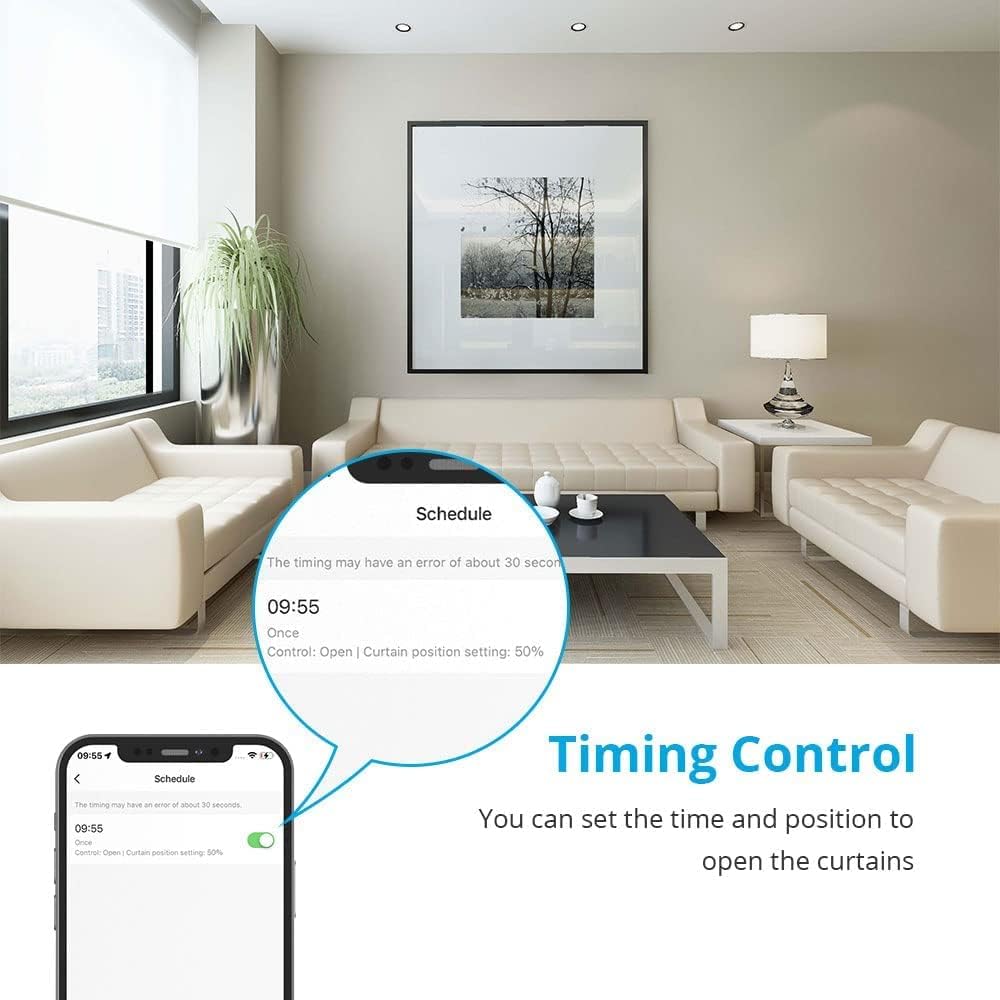
Figure 4.4: Setting up timing control via the app.
5. Specifikace produktu
| Model produktu | ZM25RW01 |
| Jmenovitá rychlost | 35 ot./min |
| Jmenovitý objemtage | 100-240V AC |
| Jmenovitý proud | 0.12 A |
| Jmenovitý točivý moment | 1.1 Nm |
| Třída ochrany | IP44 |
| Délka čáry | 100 cm |
| Délka motoru | 420 mm |
| Compatible Tube OD | 32 mm (1.25 inches), 38 mm (1.5 inches) |
| Typ ovládání | Remote Control, APP Control (Tuya/Smart Life), Voice Control (Alexa/Google Home) |
| Materiál | Fabric (referring to compatible blinds) |
| Typ montáže | Exterior Mounting |

Obrázek 5.1: Podrobné parametry a rozměry produktu.
5.2 Product Upgrade Information
Please note that recent upgrades to the Smart Roller Shutter Motor primarily involve a change in the motor tube color from silver to blue. The core functions and performance of the motor remain consistent with previous versions.

Figure 5.2: Visual representation of the motor color upgrade.
6. Údržba
To ensure optimal performance and longevity of your Zemismart Smart Blinds Motor, follow these general maintenance guidelines:
- Keep the motor and surrounding area clean and free from dust.
- Nevystavujte motor nadměrné vlhkosti nebo extrémním teplotám.
- Do not attempt to disassemble the motor. Refer to professional service if repairs are needed.
- Periodically check the mounting brackets and connections to ensure they are secure.
7. Řešení problémů
If you encounter any issues with your Zemismart Smart Blinds Motor, please refer to the following common troubleshooting tips:
- Motor nereaguje: Check if the motor is properly connected to power. Ensure the remote control or smartphone app is paired correctly and within range.
- Inconsistent movement: Verify that the blind tube is free from obstructions and the motor is securely installed. Recalibrate the motor's limits if necessary (refer to specific app instructions).
- Problémy s připojením aplikace: Ensure your Wi-Fi network is stable and the motor is within range of your router. Restart the app and the motor if problems persist.
- Hlasové ovládání nefunguje: Confirm that your smart assistant (Alexa/Google Home) is linked to your Tuya/Smart Life account and the device is recognized.
For more complex issues, please contact Zemismart customer support.
8. Záruka a podpora
Your Zemismart Smart Blinds Motor comes with a standard manufacturer's warranty. Please refer to the warranty card included with your purchase for specific terms and conditions.
For technical support, product inquiries, or warranty claims, please contact Zemismart customer service through their official webwebu nebo kontaktních informací uvedených na obalu produktu.
Online zdroje: For the latest updates, FAQs, and additional support, visit the official Zemismart webmísto: www.zemismart.com