
LogiLink ID0209
LogiLink ID0209 Wireless Keyboard User Manual
1. Úvod
This manual provides instructions for the LogiLink ID0209 Wireless Keyboard. This keyboard is designed for comfortable, precise, and quiet typing, featuring an adjustable RGB backlight and a long-lasting battery. It connects wirelessly via 2.4 GHz radio technology and is compatible with various operating systems.

Figure 1: LogiLink ID0209 Wireless Keyboard
2. Obsah balení
Zkontrolujte prosím balení, zda neobsahuje následující položky:
- LogiLink ID0209 Wireless Keyboard
- USB 2.4 GHz Receiver Dongle
- Nabíjecí kabel USB-A na Micro USB
- Uživatelská příručka (tento dokument)
3. Nastavení
3.1 Nabíjení klávesnice
Before initial use, fully charge the keyboard. Connect the supplied USB-A to Micro USB cable to the keyboard's Micro USB port (located on the side) and the other end to a USB power source (e.g., computer USB port, USB wall adapter).
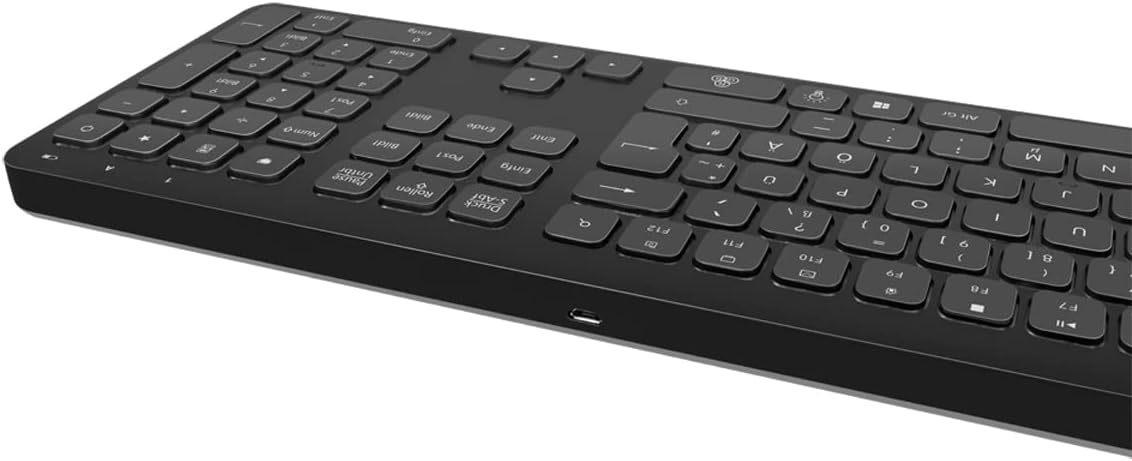
Obrázek 2: Strana klávesnice view with Micro USB charging port
3.2 Connecting the USB Receiver Dongle
Insert the 2.4 GHz USB receiver dongle into an available USB port on your computer or compatible device. The system will automatically detect and install the necessary drivers.

Figure 3: USB 2.4 GHz Receiver Dongle
3.3 Zapnutí/vypnutí
Locate the ON/OFF switch on the back of the keyboard. Slide the switch to the 'ON' position to power on the keyboard. Slide it to 'OFF' when not in use to conserve battery life.
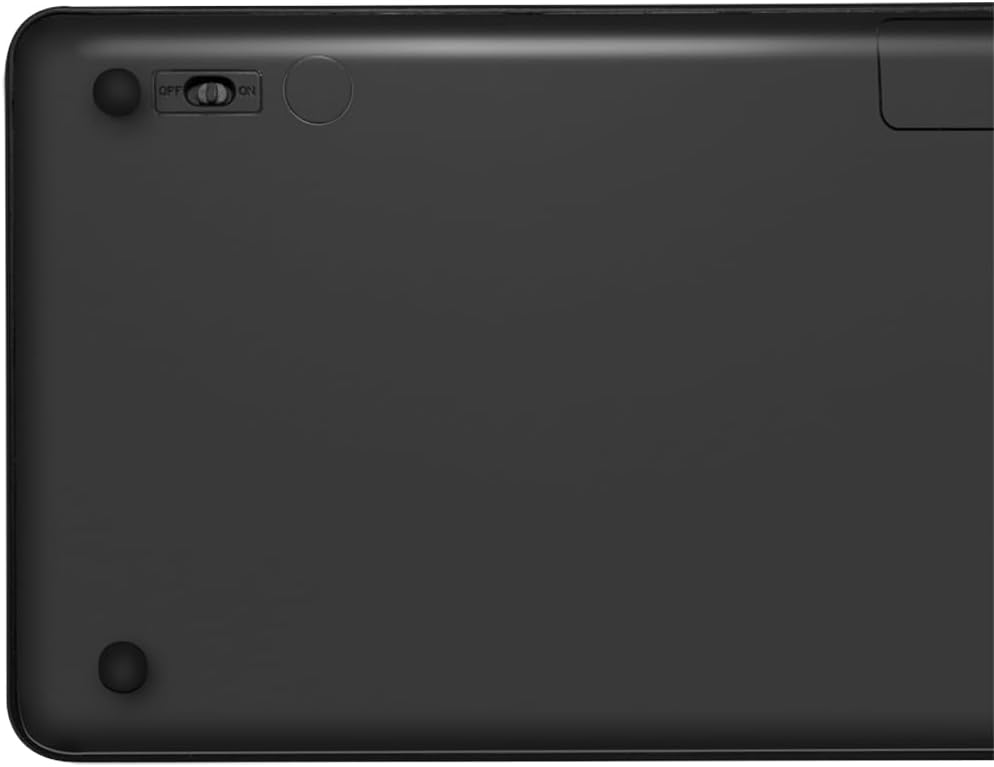
Figure 4: Keyboard back with ON/OFF switch
The keyboard should automatically connect to the USB receiver once both are powered on and within range (up to 10 meters).
4. Návod k obsluze
4.1 ovládání podsvícení
The keyboard features an adjustable RGB backlight with 7 colors and 3 brightness levels, including a breathing mode.
- Změna barev: Stiskněte tlačítko Fn + Light Bulb key to cycle through the 7 available colors (green, blue, yellow, purple, cyan, white, red).
- Nastavení jasu: Stiskněte tlačítko Fn + Up Arrow key pro zvýšení jasu a Fn + Down Arrow key pro snížení jasu. K dispozici jsou 3 úrovně jasu.
- Režim dýchání: Stiskněte tlačítko Fn + RGB Cycle key (often depicted as a swirling icon) to activate or deactivate the breathing backlight mode.

Figure 5: Keyboard with RGB backlight in use
4.2 Klávesové zkratky
The keyboard includes 17 shortcut keys for quick access to various functions. Some shortcut keys are specifically designed for Windows operating systems.
To use a shortcut key, press and hold the Fn key, then press the desired function key (e.g., F1-F12, multimedia keys).
- Ovládání multimédií: Play/Pause, Stop, Previous Track, Next Track, Volume Up, Volume Down, Mute.
- Produktivita: Open Mail, Web Browser, My Computer, Search.
- Ostatní: Lock Screen, Calculator.

Figure 6: Close-up of keyboard keys, including numpad and function row
4.3 Automatic Energy-Saving Mode
The keyboard is equipped with an automatic energy-saving mode. After a period of inactivity, the keyboard will enter a sleep state to conserve battery. Press any key to wake it up.
5. Údržba
Abyste zajistili dlouhou životnost a optimální výkon klávesnice, dodržujte tyto pokyny pro údržbu:
- Čištění: K otření povrchu klávesnice použijte měkký, suchý hadřík, který nepouští vlákna. V případě odolné nečistoty lehceamphadřík vodou nebo jemným čisticím roztokem. Zabraňte nadměrné vlhkosti.
- Skladování: Klávesnici skladujte na chladném a suchém místě mimo dosah přímého slunečního záření a extrémních teplot.
- Vyhněte se tekutinám: Do not expose the keyboard to liquids. In case of accidental spills, immediately power off the keyboard and allow it to dry completely before use.
- Zacházejte opatrně: Zabraňte pádu klávesnice na zem nebo jejímu vystavení silným nárazům.
6. Řešení problémů
If you encounter issues with your LogiLink ID0209 keyboard, refer to the following common problems and solutions:
| Problém | Možná příčina | Řešení |
|---|---|---|
| Klávesnice nereaguje | Keyboard is off Slabá baterie USB přijímač není připojen Mimo dosah | Ensure keyboard is ON Nabijte klávesnici Plug USB receiver firmly into a working USB port Move keyboard closer to the receiver (within 10m) |
| Nefunguje podsvícení | Podsvícení je vypnuté Slabá baterie | Press Fn + Light Bulb key to turn on/cycle Nabijte klávesnici |
| Klávesy se zasekávají nebo nereagují | Nečistoty nebo nečistoty pod klíči | Clean the keyboard as per maintenance instructions |
| Připojení často vypadává | Rušení Mimo dosah Slabá baterie | Přesuňte se dál od ostatních bezdrátových zařízení Move keyboard closer to the receiver Nabijte klávesnici |
7. Specifikace
| Funkce | Detail |
|---|---|
| Značka | LogiLink |
| Číslo modelu | ID0209 |
| Technologie připojení | 2.4 GHz Wireless (High-frequency) |
| Bezdrátové Dosah | Až 10 metrů |
| Počet klíčů | 111 klíčů |
| Klávesové zkratky | 17 (some Windows-specific) |
| Podsvícení | Adjustable RGB (7 colors, 3 brightness levels, breathing mode) |
| Typ klíče | Flat keys |
| Kompatibilní zařízení | Windows, Mac OS, Android, iOS, Smart TV systems |
| Speciální funkce | Ergonomic, Backlit, Automatic Energy-Saving Mode |
| Nabíjecí port | Micro USB |
| Barva | Černý |
| Materiál | Plast |
| Výrobce | 2direct GmbH |
| Země původu | Čína |
8. Záruka a podpora
Informace o záruce a technickou podporu naleznete v dokumentaci dodané s vaším nákupem nebo navštivte oficiální webové stránky LogiLink. webUschovejte si doklad o koupi pro případ reklamace.
Ask a question about this manual
Ask about setup, troubleshooting, compatibility, parts, safety, or missing instructions. Manuals+ will review the question and use this page’s manual context to help answer it.