
Zavedení
This manual provides comprehensive instructions for the operation and maintenance of your Andoer Portable Digital Camera. Designed for ease of use, this compact camera features a 48MP image sensor, 2.7K video recording capabilities, and a 2.88-inch IPS display. It includes advanced functions such as 16X digital zoom, auto focus, self-timer, face detection, and anti-shaking technology, making it ideal for capturing high-quality photos and videos.

Figure 1: Andoer Portable Digital Camera (Pink)
This image displays the front and back of the pink Andoer Portable Digital Camera. The front shows the lens, flash, and "Andoer" branding, along with "48.0 MEGA PIXELS" and "2.7K". The back features the 2.88-inch IPS screen, which is displaying a vibrant image of a person. Also visible are the control buttons and a 32GB SD card and two batteries, indicating included accessories.
Mezi klíčové vlastnosti patří:
- 48 megapixelu still image resolution
- 2.7 tis nahrávání videa
- 16X digitální zoom for capturing distant subjects
- 2.88palcový IPS displej for clear viewIng
- Automatické ostření for sharp images
- Detekce obličeje a Smile Capture for intelligent photography
- Support for up to 128GB Extended Memory (SD/MMC card)
- Vestavěný Anti-Shaking funkce

Obrázek 2: Klíčové vlastnostiview
This image visually summarizes the main features of the camera using icons and text: 48 Mega Pixel, 2.7K Video, 16X Powerful Zoom, Anti-shaking, 2s/5s/10s Self-timer, 2.88in IPS Screen, 128GB Extended Memory, and Face Detection. The camera is shown in the foreground with a group of smiling people in the background, suggesting its use for social photography.
Nastavení
Before using your camera, please ensure it is properly set up. The package includes the digital camera, USB cable, strap, carrying pouch, two batteries, and a user manual.
1. Instalace a nabíjení baterie
The camera is powered by a rechargeable lithium battery. Two batteries are included for extended use.
- Otevřete kryt přihrádky na baterie, který se nachází ve spodní části fotoaparátu.
- Insert the lithium battery, ensuring the correct polarity as indicated inside the compartment.
- Bezpečně zavřete kryt bateriového prostoru.
- To charge the battery, connect the camera to a computer or a power adapter (not included) using the provided USB cable. The charging indicator light will illuminate.
- Charging typically takes a few hours. The indicator light will change or turn off once charging is complete.
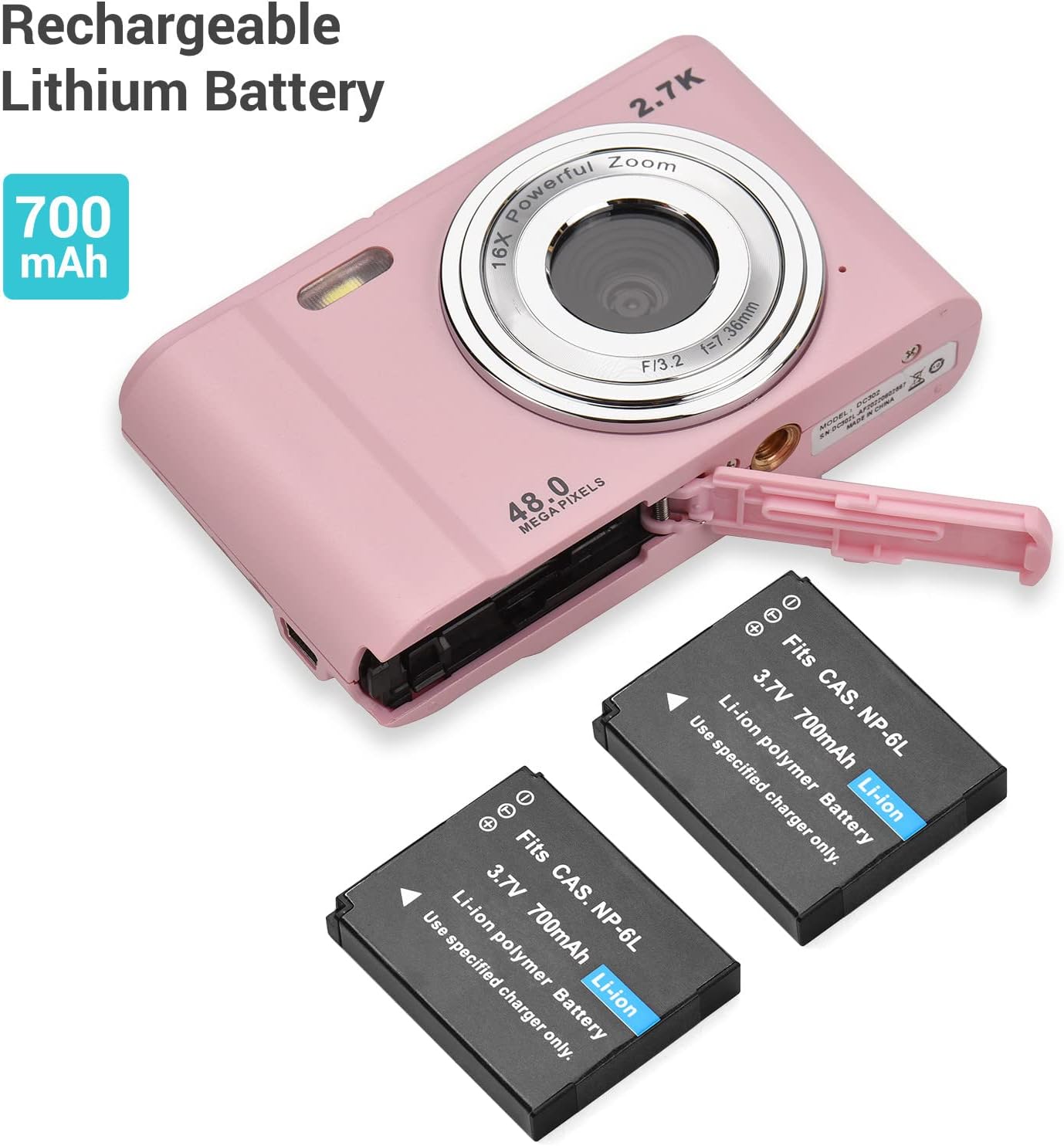
Obrázek 3: Instalace baterie
This image shows the Andoer Digital Camera with its battery compartment open, revealing the slot for the rechargeable lithium battery. Two 700mAh Li-ion batteries are displayed next to the camera, illustrating the power source and its capacity.
2. Instalace paměťové karty
The camera supports SD memory cards and MMC cards from 4GB to 128GB. A memory card is required to save photos and videos.
- Locate the memory card slot, usually next to the battery compartment or on the side of the camera.
- Insert the SD/MMC card into the slot with the metal contacts facing the correct direction (refer to the diagram near the slot). Push until it clicks into place.
- To remove the card, gently push it in again until it clicks, and it will spring out.
Figure 4: Memory Card and Accessories
This image highlights the camera's accessories, specifically a 32GB SD memory card and two rechargeable batteries, indicating their importance for camera operation and storage.
Návod k obsluze
1. Zapnutí/vypnutí
- Pro zapnutí stiskněte a podržte tlačítko Napájení.
- To power off, press and hold the Power button again. The camera also features an auto-off function (1min/3min/5min/No Shutdown) to conserve battery.
2. Fotografování
- Zapněte fotoaparát.
- Komponujte svůj snímek pomocí 2.88palcového IPS displeje.
- Press the Shutter button halfway down to allow the camera to auto-focus.
- Press the Shutter button fully down to capture the photo.
3. Nahrávání videí
- Switch to video mode (if applicable, usually a dedicated button or menu option).
- Press the Shutter button to start recording. A timer will appear on the screen.
- Dalším stisknutím tlačítka spouště nahrávání zastavíte.

Figure 5: Photo and Video Capabilities
This image illustrates the camera's dual capabilities: 2.7K video recording and 48-megapixel still photography. It shows a person skiing (representing video) and a woman posing (representing photos), with the camera positioned below, emphasizing its versatility.
4. Funkce zoomu
Use the W (Wide) and T (Telephoto) buttons, typically located near the top right of the camera, to adjust the 16X digital zoom.
- Stiskněte T pro přiblížení (teleobjektiv).
- Stiskněte W pro oddálení (širokoúhlý záběr).

Figure 6: 16X Powerful Zoom
This image demonstrates the camera's 16X powerful digital zoom capability. It shows a close-up shot of an insect on a leaf, contrasted with a wider view of the same scene as seen on the camera's screen, highlighting the zoom's effectiveness.
5. Samospoušť
The camera offers 2s, 5s, and 10s self-timer options for delayed shooting.
- Access the self-timer setting through the camera's menu.
- Select your desired delay (2s, 5s, or 10s).
- Press the Shutter button. The camera will count down before taking the photo.
6. Smart Detection (Face Detection & Smile Capture)
The camera can automatically detect faces and capture photos when a smile is detected.
- Enable Face Detection and Smile Capture in the camera settings.
- When enabled, the camera will automatically focus on faces and trigger the shutter when a smile is detected, ensuring well-composed and joyful portraits.

Figure 7: Smart Detection Features
This image illustrates the camera's "Smart Detection" capabilities, specifically Face Detection and Smile Capture. The camera's screen displays a family photo, and icons below represent these intelligent features, indicating the camera's ability to automatically optimize shots for portraits.
7. Připojení k počítači
You can transfer photos and videos to your computer using the provided USB cable.
- Ujistěte se, že je kamera zapnutá.
- Připojte jeden konec USB kabelu k USB portu fotoaparátu a druhý konec k počítači.
- The camera will appear as a removable disk drive on your computer. You can then access and transfer your files.
Údržba
Proper care and maintenance will extend the life of your Andoer Digital Camera.
- Čištění objektivu a obrazovky: Use a soft, lint-free cloth specifically designed for optics. Do not use abrasive cleaners or solvents.
- Skladování: When not in use for extended periods, remove the battery and store the camera in a cool, dry place, away from direct sunlight and extreme temperatures.
- Voda a prach: This camera is not waterproof or dustproof. Avoid exposure to water, high humidity, and dusty environments.
- Péče o baterie: Fully charge batteries before first use. Do not expose batteries to high temperatures or dispose of them in fire. Recycle used batteries according to local regulations.
Odstraňování problémů
Pokud se s fotoaparátem setkáte s problémy, podívejte se na následující běžné problémy a jejich řešení:
| Problém | Možná příčina | Řešení |
|---|---|---|
| Fotoaparát se nezapne. | Baterie je vybitá nebo nesprávně vložená. | Ujistěte se, že je baterie plně nabitá a vložená se správnou polaritou. |
| Nelze pořizovat fotografie/videa. | Paměťová karta je plná, není vložena nebo je poškozená. | Vložte paměťovou kartu, smažte nepotřebné filenebo kartu naformátujte (tím se vymažou všechna data). |
| Obrázky jsou rozmazané. | Lens is dirty, insufficient light, or camera shake. | Clean the lens, use flash if needed, or enable anti-shaking function. Hold the camera steady. |
| Kamera zamrzne. | Závada softwaru nebo vybitá baterie. | Remove and reinsert the battery to reset. Ensure battery is charged. |
| Počítač nerozpoznává kameru. | Problém s kabelem USB nebo problém s ovladačem. | Try a different USB port or cable. Ensure camera is powered on when connected. |
Specifikace
Detailed technical specifications for the Andoer Portable Digital Camera:
| Funkce | Specifikace |
|---|---|
| Zobrazit | 2.88 inches IPS LCD screen (4:3) |
| Obrazový snímač | Obrazový snímač 8MP CMOS |
| Poměr rozlišení obrazu | Max. 48MP |
| Velikost filmu | 2688*1520 2.7K, 1920*1080 HD, 1280*720 HD, 640*480 |
| Ohnisková vzdálenost | f=7.36 mm |
| Otvor | F/3.2 |
| Digitální zoom | 16X |
| Podpora paměťových karet | SD memory card and MMC card (4GB to 128GB) |
| File Formát | JPG, AVI |
| Samospoušť | 2 / 5 / 10 |
| Vyvážení bílé | Auto/ Daylight/ Cloudy/ Fluorescent/ Tungsten |
| Kompenzace expozice | -3.0~+3.0 |
| USB port | USB 2.0 |
| Automatické vypnutí | 1min/ 3min/ 5min/ No Shutdown |
| Moc | Dobíjecí lithiová baterie 700mAh |
| Požadavek na operační systém | Compatible with Windows XP/ Vista/ 7/ 8/ 10; Mac10.2 (Include and later) |
| Rozměry | 9.6 * 5.6 * 2.5 cm / 3.78 * 2.2 * 0.98 palce |
| Čistá hmotnost | 93g / 3.28oz (with Battery) |
| Montáž | 1/4 inch thread at the bottom for tripod/monopod |
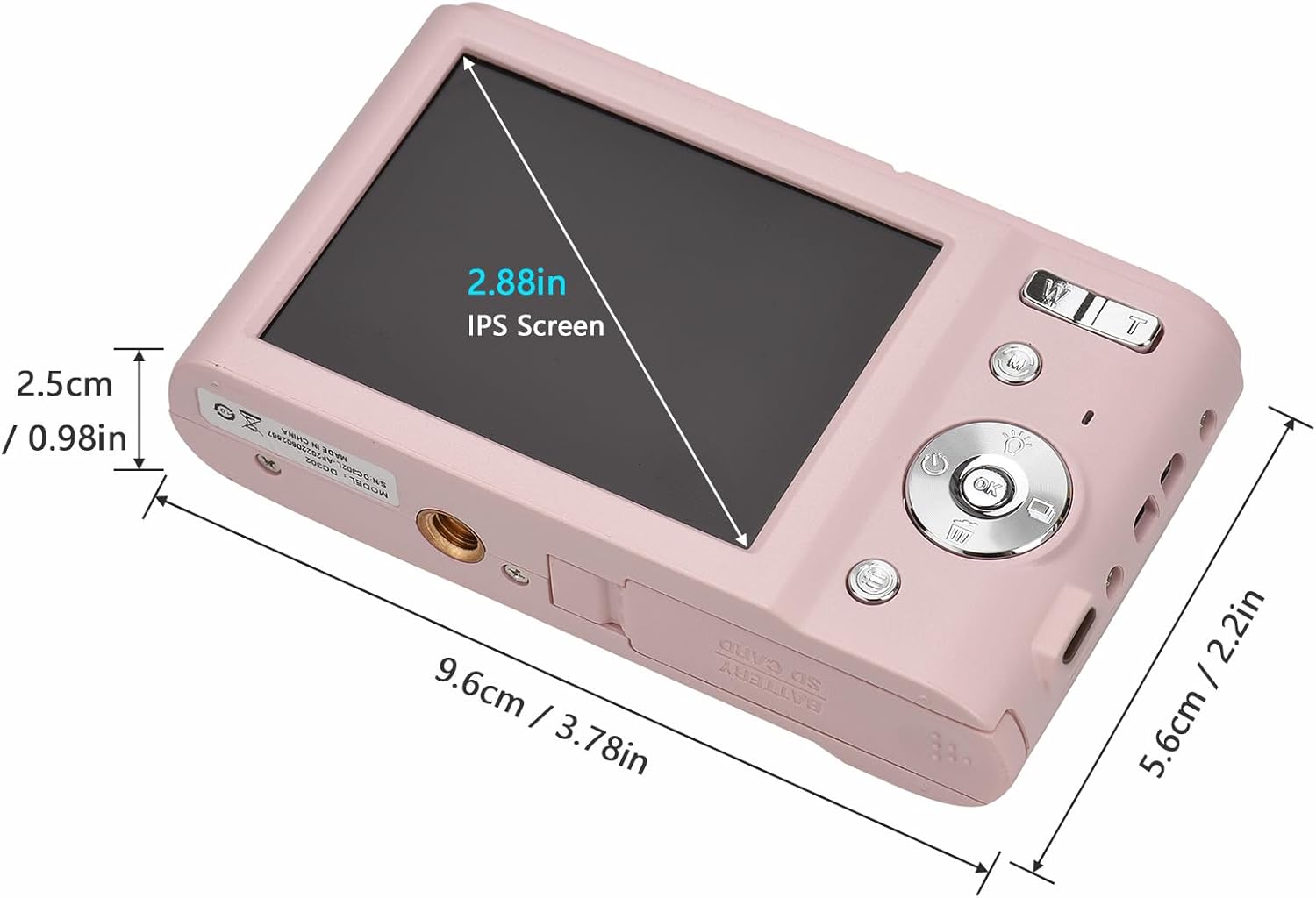
Obrázek 8: Rozměry produktu
Tento obrázek poskytuje detailní view of the Andoer Digital Camera's dimensions, including its length (9.6cm / 3.78in), width (5.6cm / 2.2in), and thickness (2.5cm / 0.98in). It also highlights the 2.88-inch IPS screen, offering a clear understanding of the camera's compact size.

Figure 9: Universal 1/4 Thread Mounting
This image illustrates the camera's universal 1/4 inch thread mounting point located at its bottom, allowing it to be easily attached to tripods or monopods for stable shooting. The camera is shown mounted on a small tripod, with a close-up inset of the mounting screw hole.
Podpora
For further assistance, technical support, or warranty information, please visit the official Andoer store or contact customer service.
Official Andoer Store: Andoer Store on Amazon