
1. Konec produktuview
The Xgody X13 is an unlocked 4G dual SIM smartphone designed for everyday use. It features a 6.1-inch qHD display, runs on Android 9.0, and includes dual 5MP cameras. With a 3000mAh battery and face recognition technology, it offers essential smartphone functionalities.
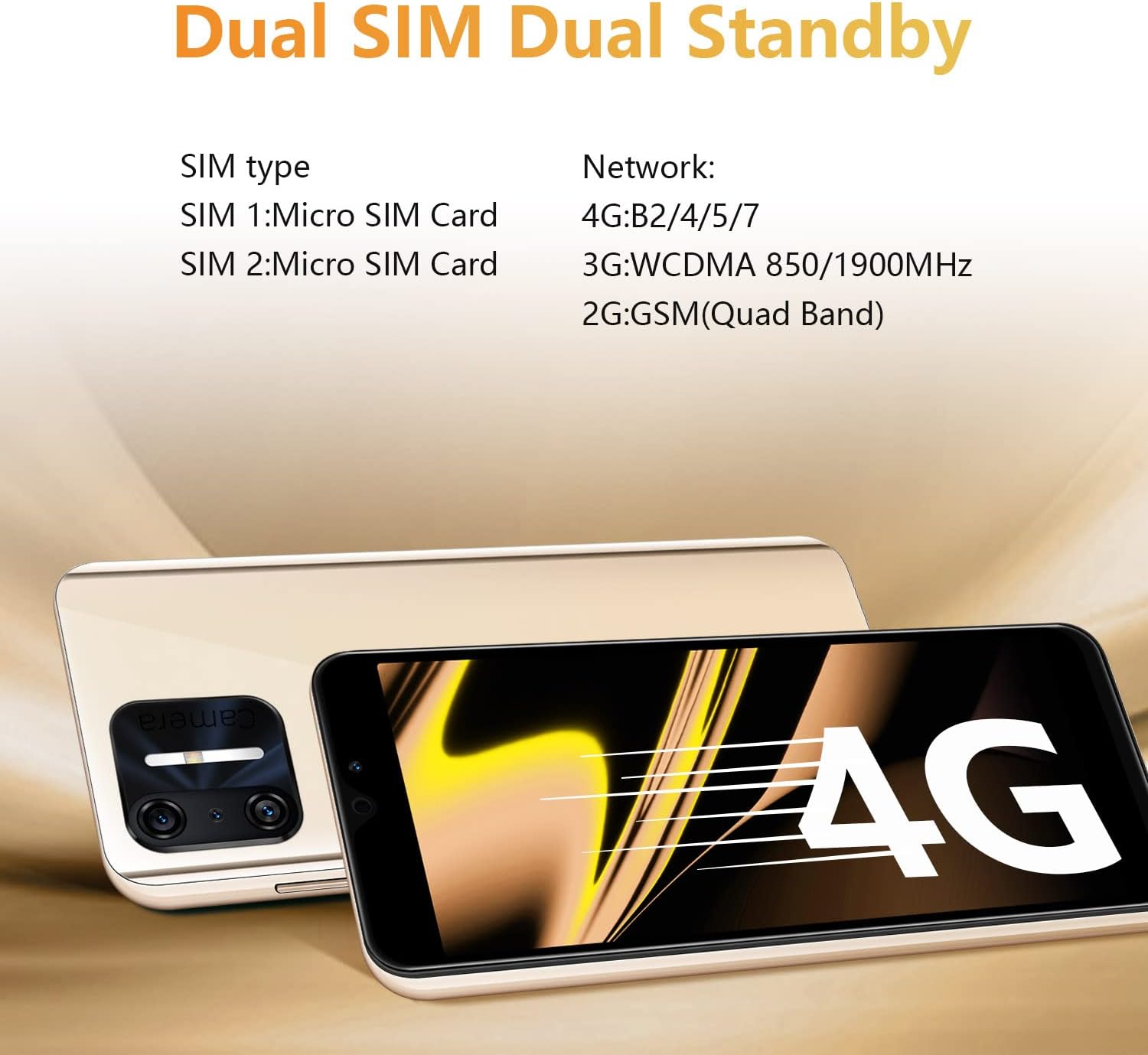
Obrázek: Přední a zadní strana view of the Xgody X13 Smartphone.
2. Co je v krabici
Po otevření balení ověřte, zda jsou přítomny všechny položky:
- Xgody X13 Smartphone
- USB kabel
- Pouzdro na telefon
- Ochrana obrazovky
- Uživatelská příručka
- Battery (may be separate)
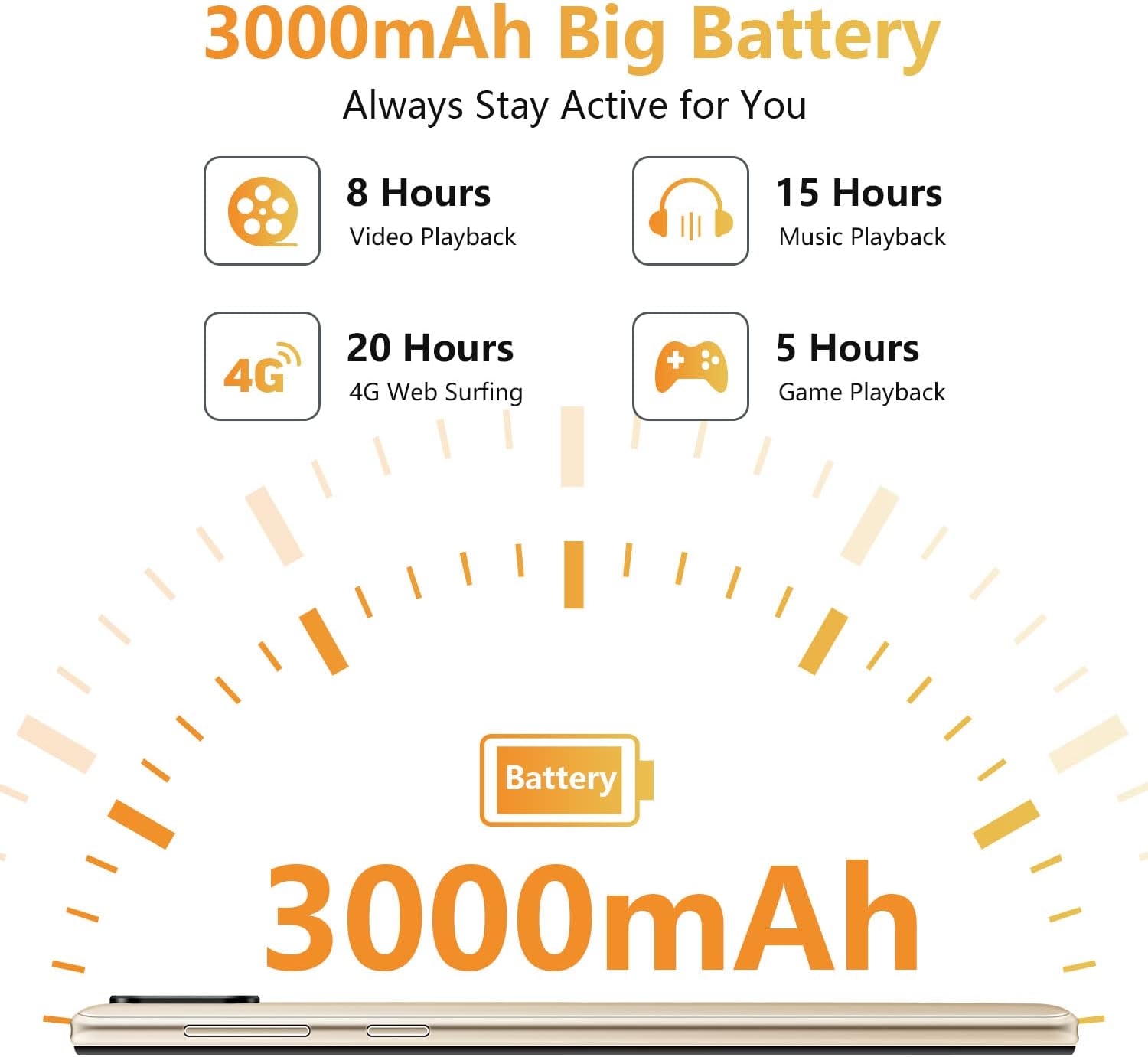
Image: All items included in the Xgody X13 retail box.
3. Nastavení
3.1. Battery, SIM Card, and Micro SD Card Installation
The Xgody X13 smartphone requires the battery to be inserted before first use. It supports dual SIM cards (Micro SIM) and a Micro SD card for expandable storage up to 256GB.
- Opatrně sejměte zadní kryt telefonu.
- Insert the provided battery into its compartment, ensuring the contacts align correctly.
- Locate the SIM card slots. Insert your Micro SIM cards into the designated slots (SIM 1 and SIM 2).
- If using expandable storage, insert a Micro SD card into the dedicated Micro SD card slot.
- Nasaďte zpět zadní kryt a ujistěte se, že bezpečně zacvakne na místo.

Obrázek: Interní view of the phone showing battery, SIM, and Micro SD card slots.
3.2. Počáteční zapnutí a nastavení
After installing the battery, SIM cards, and Micro SD card:
- Press and hold the Power button (located on the right side of the phone) until the Xgody logo appears.
- Postupujte podle pokynů na obrazovce a dokončete počáteční nastavení, včetně výběru jazyka, připojení k Wi-Fi, nastavení účtu Google a nastavení zabezpečení.
Video: Unboxing and initial setup guide for the Xgody X13 smartphone, demonstrating battery and SIM card installation, and first power-on.
4. Návod k obsluze
4.1. Základní navigace
The Xgody X13 runs on Android 9.0, offering a user-friendly interface. Navigate using touch gestures:
- Klepněte na: Vyberte položku nebo otevřete aplikaci.
- Výpad: Procházení obrazovek nebo seznamů.
- Štípání: Přiblížení nebo oddálení fotografií a web stránky.
- Dlouhé stisknutí: Přístup k kontextovým nabídkám nebo přesun ikon aplikací.
4.2. Rozpoznání tváře
The Xgody X13 features face recognition for quick and secure unlocking. To set up:
- Přejít na Nastavení > Zabezpečení a umístění > Odemknutí obličejem.
- Postupujte podle pokynů na obrazovce a zaregistrujte svůj obličej. Zajistěte dobré osvětlení a držte telefon v úrovni očí.
- Once set up, you can unlock your phone by simply looking at the front camera.

Image: Face ID icon, indicating the face recognition unlock feature.
4.3. Použití fotoaparátu
The phone is equipped with dual 5MP cameras (front and rear). To take photos or videos:
- Otevřete Fotoaparát aplikace.
- Klepnutím na tlačítko spouště pořídíte fotografii.
- V případě potřeby přepínejte mezi režimy fotografování a videa.
- Use the front/rear camera toggle to select your desired camera.

Image: A user taking a photo with the 5MP front camera.
4.4. Správa baterií
Baterie s kapacitou 3000 mAh umožňuje delší používání. Optimalizace výdrže baterie:
- Upravte jas obrazovky.
- Zavřete nepoužívané aplikace běžící na pozadí.
- V případě potřeby povolte režim úspory baterie.
- Charge the phone fully before first use and avoid letting the battery drain completely regularly.

Image: Battery life estimates for various activities on the Xgody X13.
5. Specifikace
Key technical specifications of the Xgody X13 Smartphone:
| Funkce | Specifikace |
|---|---|
| Název modelu | XGODY - X13 |
| Operační systém | Android 9.0 |
| Velikost obrazovky | 6.1 palce |
| Rezoluce | 2560 x 1440 |
| BERAN | 2 GB |
| Kapacita paměti | 16 GB (rozšiřitelné až na 256 GB pomocí Micro SD karty) |
| Kapacita baterie | 3000 XNUMX mAh |
| Buněčná technologie | 2G, 3G, 4G |
| Bezdrátové připojení | Bluetooth, WiFi |
| Vstup lidského rozhraní | Dotyková obrazovka |
| Hmotnost položky | 15.2 unce |
Video: Konecview of Xgody X13 features including camera, processor, memory, face ID, battery, screen, 4G, and Android 9.0.
6. Kompatibilita se sítí
The Xgody X13 is an unlocked 4G smartphone compatible with AT&T (except AT&T/Cricket) and T-Mobile networks, and their MVNO networks. It is není kompatibilní with Verizon or CDMA Networks like Sprint and Boost Mobile.
Always verify compatibility with your carrier directly for their Bring Your Own Device (BYOD) program.
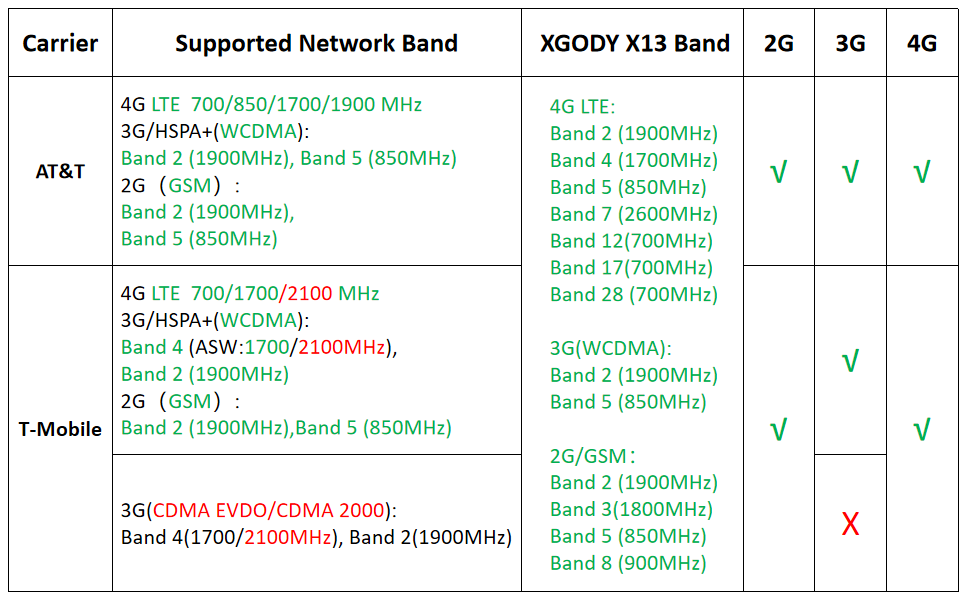
Image: Network band compatibility chart for Xgody X13 with major US carriers.
7. Řešení problémů
7.1. Telefon se nezapíná
- Ensure the battery is correctly installed and charged. Connect the phone to a charger for at least 15 minutes before attempting to power it on.
- Stiskněte a podržte tlačítko napájení po dobu 10–15 sekund pro vynucení restartu.
7.2. Problémy s připojením k síti
- Ověřte, zda je vaše SIM karta správně vložena a aktivována u vašeho operátora.
- Check your phone's network settings (Nastavení > Síť a internet > Mobilní síť) to ensure mobile data is enabled and the correct APN settings are configured.
- Confirm your carrier's network bands are compatible with the Xgody X13.
- Restartujte telefon.
7.3. Pomalý výkon
- Zavřete nepotřebné aplikace na pozadí.
- Vymažte mezipaměť a data často používaných aplikací.
- Ensure sufficient storage space is available (Nastavení > Skladování).
- Obnovení továrního nastavení proveďte jako poslední možnost (Nastavení > Systém > Obnovit možnosti > Vymazat všechna data (obnovení továrního nastavení)). Note: This will delete all data on your phone. Back up important information first.
8. Údržba
- Keep your phone clean using a soft, dry cloth. Avoid harsh chemicals.
- Protect the screen with the provided screen protector and use the phone case to prevent physical damage.
- Avoid exposing the phone to extreme temperatures or moisture.
- Pravidelně zálohujte svá data, abyste předešli jejich ztrátě.
- Keep the software updated to the latest version available for optimal performance and security.
9. Záruka a podpora
For warranty information and technical support, please refer to the warranty card included in your product packaging or visit the official Xgody webUschovejte si doklad o koupi pro případ reklamace.