
1. Úvod
This manual provides essential instructions for the installation, operation, and maintenance of your PowMr MPPT 60A Solar Charge Controller. This controller is designed to efficiently manage power flow from your solar panels to your battery bank, ensuring optimal charging and system protection. Please read this manual thoroughly before installation and use to ensure safe and correct operation.
Obsah balení:
- 1 x PowMr MPPT 60A Solar Charge Controller
- 1 x Uživatelská příručka (anglicky)
2. Bezpečnostní pokyny
Always observe the following safety precautions to prevent personal injury and damage to the controller or other components:
- Před připojením napájení se ujistěte, že jsou všechna připojení správná a bezpečná.
- The correct connection sequence for the solar controller is to connect the battery first, then the solar panel. Always adhere to this specific order. When disconnecting, follow the reverse order: disconnect solar panel, then battery.
- Nerozebírejte ani se nepokoušejte o opravu ovladače sami. Pro servis se obraťte na kvalifikovaný personál.
- Regulátor instalujte v dobře větraném prostoru, mimo dosah hořlavých materiálů a přímého slunečního záření.
- The solar charge controller is equipped with electronic protections against overcharge, over-discharge, overload, and short circuit. It also features battery temperature compensation, enhancing overall operational safety.
- Use appropriate circuit breakers or fuses for all connections to prevent damage from overcurrent.
3. Vlastnosti produktu
- Pokročilá MPPT technologie: The 60A MPPT solar charge controller features automatic battery voltage detection for 12V, 24V, 36V, and 48V systems. It utilizes advanced Maximum Power Point Tracking (MPPT) technology, ensuring a tracking efficiency of no less than 99.5% and a maximum conversion efficiency of up to 97%.
- Univerzální kompatibilita baterií: Supports various battery types for charging, including sealed, gel, flooded, LiFePO4, and Li(NiCoMn)O2 cells. User-defined battery parameters are available for custom battery types.
- Komplexní ochrana: Equipped with electronic protections against overcharge, over-discharge, overload, and short circuit. Includes battery temperature compensation for enhanced safety and battery longevity.
- Multifunkční LCD displej: Provides real-time system information, including solar panel voltage/power, charging current, battery voltage a stav načtení.
- Efektivní chlazení: Features forced air cooling with an aluminum alloy construction for effective heat dissipation, maintaining optimal performance even under high temperatures.
- Dual PV and Battery Connection: Designed for straightforward connection of both photovoltaic arrays and battery banks.
- Multiple Load Working Modes: Offers various load control options, including Load OFF, Load always ON, and Time Control.
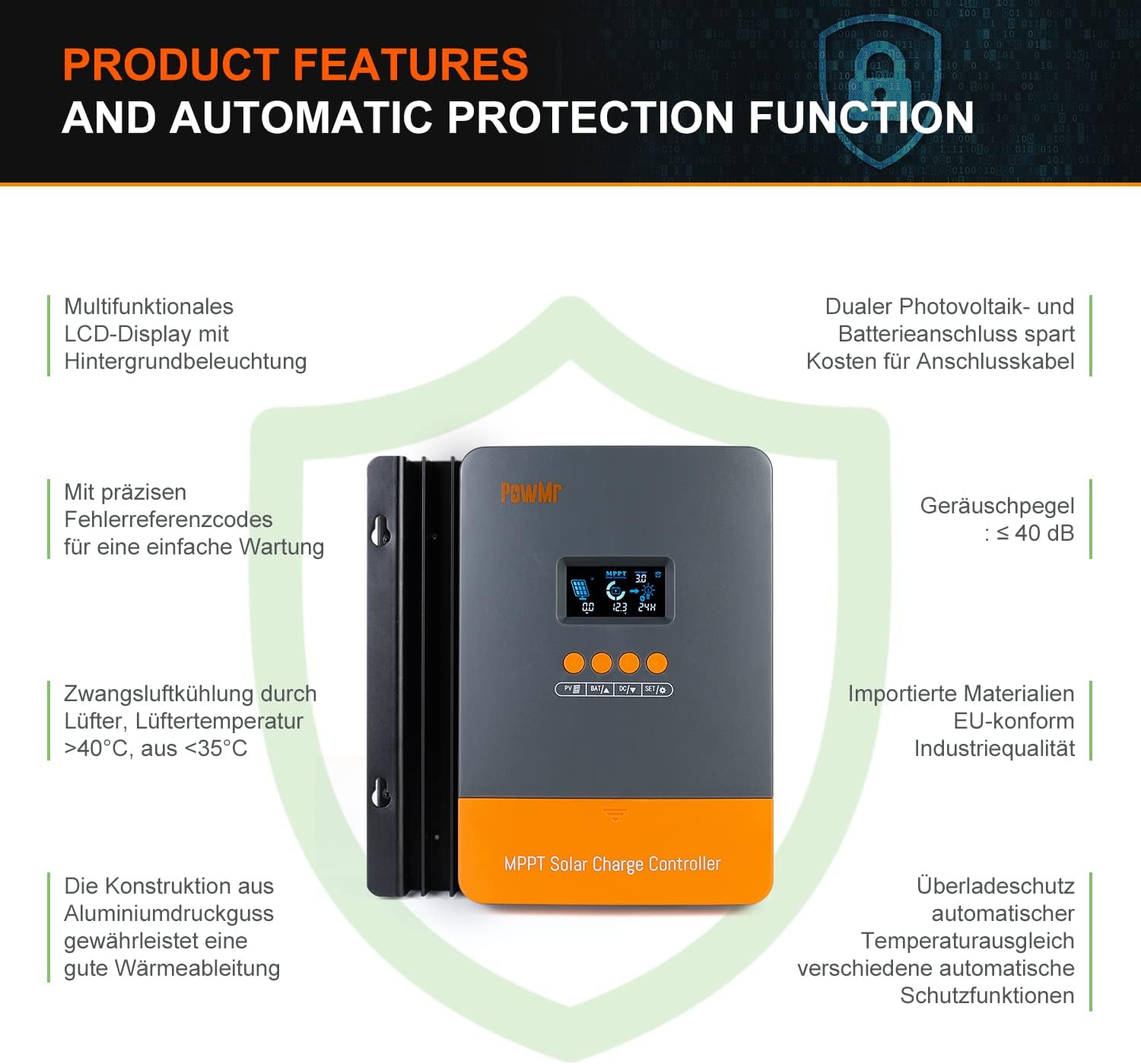
Image: Product features and automatic protection functions. Highlights include a multifunctional LCD display, dual PV and battery connection, precise error codes, forced air cooling, aluminum alloy construction for heat dissipation, and electronic protections.
4. Konec produktuview

Image: PowMr MPPT 60A Solar Charge Controller dimensions (165mm x 230mm x 72mm) and its LCD display interface. The display shows solar panel voltage/power, charging current, battery voltage, and load information. Key buttons for PV, Battery, DC Load, and Settings are also visible.
The controller features an intuitive LCD display and control buttons for easy monitoring and configuration. The display provides real-time data on solar input, battery status, and load output.
- Den nebo noc označující ikonu
- Battery icon and SOC (State of Charge)
- Pracovní režim
- State and Warning indication
- Solární panel objtage/power/current
- Charging power/charging current/battery voltage
- Load working Mode / Load power / Load current / Load voltage
5. Instalace a nastavení
5.1 Montáž regulátoru
- Vyberte suché, dobře větrané místo, chráněné před přímým slunečním zářením, vysokými teplotami a vodou.
- Ensure there is sufficient airflow around the controller for proper cooling.
- Mount the controller vertically on a wall or suitable surface using appropriate fasteners.
5.2 Zapojení kabeláže
Důležité: Vždy nejdříve připojte baterii, poté solární panel a nakonec zátěž. Odpojení proveďte v opačném pořadí.
- Připojte baterii: Connect the positive and negative terminals of your battery bank to the corresponding battery terminals on the controller. Ensure correct polarity. The controller will automatically detect the battery voltage (12V/24V/36V/48V).
- Připojte solární panel: Connect the positive and negative terminals of your solar panel array to the corresponding PV input terminals on the controller. Ensure correct polarity. The maximum open circuit voltage (Voc) from the PV array should not exceed 160V.
- Připojení stejnosměrné zátěže (volitelné): If using a DC load directly from the controller, connect its positive and negative terminals to the load terminals on the controller.

Image: Diagram illustrating recommended wiring configurations for 12V, 24V, 36V, and 48V battery systems, including corresponding input solar power and voltage ranges. Also shows the three load working modes (Load OFF, Load always ON, Time control).
5.3 Výběr typu baterie
The controller supports various battery types. You can select the appropriate type through the controller's settings menu. For lithium batteries (LiFePO4, Li(NiCoMn)O2), it is essential to set the specific start and end charging voltages according to the battery manufacturer's specifications. Refer to the detailed instructions in the user manual for proper configuration.

Image: Illustration detailing the supported battery types (Sealed, GEL, Flooded, AGM, Lithium, User Custom Battery) and a graph depicting the four-stage battery charging process: Bulk Charge, Constant Charging (Boost/Equalize), and Float Charge.
6. Návod k obsluze
6.1 LCD displej a tlačítka
The LCD display provides real-time system status. Use the buttons (PV, BAT, DC, SET) to navigate through menus and adjust parameters. Refer to the detailed manual for specific button functions and menu navigation.
6.2 Nabíjení Stages
The controller employs a multi-stage charging algorithm to optimize battery life and performance:
- Hromadný poplatek: Charges the battery at maximum current until voltage rises to the absorption level.
- Constant Charging (Boost/Equalize): Udržuje konstantní objemtage, allowing the current to gradually decrease. Equalization is a controlled overcharge for flooded batteries to balance cell voltages.
- Plovoucí poplatek: Reduces the voltage to a lower level once the battery is fully charged, maintaining it at a safe level to prevent self-discharge.
6.3 Režimy provozu zatížení
The DC load output can be configured with different working modes:
- Load OFF: The load output is always off.
- Load Always ON: The load output is continuously on.
- Ovládání času: The load output operates for a specified duration after sunset.
7. Údržba
Pravidelná údržba zajišťuje optimální výkon a dlouhou životnost vašeho solárního regulátoru nabíjení:
- Pravidelně kontrolujte všechna kabelová spojení, zda nejsou pevně utažená a zda nejsou korozivá.
- Clean the controller's exterior with a dry cloth. Do not use liquids or solvents.
- Ensure the ventilation openings are clear of dust and debris to allow for proper heat dissipation.
- Sledujte LCD displej, zda se na něm neobjevují chybové kódy nebo neobvyklé hodnoty.
8. Řešení problémů
If you encounter issues, refer to the following common problems and solutions. For more complex issues, contact customer support.
| Problém | Možná příčina | Řešení |
|---|---|---|
| Žádný displej/Žádné napájení | Baterie není připojena nebo je nízkátage; obrácená polarita. | Zkontrolujte připojení baterie a objtage. Zajistěte správnou polaritu. |
| Baterie se nenabíjí | Solar panel not connected; low solar input; PV reversed polarity; battery type misconfigured. | Check solar panel connections and polarity. Verify sufficient sunlight. Confirm correct battery type settings. |
| Zatížení nefunguje | Load mode set to OFF; overload; short circuit; low battery voltage. | Check load mode settings. Reduce load. Inspect for short circuits. Charge battery. |
| Zobrazí se kód chyby | Specifická systémová chyba. | Seznam chybových kódů a jejich odpovídajících řešení naleznete v úplné uživatelské příručce. |
9. Specifikace
| Parametr | Hodnota |
|---|---|
| Číslo modelu | POW-M60-PRO |
| Značka | PowMr |
| Jmenovitý nabíjecí proud | 60A |
| System Voltage | 12V/24V/36V/48V Auto-Identify |
| Max. PV vstup Voltage (Voc) | 160V DC |
| Max. Solar Panel Power (for 48V system) | 2880W (12V: 720W, 24V: 1440W, 36V: 2160W) |
| Efektivita sledování | ≥99.5 % |
| Účinnost konverze | až 97 % |
| Podporované typy baterií | Sealed, Gel, Flooded, LiFePO4, Li(NiCoMn)O2, User-defined |
| Typ zobrazení | LCD s podsvícením |
| Rozměry produktu (D x Š x V) | 16.5 cm x 7.1 cm x 23.1 cm |
| Hmotnost produktu | 1.3 kg |
| Provozní teplota | -20°C to +50°C (Max. 60°C ambient) |

Image: Universal compatibility of the PowMr 60A MPPT controller compared to other controllers. It highlights higher maximum input solar power and voltage for 12V, 24V, 36V, and 48V systems, supporting SLA, SLD, GEL, AGM, and LiFePO4 battery types.
10. Záruka a podpora
For warranty information, technical support, or any questions regarding your PowMr MPPT 60A Solar Charge Controller, please contact PowMr customer service. Refer to the product packaging or the official PowMr webstránky pro kontaktní údaje.