
1. Úvod
Thank you for choosing the ICON Morpheus GX 66 Wired Gaming Mouse. This manual provides essential information for setting up, operating, and maintaining your new gaming mouse. Please read this guide thoroughly to ensure optimal performance and longevity of your device.
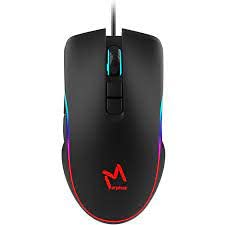
The ICON Morpheus GX 66 is a high-performance wired gaming mouse featuring customizable LED lighting and a precise 7200 DPI optical sensor, designed for an optimal gaming experience. It offers a modern style and ambidextrous design, compatible with Windows 7, Windows XP, and Linux operating systems.
2. Vlastnosti produktu
- Vysoce přesný senzor: Equipped with a 7200 DPI optical sensor for accurate tracking and responsiveness.
- Přizpůsobitelné LED osvětlení: Dynamic LED illumination enhances your gaming setup.
- 7 programovatelných tlačítek: Offers extensive customization for various gaming commands.
- Kabelové připojení: Zajišťuje stabilní a bezproblémové připojení.
- Oboustranný design: Pohodlné pro leváky i praváky.
- Odolná konstrukce: Designed for long-lasting use in intense gaming sessions.
- Široká kompatibilita: Supports Windows 7, Windows XP, and Linux operating systems.

3. Nastavení
- Rozbalte myš: Carefully remove the ICON Morpheus GX 66 mouse from its packaging.
- Připojení k počítači: Locate an available USB port on your computer. Plug the USB connector of the mouse firmly into the USB port.
- Instalace ovladače: The mouse is plug-and-play. Your operating system (Windows 7, Windows XP, or Linux) should automatically detect and install the necessary drivers. This process may take a few moments.
- Test funkčnosti: Once installed, move the mouse and click the buttons to ensure it is working correctly.
4. Návod k obsluze
4.1 Základní funkce
- Levé kliknutí: Primární akce, výběr, aktivace.
- Klikněte pravým tlačítkem myši: Kontextové menu, sekundární akce.
- Rolovací kolečko: Scroll up/down, middle click for specific functions.
4.2 Nastavení DPI
The mouse features a dedicated DPI button (often located behind the scroll wheel) to cycle through different sensitivity levels. Press this button to adjust the DPI (Dots Per Inch) to your preferred setting for various tasks or games. The LED lighting may change color to indicate the current DPI level.
4.3 LED osvětlení
The ICON Morpheus GX 66 features dynamic LED lighting. The lighting patterns and colors are typically pre-programmed and may change based on the selected DPI setting or cycle automatically. There are no user-configurable software controls for the LED lighting on this model.

5. Údržba
- Čištění: K otření povrchu myši použijte měkký, suchý hadřík. V případě odolné nečistoty lehceamphadřík vodou. Nepoužívejte agresivní chemikálie ani abrazivní materiály.
- Čištění senzoru: Occasionally, dust or debris may accumulate around the optical sensor. Use a cotton swab or compressed air to gently clean the sensor area on the underside of the mouse.
- Péče o kabely: Avoid sharp bends or excessive pulling on the mouse cable to prevent damage. Store the cable neatly when not in use.
- Skladování: Pokud myš delší dobu nepoužíváte, skladujte ji v čistém a suchém prostředí mimo dosah přímého slunečního záření a extrémních teplot.

6. Řešení problémů
- Myš nereaguje:
- Ujistěte se, že je kabel USB bezpečně zapojený do portu USB počítače.
- Zkuste zapojit myš do jiného USB portu.
- Restartujte počítač.
- Nepravidelný pohyb kurzoru:
- Vyčistěte optický senzor na spodní straně myši.
- Ujistěte se, že myš používáte na čistém, nereflexním a rovnoměrném povrchu. Vyhněte se sklu nebo vysoce reflexním povrchům.
- LED Lighting Not Working:
- Zkontrolujte připojení USB.
- The LED lighting is typically powered directly via USB. If the mouse functions but LEDs do not, contact support.
- Nefunkční tlačítka:
- Ujistěte se, že je myš správně připojena.
- Vyzkoušejte myš na jiném počítači, abyste vyloučili problémy se softwarem.
7. Specifikace
| Výrobce | IKONA |
| Model | Morpheus GX 66 |
| ASIN | B0B5PLWQXC |
| Speciální funkce | LED osvětlení |
| Technologie detekce pohybu | Optický |
| DPI | 7200 |
| Orientace rukou | Obouruký |
| Doporučená použití | Hraní |
| Kompatibilita operačního systému | Linux, Windows 7, Windows XP |
| Styl | Moderní |
| Typ dokončení | Matný |
| Zdroj napájení | Elektrický kabel (USB) |
| Barva | Vícebarevné |
8. Záruka a podpora
The ICON Morpheus GX 66 Wired Gaming Mouse comes with a standard manufacturer's warranty. For specific warranty terms and conditions, please refer to the warranty card included with your product or visit the official ICON webmísto.
For technical support, troubleshooting assistance, or to inquire about replacement parts, please contact ICON customer service through their official support channels. Keep your purchase receipt and product model information (GX 66) handy when contacting support.