
Crony SD-306Plus
Crony SD-306Plus Karaoke Speaker System User Manual
Model: SD-306Plus
1. Úvod
Děkuji za nákupasing the Crony SD-306Plus Karaoke Speaker System. This device is designed to provide a high-quality audio experience for family entertainment, featuring dual Bluetooth 4.2 connectivity, a powerful 30W speaker, and two wireless microphones. Please read this manual carefully before use to ensure proper operation and to maximize the lifespan of your product.
2. Bezpečnostní informace
- Nevystavujte zařízení vodě ani nadměrné vlhkosti.
- Neumisťujte zařízení do blízkosti zdrojů tepla nebo na přímé sluneční světlo.
- Nepokoušejte se zařízení rozebírat ani opravovat sami. Veškerý servis svěřte kvalifikovanému personálu.
- Use only the provided charging cable and adapter (5V-2A) to charge the speaker and microphones.
- Uchovávejte mimo dosah dětí.
3. Obsah balení
Zkontrolujte prosím balení, zda jsou všechny položky přítomny:
- 1 x Crony SD-306Plus Speaker
- 2 x bezdrátové mikrofony
- 1 x USB nabíjecí kabel
- 1 x audio kabel
- 1 x Uživatelská příručka (tento dokument)
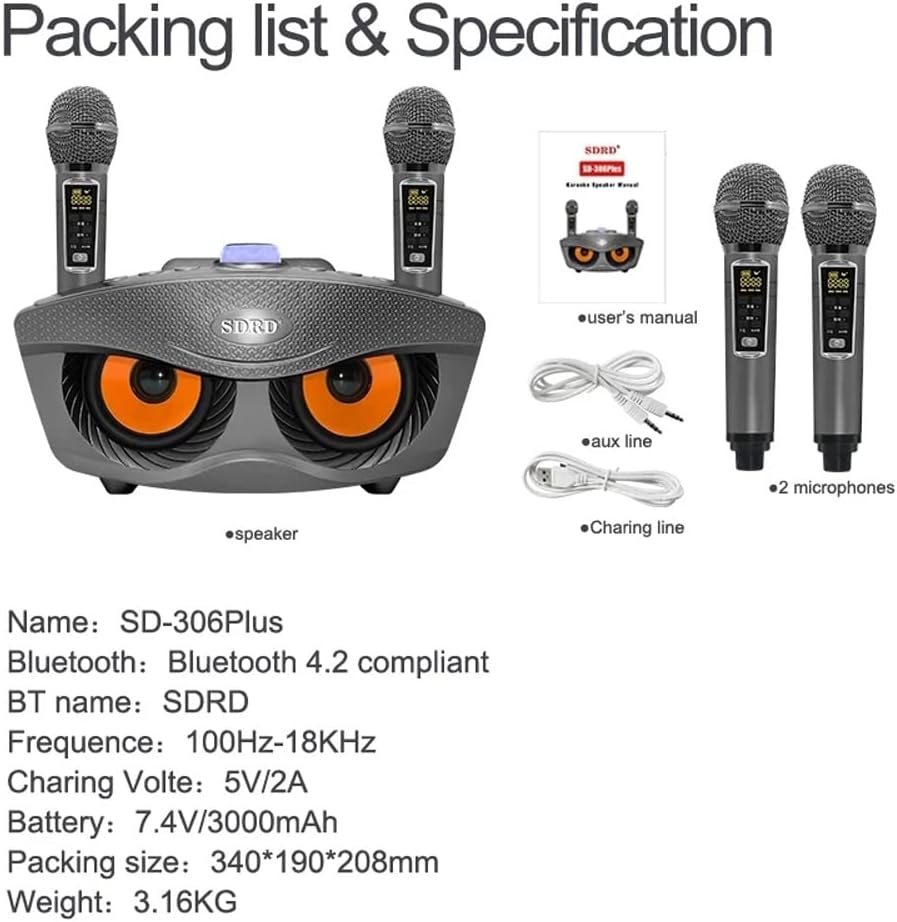
Image: Contents of the Crony SD-306Plus package, including the speaker, two microphones, charging cable, audio cable, and user manual.
4. Vlastnosti produktu
- Dual Bluetooth 4.2 Connectivity: Seamless wireless connection up to 10 meters.
- Výkonný zvukový výstup: Two 15W speakers (total 30W) for rich, clear audio.
- Integrated Sound Card Functions: Features for voice changing (Men, Women, Child), Mic Priority, KTV Mode, and Concert Mode.
- Dlouhá výdrž baterie: Built-in 3000mAh 7.4V battery for 2-3 hours of playing time.
- Bezdrátové mikrofony: Two wireless microphones with a range of 10 meters.
- Více režimů přehrávání: Supports USB, TF card, Bluetooth, and AUX input.
- Zesílení basů: Enhanced bass for a more immersive audio experience.

Image: Illustration emphasizing the dual 15W speaker power and sound quality of the Crony SD-306Plus.
5. Identifikace součásti
Familiarize yourself with the various buttons and ports on your SD-306Plus speaker:

Obrázek: Podrobný view of the speaker's control panel, showing buttons for EQ, Music Original, Mode, Volume, Mic Priority, KTV, Concert Hall, Previous/Volume Down, Play/Pause, and Next/Volume Up. Also indicates voice change functions (Men, Women, Child).
- EQ: Nastavení ekvalizéru.
- MUSIC ORIG: Toggles original music sound.
- REŽIM: Switches between USB, TF, Bluetooth, and AUX input modes.
- VOL-/VOL+: Adjusts the main volume.
- PRIORITA MIC: Upřednostňuje zvuk mikrofonu před hudbou.
- KTV MODE: Activates KTV (Karaoke) specific sound effects.
- CONCERT HALL: Simulates a concert hall acoustic environment.
- PREV/VOL-: Přeskočí na předchozí skladbu nebo sníží hlasitost.
- PAUSE/PLAY: Přehraje nebo pozastaví aktuální skladbu.
- NEXT/VOL+: Přeskočí na další skladbu nebo zvýší hlasitost.
- Voice Change Buttons: Buttons for Men Voice, Women Voice, and Child Voice effects.
6. Nastavení
6.1 Počáteční nabíjení
Before first use, fully charge the speaker and both microphones. Refer to Section 8 for charging instructions.
6.2 Zapnutí/vypnutí
Locate the power switch on the speaker and microphones. Toggle to turn on or off.
6.3 Připojení Bluetooth
Připojení zařízení přes Bluetooth:
- Turn on the Crony SD-306Plus speaker. It will automatically enter Bluetooth pairing mode.
- On your mobile phone or other Bluetooth-enabled device, open the Bluetooth settings.
- Hledat available devices and select "SDRD" (the Bluetooth name for the speaker).
- Po připojení uslyšíte z reproduktoru potvrzovací zvuk.

Image: Visual representation of connecting the speaker to a smartphone via Bluetooth for wireless music playback.
7. Návod k obsluze
7.1 Přehrávání hudby
- Bluetooth: Po úspěšném spárování přehrajte hudbu z připojeného zařízení.
- USB/TF karta: Insert a USB drive or TF card into the respective port. The speaker will automatically switch to the corresponding mode and begin playing.
- Vstup AUX: Connect an external audio source using the provided audio cable to the AUX port. Press the MODE button to select AUX input.
7.2 Používání mikrofonů
Turn on both wireless microphones. They will automatically connect to the speaker. Adjust microphone volume directly on the microphone or through the speaker's controls if available.
7.3 Sound Card Functions
Utilize the dedicated buttons on the speaker's control panel for various sound effects:
- Změna hlasu: Press the 'Man', 'Girl', or 'Child's voice' buttons to alter your microphone voice.
- Priorita mikrofonu: Press 'MIC Priority' to lower music volume automatically when speaking into the microphone.
- KTV Mode: Press 'KTV' for a typical karaoke sound effect.
- Concert Hall: Press 'Concert Hall' to simulate a larger acoustic space.
8. Nabíjení
8.1 Nabíjení reproduktoru
Connect the provided USB charging cable to the speaker's charging port and the other end to a 5V-2A USB power adapter (not included). The charging indicator will show the charging status. A full charge takes approximately 3-4 hours.
8.2 Nabíjení mikrofonů
The microphones can be charged in two ways:
- Via USB Charging Line: Connect the microphone directly to a USB power source using a USB charging cable.
- With Speaker: Place the microphone into its designated slot on the speaker. The speaker will charge the microphone when connected to power or if the speaker has sufficient battery.

Image: Instructions for charging the wireless microphones, either independently via USB or by docking them into the main speaker unit.
Microphone charging time is approximately 1-2 hours.
9. Údržba
- Clean the speaker and microphones with a soft, dry cloth. Do not use abrasive cleaners or solvents.
- Přístroj skladujte na chladném a suchém místě mimo dosah přímého slunečního záření a extrémních teplot.
- If not used for extended periods, charge the battery every 3 months to maintain its lifespan.
10. Řešení problémů
| Problém | Možná příčina | Řešení |
|---|---|---|
| Žádná síla | Baterie je vybitá | Charge the speaker/microphones fully. |
| Žádný zvuk | Příliš nízká hlasitost; Nesprávný režim; Zařízení není připojeno | Increase volume; Select correct input mode (Bluetooth, USB, AUX); Reconnect Bluetooth device. |
| Mikrofon nefunguje | Microphone off; Battery low; Out of range | Turn on microphone; Charge microphone; Move closer to speaker (within 10m). |
| Bluetooth odpojení | Device out of range; Interference | Move Bluetooth device closer to speaker; Avoid obstacles; Turn off other Bluetooth devices. |
11. Specifikace
| Funkce | Detail |
|---|---|
| Model | SD-306Plus |
| Verze Bluetooth | Bluetooth 4.2 |
| Vzdálenost Bluetooth | 10 metrů |
| Výkon reproduktoru | 2 x 15 W (celkem 30 W) |
| Specifikace reproduktoru | 4 inch external magnetic |
| Frekvenční odezva | 100Hz-18KHz |
| Specifikace baterie | Vestavěná baterie 18650 3000mAh 7.4V |
| Doba přehrávání | 2-3 hodin |
| Specifikace nabíječky | 5V-2A |
| Doba nabíjení (reproduktor) | 3-4 hodin |
| Vzdálenost mikrofonu | 10 metrů |
| Doba nabíjení mikrofonu | 1-2 hodin |
| Rozměry produktu | 340 x 190 x 208 mm (19 H x 34 Š x 20.8 V cm) |
| Hmotnost produktu | 2 kg (3.16 kg packaged) |
12. Záruka a podpora
Crony products are manufactured to high quality standards. For warranty information or technical support, please refer to the warranty card included with your purchase or contact your local retailer or Crony customer service. Please retain your proof of purchase for any warranty claims.
Ask a question about this manual
Ask about setup, troubleshooting, compatibility, parts, safety, or missing instructions. Manuals+ will review the question and use this page’s manual context to help answer it.