
Zavedení
This manual provides detailed instructions for the setup, operation, and maintenance of your Wiszodet Kids Smart Game Watch S16. Please read this manual thoroughly to ensure proper use and to maximize the watch's features.

Obrázek: Přední strana view of the Wiszodet Kids Smart Game Watch S16 in blue, showing the digital time and date.
Co je v krabici
Po otevření balení ověřte, zda jsou v něm obsaženy všechny následující položky:
- Wiszodet Kids Smart Watch (S16)
- Ochranná fólie na sklo obrazovky
- USB nabíjecí kabel
Konec produktuview
Familiarize yourself with the physical components of your smart watch.

Image: Diagram illustrating the watch's features including the camera, soft band, flashlight (torch), home button, USB charging port, and aluminum casing.
- Fotoaparát: Located at the top of the watch face for photos and videos.
- Soft Band: Comfortable and adjustable strap.
- Svítilna (baterka): Integrované světlo pro osvětlení.
- Tlačítko Domů: Used to return to the main screen or activate certain functions.
- USB zásuvka: For charging the watch and transferring data.
- Hliníkový plášť: Odolný vnější materiálasing.
- Dotyková obrazovka: 1.54-inch display for interactive control.
Nastavení
1. Nabíjení hodinek
Před prvním použitím hodinky plně nabijte.
- Connect the provided USB charging cable to the USB socket on the watch.
- Zapojte druhý konec kabelu USB do kompatibilního napájecího adaptéru USB (není součástí balení) nebo do portu USB počítače.
- Displej hodinek bude ukazovat stav nabíjení. Plné nabití trvá přibližně 2–3 hodiny.
2. Zapnutí/vypnutí
- Zapnutí: Press and hold the Home button until the screen lights up.
- Vypnutí: Press and hold the Home button, then follow the on-screen prompts to confirm power off.
3. Počáteční nastavení (čas a datum)
Upon first power-on or after a factory reset, you may need to set the correct time and date.
- From the main screen, swipe to find and tap the "Settings" icon.
- Navigate to "Time & Date" or a similar option.
- Adjust the hour, minute, year, month, and day as needed.
- Select 12-hour or 24-hour format.
- Potvrďte svá nastavení.
Návod k obsluze
The Wiszodet S16 Smart Watch offers a variety of functions accessible via its touch screen.

Image: The watch interface showing various application icons, including Camera, Games, Music, and more.
1. Kamera a videozáznam
Capture photos and record videos directly from your watch.
- From the main menu, tap the "Camera" icon to open the camera application.
- Klepnutím na obrazovku pořídíte fotografii.
- To switch to video recording, look for a video camera icon within the camera app and tap it.
- Tap again to start recording, and tap once more to stop.
- Photos and videos are saved to the watch's internal storage.

Image: The watch demonstrating its selfie camera function, with options for video recording and playback.
2. Hry
The watch includes 24 built-in puzzle games designed to engage and entertain.
- Tap the "Game" icon from the main menu.
- Select from the list of available games.
- Follow the on-screen instructions to play.

Image: A visual representation of the 24 puzzle games available on the watch, such as 'Fruit Weighing' and 'Time Teaching'.
3. Hudební přehrávač
Poslouchejte hudbu fileje uloženo v hodinkách.
- Tap the "Music" icon.
- Browse and select the desired audio file.
- Use the on-screen controls for playback (play, pause, skip).
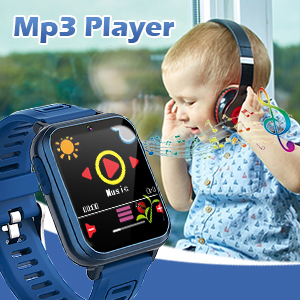
Image: The watch displaying its MP3 player interface, with a child listening to music in the background.
4. Krokoměr
Track daily steps and estimated calories burned.
- Tap the "Pedometer" icon.
- The watch will automatically begin tracking steps when worn.
- View your daily step count and calorie estimates on the screen.

Image: The watch highlighting its fitness tracking features, including pedometer, stopwatch, and timer, with children engaged in physical activity.
5. Budík
Nastavte si budíky pro připomenutí nebo denní rutiny.
- Tap the "Alarm" icon.
- Tap "+" or "Add Alarm" to set a new alarm.
- Adjust the time and select repeat days if desired.
- Save the alarm.
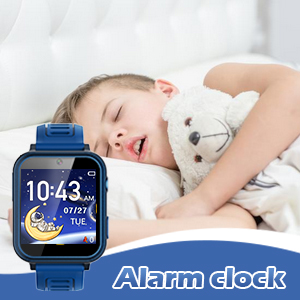
Image: The watch displaying the alarm clock feature, with a child sleeping, suggesting its use for morning routines.
6. Svítilna
Activate the built-in flashlight for quick illumination.
- Tap the "Torch" or "Flashlight" icon.
- Klepnutím znovu jej vypnete.
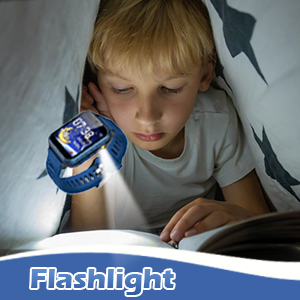
Image: The watch's flashlight feature in use, providing light for a child reading under a blanket.
7. Hlasový záznamník
Record short audio messages or notes.
- Tap the "Voice Recorder" icon.
- Klepnutím na tlačítko nahrávání spusťte nahrávání.
- Tap again to stop and save the recording.
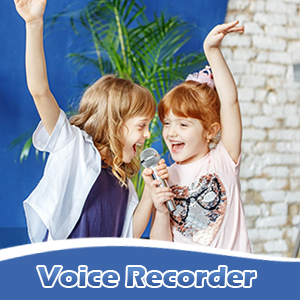
Image: The watch displaying the voice recorder function, with children singing, indicating its use for capturing audio.
8. Kalkulačka
Provádějte základní aritmetické výpočty.
- Tap the "Calculator" icon.
- Use the on-screen keypad to input numbers and operations.
9. Další funkce
- Téma: Customize the watch face and interface theme.
- Spořič obrazovky: Select different screensaver options.
- Stopky: Změřte časové intervaly.
- Časovač: Nastavte si odpočítávací časovače.
- Kalendář: View the current date and navigate through months.
- Nastavení hlasitosti: Control the watch's audio output level.
- Doba podsvícení: Adjust how long the screen stays lit.

Obrázek: Výstava kolážíasing various watch functions including alarm, recorder, music, calculator, flashlight, and calendar, with children demonstrating their use.
Údržba
Proper care will extend the life of your Wiszodet S16 Smart Watch.
- Čištění: Wipe the watch screen and band with a soft, dry cloth. Avoid harsh chemicals or abrasive materials.
- Voděodolnost: The watch is designed for daily use and splash resistance, but it is not suitable for swimming or showering. Avoid submerging the watch in water.
- Skladování: Hodinky skladujte na chladném a suchém místě mimo dosah přímého slunečního záření a extrémních teplot.
- Ochrana obrazovky: Apply the included screen glass protector to prevent scratches.
Odstraňování problémů
| Problém | Možná příčina | Řešení |
|---|---|---|
| Hodinky se nezapínají. | Slabá baterie. | Nabíjejte hodinky alespoň 30 minut. |
| Obrazovka nereaguje. | Dočasná softwarová závada. | Restart the watch by holding the Home button. |
| Nelze ukládat fotografie/videa. | Nedostatek úložného prostoru. | Smazat staré filenebo je přeneste do počítače. |
| Čas/datum je nesprávný. | Nastavení je třeba upravit. | Go to Settings > Time & Date to adjust. |
Specifikace
| Funkce | Detail |
|---|---|
| Název modelu | S16 |
| Značka | Wiszodet |
| Velikost obrazovky | 1.54 palce |
| Typ zobrazení | Dotyková obrazovka |
| Typ baterie | 1 Lithium Polymer (součástí balení) |
| Konektivita | USB |
| GPS | Bez GPS |
| Rozlišení fotoaparátu | HD (not full HD) |
| Rozměry produktu | 9.4 x 2.4 x 0.71 palce |
| Hmotnost položky | 0.353 unce (10 gramů) |
Záruka a podpora
For warranty information or technical support, please refer to the contact details provided with your purchase or visit the official Wiszodet webUschovejte si doklad o koupi pro případné reklamace.