
Zavedení
This manual provides detailed instructions for the setup, operation, and maintenance of your Amazon Basics Projection Alarm Clock. Please read this manual thoroughly before using the product to ensure proper function and to prevent damage.

Image: The Amazon Basics Projection Alarm Clock, showing its digital display and projection lens.
Bezpečnostní pokyny
- Nevystavujte jednotku extrémním teplotám, přímému slunečnímu světlu, prachu nebo vlhkosti.
- Ujistěte se, že je napájecí adaptér kompatibilní s vaší místní elektrickou sítí.
- Uchovávejte jednotku mimo dosah vody nebo jiných kapalin.
- Nepokoušejte se jednotku rozebírat ani upravovat. Ztratíte tak záruku.
- Čistěte přístroj pouze měkkým, suchým hadříkem. Nepoužívejte tekuté čisticí prostředky.
- Baterie likvidujte správným způsobem v souladu s místními předpisy.
Obsah balení
- Amazon Basics Projection Alarm Clock
- Napájecí adaptér
- Uživatelská příručka
Vlastnosti produktu
- Projection of time onto a wall or ceiling.
- FM Radio with automatic/manual scan and up to 15 preset stations.
- USB port for charging mobile phones or tablets.
- 7-inch high-definition LED display with adjustable brightness.
- Dual alarms for separate wake-up times.
- Snooze function with adjustable duration (2 to 60 minutes).
- Sleep timer for automatic radio shut-off (5 to 90 minutes).
- DST button for Daylight Saving Time adjustment.
- Battery backup (requires 2 AAA batteries, not included) to maintain time settings during power outages.

Obrázek: Overview of key features including sleep timer, radio presets, and snooze function.
Ovládací prvky a displej
Familiarize yourself with the buttons and ports on your alarm clock for optimal use.

Obrázek: Boční view illustrating the location of controls, USB charging port, and projection lens.
- Tlačítko pro nastavení času: Slouží k nastavení aktuálního času.
- Tlačítka alarmu 1/2: Used to set and activate Alarm 1 and Alarm 2.
- Tlačítko odložení/ztlumení: Activates snooze during an alarm; adjusts display brightness when not alarming.
- Tlačítko rádia/spánku: Turns FM radio on/off; sets sleep timer.
- Volume/Tune Dial: Adjusts radio volume and tunes FM frequencies.
- Projection On/Off/Flip Button: Controls the projection feature and flips the projected time.
- Projection Focus Wheel: Upravuje jasnost promítaného času.
- Nastavovač úhlu projekce: Mění úhel promítaného času.
- USB nabíjecí port: Pro nabíjení externích zařízení.
- Tlačítko letního času: Toggles Daylight Saving Time.
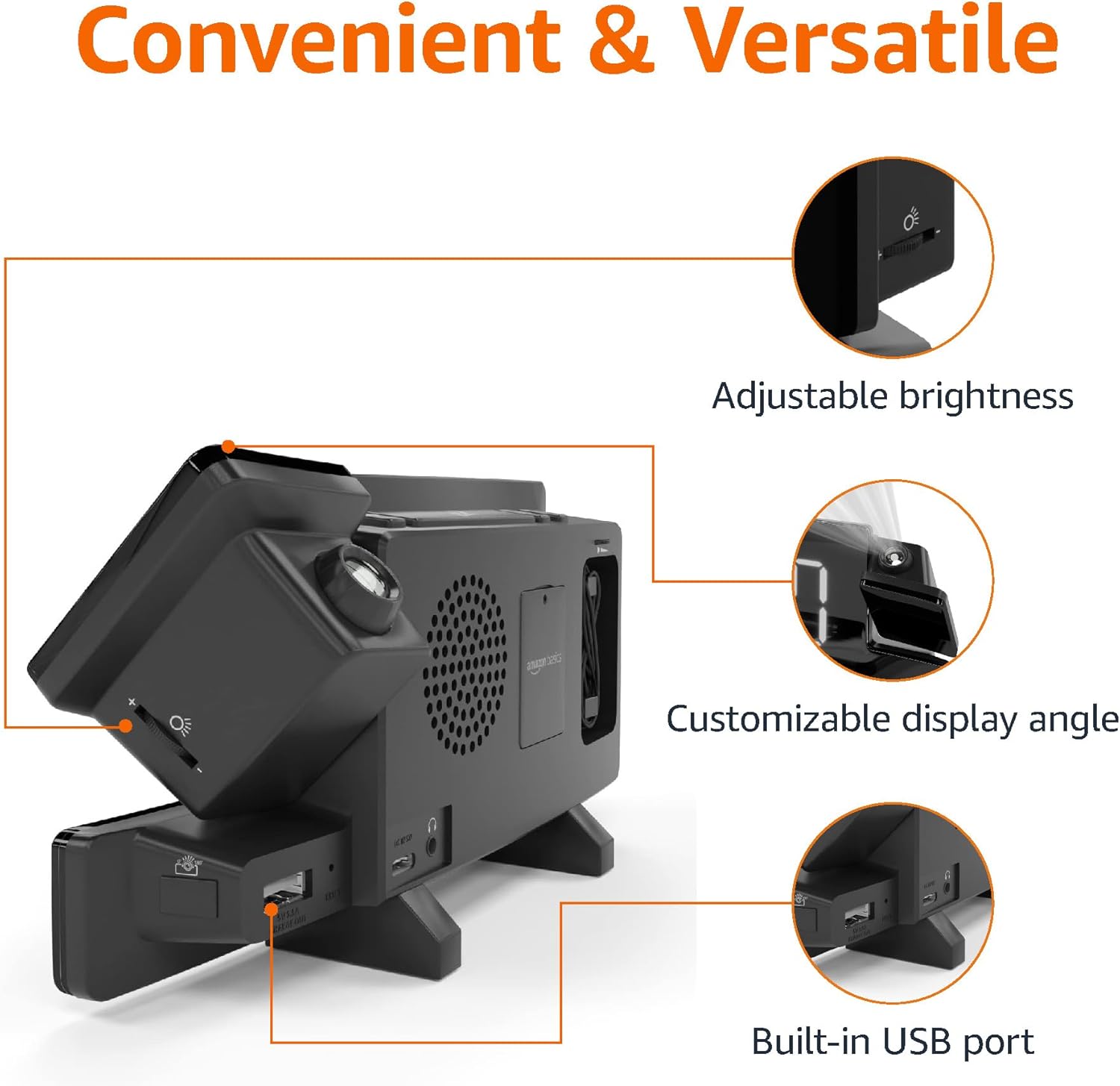
Image: Diagram highlighting the adjustable brightness, customizable projection angle, and USB charging port.
Nastavení
1. Připojení napájení
Connect the AC power adapter to the DC IN port on the back of the alarm clock and plug it into a standard wall outlet. The display will light up.
2. Instalace záložní baterie
For battery backup, open the battery compartment on the bottom of the unit. Insert 2 AAA batteries (not included), ensuring correct polarity (+/-). Close the compartment. The battery backup maintains time settings during power outages but does not power the display or alarm functions.
3. Počáteční nastavení času
- Stiskněte a podržte Nastavení času knoflík. Začnou blikat číslice hodin.
- Použijte Volume/Tune Dial upravit hodinu. lis Nastavení času znovu pro potvrzení.
- Číslice minut budou blikat. Použijte Volume/Tune Dial upravit minuty. lis Nastavení času znovu pro potvrzení.
- The time format (12H/24H) will flash. Use the Volume/Tune Dial to select your preferred format. Press Nastavení času pro potvrzení a ukončení režimu nastavení času.
4. Letní čas (DST)
Stiskněte tlačítko DST button to toggle Daylight Saving Time on or off. The DST indicator will appear or disappear on the display.
Návod k obsluze
1. Nastavení alarmů (Alarm 1 a Alarm 2)
- Stiskněte a podržte Poplach 1 or Poplach 2 tlačítko. Číslice hodin budíku budou blikat.
- Použijte Volume/Tune Dial to adjust the alarm hour. Press the respective Poplach potvrďte opětovným tlačítkem.
- Číslice minut budíku budou blikat. Použijte Volume/Tune Dial to adjust the alarm minutes. Press the respective Poplach potvrďte opětovným tlačítkem.
- The alarm source (FM radio or buzzer) will flash. Use the Volume/Tune Dial to select your preference. Press the respective Poplach tlačítko pro potvrzení a aktivaci budíku. Na displeji se zobrazí ikona budíku.
- To deactivate an alarm, press the respective Poplach jednou tlačítko. Ikona budíku zmizí.
2. Using Snooze
Když zazní alarm, stiskněte tlačítko Odložit/ztlumit button to temporarily silence the alarm. The alarm will sound again after the set snooze duration. The default snooze duration is 9 minutes. To adjust the snooze duration, press and hold the Odložit/ztlumit tlačítko, poté použijte Volume/Tune Dial to select a duration between 2 and 60 minutes. Press Odložit/ztlumit znovu pro potvrzení.
3. Provoz rádia FM
- Zapnout/Vypnout: Stiskněte tlačítko Rádio/Spánek tlačítko pro zapnutí nebo vypnutí FM rádia.
- Nalaďte si stanice: Použijte Volume/Tune Dial to manually tune to a desired FM frequency.
- Automatické skenování: Stiskněte a podržte Rádio/Spánek button to automatically scan and save available FM stations as presets.
- Vyberte předvolby: Once stations are saved, short press the Rádio/Spánek button to cycle through the preset stations.
- Upravit hlasitost: Otočte Volume/Tune Dial pro nastavení hlasitosti rádia.
4. Časovač vypnutí
Během přehrávání FM rádia stiskněte tlačítko Rádio/Spánek button repeatedly to set the sleep timer. Options typically range from 5 to 90 minutes. The radio will automatically turn off after the selected duration.
5. Funkce projekce

Image: The alarm clock projecting the time onto a bedroom ceiling.
- Aktivovat/deaktivovat: Stiskněte tlačítko Projection On/Off/Flip tlačítko pro zapnutí nebo vypnutí projekce času.
- Upravit úhel: Manually adjust the projection arm to direct the time onto your desired surface (wall or ceiling).
- Soustředit: Otočte Projection Focus Wheel to achieve a clear image.
- Výklopný displej: Stiskněte tlačítko Projection On/Off/Flip button repeatedly to rotate the projected time 180 degrees, ensuring correct orientation.

Image: The alarm clock on a nightstand, projecting the time onto a wall, demonstrating its use in a bedroom setting.
6. USB nabíjení
Connect your mobile phone or tablet's USB charging cable to the Nabíjecí port USB on the back of the alarm clock. The device will begin charging. This port is for charging only and does not support data transfer.
7. Nastavení jasu displeje
Stiskněte tlačítko Odložit/ztlumit button (when no alarm is sounding) to cycle through different brightness levels for the main LED display.
Údržba
1. Čištění
Wipe the unit with a soft, dry, lint-free cloth. Do not use abrasive cleaners, waxes, or solvents as they may damage the surface.
2. Výměna baterie
If the battery backup is not functioning correctly (e.g., time resets after a power outage), replace the 2 AAA batteries in the battery compartment, ensuring correct polarity.
Odstraňování problémů
| Problém | Možná příčina | Řešení |
|---|---|---|
| Displej je prázdný. | Žádné připojení k napájení. | Ensure the AC adapter is securely plugged into the unit and a working wall outlet. |
| Alarm se nespustí. | Budík není aktivován nebo je hlasitost příliš nízká. | Check if the alarm icon is visible on the display. Re-set the alarm if necessary. Increase radio volume if FM is selected as alarm source. |
| Projektovaný čas je rozmazaný. | Projection focus is not adjusted. | Otočte Projection Focus Wheel dokud nebude obraz jasný. |
| Projected time is not visible. | Projection is off or room is too bright. | Stiskněte tlačítko Projection On/Off/Flip button to activate. The projection is best viewed in a dark room. |
| Příjem rádia je špatný. | Antenna position or interference. | Adjust the position of the FM antenna wire. Move the unit away from other electronic devices that may cause interference. |
| Nabíjení přes USB nefunguje. | Problém s kabelem nebo nekompatibilita zařízení. | Ensure the USB cable is functional and properly connected. Try a different cable or device. |
Specifikace
- Model: MET8831-US
- Příkon: AC adaptér (součástí balení)
- Bateriová záloha: 2 x AAA baterie (nejsou součástí balení)
- Zobrazit: 7palcová LED
- Rádiová frekvence: FM
- USB výstup: 5V, 1A (for charging)
- Rozměry (D x Š x V): 7.1 x 1.6 x 3.7 palce (18.03 x 4.06 x 9.4 cm)
- Hmotnost: Přibližně 0.59 lb (267.62 g)

Image: Product dimensions for the Amazon Basics Projection Alarm Clock.
Informace o záruce
This product is covered by the Amazon Basics warranty. For detailed information regarding warranty terms and conditions, please refer to the official Amazon Basics webwebu nebo kontaktujte zákaznickou podporu.
Zákaznická podpora
For further assistance, troubleshooting, or product inquiries, please contact Amazon Basics customer support through the Amazon website or your purchase platform. Have your product model number (MET8831-US) and purchase details ready.