
1. Úvod
This manual provides detailed instructions for the proper use, setup, and maintenance of your BOBLOV M5 2K 64GB Police Body Camera. Please read this manual thoroughly before operating the device to ensure optimal performance and safety.
2. Konec produktuview
The BOBLOV M5 is a robust body-worn camera designed for law enforcement and security professionals, featuring 2K video recording, 48MP photo capabilities, GPS, and a durable IP67 waterproof design.
2.1. Schéma produktu
Viz níže uvedený diagram pro více informacíview of the camera's components and controls.
Video: M5 Body Camera Diagram & Menu Settings. This video provides a visual guide to the physical components and menu navigation of the BOBLOV M5 body camera.
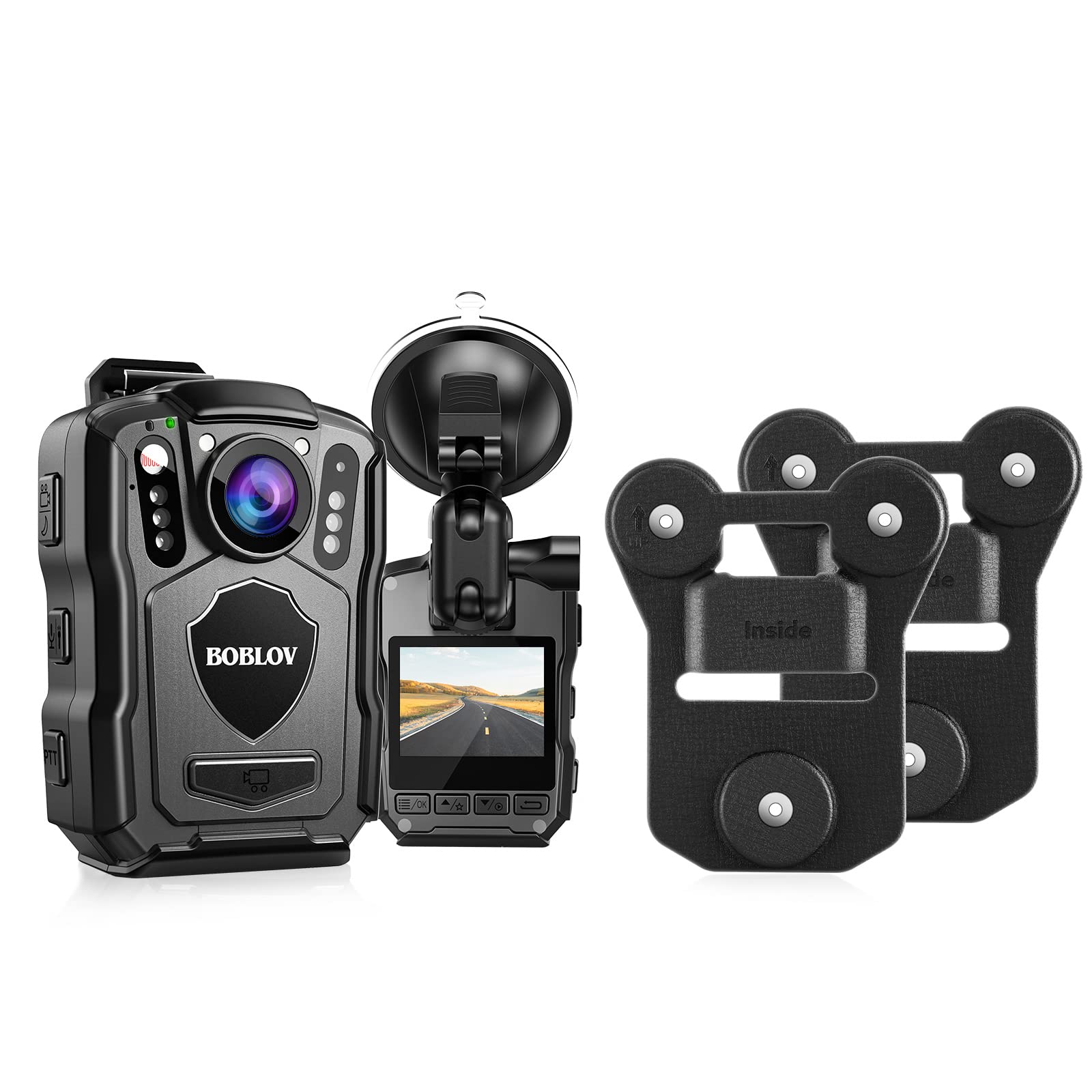
Obraz: Přední view of the BOBLOV M5 Body Camera, highlighting the lens, IR lights, and control buttons.
2.2. Co je v krabici
Standardní balíček obsahuje následující položky:
- BOBLOV M5 Body Camera
- USB kabel
- Napájecí adaptér do auta
- Suction Mount for Car Windshield
- Long Rotating Clip
- Short Rotating Clip
- Uživatelská příručka
Video: BOBLOV M5 Body camera accessories and package. This video demonstrates the unboxing and contents of the BOBLOV M5 package.
3. Nastavení
3.1. Nabíjení baterie
Before first use, fully charge the camera's built-in 4200mAh battery. Connect the camera to a standard adapter and USB cable. A full charge typically takes 5-6 hours. The blue indicator light will turn off when fully charged.

Obraz: The BOBLOV M5 body camera connected to a power source via USB cable for charging.
3.2. Počáteční zapnutí a základní nastavení
Long press the Power On/Off button to turn on the camera. Navigate through the menu using the control buttons to set the date, time, and other preferences. Refer to the 'M5 Body Camera Diagram & Menu Settings' video in Section 2.1 for menu navigation guidance.
4. Návod k obsluze
The M5 camera offers various recording modes and features to capture critical evidence.
Video: M5 Police Body Camera Introduction and Operations. This video demonstrates the basic operational functions of the M5 body camera, including recording modes.
4.1. Nahrávání videa
To start video recording, long press the dedicated video button. The camera supports 2560x1440P/30fps video resolution. Ensure sufficient battery life for extended recording (up to 15 hours at 1080P with IR off).
4.2. Nahrávání zvuku
To initiate audio-only recording, long press the audio button. This feature is useful for capturing verbal interactions without video.
4.3. Fotografování
To take a photo, long press the photo button. The camera captures images at up to 48 megapixels.
4.4. Noční vidění
The M5 features built-in 6 pcs IR lights for effective night vision. This allows for clear recording in low-light or no-light conditions. The IR lights can be set to auto or manual mode via the menu settings.
4.5. Stealth režim
Activate stealth mode in the camera settings to disable indicator lights and sounds, allowing for discreet operation. This is a key feature for covert operations.
4.6. Červená a modrá blikající světla a zvuk alarmu
The camera is equipped with red and blue flashing lights and an alarm sound function. These can be activated to deter threats or signal for assistance in emergency situations.

Obraz: Illustration of the BOBLOV M5 body camera's white illuminator and red & blue flashing alarm functions.
4.7. Funkce GPS
Enable the GPS function in the camera settings to embed location data into your video recordings. This provides crucial geographical context when reviewing footage on a PC.
Video: M5 Police Body Camera Features. This video highlights various features of the M5 camera, including night vision, alarm, and stealth mode.
5. Možnosti montáže
5.1. Car Mount / Dash Cam Mode
The M5 can be used as a dash camera with the provided car suction bracket. Attach the camera to the windshield using the suction mount. In the camera's menu, activate 'Dash Camera Mode'. When connected to the car charger, the camera will automatically start recording upon vehicle ignition.

Obraz: The BOBLOV M5 body camera mounted on a car windshield, functioning as a dash cam.

Obraz: A visual comparison showing the BOBLOV M5 used both as a dash cam with a suction mount and as a body camera with a clip.
Video: M5 - How Dash Camera Mode works and install a suction mount? This video provides a step-by-step guide on setting up the M5 in dash camera mode and installing the suction mount.
5.2. Magnetic Mount Installation
The camera comes with a strong magnetic clip for body-worn use. Ensure correct orientation for optimal magnetic force: the 'Outside' clip goes on the exterior of clothing, and the 'Inside' clip goes underneath. The six magnets attract each other to form a secure attachment.
- Separate the two magnetic clips.
- Attach the camera to the 'Outside' clip.
- Place the 'Inside' clip inside your clothing (e.g., shirt, vest) at the desired position.
- Align the camera with the 'Outside' clip to the 'Inside' clip, allowing the magnets to secure the camera to your clothing.

Obraz: A visual guide distinguishing the 'Inside' and 'Outside' components of the magnetic mount for proper installation.

Obraz: Step-by-step instructions for installing the BOBLOV M5 body camera using the magnetic clip on clothing.

Obraz: Dimensions of the high-quality black silicone magnetic clips for the BOBLOV M5 body camera.
6. Údržba
6.1. Hydroizolace
The M5 body camera has an IP67 waterproof rating, meaning it can withstand heavy rains and immersion in water for up to half an hour. Ensure all ports are securely closed before exposing the device to water.
6.2. Péče o baterie
To prolong battery life, avoid extreme temperatures and fully charge the device regularly. The camera supports recording while charging, allowing for extended operational periods.
7. Řešení problémů
Pokud narazíte na jakékoli problémy s kamerou BOBLOV M5, podívejte se na následující běžná řešení:
- Zařízení se nezapíná: Ujistěte se, že je baterie plně nabitá. Připojte ji ke zdroji napájení a zkuste to znovu.
- Problémy s nahráváním: Check if the internal storage is full. Ensure the correct recording mode is selected.
- GPS nefunguje: Verify that the GPS function is enabled in the settings and that the camera has a clear view z nebe.
- Nereagující tlačítka: Try resetting the device by holding down the power button for an extended period (e.g., 10-15 seconds).
For persistent issues, contact BOBLOV customer support.
8. Specifikace
| Funkce | Hodnota |
|---|---|
| Rozlišení záznamu videa | 1080p, 2K |
| Efektivní rozlišení | 48 MP |
| Životnost baterie | 15 hodin (1080P, IR vypnuto) |
| Kapacita baterie | 4200 XNUMX mAh |
| Úroveň odolnosti proti vodě | IP67 Vodotěsný |
| Materiál | Akrylonitrilbutadienstyren (ABS) |
| Velikost obrazovky | 2 palce |
| Snímková frekvence | 30 snímků za sekundu |
| Technologie připojení | USB |
| Speciální funkce | Waterproof, GPS Enabled, Night Vision, Alarm Function |
9. Záruka a podpora
For warranty information, technical support, or service inquiries, please contact BOBLOV customer service through the official webnebo u prodejce. Uschovejte si účtenku jako doklad o koupi.