
PPLEE CR1002W
Uživatelská příručka k přístroji PPLEE Sound a duálnímu budíku
Model: CR1002W
Zavedení
This user manual provides detailed instructions for the operation and maintenance of your PPLEE Sound Noise Machine & Dual Alarm Clock. Please read this manual thoroughly before using the product to ensure proper function and longevity.
The PPLEE Sound Noise Machine & Dual Alarm Clock is designed to enhance sleep and relaxation for babies, kids, and adults. It features 42 soothing sounds, a 7-color night light, dual alarms with snooze, adjustable volume and display brightness, and convenient charging ports.

Obrázek: Přední strana view of the PPLEE Sound Noise Machine and Dual Alarm Clock, showcasing its digital display, control buttons, and a smartphone connected for charging.
Co je v krabici
- 1 x PPLEE Noise Machine Alarm Clock
- 1 x 5V 2A Power Adapter and Cord
- 1 x Uživatelská příručka
Nastavení
Připojení napájení
To power on the device, connect the provided 5V 2A power adapter to the DC jack on the back of the unit and plug it into a standard wall outlet. The device requires continuous power for all functions, including USB charging and time display.
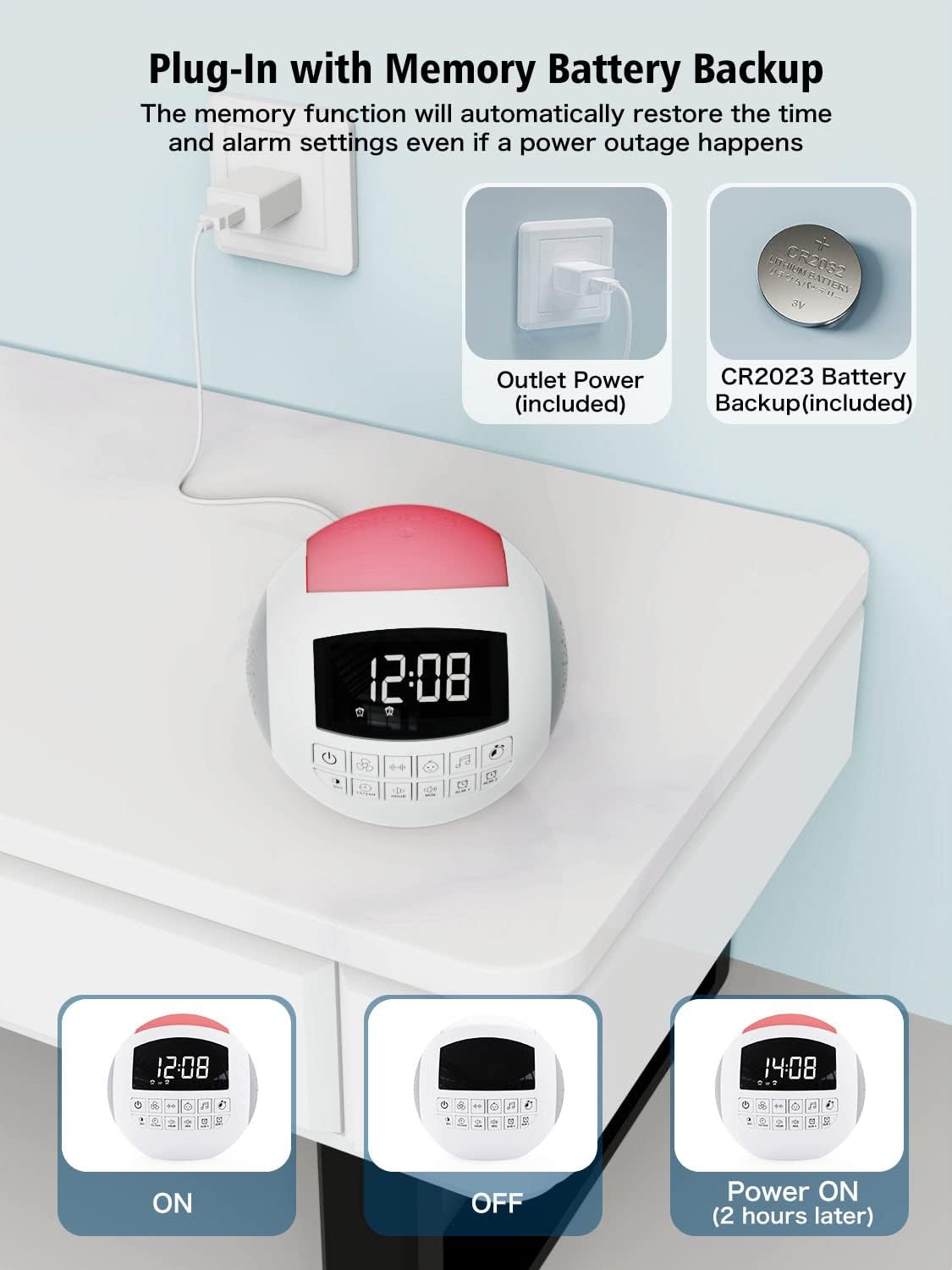
Image: The sound machine connected to a power outlet, illustrating the primary power source and the internal CR2032 battery for backup.
Instalace záložní baterie
The unit includes a CR2032 battery for backup. This battery maintains time and alarm settings during a power outage, ensuring you wake up on time. No user installation is typically required for this battery, as it comes pre-installed.
Nastavení počátečního času
Upon first power-up or after a prolonged power disconnection without battery backup, the time display may need to be set. Refer to the "Operating Instructions" section for detailed steps on setting the time and date.
Návod k obsluze
Obecné kontroly nadview
The device features an intuitive control panel with clearly labeled buttons for various functions. Familiarize yourself with the button layout for easy operation.
Obrázek: Podrobný view of the control panel on the sound machine, showing buttons for power, sound categories, time adjustment, and alarms.
Nastavení času a data
- Stiskněte tlačítko HODINA nastavte hodinu.
- Stiskněte tlačítko MIN minutu.
- Chcete-li přepnout mezi 12hodinovým a 24hodinovým formátem času, stiskněte tlačítko 12/24 hod tlačítko.
- To activate or deactivate Daylight Saving Time (DST), press the DST tlačítko.
Funkce zvukového stroje
The device offers 42 high-quality soothing sounds across various categories:
- Zvuky ventilátoru: 5 different fan sounds.
- Bílý šum: 6 types of white noise.
- Ukolébavky: 15 lullaby melodies, suitable for babies and children.
- Přirozené zvuky: 16 natural sounds including rain, thunderstorm, ocean waves, forest, clock ticking, summer night (crickets), bird, brook, wind, drops, keyboard, and fire.

Image: Illustration of the 42 soothing sounds available, categorized into fan, white noise, lullabies, and natural sounds, with sleep timer options.
To select a sound, press the corresponding sound category button (e.g., Fan, White Noise, Lullaby, Music Note for Natural Sounds) and then cycle through the available sounds within that category using the sound selection buttons.
Časovač spánku
The sleep timer allows the sound machine to automatically turn off after a set duration. Available timer settings are 15, 30, 60, 90, 120, or 180 minutes.
- Stiskněte tlačítko ČASOVAČ button repeatedly to cycle through the timer options.
- The selected timer duration will be displayed on the screen.
- To cancel the timer, cycle through the options until no timer duration is displayed.

Image: A visual representation of the auto-off timer settings (15, 30, 60, 90, 120, 180 minutes) for the sound machine.
Funkce budíku
The device features dual alarms (Alarm 1 and Alarm 2) and 9 natural wake-up sounds.
- Nastavení budíků:
- Stiskněte a podržte ALM 1 or ALM 2 tlačítko pro vstup do režimu nastavení budíku.
- Použijte HODINA a MIN tlačítky nastavte požadovaný čas budíku.
- Stiskněte tlačítko ALM 1 or ALM 2 button again to confirm and exit setting mode.
- Výběr zvuku budíku:
- While in alarm setting mode, or after selecting an alarm, use the sound selection buttons to choose from 9 wake-up sounds (flute, bird, piano, buzzer, bell, beep, etc.).
- Funkce odložení: Když zazvoní budík, stiskněte velké PODŘIMOVAT button on top of the unit to get an extra 9 minutes of sleep.
- Vypnutí alarmu: To turn off an active alarm, press any button other than the SNOOZE button. To disable an alarm permanently, press the ALM 1 or ALM 2 tlačítko, dokud ikona alarmu nezmizí z displeje.

Image: Depiction of the dual alarm functionality, showing two different alarm times and a selection of 9 natural wake-up sounds.

Image: The snooze button on top of the unit, indicating its ease of use for an additional 9 minutes of sleep.
Volume and Display Brightness Adjustment
The device features 16 adjustable volume levels for sounds and 5 levels of display brightness.
- Objem: Použijte Zvýšení hlasitosti a Snížit hlasitost buttons to adjust the sound output from level 0 to 16.
- Jas displeje: Stiskněte tlačítko DIMMER button to cycle through 5 levels of display brightness. Level 01 is suitable for night, and level 05 is bright enough for daytime viewIng.

Image: Visual representation of the 16 adjustable volume levels and 5 adjustable brightness levels for the display.
Funkce nočního světla
The integrated night light offers 7 color options: blue, ice blue, green, white, yellow, red, and purple. It provides a warm and comfortable light, suitable for various environments.
- To turn on the night light, press the Noční světlo tlačítko.
- Stiskněte tlačítko Noční světlo opakovaným stisknutím tlačítka můžete procházet 7 barvami.
- To turn off the night light, cycle through the colors until the light is off.
- Alternatively, pat the top of the unit to switch colors or turn the light on/off.
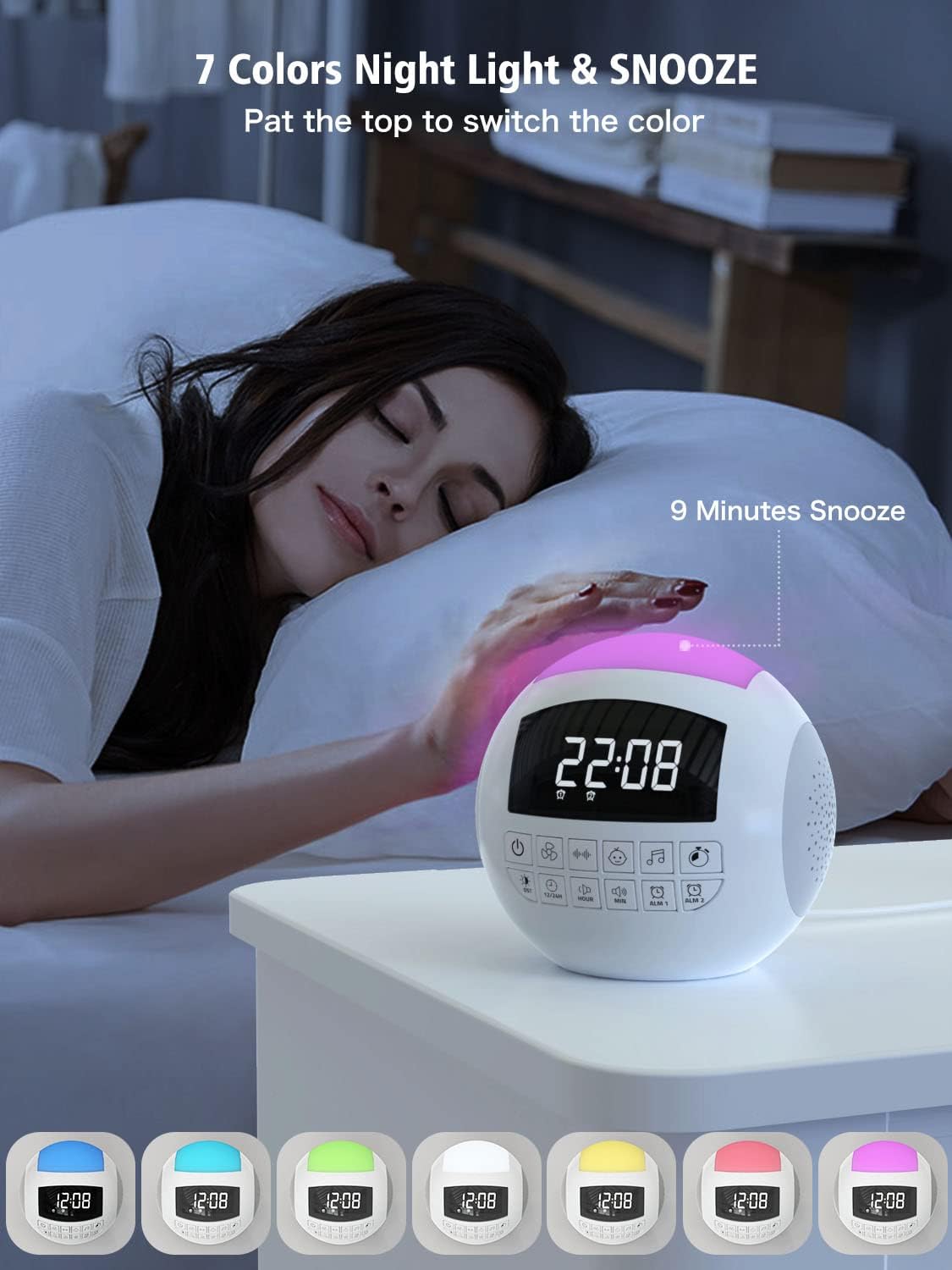
Image: The sound machine with its night light illuminated in various colors, demonstrating the 7-color option and the pat-to-switch feature.
Nabíjecí porty
The device includes a USB-A port and a Type-C port for charging external devices like smartphones or tablets. These ports are active only when the unit is powered via the wall outlet.

Image: The sound machine with a smartphone connected to its USB charging port, illustrating its function as a charging station.
Údržba
Čištění
To clean the device, gently wipe the exterior with a soft, dry cloth. Do not use liquid cleaners, abrasive cleaners, or spray directly onto the unit. Ensure the device is unplugged before cleaning.
Skladování
When not in use for extended periods, store the device in a cool, dry place away from direct sunlight and extreme temperatures. Keep it free from dust and moisture.
Battery Replacement (CR2032)
The CR2032 backup battery is designed for long-term use. If the time and alarm settings are not retained during a power outage, the battery may need replacement. Consult the manufacturer's support for guidance on battery replacement.
Odstraňování problémů
| Problém | Možná příčina | Řešení |
|---|---|---|
| Zařízení se nezapne. | Not plugged in; power outlet issue; faulty adapter. | Ujistěte se, že je napájecí adaptér bezpečně zapojený do zařízení a do funkční zásuvky. Zkuste jinou zásuvku. |
| Z reproduktoru nevychází žádný zvuk. | Volume is too low or muted; incorrect sound selected. | Increase the volume using the volume buttons. Ensure a sound is selected and not paused. |
| Alarm se nespustí. | Alarm not set or disabled; volume too low. | Verify alarm time and ensure alarm is enabled (alarm icon visible). Check alarm volume. |
| Čas/nastavení se resetují po výpadku napájenítage. | Backup battery depleted or not installed. | The CR2032 backup battery may need replacement. Contact customer support for assistance. |
| USB/Type-C charging not working. | Device not powered by wall outlet; cable issue. | Ensure the device is plugged into a wall outlet. Try a different charging cable. |
Specifikace
| Funkce | Detail |
|---|---|
| Číslo modelu | CR1002W |
| Rozměry produktu | 5.32 x 5.95 x 6.1 palce |
| Hmotnost položky | 1.39 libry |
| Zdroj napájení | AC Outlet (5V 2A adapter included) |
| Záložní baterie | 1 x CR2032 (součástí balení) |
| Možnosti zvuku | 42 (Fan, White Noise, Lullabies, Natural Sounds) |
| Úrovně hlasitosti | 16 |
| Display Dimmer Levels | 5 |
| Barvy nočního světla | 7 (Blue, Ice Blue, Green, White, Yellow, Red, Purple) |
| Možnosti časovače spánku | 15, 30, 60, 90, 120, 180 minut |
| Zvuky alarmu | 9 (Flute, Bird, Piano, Buzzer, Bell, Beep, etc.) |
| Nabíjecí porty | 1 x USB-A, 1 x Type-C |
| Výrobce | PPLEE E-commerce Co.Ltd |
| Datum první dostupnosti | 24. června 2022 |
Záruka a podpora
Your PPLEE Sound Noise Machine & Dual Alarm Clock comes with an 18-month warranty from the date of purchase. This warranty covers manufacturing defects and ensures the product functions as intended under normal use.
Additionally, PPLEE offers a 30-day free return and refund service. For any inquiries, technical assistance, or warranty claims, please contact our 24/7 online customer services. Please have your purchase details and model number (CR1002W) ready when contacting support.
For further assistance, you may refer to the official PPLEE store on Amazon: PPLEE Amazon Store
Ask a question about this manual
Ask about setup, troubleshooting, compatibility, parts, safety, or missing instructions. Manuals+ will review the question and use this page’s manual context to help answer it.