
1. Úvod
Thank you for choosing the BLACK+DECKER BD40K27A-JP Cordless Push Driver. This compact and versatile tool is designed for efficient screw tightening and assembly tasks. Featuring a unique push-activated mechanism and integrated LED lighting, it offers convenience and precision for various applications. Please read this manual thoroughly before use to ensure safe and optimal operation.

Image 1.1: The BLACK+DECKER BD40K27A-JP Cordless Push Driver, showcasing jeho ergonomický design.
2. Bezpečnostní informace
Při používání elektrického nářadí vždy dodržujte základní bezpečnostní opatření, abyste snížili riziko požáru, úrazu elektrickým proudem a zranění osob.
- Přečtěte si všechny pokyny: Seznamte se s obsluhou nástroje a bezpečnostními pokyny.
- Udržujte pracovní prostor v čistotě: Nepřehledné oblasti mohou způsobit nehody.
- Vyhněte se nebezpečnému prostředí: Nepoužívejte elektrické nářadí v damp nebo na vlhkých místech nebo je vystavujte dešti.
- Udržujte děti mimo dosah: Všichni návštěvníci by se měli zdržovat v bezpečné vzdálenosti od pracovního prostoru.
- Správně se oblečte: Do not wear loose clothing or jewelry. Wear protective hair covering to contain long hair.
- Use safety glasses: Vždy používejte ochranné brýle.
- Secure work: Použijte třamps nebo svěrák k držení práce, když je to praktické.
- Nepřekračujte: Vždy udržujte správný postoj a rovnováhu.
- Odpojovací nástroje: Unplug tools when not in use, before servicing, or when changing accessories.
- Vyhněte se neúmyslnému spuštění: Ensure the switch is in the off position before plugging in.
- Používejte doporučené příslušenství: Consult the manual for recommended accessories.
- Pečlivě udržujte nářadí: Udržujte nástroje ostré a čisté pro nejlepší a nejbezpečnější výkon.
- Zkontrolujte poškozené díly: Before further use, a guard or other part that is damaged should be carefully checked to determine that it will operate properly and perform its intended function.
- Do not operate power tools near flammable liquids or gases.
3. Obsah balení
Ověřte, zda jsou v balení obsaženy všechny níže uvedené položky:
- BLACK+DECKER BD40K27A-JP Cordless Push Driver
- Lithium-Ion Battery (integrated)
- USB nabíjecí kabel
- Hliníkové úložné pouzdro
- 26 Types of Screwdriver Bits
- Návod k použití
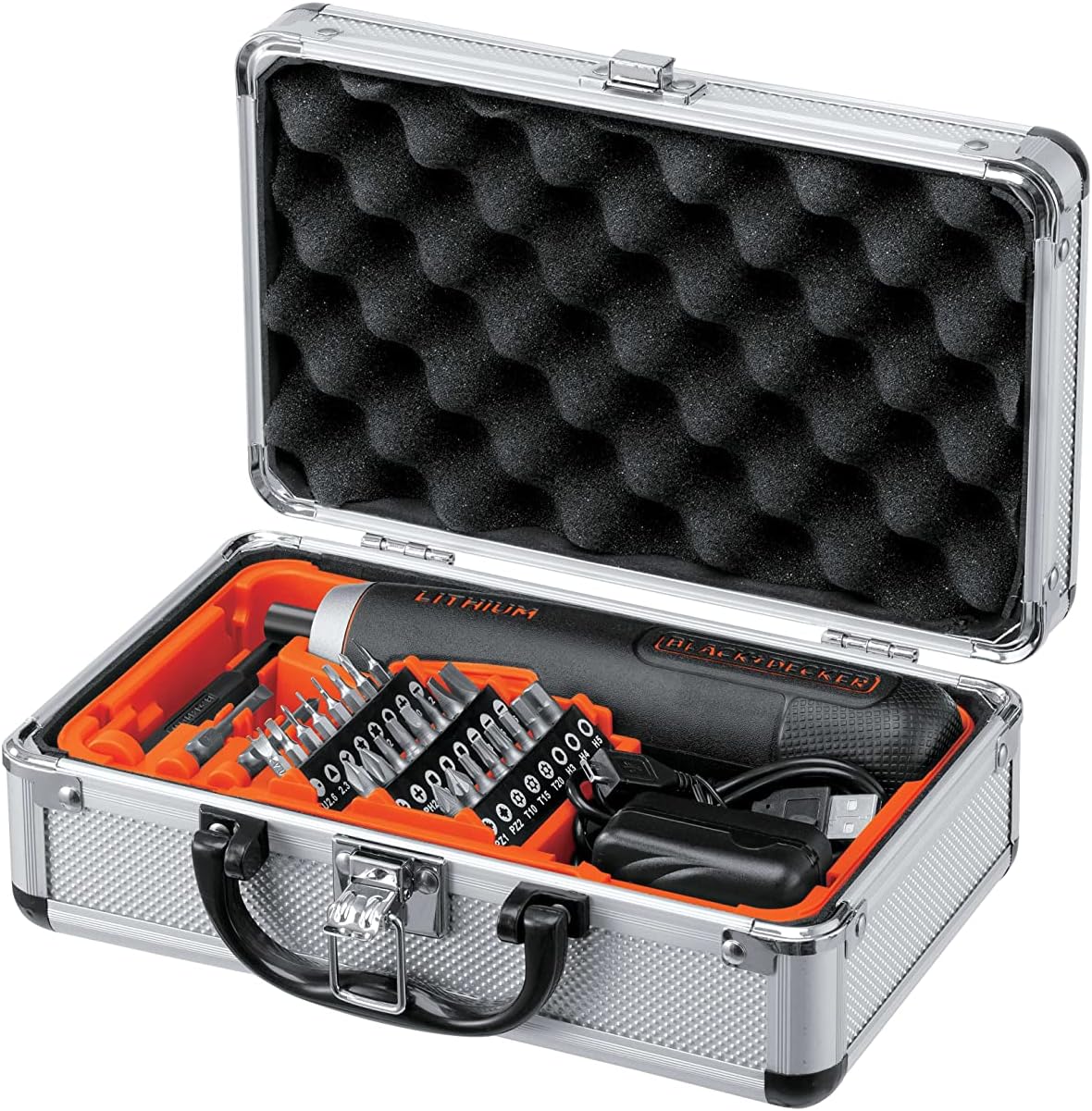
Image 3.1: The BD40K27A-JP Cordless Push Driver kit, including the driver, charging cable, and 26 bits, neatly organized in its aluminum storage case.
4. Vlastnosti produktu
The BD40K27A-JP Cordless Push Driver is engineered with several features to enhance usability and performance:
- Compact and Straight Design: Allows for easy handling and access in tight spaces.
- Push-Activated Mechanism: Automatically rotates when the bit is pressed into the screw, eliminating the need for a traditional trigger switch.
- Integrovaná lithium-iontová baterie: Provides reliable cordless power.
- 5-Position Adjustable Clutch: Allows for precise torque control to prevent overtightening or damaging fasteners.
- LED pracovní světlo: Osvětluje pracovní prostor pro lepší viditelnost za špatných světelných podmínek.
- Indikátor stavu baterie: Zobrazuje zbývající nabití baterie.

Obrázek 4.1: Detail view of the driver's battery level indicator and forward/reverse switch.

Image 4.2: The driver's integrated LED work light illuminating a dark area.
5. Nastavení
5.1 Nabíjení baterie
The BD40K27A-JP comes with an integrated Lithium-Ion battery. Before first use, fully charge the battery.
- Locate the USB charging port on the driver.
- Connect the provided USB charging cable to the driver's port.
- Druhý konec kabelu USB připojte ke kompatibilnímu napájecímu adaptéru USB (není součástí balení) nebo k portu USB počítače.
- The battery indicator lights will show charging progress. All lights will illuminate steadily when fully charged.
- Po dokončení nabíjení odpojte nabíječku.
Poznámka: Do not store the tool with a completely discharged battery for extended periods, as this can damage the battery.
5.2 Vkládání a výměna bitů
The driver uses standard 1/4-inch hex shank bits.
- Ensure the driver is in the OFF position (center position of the forward/reverse switch).
- Push the desired screwdriver bit firmly into the bit holder until it clicks into place.
- Chcete-li bit vyjmout, vytáhněte jej přímo z držáku bitů.
5.3 Adjusting the Clutch
The BD40K27A-JP features a 5-position adjustable clutch to control the torque output. This helps prevent overtightening screws or stripping screw heads.
- Rotate the clutch collar located near the bit holder to select the desired torque setting.
- Lower numbers (1-2) are for smaller screws and softer materials, requiring less torque.
- Higher numbers (3-5) are for larger screws and harder materials, requiring more torque.
- Experiment with different settings on scrap material to find the appropriate torque for your task.
6. Návod k obsluze
6.1 Otáčení vpřed/vzad
The forward/reverse switch is located on the side of the driver.
- Slide the switch forward (towards the bit) for forward rotation (tightening screws).
- Slide the switch backward (away from the bit) for reverse rotation (loosening screws).
- Position the switch in the center for the OFF/lock position.
6.2 Using the Push-Activated Mechanism
This driver operates without a traditional trigger. Rotation is activated by applying pressure.
- Ensure the forward/reverse switch is set to the desired direction (forward for tightening, reverse for loosening).
- Place the screwdriver bit onto the screw head.
- Apply firm, steady pressure to the back of the driver, pushing it into the screw. The driver will automatically begin to rotate.
- Release pressure to stop rotation.

Image 6.1: Demonstrating the push-activated mechanism for driving a screw into wood.
6.3 Používání pracovního LED světla
The integrated LED light automatically illuminates when the driver is activated by pressure, providing visibility in dark work areas.
7. Údržba
7.1 Čištění
- Udržujte větrací otvory nástroje čisté, abyste zabránili jeho přehřátí.
- Použijte měkký, damp hadříkem k čištění vnější strany nástroje. Nepoužívejte agresivní chemikálie ani abrazivní čisticí prostředky.
- Never immerse the tool in water or any other liquid.
7.2 Péče o baterii a její skladování
- Nástroj skladujte na chladném a suchém místě, mimo dosah přímého slunečního záření a extrémních teplot.
- Pro dlouhodobé skladování nabijte baterii přibližně na 50 % kapacity.
- Recharge the battery every 3-6 months during long storage periods to maintain battery health.
- Do not store the tool with a completely discharged battery.
8. Řešení problémů
| Problém | Možná příčina | Řešení |
|---|---|---|
| Ovladač se nezapne. | Baterie je vybitá. Forward/reverse switch is in the center (OFF) position. |
Nabijte baterii. Slide the switch to forward or reverse. |
| Insufficient power/torque. | Baterie je vybitá. Clutch setting is too low. |
Nabijte baterii. Adjust the clutch to a higher setting. |
| Bit slips from screw head. | Incorrect bit type/size. Nedostatečný tlak. Clutch setting too high (stripping screw). |
Použijte správný bit pro šroub. Vyvíjejte pevný a stálý tlak. Adjust clutch to a lower setting. |
9. Specifikace
| Číslo modelu | BD40K27A-JP |
| svtage | 3.6 voltů |
| Typ baterie | Lithium-Ion (integrated) |
| Nastavení spojky | Pozice 5 |
| Držák bitů | 1/4palcový šestihran |
| Rozměry produktu (D x Š x V) | 18.5 x 4 x 4 cm |
| Hmotnost položky | 280 g |
| Výrobce | ČERNÁ+DECKER |
10. Záruka a podpora
Informace o záruce a zákaznické podpoře naleznete v záruční kartě dodané s vaším produktem nebo navštivte oficiální webové stránky BLACK+DECKER. webUschovejte si účtenku jako doklad o koupi pro případné reklamace.
For technical assistance or service inquiries, please contact BLACK+DECKER customer service through their official channels.