
HARFO c324ae4a-3e98-4057-a775-bf40ce7668ff
HARFO Smart Door Lock Instruction Manual
Model: c324ae4a-3e98-4057-a775-bf40ce7668ff
Značka: HARFO
Zavedení
The HARFO Smart Door Lock offers advanced security and convenience for your home, office, or apartment. This 5-in-1 keyless entry system provides multiple unlock methods including fingerprint, passcode, IC cards, app control, and traditional physical keys. Designed for heavy-duty use, it features a reversible handle for versatile installation and includes functions like auto-lock, anti-peep, and private mode for enhanced safety.
For remote control and voice assistant integration (Alexa/Google Assistant), a separate HARFO Wi-Fi Gateway is required.
Nastavení
Obsah balení
Před zahájením instalace se ujistěte, že jsou přítomny všechny komponenty:
- Smart Door Lock Assembly (Exterior and Interior units)
- 3 IC karty
- 2 Záložní klíče
- Accessory Bag (screws, pins, etc.)
- Uživatelská příručka

Figure 1: Harfo Smart Door Lock and included accessories.
Instalace
The HARFO Smart Door Lock is designed for easy installation, typically requiring only a Phillips screwdriver. No extra drilling is needed for standard door preparations. The reversible door handle is suitable for both left-handed and right-handed doors. Ensure your door thickness is between 1 3/8 inch to 2 3/16 inch (35mm-55mm).
Refer to the included User Manual for detailed step-by-step instructions and diagrams specific to your door type (e.g., if replacing an existing deadbolt).

Figure 2: Reversible handle for left or right-handed door installation.

Figure 3: Installation of the latch mechanism into the door.
Instalace baterie
The lock requires 4 AA batteries (not included) for operation. Install them into the battery compartment located on the interior unit of the lock. Ensure correct polarity as indicated.

Obrázek 4: Přihrádka na baterie pro 4 baterie typu AA.
Ovládání zámku
Metody odemknutí
The HARFO Smart Door Lock offers five convenient ways to unlock:
- otisk: Pro rychlý přístup přiložte registrovaný otisk prstu na snímač.
- přístupový kód: Enter your programmed numerical passcode on the digital keypad.
- IC karty: Tap one of the included IC cards against the keypad for instant unlock.
- Ovládání aplikace: Use the dedicated mobile application (TTLock) to remotely unlock the door.
- Fyzické klíče: Utilize the backup physical keys for traditional manual unlocking.

Obrázek 5: Přesview of the 5 unlock methods.
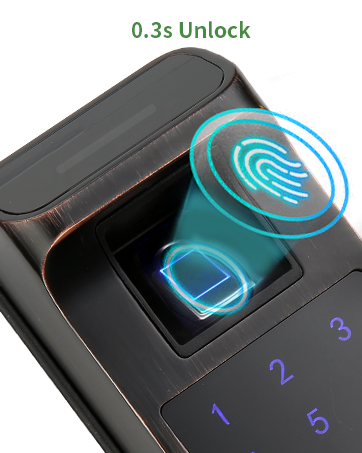
Figure 6: Fingerprint unlock in action.
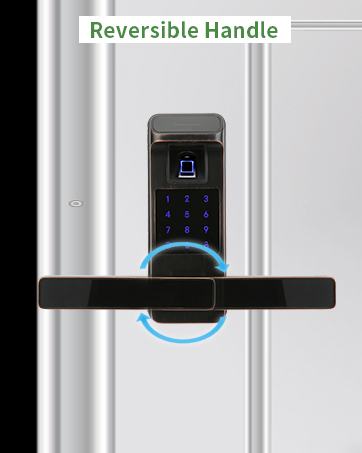
Figure 7: Passcode entry on the digital keypad.

Figure 8: TTlock App interface for smart lock control.
Ovládání aplikací a vzdálený přístup
The TTLock app allows you to manage your lock from your smartphone. With the optional HARFO Wi-Fi Gateway (sold separately), you can:
- Remotely unlock/lock your door from anywhere.
- Set up and manage temporary, one-time, or customized passcodes for guests.
- Check access records and monitor lock status in real-time.
- Integrate with voice assistants like Amazon Alexa and Google Assistant for voice control.

Figure 9: Smart Voice Control with Alexa (Gateway required).
Video 1: A01 Smart Door Lock - Demonstrates various unlocking methods including fingerprint, card, passcode, app, and backup key, as well as emergency power supply and private mode. (Creator: HARFO)
Bezpečnostní funkce
- Automatický zámek: The lock can be set to automatically lock after a specified period.
- Funkce proti narušení zvuku: You can add random digits before or after your true passcode to prevent others from guessing your code.
- Soukromý režim: Activate private mode from the interior unit to prevent external unlocking methods (except physical key) for enhanced privacy.

Figure 10: Anti-Peep Password feature for enhanced security.

Figure 11: Private Mode activated on the smart lock.
Údržba
Battery Life and Emergency Power
The HARFO Smart Door Lock is designed for long-lasting battery performance, offering up to 1 year of battery life under normal usage. In case the batteries run out, you have two backup options:
- Záložní klíče: Use the provided physical keys to manually unlock the door.
- Emergency USB Port: A hidden emergency USB port is located on the exterior unit. You can connect a power bank (not included) to temporarily power the lock and gain access.

Figure 12: Emergency USB Power Supply.
Odstraňování problémů
- Zámek nereaguje: Check battery levels. If batteries are depleted, use backup key or emergency USB power.
- Otisk prstu nebyl rozpoznán: Ujistěte se, že máte prst čistý a suchý. Pokud problémy přetrvávají, otisk prstu znovu zaregistrujte.
- Heslo nefunguje: Verify the correct passcode is entered. Check if anti-peep function is active and adjust accordingly.
- Problémy s připojením aplikace: Ensure Bluetooth is enabled on your phone. If using Wi-Fi features, confirm the HARFO Wi-Fi Gateway is properly connected and within range.
- Lock makes unexpected sounds: Refer to the voice guide settings in the app to adjust volume or disable voice prompts if desired.
Specifikace
| Funkce | Detail |
|---|---|
| Značka | HARFO |
| Číslo modelu | c324ae4a-3e98-4057-a775-bf40ce7668ff |
| Metody odemknutí | Fingerprint, Passcode, IC Cards, APP Control, Physical Keys |
| Materiál | Zinek |
| Barva | Starší bronz |
| Rozsah tloušťky dveří | 1 3/8 inch to 2 3/16 inch (35mm-55mm) |
| Zdroj napájení | 4 AA baterií (nejsou součástí balení) |
| Nouzové napájení | USB port |
| Konektivita | Bluetooth, Wi-Fi (s volitelnou bránou) |
| Typ ovladače | Amazon Alexa (with optional Gateway) |
| Hmotnost položky | 4.88 libry |
Záruka a podpora
The HARFO Smart Door Lock comes with a 12-month warranty from the manufacturer. For technical support, troubleshooting assistance, or warranty claims, please refer to the contact information provided in your product packaging or visit the official HARFO webmísto.
Additional protection plans may be available for purchase separately, offering extended coverage beyond the standard warranty period.
Ask a question about this manual
Ask about setup, troubleshooting, compatibility, parts, safety, or missing instructions. Manuals+ will review the question and use this page’s manual context to help answer it.