
1. Úvod
This user manual provides comprehensive instructions for the HP EliteDesk 800 G5-SFF desktop computer. It covers essential information regarding product setup, operational procedures, routine maintenance, and troubleshooting common issues. Please read this manual thoroughly to ensure proper use and longevity of your device.
2. Co je v krabici
Upon unboxing your HP EliteDesk 800 G5-SFF, verify that all the following components are present:
- HP EliteDesk 800 G5-SFF Desktop Computer
- Napájecí kabel
- Klávesnice
- Myš
- Documentation (this manual or similar guides)

Image: The HP EliteDesk 800 G5-SFF desktop computer shown with its accompanying wired keyboard and mouse.
3. Pokyny k nastavení
Follow these steps to set up your HP EliteDesk 800 G5-SFF desktop computer:
- Umístění: Position the desktop computer on a stable, flat surface with adequate ventilation. Ensure that air vents are not obstructed.
- Připojení periferií:
- Connect the keyboard and mouse to the available USB ports on the front or rear of the computer.
- Connect your monitor(s) to the DisplayPort outputs on the rear of the computer. If your monitor requires a different connection type (e.g., HDMI, VGA), an appropriate adapter may be necessary.
- Připojte napájení: Zapojte napájecí kabel do napájecího konektoru na zadní straně počítače a poté zapojte druhý konec do uzemněné elektrické zásuvky.
- Zapnutí: Press the power button located on the front of the computer. The system will begin to boot up.
- Počáteční konfigurace: Postupujte podle pokynů na obrazovce a dokončete nastavení systému Windows 11 Pro, včetně výběru jazyka, síťového připojení a vytvoření uživatelského účtu.
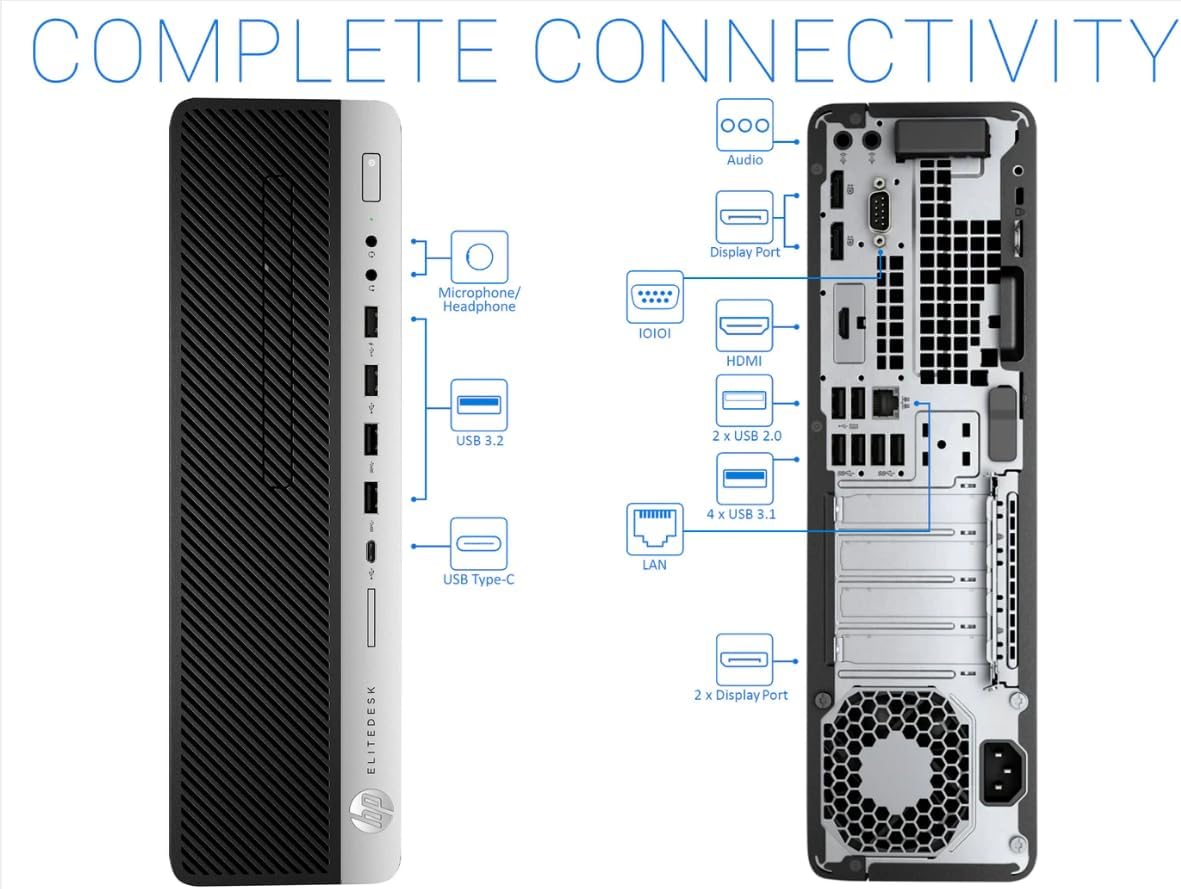
Image: The HP EliteDesk 800 G5-SFF desktop computer integrated into a typical office workspace with a monitor and accessories.

Image: A complete desktop setup featuring the HP EliteDesk 800 G5-SFF, a monitor, keyboard, and mouse.
4. Návod k obsluze
4.1 Řízení spotřeby
- Zapnutí: Stiskněte tlačítko napájení na předním panelu.
- Vypnout: V systému Windows klikněte na tlačítko Start a poté vyberte Napájení > Vypnout.
- Restartovat: V systému Windows klikněte na tlačítko Start a poté vyberte Napájení > Restartovat.
- Spát: V systému Windows klikněte na tlačítko Start a poté vyberte Napájení > Režim spánku.
4.2 Konektivita
The HP EliteDesk 800 G5-SFF offers various ports for connecting external devices and networks.

Image: Front panel of the HP EliteDesk 800 G5-SFF, highlighting accessible USB ports, headphone/microphone jacks, and the power button.

Obrázek: Boční view of the HP EliteDesk 800 G5-SFF, illustrating its compact Small Form Factor design.

Image: A comprehensive diagram detailing the front and rear connectivity ports of the HP EliteDesk 800 G5-SFF, including USB, DisplayPort, LAN, and audio jacks.

Obrázek: Detailní záběr view of the rear panel ports on the HP EliteDesk 800 G5-SFF, labeling various connections such as DisplayPort, USB, and power input.
Přední porty:
- USB 3.2 (Type-A and Type-C)
- Microphone/Headphone Combo Jack
Zadní porty:
- USB 3.1 (multiple ports)
- USB 2.0 (multiple ports)
- DisplayPort (multiple ports for video output)
- LAN (Ethernet) port for wired network connection
- Zvukový vstup/výstup
4.3 Síťové připojení
- Kabelové připojení: Connect an Ethernet cable from your router or modem to the LAN port on the rear of the computer.
- Bezdrátové připojení: If your system includes a wireless adapter (or you are using a USB Wi-Fi dongle), Windows will automatically detect available Wi-Fi networks. Select your network and enter the password to connect.
5. Údržba
Regular maintenance helps ensure optimal performance and extends the lifespan of your HP EliteDesk 800 G5-SFF.
5.1 Čištění
- Vnější: Použijte měkký hadřík, který nepouští vlákna dampened with a mild cleaning solution to wipe the exterior surfaces. Avoid harsh chemicals.
- Průduchy: Periodically clean dust from the air vents using compressed air to prevent overheating. Ensure the computer is powered off before cleaning vents.
- Porty: Gently remove any dust or debris from ports using compressed air.
5.2 Aktualizace softwaru
Keep your operating system and drivers updated to ensure security and performance. Windows Update will typically handle OS updates automatically. For driver updates, visit the official HP support webmísto.
5.3 Zálohování dat
Pravidelně zálohujte své důležité věci filena externí disk nebo do cloudového úložiště, aby se zabránilo ztrátě dat.
6. Řešení problémů
This section addresses common issues you might encounter with your HP EliteDesk 800 G5-SFF.
- Bez napájení:
- Ujistěte se, že je napájecí kabel bezpečně připojen k počítači i k elektrické zásuvce.
- Ověřte funkčnost elektrické zásuvky zapojením jiného zařízení.
- Bez displeje:
- Check that the monitor is powered on and the video cable is securely connected to both the computer's DisplayPort and the monitor.
- Ujistěte se, že je na monitoru vybrán správný vstupní zdroj.
- Pomalý výkon:
- Zavřete nepotřebné aplikace běžící na pozadí.
- Spusťte čištění a defragmentaci disku (pro pevný disk, pro SSD není nutné).
- Zkontrolujte a nainstalujte všechny čekající aktualizace systému Windows.
- Prohledejte systém, zda neobsahuje malware nebo viry.
- Periferní zařízení nebylo detekováno:
- Zkuste připojit periferní zařízení k jinému USB portu.
- Ujistěte se, že jsou ovladače periferního zařízení nainstalovány a aktuální.
- Restartujte počítač.
For more complex issues or if troubleshooting steps do not resolve the problem, please refer to the official HP support webnebo kontaktujte jejich zákaznický servis.
7. Specifikace
| Funkce | Detail |
|---|---|
| Model | HP EliteDesk 800 G5-SFF |
| Procesor | Intel Core i7-9700 (8 Cores, 3.0 GHz base, up to 4.7 GHz) |
| BERAN | 32 GB DDR4 |
| Skladování | 1TB M.2-NVMe SSD |
| Operační systém | Windows 11 Pro 64Bit |
| Grafika | Grafická karta Intel UHD 630 (integrovaná) |
| Přední porty | USB 3.2 (Type-A, Type-C), Headphone/Microphone Combo Jack |
| Zadní porty | 6x USB 3.1, 4x USB 2.0, Multiple DisplayPort, LAN, Audio In/Out |
| Bezdrátové připojení | 802.11ac (Wi-Fi), Bluetooth 4.0 (may require USB adapter) |
| Rozměry (DxŠxV) | 13.3 x 3.94 x 12.13 palce |
| Hmotnost | 12.97 libry |
8. Záruka a podpora
This product is a Certified Refurbished item. It is tested and certified to look and work like new. The refurbishing process includes functionality testing, basic cleaning, inspection, and repackaging. The product ships with all relevant accessories and a minimum 90-day warranty.
For warranty claims, technical assistance, or further support, please refer to the documentation provided with your purchase or visit the official HP support webmísto.