
1. Úvod
The SofaBaton U2 is a universal remote control designed to consolidate control of multiple home entertainment devices. It supports both Infrared (IR) and Bluetooth devices, allowing management of up to 15 different components such as Smart TVs, DVD/Blu-ray players, set-top boxes (STB), projectors, and streaming players. The remote features an OLED screen, a scroll wheel for device selection, and programmable macro functions.
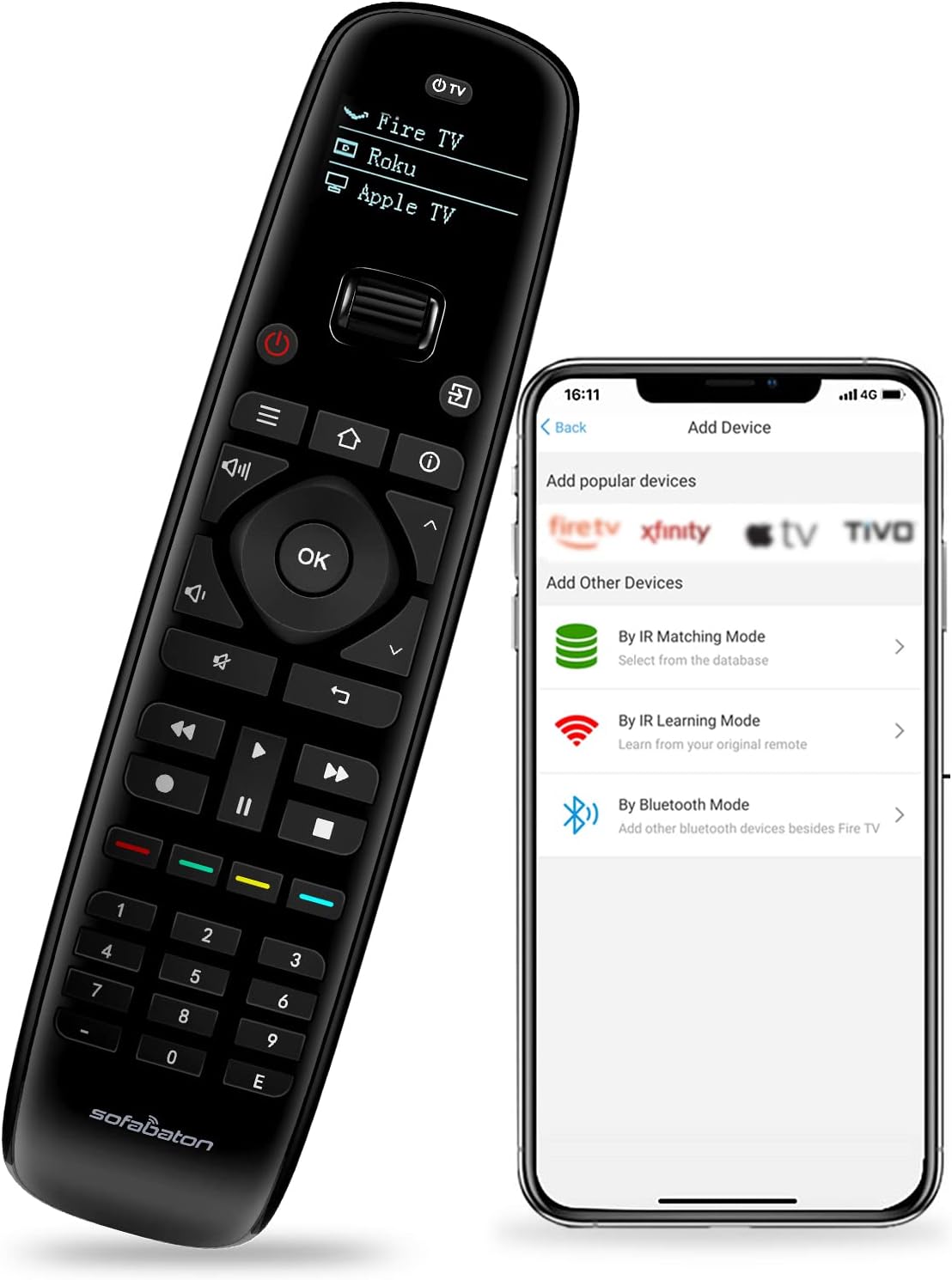
Image 1.1: The SofaBaton U2 remote control shown alongside its companion smartphone application interface, illustrating the device setup process.
2. Nastavení
2.1 Instalace baterie
The SofaBaton U2 remote requires two AA batteries for operation. To install the batteries:
- Najděte kryt prostoru pro baterie na zadní straně dálkového ovladače.
- Press and hold the black tab located above the battery compartment.
- While holding the tab, slide down the battery compartment cover to remove it.
- Vložte dvě baterie typu AA a dbejte na správnou polaritu (+/-).
- Nasaďte kryt přihrádky na baterie tak, že jej zasunete zpět na místo, dokud bezpečně nezacvakne.

Image 2.1: Illustration of the battery compartment on the SofaBaton U2 remote, showing the process of inserting AA batteries.
2.2 Smartphone App Download and Device Pairing
The SofaBaton U2 is configured using a smartphone application. This app allows you to add devices from a cloud database, learn IR signals, and pair Bluetooth devices.
- Download the SofaBaton app from your device's app store (available for Apple iOS and Android).
- Otevřete aplikaci a podle pokynů na obrazovce vytvořte účet nebo se přihlaste.
- Select the option to add a new device. You will be presented with several pairing modes:
- Režim IR párování: Hledat your device by brand and model number within the app's extensive code library. This database supports over 500,000 devices from 6,000+ brands.
- Režim učení IR: If your device is not found in the database, you can use the original remote control to teach the U2 remote specific functions. Point the original remote at the U2's IR receiver and press the desired button.
- Režim Bluetooth: For compatible Bluetooth devices (e.g., Fire TV), select this option to pair the U2 remote directly.
- Once a device is successfully added, it will appear on the U2 remote's OLED screen.

Image 2.2: The SofaBaton app interface demonstrating access to a cloud database for device code matching.
3. Návod k obsluze
3.1 Výběr zařízení
The SofaBaton U2 features an ergonomic scroll wheel for quick switching between configured devices. Rotate the scroll wheel to cycle through the devices listed on the OLED screen. Press the scroll wheel to select the desired device.
3.2 Základní řídicí funkce
After selecting a device, the remote's buttons will control that specific device. The U2 remote includes standard buttons for power, volume, channel, navigation, playback controls (play, pause, fast forward, rewind, stop), and a numeric keypad.

Obrázek 3.1: Přední strana view of the SofaBaton U2 remote control, highlighting its button layout and OLED screen.
3.3 Programovatelná makra
Macros allow you to execute a sequence of up to 10 commands with a single button press. These commands can be from the same device or different devices. Macros are configured via the SofaBaton smartphone app.
- Open the SofaBaton app and navigate to the settings for your U2 remote.
- Select the 'Macro' or 'Customize Key' option.
- Choose a button on the U2 remote to assign the macro to.
- Add the desired sequence of commands, specifying the device for each command.
- Save the macro. When the assigned button is pressed on the U2 remote, the sequence will execute.

Image 3.2: Visual representation of macro programming, showing how multiple commands can be assigned to a single button on the SofaBaton U2 remote.
3.4 Infrared (IR) Signal Range
The U2 remote offers an upgraded infrared signal range of up to 35 feet, providing reliable control over your devices from a greater distance.

Image 3.3: Diagram illustrating the extended 35-foot infrared signal range of the SofaBaton U2 remote control.
3.5 Raise to Wake Feature
The OLED screen on the U2 remote automatically illuminates when the remote is picked up, enhancing visibility in various lighting conditions. The screen will automatically turn off after a period of inactivity to conserve battery power.
4. Údržba
4.1 Čištění
K čištění dálkového ovladače použijte měkký, suchý hadřík. Nepoužívejte abrazivní čisticí prostředky, rozpouštědla ani agresivní chemikálie, protože by mohly poškodit povrch nebo vnitřní součásti dálkového ovladače.
4.2 Výměna baterie
Replace the AA batteries when the remote's performance diminishes or the OLED screen indicates low power. Refer to Section 2.1 for battery installation instructions.
5. Řešení problémů
- Dálkový ovladač nereaguje:
- Zkontrolujte stav baterie a v případě potřeby ji vyměňte.
- Ensure the remote is pointed directly at the device's IR receiver.
- Verify that the correct device is selected on the U2 remote's OLED screen.
- Zařízení nereaguje na příkazy:
- Confirm that the device is properly configured in the SofaBaton app. Try re-pairing the device or using the IR learning function.
- Ujistěte se, že mezi dálkovým ovladačem a zařízením nejsou žádné překážky.
- For Bluetooth devices, ensure the device's Bluetooth is enabled and the remote is within range.
- Scroll wheel is not functioning correctly:
- Jemně očistěte okolí rolovacího kolečka, abyste odstranili veškeré nečistoty.
- Restart the remote by removing and reinserting the batteries.
- OLED screen is blank:
- The screen may be off due to inactivity; pick up the remote to activate the 'Raise to Wake' feature.
- Zkontrolujte stav nabití baterie.
6. Specifikace
| Funkce | Detail |
|---|---|
| Rozměry produktu | 6 x 3 x 0.01 palce |
| Hmotnost položky | 10.2 unce |
| Číslo modelu položky | U2 |
| Baterie | Je vyžadováno 2 baterií AA |
| Výrobce | SofaBaton |
| Speciální funkce | Digital Display, Ergonomic, Lightweight, Pre Programmed, Universal |
| Barva | Černý |
| Maximální počet podporovaných zařízení | 15 |
| Kompatibilní zařízení | DVD/Blu-ray přehrávač, domácí kino, set-top box, stereo systém, televize |
7. Záruka a podpora
7.1 Informace o záruce
Please refer to the warranty card included with your product or visit the official SofaBaton website for detailed warranty terms and conditions. Warranty coverage typically includes manufacturing defects for a specified period from the date of purchase.
7.2 Zákaznická podpora
For technical assistance, troubleshooting, or inquiries regarding your SofaBaton U2 Universal Remote Control, please contact SofaBaton customer support. Contact information can usually be found on the manufacturer's webmístě nebo na obalu produktu.
8. Důležité poznámky
- The SofaBaton U2 remote control does not support Wireless (Wi-Fi) devices. It is compatible with Infrared (IR) and Bluetooth devices only.
- Ensure your smartphone has an active internet connection when using the SofaBaton app for device setup and database access.