
Fenge B0B2JGPRNH
Fenge 48x24 Inch Electric Height Adjustable Standing Desk with LED Strips Instruction Manual
Model: B0B2JGPRNH
1. Úvod
Thank you for choosing the Fenge 48x24 Inch Electric Height Adjustable Standing Desk. This manual provides detailed instructions for assembly, operation, maintenance, and troubleshooting to ensure optimal performance and longevity of your desk. Please read this manual thoroughly before use and retain it for future reference.
2. Bezpečnostní informace
- Před montáží se ujistěte, že jsou všechny součásti přítomny a nepoškozené. Nepoužívejte, pokud některé součásti chybí nebo jsou poškozené.
- Během práce držte děti a domácí zvířata v dostatečné vzdálenosti od stolu, abyste předešli zranění.
- Nepřetěžujte stůl. Maximální nosnost naleznete ve specifikacích.
- Ensure the power cord is not pinched or damaged. Use only the provided power adapter.
- Neumisťujte tekutiny přímo na ovládací panel nebo do blízkosti elektrických součástí.
- Do not attempt to disassemble or repair the motor or control system yourself. Contact customer service for assistance.
- Umístěte stůl na rovný povrch, abyste zajistili jeho stabilitu.
3. Obsah balení
Ověřte, zda balení obsahuje všechny následující komponenty:
- Desktop sections (pre-drilled)
- Nohy stolu a komponenty rámu
- Electric motor and control box
- Control panel with USB charging port
- Napájecí adaptér a kabel
- Assembly hardware (screws, washers, Allen wrench)
- Desk hook
- Návod k použití
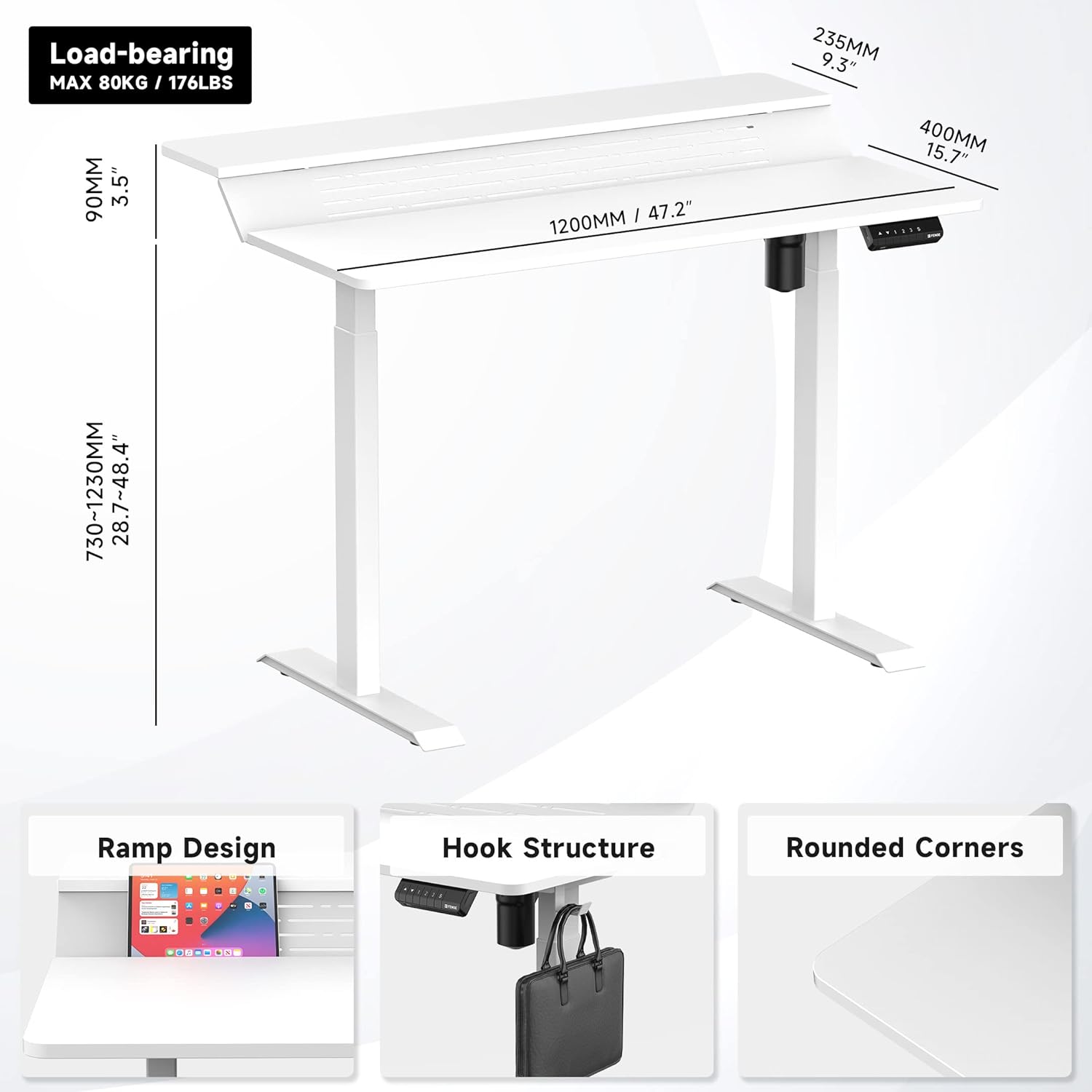
Obrázek 1: Přesview of desk components and key dimensions.
4. Nastavení a montáž
The Fenge Standing Desk is designed for simplified assembly. All parts are letter-coded, and the tabletop is pre-drilled. An Allen wrench is included; no additional power tools are required.
4.1 Montážní kroky
- Připevněte nohy k nohám: Secure the feet to the bottom of each desk leg using the provided screws.
- Připojení příčníku: Attach the crossbar between the two legs. Ensure the hexagonal rod is fully inserted into the motor and the limit ring is no longer visible.
- Instalace bočních konzol: Fasten the side brackets to the top of the legs.
- Mount Desktop Sections: Carefully place the pre-drilled desktop sections onto the assembled frame and secure them with screws.
- Install Control Panel and Power: Attach the control panel to the underside of the desk. Connect the power adapter to the control box and then to a power outlet.
- Attach Desk Hook: Install the desk hook on either side of the desk as desired.
Video 1: Detailed installation guide for the Fenge Standing Desk. This video demonstrates each step of the assembly process, from attaching the legs to connecting the electrical components and securing the desktop.
Video 2: Rychlý přehledview of the Fenge Standing Desk assembly process. This video highlights the ease of putting the desk together, showcasing the main steps involved in a concise format.
5. Návod k obsluze
Your Fenge Standing Desk features an electric height adjustment system with memory presets and a convenient USB charging port.
5.1 Nastavení výšky
- Použijte Nahoru (▲) a Dolů (▼) arrow buttons on the control panel to manually adjust the desk height.
- The desk height can be adjusted from 28.7 inches to 48.4 inches.
5.2 Předvolby paměti
Ovládací panel umožňuje uložit až tři preferovaná nastavení výšky:
- Nastavte stůl do požadované výšky pomocí šipek nahoru/dolů.
- Stiskněte tlačítko „S“ button (Save).
- Okamžitě stiskněte jedno z číselných tlačítek ("1", "2"nebo "3") pro uložení aktuální výšky do dané předvolby.
- To recall a saved height, simply press the corresponding number button. The desk will automatically move to the saved position.
5.3 USB nabíjecí port
The control panel includes a USB charging port to conveniently power your devices.

Figure 2: Close-up of the multifunction control panel, showing height adjustment buttons, memory presets (1, 2, 3, S), and the integrated USB charging port.

Figure 3: A closer look at the USB charging port located on the control panel, providing convenient power for your devices.
6. Vlastnosti
The Fenge Standing Desk is designed with several features to enhance your workspace:
- 2-Tier Design with 135° Ramp: The unique two-tier desktop with a 135° ramp design provides an ergonomic setup, allowing for optimal monitor placement and increased workspace.
- LED pásky: Integrated LED strips offer customizable lighting to suit your mood or task.
- Správa kabelů: Strategically placed holes and a metal cable management tray (optional, may require separate purchase) help keep your cables organized and out of sight.
- Háček na stůl: A convenient hook is included for hanging headphones, bags, or other accessories.
- Tichý provoz: The electric motor operates at less than 49 dB, ensuring a quiet adjustment experience.
- Funkce proti kolizi: The desk is equipped with a rebound-on-resistance safety feature, stopping movement if an obstruction is detected.

Figure 4: The 135-degree ramp design of the desk, providing an elevated surface for monitors or other items, promoting ergonomic posture.

Figure 5: The Fenge Standing Desk in an ergonomic workspace setup, showcasing the integrated LED strips and ample space for dual monitors and a laptop.
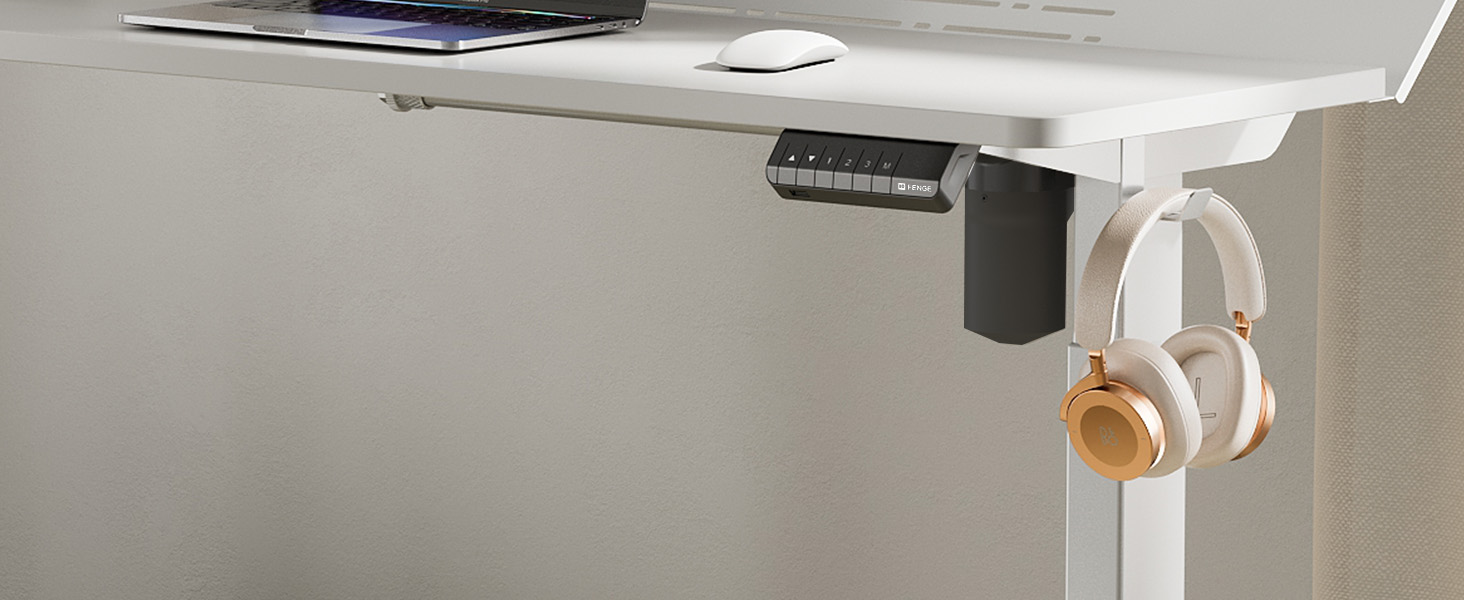
Figure 6: A close-up of the convenient desk hook, ideal for hanging headphones or other personal items, keeping your workspace tidy.
7. Údržba
- Čištění: Otřete povrch stolu měkkým, damp hadříkem. Nepoužívejte agresivní chemikálie ani abrazivní čisticí prostředky.
- Inspekce: Pravidelně kontrolujte všechny šrouby a spoje, zda jsou pevně utažené. V případě potřeby je dotáhněte.
- Správa kabelů: Regularly organize cables to prevent tangles and damage.
8. Řešení problémů
If you encounter any issues with your Fenge Standing Desk, please refer to the following common problems and solutions:
| Problém | Možná příčina | Řešení |
|---|---|---|
| Stůl se nehýbe | Odpojený napájecí kabel; chyba motoru; přetížení. | Check power connections. Unplug and replug the power for 10 seconds. Reduce weight on the desk. |
| Nerovnoměrné nastavení výšky | Legs not properly aligned; obstruction. | Ensure all screws are tightened. Check for any obstructions under the desk. Perform a reset (refer to control panel instructions if available). |
| Hluk během provozu | Loose screws; motor issue. | Tighten all assembly screws. If noise persists and is unusual, contact customer service. |
| Předvolby paměti nefungují | Nesprávný postup ukládání. | Follow the memory preset saving instructions carefully (Section 5.2). |
If the problem persists after trying these solutions, please contact Fenge customer service.
9. Specifikace
| Funkce | Detail |
|---|---|
| Značka | Fenge |
| Model | B0B2JGPRNH |
| Rozměry produktu | 24"H x 48"Š x 51.9"V |
| Minimální výška | 28.7 palce |
| Maximální výška | 48.4 palce |
| Doporučená maximální hmotnost | 264 liber (120 kg) |
| Typ materiálu | Aluminum alloy (Base), Metal (Top) |
| Zvedací mechanismus | Elektrický |
| Úroveň hluku | Pod 49 dB |
| Montáž Vyžadována | Ano (nářadí je součástí balení) |
| Speciální funkce | LED Strips, 2-Tier Design, Memory Presets, USB Charging Port |
10. Záruka a podpora
Fenge provides the following warranty for your standing desk:
- Desk Frame: 3-letá záruka
- Motor: 5-letá záruka
This electric desk has obtained TUV, UL, CE, SGS, and other global certifications, ensuring high quality and safety standards.
For any product issues, questions, or warranty claims, please contact Fenge customer service. We are committed to providing prompt responses and practical solutions.
Visit the official Fenge Store for more information and products: Fenge Store on Amazon
Ask a question about this manual
Ask about setup, troubleshooting, compatibility, parts, safety, or missing instructions. Manuals+ will review the question and use this page’s manual context to help answer it.