
1. Úvod
Thank you for choosing the NUBWO USB C Headset, Model HW02. This headset is designed for clear communication and comfortable use in various environments, including office, home, and call centers. It features a noise-cancelling microphone, in-line controls, and broad compatibility with USB-C enabled devices. This manual provides essential information for setting up, operating, maintaining, and troubleshooting your headset to ensure optimal performance.
2. Obsah balení
Prosím, ověřte, zda jsou v balení přítomny všechny položky:
- NUBWO USB C Headset (Model HW02)
- USB-C Cable (integrated with in-line control)
- Uživatelská příručka (tento dokument)
3. Pokyny k nastavení
Follow these steps to set up your NUBWO USB C Headset:
- Připojení headsetu: Plug the USB-C connector of the headset directly into an available USB-C port on your laptop, phone, or computer. The headset is plug-and-play, requiring no additional drivers for most operating systems (Windows 7/8/10, Android, iOS).

Image: NUBWO USB C Headset connected to a laptop, illustrating its wide compatibility with PC, laptop, tablet, and smartphone devices running Android, iOS, Windows 7, Windows 8, and Windows 10.
- Upravte pro pohodlí: Adjust the headband to fit comfortably on your head. The headset features an adjustable headband and breathable ear muffs for extended wear.

Image: Diagram highlighting the comfortable design elements of the headset, including a 180-degree rotatable microphone, breathable earmuffs, and an adjustable headband for personalized fit.
- Umístěte mikrofon: Rotate the microphone boom to position it optimally near your mouth for clear voice capture. The microphone is 180-degree rotatable.
Ukázkové video s nastavením
Video: Podrobný popisview of the NUBWO USB C Headset, demonstrating its lightweight design, in-line controls, and overall comfort for various uses. This video is provided by a seller and offers practical insights into the product's features.
4. Návod k obsluze
The NUBWO HW02 headset features convenient in-line controls for easy management of audio and microphone functions:
- Ovládání hlasitosti: Use the '+' and '-' buttons on the in-line control unit to adjust the speaker volume.
- Ztlumení mikrofonu: Press the microphone icon button to mute or unmute the microphone. A red indicator light will typically show when the microphone is muted.
- Ztlumení reproduktoru: Press the speaker icon button to mute or unmute the headset speakers. A red indicator light will typically show when the speakers are muted.
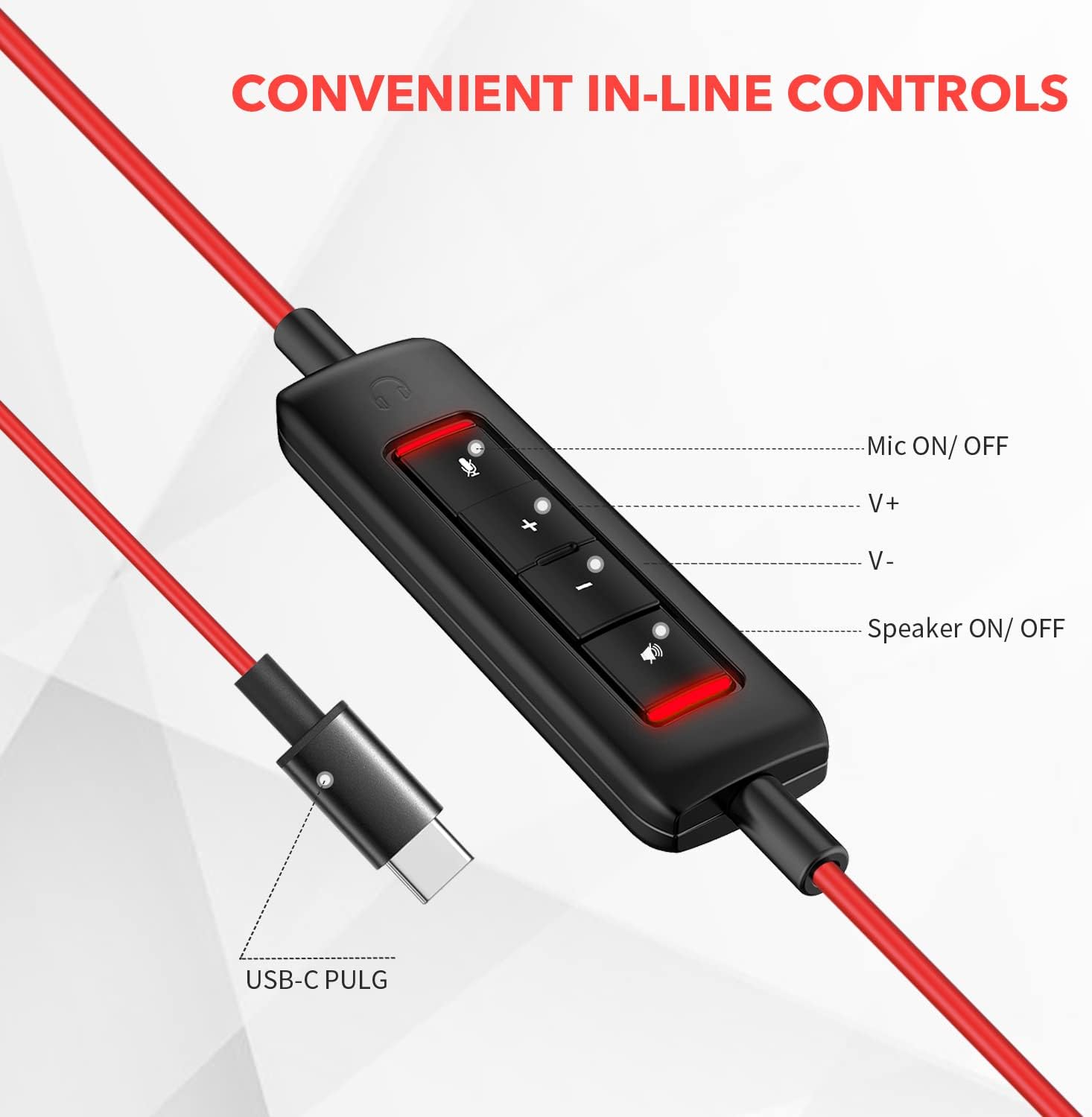
Obrázek: Detail view of the in-line control unit, detailing the buttons for microphone mute/unmute, volume up, volume down, and speaker mute/unmute. The USB-C plug is also shown.
5. Údržba
To ensure the longevity and optimal performance of your NUBWO USB C Headset, follow these maintenance guidelines:
- Čištění: Use a soft, dry cloth to wipe down the headset and cable. Avoid using harsh chemicals or abrasive materials.
- Skladování: When not in use, store the headset in a clean, dry place, preferably in the provided velvet bag, to protect it from dust and damage.
- Péče o kabely: Vyhněte se ostrým ohybům nebo nadměrnému tahání za kabel, abyste zabránili poškození vnitřních vodičů.
- Podmínky prostředí: Do not expose the headset to extreme temperatures, humidity, or direct sunlight. The headset is not water resistant.
6. Řešení problémů
If you encounter issues with your NUBWO USB C Headset, refer to the following common solutions:
- Žádný zvuk z náhlavní soupravy:
- Ensure the USB-C connector is fully inserted into the device's port.
- Check the in-line control unit to ensure the speaker is not muted (red indicator light off).
- Increase the volume using the '+' button on the in-line control and your device's system volume settings.
- Ověřte, zda jsou v nastavení zvuku počítače jako výchozí výstupní zvukové zařízení vybrána sluchátka s mikrofonem.
- Mikrofon nefunguje:
- Ensure the microphone is not muted on the in-line control unit (red indicator light off).
- Check that the microphone boom is correctly positioned.
- Verify that the headset microphone is selected as the default input device in your device's sound settings or communication application settings.
- Otestujte mikrofon s jinou aplikací nebo zařízením, abyste vyloučili problémy specifické pro software.
- Špatná kvalita zvuku:
- Ujistěte se, že je spojení bezpečné a bez nečistot.
- Avoid using the headset in environments with high electromagnetic interference.
- Adjust the audio settings on your device.
7. Specifikace
| Funkce | Specifikace |
|---|---|
| Značka | NUBWO |
| Číslo modelu | HW02 |
| Technologie připojení | Kabelové (USB-C) |
| Umístění uší | Na uchu |
| Impedance | 32 ohmů |
| Frekvenční rozsah | 20 Hz - 20,000 XNUMX Hz |
| Typ ovládání | Volume Control, Microphone Mute, Speaker Mute (in-line) |
| Kontrola hluku | Aktivní potlačení hluku (mikrofon) |
| Hmotnost položky | 0.17 kg |
| Materiál | Plast |
| Další funkce | Adjustable Headband, Lightweight, Microphone Included |
| Kompatibilní zařízení | Laptops, Phones, Computers (with USB-C) |
8. Informace o záruce
The NUBWO USB C Headset (Model HW02) comes with a 2-letá záruka výrobce. For details regarding warranty claims and coverage, please refer to the official NUBWO webwebu nebo kontaktujte zákaznickou podporu.
Additionally, products purchased through Amazon may be eligible for a 30-day refund/replacement return policy, subject to Amazon's terms and conditions.
9. Podpora
For further assistance, technical support, or inquiries regarding your NUBWO USB C Headset, please visit the official NUBWO webwebové stránky nebo kontaktujte jejich oddělení zákaznických služeb. Kontaktní informace obvykle naleznete na obalu produktu nebo na oficiálních webových stránkách značky.